Before you start
This guide is for people who do not program. Every recipe says which file to open and what to change. You need:
-
a text editor (Visual Studio Code, Notepad++, TextEdit in plain-text mode) for
.jsand.cssfiles; - an image editor that saves WebP (GIMP, Photopea in the browser, Krita) for the art;
- an audio editor that saves MP3 (Audacity) for the sounds.
Make a backup first: copy the whole package folder before you change anything.
There are two ways to change the game:
-
Directly on the host (no tools): replace files in your uploaded
game/folder (art, audio,tiki-paradise.config.js). Fast, but these changes live only on the host. -
In
source/and build (needs Node.js, see the main guide): change files insource/, runnpm run buildand uploadsource/dist/. Use this for code, styles,theme.js,feel.jsand translations.
After each upload, reload the game without the cache (Ctrl+F5, or Cmd+Shift+R on a Mac).
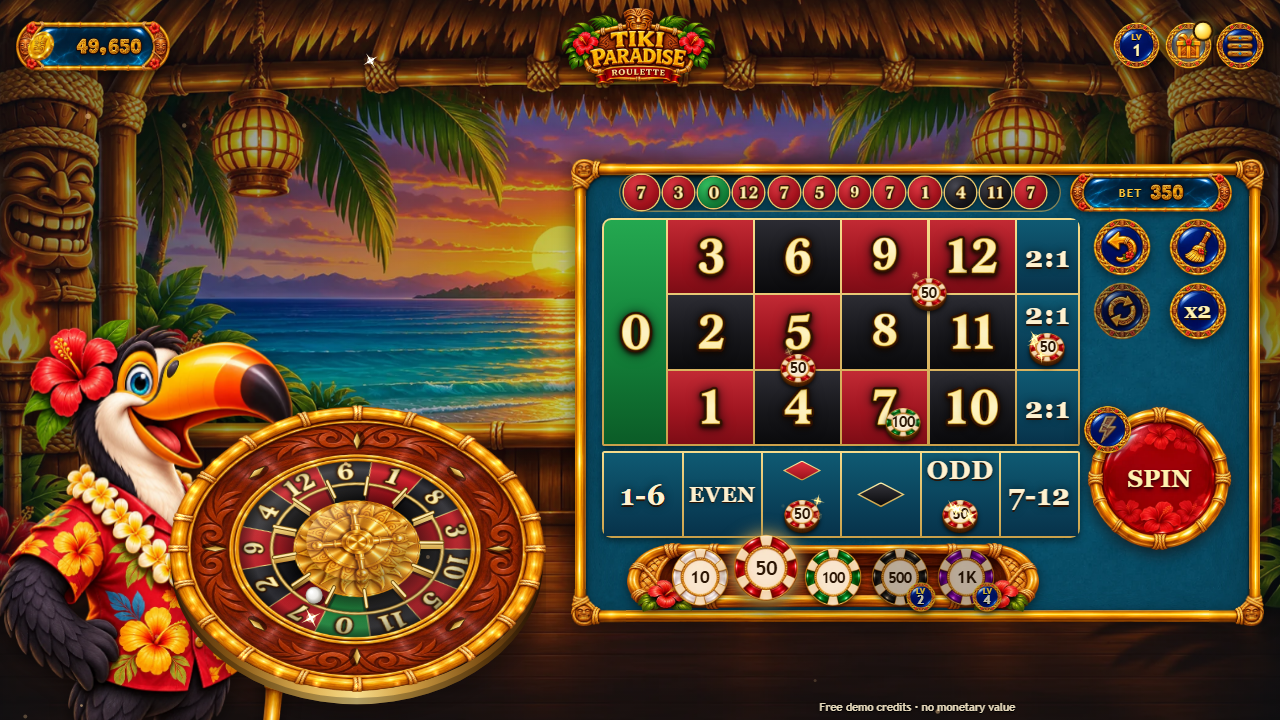 1
2
3
4
5
6
7
8
9
10
11
12
13
14
15
16
- Balance: the free demo credits
- Level: grows with play, gives free credits and opens the bigger chips
- Gifts: free coins, the daily wheel and the daily missions
- Menu: INFO, numbers, favourite bets, auto play, turbo, sound, full screen
- The wheel: 13 pockets; tap a number on it to bet on it and its two neighbours
- Last results (tap: the NUMBERS page)
- BET: what is on the table; after a round, WIN
- The table: tap a number, a line, a corner or an outside box to place the chip in hand
- Chips: pick the value; the locked ones open at higher levels
- Undo the last chip
- Clear the table
- Rebet: the bets of the last round again
- ×2: double every bet
- SPIN (hold it: auto play)
- Turbo on/off
- The credits notice (keep it visible:
SCOPE.md)
Which file is each part of the screen
| On screen | File (in game/, the same name in source/public/) |
|---|---|
| Background (landscape / portrait) | art/bg-landscape.webp, art/bg-portrait.webp |
| Logo | art/logo.webp |
| Croupier (the toucan bartender) |
art/mascot-idle.webp, art/mascot-watch.webp,
art/mascot-hype.webp, art/mascot-cheer.webp
|
| Wheel: gold rim with the ball track / turret in the middle |
art/rim.webp / art/hub.webp (the pockets and their numbers are drawn by
code)
|
| Frame around the table | art/frame.webp |
| Chips: in the tray / on the table and in the air |
art/chip-0.webp ... art/chip-5.webp / art/chip3d-0.webp ...
art/chip3d-5.webp
|
| Chip tray | art/tray.webp |
| Crystal marker on the winning number | art/dolly.webp |
| The croupier's rake | art/rake-head.webp, art/rake-handle.webp |
| SPIN button | art/spin.webp |
| Gold buttons / pills / plaques / round buttons |
art/btn-gold.webp, art/pill.webp, art/plaque.webp,
art/btn-blank.webp, art/btn-close.webp
|
| Icons (menu, info, sound, full screen, gift, undo, clear, rebet, auto, favourites, turbo...) | art/icon-*.webp |
| Celebration titles (BIG WIN, MEGA WIN, EPIC WIN) |
art/title-big.webp, art/title-mega.webp, art/title-epic.webp,
banner art/banner.webp
|
| Daily wheel |
art/wheel.webp, art/wheel-hub.webp, art/wheel-pointer.webp,
art/title-wheel.webp, coin piles art/pile-0..2.webp
|
| Painted numbers: gold (amounts) / ivory (table, wheel, results) |
art/font-gold.webp + .json / art/font-board.webp +
.json
|
| Coins and sparkles | art/coin.webp, art/burst.webp, art/shard-0..5.webp |
| Texts |
source/src/locales/*.js or texts in tiki-paradise.config.js
|
| Colours of the effects | source/src/ui/theme.js |
| Timings of the game feel | source/src/ui/feel.js |
| Layout, sizes, palette |
source/src/ui/styles.css (shared shell) and source/src/ui/game.css (the
roulette table)
|
Recipe 1: replace the backgrounds
-
bg-landscape.webpis 1672 × 941 (desktop and phones held sideways),bg-portrait.webpis 941 × 1672 (phones held upright). - Keep the important part of the picture in the middle: the edges are cut on screens of other shapes. Keep the lower part calm: the table and the wheel stand there.
- Save as WebP with the same names and replace them.
Recipe 2: the logo and the croupier
-
The logo is
logo.webp(1753 × 869, transparent background). Keep a similar width-to-height shape so it fits in the same place. -
The croupier has four poses of 869 × 1100 with a transparent background:
mascot-idle(waiting),mascot-hype(throwing the ball, the title screen),mascot-watch(following the ball) andmascot-cheer(wins). Replace all four with the same character, standing in the same place in the picture, so the poses switch without a jump. -
To rename the game, also set
brand: { name: 'My Game' }intiki-paradise.config.jsand the<title>inindex.html.
Recipe 3: the wheel
-
The 13 pockets, their colours and their numbers are drawn by the game, so they always
match the rules. Only the gold rim (
rim.webp, 900 × 900, transparent in the middle) and the turret (hub.webp, 420 × 420) are pictures. Keep their sizes and keep the rim's ball track where it is: the ball runs on it. -
The order of the numbers on the wheel and which are red are settings, not art:
rules: { wheel: [...], red: [...] }intiki-paradise.config.js(the shipped order is 0, 7, 2, 9, 4, 12, 6, 1, 8, 3, 10, 5, 11; red: 1, 3, 5, 7, 9, 12). -
The colours of the pockets are in
source/src/ui/roulette.js(theinklist at the top ofbuildRotor); the glow of the winning pocket isglowinsource/src/ui/theme.js.
Recipe 4: the chips
-
Each chip value has two pictures with the same number:
chip-N.webp(160 × 160, seen from above, in the tray) andchip3d-N.webp(the same chip seen at the table's angle, with its striped side, on the table and in the air). Chip 0 is the smallest value; the shipped table uses five values (10, 50, 100, 500, 1000), sochip-5is the colour of a sixth value if you add one. -
The values themselves are
rules.chipsintiki-paradise.config.js(1 to 6 values, low to high). Keep them even: halves on 0 are rounded down. - Draw the value on the chip or leave it blank: the game writes the value on it.
Recipe 6: sounds, voice and music
-
Every sound is an MP3 in
game/audio/(same names insource/public/audio/). Replace a file with another MP3 of the same name; short effects should be short (under 2 seconds). -
Music:
music.mp3(the table) andmusic-wheel.mp3(the daily wheel). They loop. -
Announcer:
v-place(place your bets),v-nomore(no more bets),v-n0tov-n12(the result),v-luckyandv-luckyhit(lucky numbers),v-big,v-mega,v-epic. -
Effects: the ball (
launch,ball-roll,ball-ting,ball-tock,ball-settle,whoosh), the chips (chip,chip-stack,chips-rake,chips-pay,dolly), wins (win,bigwin,coin,coinrain,count,shatter,levelup), lucky numbers (lucky-strike,lucky-hit), the daily wheel and gifts (wheel-tick,drumroll,wheel-win,collect), andclick,nope. -
If a file is missing the game plays a built-in synthesised sound instead, so it never breaks. The starting
volume is
audio: { volume: 0.8 }intiki-paradise.config.js.
Recipe 7: colours, effects and timings
-
In
source/src/ui/theme.jschangeaccent(rings and sparks),gold,glow(the winning pocket and cell),tierRays(light rays of the celebrations) andambient(the warm embers rising from the tiki torches). Colours are written like'#ffd76a'or[255, 214, 110]. -
In
source/src/ui/feel.jsevery timing of a round has a name and a comment: how fast chips fly, how long the slow motion of the decisive bounce lasts, the replay of an EPIC win, the rake, the payout towers, the celebration count. Smaller numbers make the round quicker. -
The palette of the interface is at the top of
source/src/ui/styles.css(the--variables). -
Run
npm run buildand uploaddist/. Nothing in these files changes a result or a payout.
Recipe 8: texts and languages
-
To change a few texts on the host, add them to
tiki-paradise.config.js:texts: { tapToPlay: 'PLAY NOW' }changes every language;texts: { pt: { tapToPlay: 'JOGAR' } }only Portuguese. The names (tapToPlay,placeBets...) are the keys ofsource/src/locales/en.js. -
To offer only some languages:
languages: ['en', 'es']. To always open in one:language: 'es'. -
To edit a whole translation, change
source/src/locales/<code>.js, runnpm run localesandnpm run build.
Recipe 9: the table's rules and the starting credits
In tiki-paradise.config.js, inside rules: { }:
-
zeroRule:'half'(losing bets that do not cover the 0 get half back when the ball lands on 0),'evenHalf'(only the 1:1 bets do) or'none'(the classic table). -
lucky: { enabled: false }plays without lucky numbers (straight up pays 11 to 1);count,multsandweightschange how many there are and how big. -
payschanges what a kind of bet pays;startBalancethe credits of a new player;limitsthe most on one spot and on the table. -
After a change, run
npm run rtpinsource/to see the return of every bet. A setting that would return more than 100% is refused with a message.
These are fictional demo credits only.
Recipe 10: levels, daily wheel, free coins and missions
In tiki-paradise.config.js, inside progress: { }:
-
wheel: { alwaysReady: false, everyHours: 24 }offers the wheel once a day (the demo offers it on every visit);prizesandweightsset the wedges. coins: { everyHours: 3, amount: 50 }sets the gift button.-
missions: { enabled: false }turns the daily missions off;perDayandrewardchange them. -
levels: { enabled: false }turns levels off (every chip open from the start);unlocksays at which level each chip opens.
Amounts are multiples of the smallest chip.
Recipe 11: publish your version
-
If you changed only files of
game/on the host, you are done: reload without the cache. -
If you changed
source/: runnpm test, thennpm run build, and upload the contents ofsource/dist/over your game folder. -
Keep
SCOPE.mdwith the game and the credits notice visible. Changebrand.storageKeyif you want players to start with a fresh save.