Before you start
This guide is for people who do not program. Every recipe says which file to open and what to change. You need:
-
a text editor (Visual Studio Code, Notepad++, TextEdit in plain-text mode) for
.jsand.cssfiles; - an image editor that saves WebP (GIMP, Photopea in the browser, Krita) for the art;
- an audio editor that saves MP3 (Audacity) for the sounds.
Make a backup first: copy the whole package folder before you change anything.
There are two ways to change the game:
-
Directly on the host (no tools): replace files in your uploaded
game/folder (art, audio,saloon-showdown.config.js). Fast, but these changes live only on the host. -
In
source/and build (needs Node.js, see the main guide): change files insource/, runnpm run buildand uploadsource/dist/. Use this for code, styles,theme.js,engine.jsand translations.
After each upload, reload the game without the cache (Ctrl+F5, or Cmd+Shift+R on a Mac).
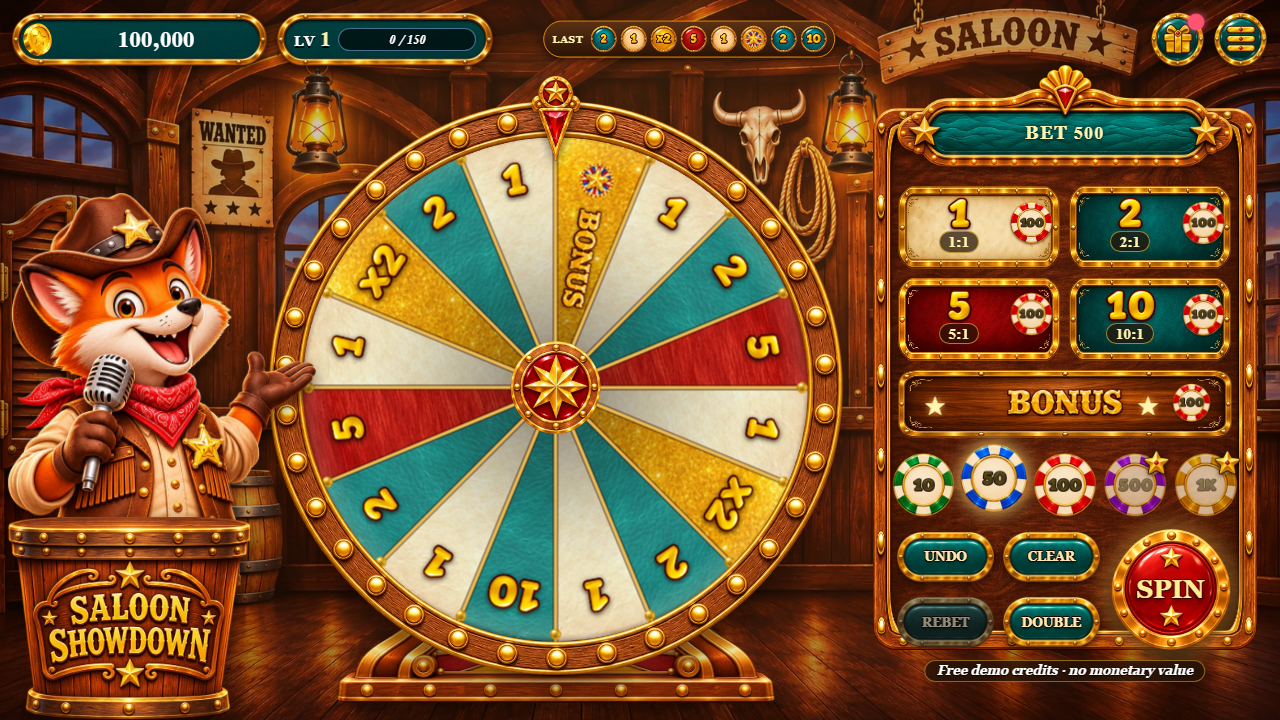 1
2
3
4
5
6
7
8
9
10
11
12
13
14
15
- Demo credits balance (FREE = refill when empty)
- Player level and XP (tap: next gift and next chip)
- Free coins and the daily free spin (the dot = something is ready)
- Menu: rules and options, sound, full screen
- The money wheel (drawn on a canvas)
- The last 10 results
- Status ribbon: total bet, NO MORE BETS, the win
- The bet board: one spot per number and BONUS
- Chips (a star = opens at a higher level)
- UNDO the last chip
- CLEAR the table
- SPIN (Space or Enter)
- REBET: the last round's bets again
- DOUBLE every bet on the table
- Credits notice, always visible while playing
Which file is each part of the screen
Sizes are measured from the files in the package (width × height in pixels).
| On screen | File (in game/art/, the same name in source/public/art/) |
Size |
|---|---|---|
| Background, desktop and phone lying down / phone upright | bg-landscape.webp / bg-portrait.webp |
1672 × 940 / 941 × 1672 |
| Title screen background, lying down / upright, and the bonus stage | bg-entry-wide.webp / bg-entry.webp |
1672 × 941 / 941 × 1672 |
| The host on the title screen (whole, hat to boots) | mascot-entry.webp |
586 × 1100 |
| Loading bar frame | load-bar.webp |
900 × 134 |
| Bonus wheel rim (lit bulbs) | wheel-rim-bonus.webp |
1024 × 1024 |
| Rules sheet: frame / title plaque / option cards / rope divider / desert / footer ornament |
sheet-frame.webp / header-plaque.webp / opt-card.webp /
rope-divider.webp / desert.webp / ornament.webp
|
900 × 1364 / 900 × 220 / 900 × 214 |
| Logo (title screen and podium) | logo.webp |
1000 × 554 |
| The host's five poses |
mascot-idle.webp, mascot-hope.webp, mascot-pull.webp,
mascot-cheer.webp, mascot-aww.webp
|
670 × 900 each |
| The host's podium (desktop) | podium.webp |
600 × 501 |
| Wheel rim with bulbs / hub / pegs | wheel-rim.webp / wheel-hub.webp / wheel-peg.webp |
1024 × 1024 / 320 × 320 / 96 × 96 |
| Wheel pointer (flapper) / stand | wheel-pointer.webp / wheel-stand.webp |
151 × 260 / 900 × 248 |
| Wedge materials (seamless textures) |
mat-cream.webp, mat-blue.webp, mat-ruby.webp,
mat-gold.webp
|
1024 × 1024 each |
| BONUS wedge and picture bets |
emblem-bonus.webp, emblem-crown.webp, emblem-star.webp /
painted word word-bonus.webp
|
192 × 192 / 640 × 159 |
| Painted numbers (wheel, board, prizes) | font-gold.webp + font-gold.json |
1609 × 128 |
| Bet board frame / bet spots |
board.webp / tile-cream.webp, tile-blue.webp,
tile-ruby.webp, tile-gold.webp
|
1200 × 683 / 520 × 153 |
| Status ribbon / balance and level plaques | ribbon.webp / plaque.webp |
900 × 278 / 560 × 124 |
| Teal pill buttons (file named blue) / gold buttons / prize plate | pill-blue.webp / btn-gold.webp / prize-plate.webp |
520 × 214 / 700 × 193 / 900 × 259 |
| SPIN button / round button | btn-spin.webp / btn-round.webp |
360 × 360 / 160 × 160 |
| Chips (smallest to biggest) | chip-0.webp ... chip-4.webp |
160 × 160 each |
| Coins / result seal / history tokens |
coin.webp / seal.webp / token-cream.webp,
token-blue.webp, token-ruby.webp, token-gold.webp
|
128 × 128 / 320 × 320 / 96 × 96 |
| Icons (gift, menu, rules, sound, mute, full screen, star) | icon-*.webp |
128 × 128 |
| Painted titles (BONUS ROUND, FREE SPIN, BIG/MEGA/EPIC WIN) |
title-bonus.webp, title-daily.webp, title-big.webp,
title-mega.webp, title-epic.webp
|
1000 × 305 (bonus) |
| Texts |
source/src/locales/*.js or texts in saloon-showdown.config.js
|
|
| Colours, wedge materials, light rays | source/src/ui/theme.js |
|
| Layout, sizes, palette | source/src/ui/styles.css (palette variables at the top) |
|
| The wheel, its payouts, chips and limits |
math in saloon-showdown.config.js, or
source/src/logic/engine.js
|
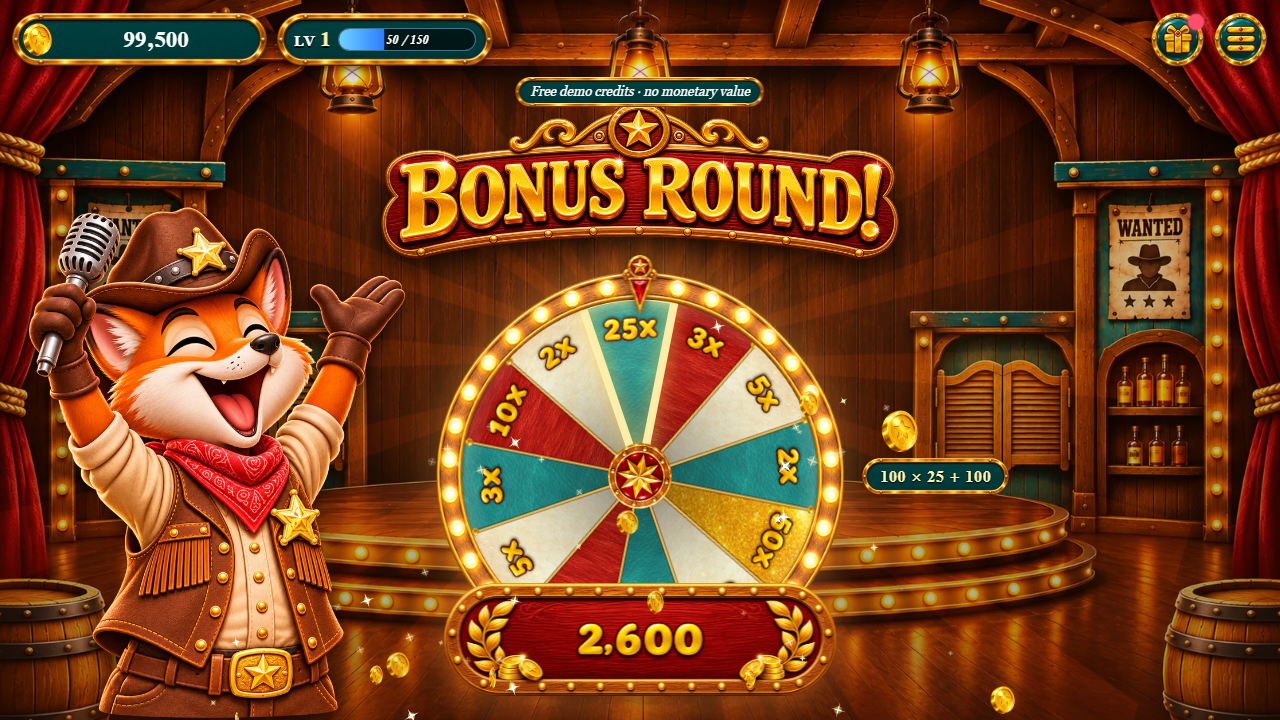 1
2
3
4
- Painted title (
art/title-bonus.webp) - The bonus wheel (multipliers)
- The sum: bet × multiplier + the bet back
- What comes back to the balance
Recipe 1: replace the backgrounds
-
bg-landscape.webp(1672 × 940) is used on desktops, tablets and phones lying down;bg-portrait.webp(941 × 1672) on phones held upright. - Keep the important part of the picture in the middle: the edges are cut on screens of other shapes. Keep the middle calm so the wheel stands out.
-
Save as WebP with the same names and replace them in
game/art/(and insource/public/art/to keep the source in step). - Reload without the cache.
Recipe 2: the logo and the host
-
The logo is
logo.webp(1000 × 554, transparent background). It shows on the title screen and on the podium. Keep a similar width-to-height shape so it fits in the same places. -
The host has five poses of 670 × 900 with a transparent background:
mascot-idle(waiting),mascot-hope(the wheel slows down),mascot-pull(spinning),mascot-cheer(a win, the bonus wheel, celebrations) andmascot-aww(a loss). The game swaps them in place, so draw all five with the same framing (same size and position of the body), or the host jumps between poses. - The podium (
podium.webp, 600 × 501) stands in front of the host on desktop. -
To rename the game, set
brand: { name: 'My Show' }insaloon-showdown.config.jsand change the<title>inindex.html.
Recipe 3: the wheel's look
-
The rim with its bulbs is
wheel-rim.webp(1024 × 1024, a square with a transparent middle). The wedges are drawn inside its inner circle; that circle is measured insource/src/ui/art.js(wheel.face, a share of the picture's radius). A new rim with a wider or narrower inner circle needs this number changed (and a build). -
The wedges are filled with the four seamless textures
mat-cream,mat-blue,mat-ruby,mat-gold(1024 × 1024). Which number gets which material is set insource/src/ui/theme.js(wedge:1: 'cream',2: 'blue',mult: 'gold'...). The bonus wheel usesbonusWedgesin turn, with its biggest value always gold. -
The hub, pegs, pointer and stand are
wheel-hub,wheel-peg,wheel-pointerandwheel-stand. Keep their proportions. -
The numbers on the wheel are written with the painted font (
font-gold.webp+font-gold.json): it has0-9 x K M + , .only. To redraw it, keep the same characters; the JSON lists each character's x and width in the picture.
Recipe 5: sounds, voice and music
-
Every sound is an MP3 in
game/audio/(same names insource/public/audio/). Replace a file with another MP3 of the same name; short effects should stay short (under 2 seconds). -
Music:
music.mp3(the table) andmusic-bonus.mp3(the bonus wheel and big wins). They loop with a crossfade. -
Announcer:
v-bets,v-nomore,v-x2,v-x7,v-bonus,v-big,v-mega,v-epic. -
Effects:
coin,chip,chips,sweep,spin,peg,stop,stopSpecial,win,bigwin,stamp,bonus,line,count,click,nope,collect,wheel-win,levelup,coinrain,drumroll,applause,aww. -
If a file is missing the game plays a built-in synthesised sound instead, so it never breaks. To add a new
file name, add it to the
FILESlist at the top ofsource/src/audio/audio.jsand build (a listed name without a file would be requested and fail). The starting volume isaudio: { volume: 0.8 }insaloon-showdown.config.js.
Recipe 6: colours of the effects and the screen
-
In
source/src/ui/theme.jschangeaccent(rings, sparks, glints),gold,ruby,bulbs(the rim lights),tierRays(light rays of the BIG, MEGA and EPIC celebrations) andambient. Colours are written like'#ffd36a'or[255, 214, 120]. -
The palette of the interface is at the top of
source/src/ui/styles.css(the--gold-1...--panel-2variables). -
Timings (how long the wheel turns, the pointer spring, the celebrations) are in
source/src/ui/feel.js. -
Run
npm run buildand uploaddist/. Nothing in these files changes a result or a payout.
Recipe 7: texts and languages
-
To change a few texts on the host, add them to
saloon-showdown.config.js:texts: { tapToPlay: 'PLAY NOW' }changes every language;texts: { pt: { tapToPlay: 'JOGAR' } }only Portuguese. The names (tapToPlay,placeBets...) are the keys ofsource/src/locales/en.js. -
To offer only some languages:
languages: ['en', 'es']. To always open in one:language: 'es'. -
To edit a whole translation, change
source/src/locales/<code>.js, runnpm run localesandnpm run build. -
The painted titles (BONUS ROUND, FREE SPIN, BIG/MEGA/EPIC WIN) are pictures (
title-*.webp): to translate them, replace the pictures.
Recipe 8: the wheel and its payouts
The easy way
Pick one of the 6 built-in wheels with math: { preset: 'party' } in
saloon-showdown.config.js (studio, party, grand,
polar, show, classic; see the table in the main guide). No rebuild.
Your own wheel
Also in saloon-showdown.config.js: math: { wheel: { order: [...], pays: {...} } }.
-
orderis the list of wedges clockwise from the pointer: numbers ('1','2','5'...), multipliers ('x2','x7': the wheel spins again) and'@bonus'(the bonus wheel). Every wedge is equally likely, so a number on more wedges wins more often. payssays what each number pays to 1:{ 1: 1, 2: 2, 5: 5, 10: 10 }.-
maxRespins: how many x2/x7 in a row at most (9 on the default wheel).bonus: { order: ['5x', '10x', ...] }sets the bonus wheel;bonus: nullremoves it.
Check it
Save, then in source/ run npm run rtp: it reads the config file and prints the RTP
of every bet. The game refuses a wheel where any bet would return 100% or more, a wheel with fewer than 6
wedges, or so many that the numbers would be smaller than 13 px on a phone (59 wedges with the default
numbers), and says why on the first screen. With your own wheel, the wheel list in OPTIONS is hidden
(players could not go back to yours).
window.SALOON_SHOWDOWN_CONFIG = {
  math: {
    wheel: {
      order: ['@bonus', '1', '2', '1', '5', '1', '2', 'x2', '1', '2', '1', '10', '1', '2', '1', '5'],
      pays: { 1: 1, 2: 2, 5: 5, 10: 10 },
    },
  },
};
These are fictional demo credits only.
Recipe 9: chips, limits and starting credits
In saloon-showdown.config.js, inside math: { }:
startBalance(100,000): the credits of a new player (and of a refill).-
chips(10, 50, 100, 500, 1,000): up to 5 chip values, smallest first (there are 5 chip pictures). -
minTotal(10),maxSpot(5,000, on one spot) andmaxTotal(20,000, on the table): the table limits. Every chip must be at mostmaxSpot. maxWin(5,000): a round never pays more than this many times the total bet.
A wrong value stops the game on the first screen with a message that says what to fix.
Recipe 10: levels, the daily free spin and free coins
In saloon-showdown.config.js, inside progress: { } (amounts are multiples of the
smallest chip):
-
levels: { enabled: false }turns levels off (every chip open from the start).unlock: [1, 1, 1, 3, 6]is the level that opens each chip;rewardthe level-up gift. -
daily: { everyHours: 24, stake: 10 }: the daily free spin of the bonus wheel (prize = its multiplier × stake × smallest chip).alwaysReady: trueoffers it on every visit (a demo page);enabled: falseturns it off. coins: { everyHours: 3, amount: 50 }: the free coins of the gift button.-
winTiers: { big: 10, mega: 25, epic: 50 }(outsideprogress): when the celebrations start.
Recipe 11: publish your version
-
If you changed only files of
game/on the host, you are done: reload without the cache. -
If you changed
source/: runnpm test, thennpm run build, and upload the contents ofsource/dist/over your game folder. -
Keep
SCOPE.mdwith the game and the credits notice visible. Changebrand.storageKeyif you want players to start with a fresh save.