Overview
Onyx Club Blackjack is an HTML5 blackjack simulation game with side bets:
a 1920s Art Deco jazz club at night, with a black panther in an ivory tuxedo as the dealer. It ships as a
ready-to-host game (game/) and as its complete editable source (source/). It runs
in any current browser, on phones, tablets and desktops, in portrait and landscape, with no server, database
or account.
Features: classic blackjack against an animated dealer (a black panther in an ivory tuxedo who deals, claps, shrugs and waves), up to 3 hands at once on wide screens, every move (hit, stand, double, split up to 4 hands, surrender, insurance), two side bets (Perfect Pairs and 21+3), the basic-strategy tip, three tables with their own limits and their own room, player levels that open the tables, a daily prize wheel, timed free coins, big/mega/epic win celebrations, statistics and achievements, 14 interface languages, recorded announcer voice and music.
Simulation only. The player gets free fictional demo credits. They have no monetary value
and cannot be bought, transferred, sold or redeemed. There are no deposits, withdrawals, prizes or rewards
of economic value. The purchase price is for a software licence, not participation in gambling. Real-money
or other real-value gambling use is not permitted under the licence. Read SCOPE.md (at the root
of the package and inside game/): it is part of the licence terms.

Install on your website
The playable game is the folder game/. It is plain HTML, CSS and JavaScript: no build, no
Node.js and no database are needed to host it.
- Open your hosting file manager, or connect with an FTP program (for example FileZilla).
- Create a folder for the game, for example
/games/onyx-club/. -
Upload the contents of
game/into it:index.html,onyx-club.config.js,SCOPE.md,DOCUMENTATION.txtand the foldersart/,audio/,assets/andmodules/. - Open the address in a browser, for example
https://your-site.example/games/onyx-club/.
The game uses relative paths, so it works in any folder or subdomain. Opening
index.html straight from your disk (file://) does not work, because browsers block
JavaScript modules there: test it on a web host or with the local preview described in "Editing the source".
Put it inside a page (iframe)
<iframe src="/games/onyx-club/" style="width:100%;aspect-ratio:16/9;border:0" allow="fullscreen; autoplay"></iframe>
Leave the on-screen credits notice visible and keep SCOPE.md with the game when you publish it
to the public.
Requirements
- Any static HTTP or HTTPS web host (shared hosting, a CDN, GitHub Pages, Netlify...). No PHP, database or server code.
- A current browser: Chrome, Edge, Firefox, Safari (macOS and iOS), Samsung Internet or Opera.
- Only for editing the source: Node.js 26 LTS (the current LTS line) and npm, see "Editing the source".
-
No internet connection is needed to play: art, sounds and code are all inside
game/. The game makes no requests to other sites.
How to play and the screens
The player taps TAP TO PLAY, chooses a table in the lobby, picks a chip in the rack, taps a betting spot and taps DEAL. The dealer deals two cards to each hand and two to himself, one face down. The player plays each hand; then the dealer reveals his card and draws to 17. All amounts are fictional demo credits.
 1
2
3
4
5
6
- table carousel: arrows, swipe or a tap
- daily wheel
- balance of free demo credits (the + opens the free coins)
- player level and XP
- menu: settings, rules, statistics, tables
- rules of this table
The lobby: three tables, three rooms
The tables wait in a carousel: arrows, a swipe, a tap on a side table or the arrow keys move it, and PLAY (or a tap on the selected table) sits down. A locked table shows a padlock and the level that opens it. Each table has its own limits, chips and room:
- LOUNGE TABLE (bets 10 - 500): the main club hall, on emerald felt
- STAGE TABLE (bets 100 - 5,000): facing the jazz stage, on ruby felt
- ROOFTOP TABLE (bets 1,000 - 50,000): the roof terrace over the night skyline, on sapphire felt
Betting
Tap a chip in the rack, then a spot. Wide screens show 3 spots (a phone in portrait shows one). The small circles beside the middle spot are the side bets. CLEAR takes the bets back, REBET places the last round's bets again, ×2 doubles them, DEAL starts the round. Any bet stays between the table's minimum and maximum.
 1
2
3
4
5
6
7
8
9
10
11
12
13
- balance of free demo credits (the + opens the free coins)
- player level and XP
- menu: settings, rules, statistics, tables
- rules of this table
- betting spot
- Perfect Pairs side bet
- 21+3 side bet
- chip rack (the table's five chips)
- CLEAR: take the bets back
- REBET: the last round's bets again
- ×2: double the bets
- DEAL: start the round
- the free-credits notice (keep it visible)
Playing a hand
| Move | What it does |
|---|---|
| Hit | one more card |
| Stand | keep the hand as it is |
| Double | double the bet, take exactly one more card (on any first two cards, also after a split) |
| Split | two cards of the same value become two hands, each with its own bet (up to 4 hands) |
| Surrender | give up the hand on the first decision and get half the bet back (after the dealer checks for blackjack) |
| Insurance | when the dealer shows an Ace: a side stake of half the bet that pays 2 to 1 if he has blackjack |
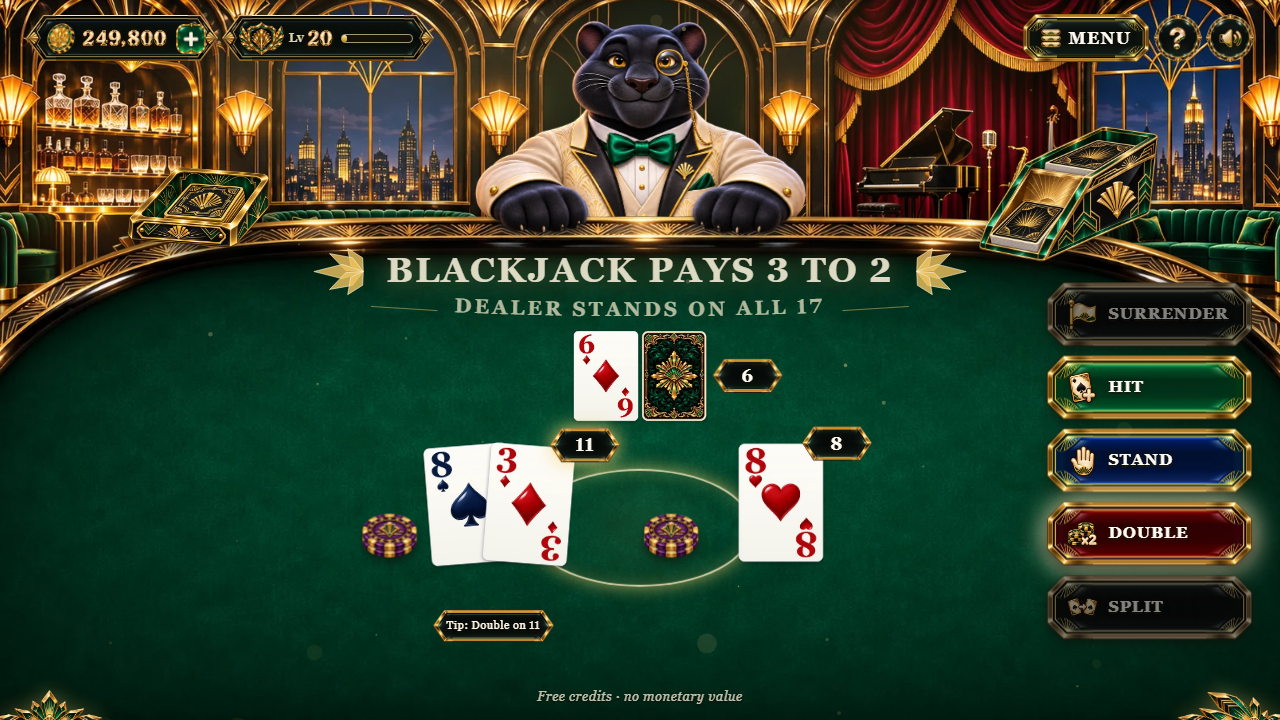
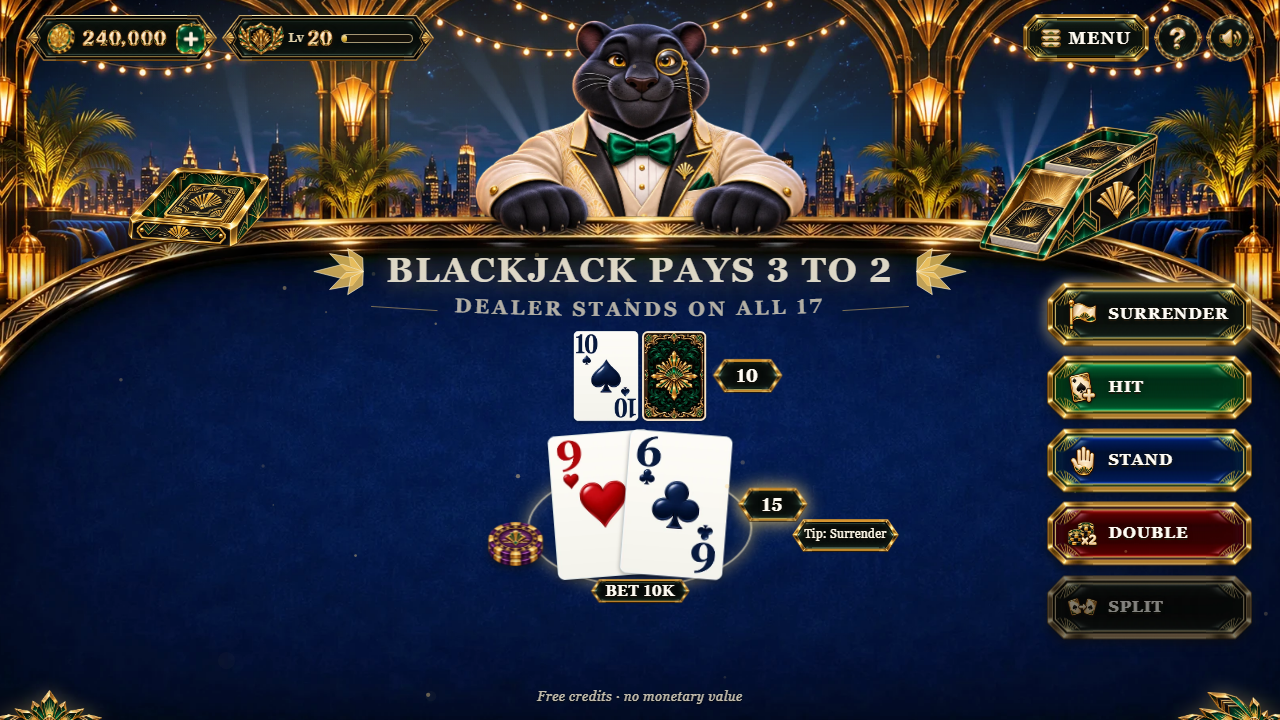
The tip bubble shows the basic-strategy move for the hand (the player can switch it off in SETTINGS). Card values: 2 to 10 count their number, J, Q and K count 10, an Ace counts 1 or 11. An Ace and a ten-value card as the first two cards is a blackjack and pays 3 to 2. The dealer stands on every 17.
1
2
3
4
5
6
- HIT: one more card
- STAND: keep the hand
- DOUBLE: double the bet, one card
- SPLIT: a pair becomes two hands
- SURRENDER: half the bet back
- basic-strategy tip
Results and celebrations
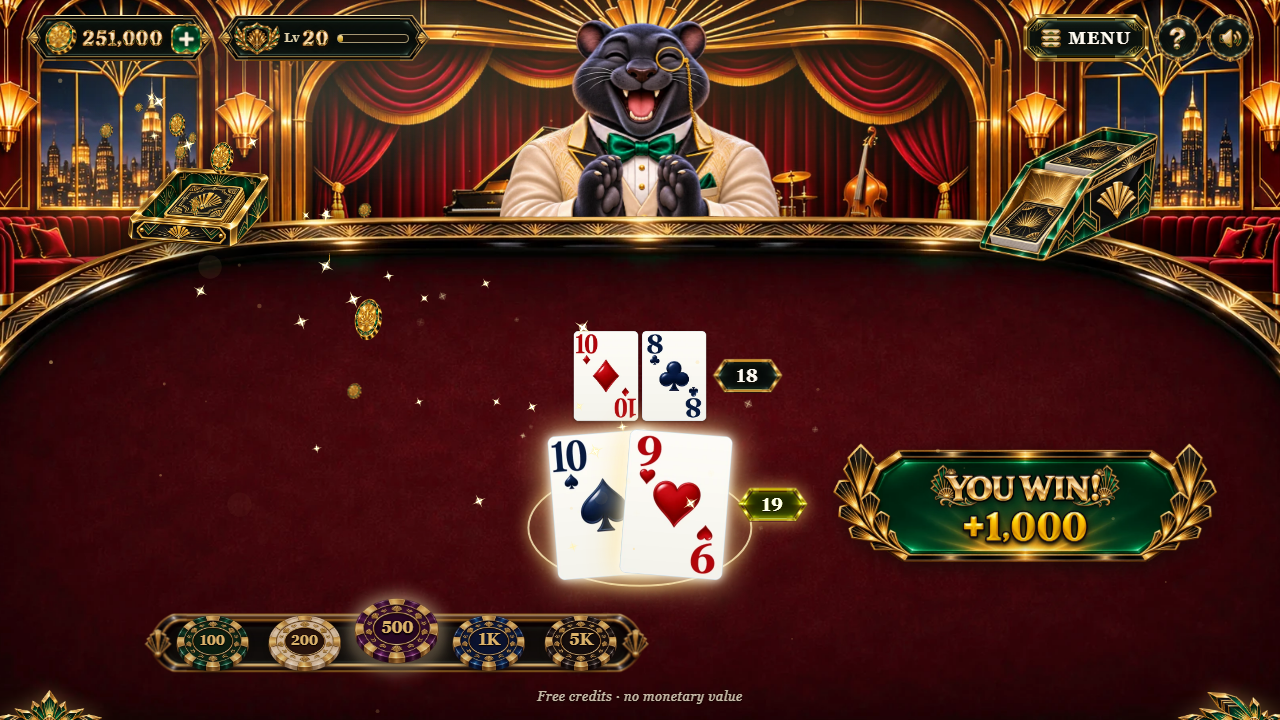
After the dealer's turn each hand shows its result on the felt (WIN, PUSH, BUST, DEALER BUSTS) and the chips move: lost bets go to the dealer, wins are paid next to the bet. A blackjack gets its own title. When a round pays at least 4 times its stake the game plays a BIG WIN celebration (MEGA from 10×, EPIC from 25×) with coins flying to the balance.


Side bets
They are decided by the first cards, before the round is played, and pay "to 1" on the side stake:
| Side bet | Wins when | Pays |
|---|---|---|
| Perfect Pairs | the player's first two cards are a pair: same suit (perfect) / same colour (coloured) / mixed | 25 to 1 / 12 to 1 / 6 to 1 (perfect / coloured / mixed) |
| 21+3 | the player's two cards and the dealer's up card make a poker hand | suited trips 100 to 1, straight flush 40 to 1, trips 30 to 1, straight 10 to 1, flush 5 to 1 |
Rewards outside the table
Levels (the badge beside the balance) grow with the credits played; each new level gives free credits and opens the next tables. The daily wheel gives free credits (offered on every visit in the shipped demo setting). The gift button gives 1,000 free credits every 3 hours. When the credits run out, a free refill of 25,000 is offered.
 1
2
3
- the wheel: 12 prizes of free credits
- SPIN
- close
Menu: settings, rules and statistics
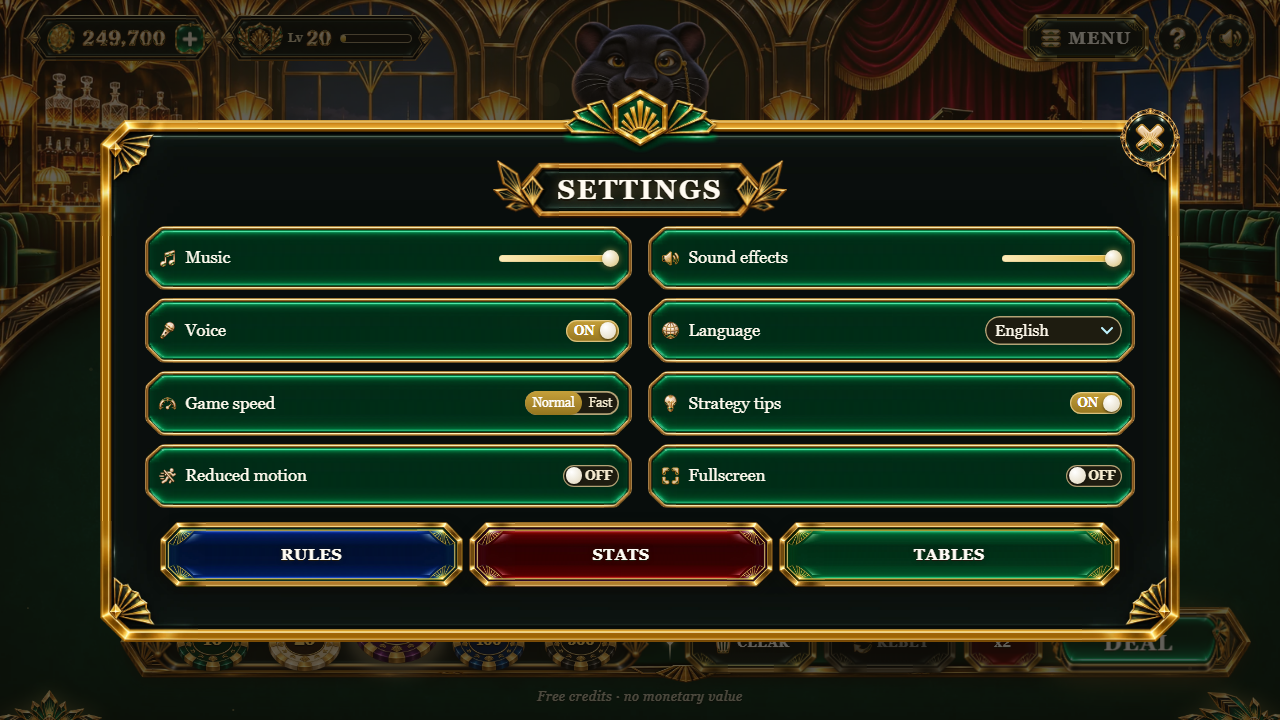
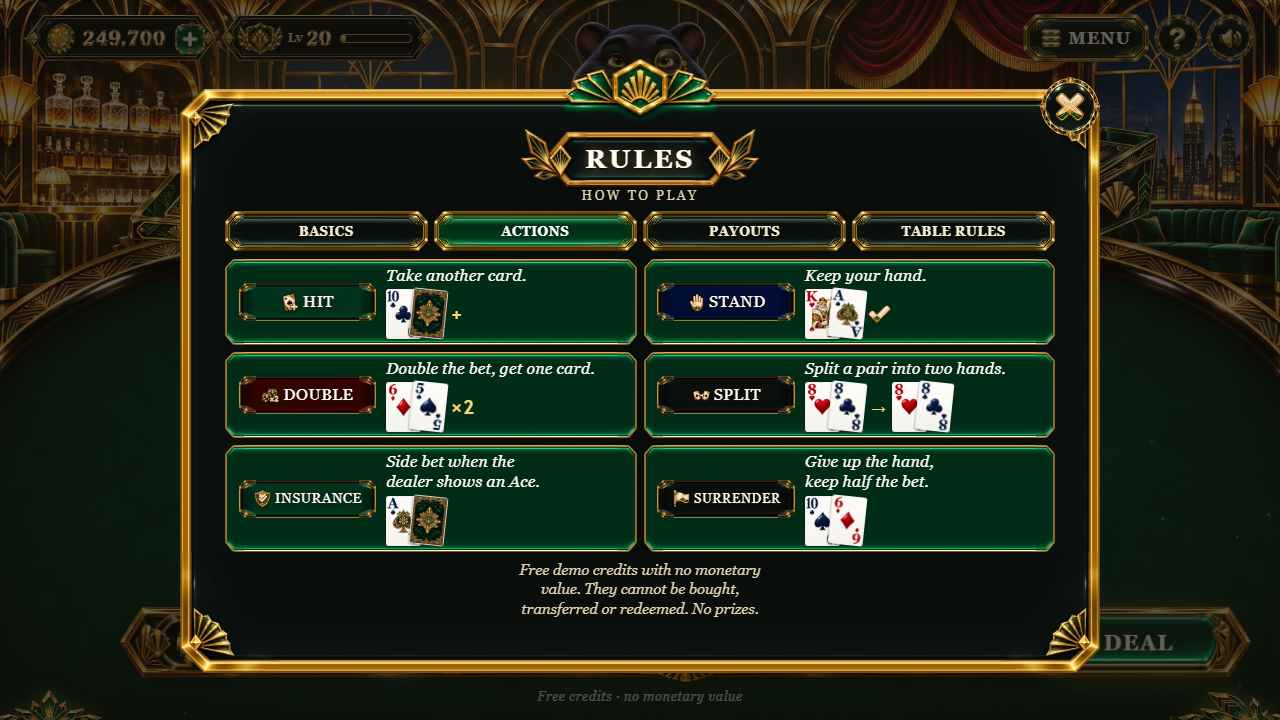
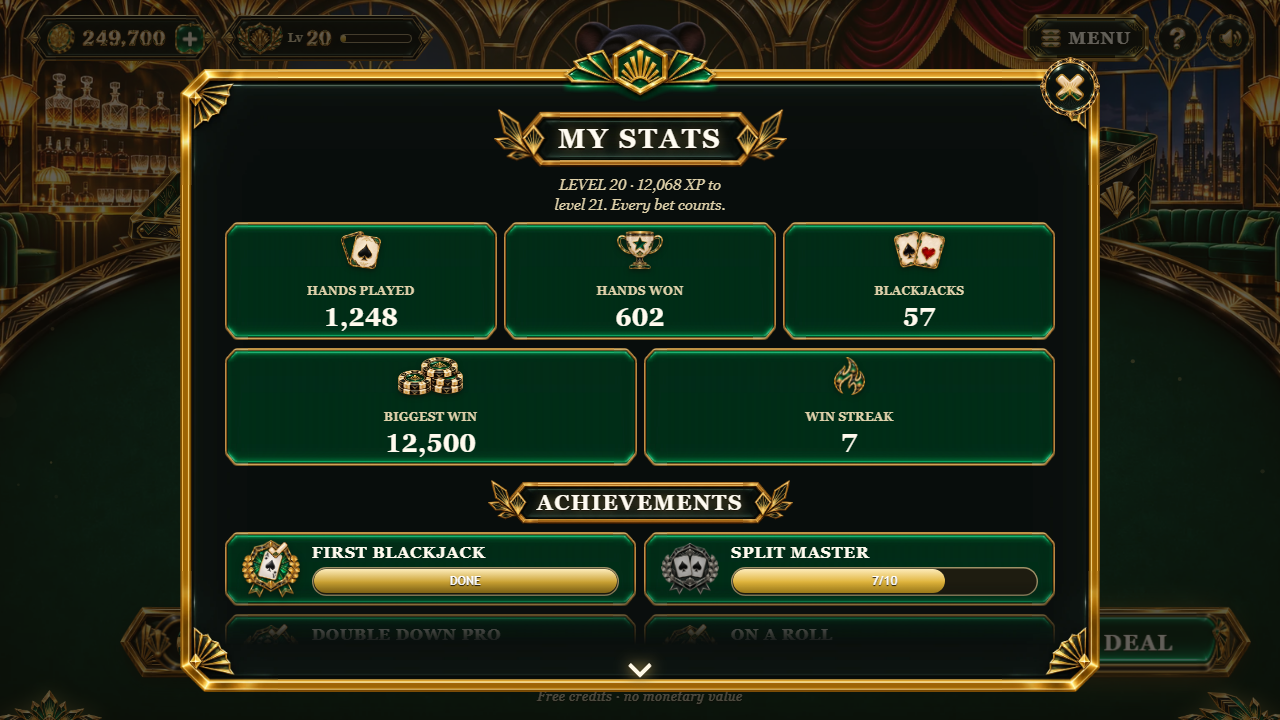
The menu opens SETTINGS (music, sound effects, announcer voice, game speed, the tip, less motion, language), the RULES of the current table (the moves with small cards as examples, the payouts, the rule set) and the STATISTICS (hands, wins, blackjacks, biggest win, best streak, achievements with medals).
 1
- close the panel
 1
2
3
4
5
6
7
8
9
- balance of free demo credits (the + opens the free coins)
- player level and XP
- menu: settings, rules, statistics, tables
- HIT: one more card
- STAND: keep the hand
- DOUBLE: double the bet, one card
- SPLIT: a pair becomes two hands
- SURRENDER: half the bet back
- basic-strategy tip
Keyboard
In play: H hit, S stand, D double, P split, R surrender. Enter or Space deals (while betting) and places the bets again (after a round). In the lobby: the arrow keys choose a table and Enter sits down.
What is in the package
onyx-club-static-1.0.0/
  START-HERE.txt          first steps
  DOCUMENTATION.html      opens this guide
  CUSTOMIZATION.html      opens the customization guide (recipes, no coding)
  CHANGELOG.txt
  SCOPE.md                what the product is and what the licence does not allow
  documentation/          this guide and the customization guide (EN/PT/ES), screenshots
  game/                   UPLOAD THE CONTENTS OF THIS FOLDER
    index.html            the page
    onyx-club.config.js    your settings (edit on the host, no rebuild)
    modules/              the JavaScript, one readable file per source module (plus _virtual/preload-helper.js,
                          the small loader Vite adds for the dealer module, which loads on demand)
    assets/ui/            the stylesheets (four files)
    art/                  images (WebP)
    audio/                sounds, voice and music (MP3)
    SCOPE.md, DOCUMENTATION.txt
  source/                 the complete editable project
    index.html            the page (development version)
    src/main.js           start-up, screens, layout, the lobby carousel, betting, the daily wheel, settings, input
    src/flow/round.js     one round: deal, moves, insurance, side bets, results, blackjack, celebrations (part of main.js)
    src/config.js         defaults, events, save key
    src/logic/            rules.js (tables and rules), engine.js (shoe, hands, credits), strategy.js (the tip), progress.js
    src/ui/               table.js (the felt), sheets.js (panels), wheel.js, fx.js, feel.js, theme.js, art.js, styles*.css
    src/bear/             sprite-bear.js: the animated dealer
    src/locales/          the 14 languages (en.js is the reference)
    src/audio/audio.js    the list of sounds, music and voices
    public/               art/, audio/, onyx-club.config.js (copied to the build as they are)
    tests/                npm test
    tools/                house edge, translation check, play robot, in-page text check, build formatter
    package.json, package-lock.json, vite.config.js, .prettierrc, README.md
    licenses/             licences of the development tools
  THIRD-PARTY-LICENSES/   the same licence texts
game/ is exactly what npm run build makes from source/ (checked file
by file before packaging). Edit source/ and build again, or edit only
onyx-club.config.js on the host.
Settings (onyx-club.config.js)
game/onyx-club.config.js is read every time the game opens, so you can change these settings on
your host with a text editor and no rebuild. Every field is optional: remove the // in front of
a line to use it. A wrong value stops the game with a message that says what to fix.
window.BLACKJACK_CONFIG = {
  brand: { name: 'Onyx Club Blackjack', storageKey: 'mysite.onyx-club' },
  language: 'auto',
  languages: ['en', 'pt', 'es'],
  texts: { tapToPlay: 'PLAY NOW', de: { tapToPlay: 'LOS!' } },
  audio: { volume: 0.8, muted: false },
  tips: true,
  lobby: true,
  ageGate: true,
  notice: true,
  rules: { preset: 'vegas', decks: 6, blackjackPays: [3, 2], dealerHitsSoft17: false, startBalance: 25000 },
  progress: { wheel: { alwaysReady: false, everyHours: 24 }, coins: { everyHours: 3, amount: 100 } },
  winTiers: { big: 4, mega: 10, epic: 25 },
};| Option | What it does |
|---|---|
brand.name |
game name used in the page and messages |
brand.storageKey |
prefix of the saved data in the browser (default onyx-club.template.save.v1); change it
to start a fresh save
|
language |
'auto' = the device language (English when not offered), or a code:
en pt es fr de it nl pl tr ru id ja ko zh. A player's pick in SETTINGS and
?lang=xx in the address come first
|
languages |
the languages offered in SETTINGS (default: all 14). One language hides the picker |
texts |
replace any text of src/locales/en.js in every language, or in one language (texts: { pt: {...} })
|
audio |
starting volume (0 to 1) and muted state |
tips |
the basic-strategy tip (the player can switch it off) |
lobby |
false skips the lobby: the player sits at the first table |
ageGate |
true shows the 18+ badge and the social-casino notice |
notice |
the one-line credits notice under the controls. Leave it on: SCOPE.md requires it on
public releases
|
showEdge |
prints the measured house edge on the rules sheet (set rules.houseEdge after running
npm run edge)
|
debug |
testing only, see "Testing link" below |
rules |
the table rules and the lobby, see "Table rules and limits" |
progress |
levels (enabled, need, reward), the daily wheel
(enabled, alwaysReady, everyHours, prizes,
weights) and free coins (enabled, everyHours,
amount). Amounts are multiples of the smallest bet of the first table
|
winTiers |
at how many times the round's stake the big, mega and epic celebrations start |
integration, callbacks |
events for your own page, see "Events" |
The file in the package lists every option with a comment. The full defaults are in
source/src/config.js, source/src/logic/rules.js and
source/src/logic/progress.js.
Testing link
On your own machine (localhost, 127.0.0.1 or a home-network address such as
192.168.x.x) the address ?debug=1 switches on a testing mode, with no change to
any file: &seed=123 repeats the same shoe, &deal=AS,KH,9D,7C puts those
cards on top of the shoe, &level=20 starts at that level (every table open) and
&coins=500000 starts with that balance. On a public host these are ignored, unless you set
debug: true in onyx-club.config.js (do not leave it on for players). The play
robot and the tests use it.
Table rules and limits
Everything is in rules: { } of onyx-club.config.js (or
source/src/logic/rules.js). The shipped table:
-
preset: 'vegas': a ready-made rule set.'vegas'(6 decks, peek, double on any two cards, late surrender),'european'(no hole card: the dealer takes his second card after the players, double on 9 to 11, no surrender) or'social'(2 decks, split Aces may be split again and hit). Any key below then overrides the preset. -
decks: 6 (1 to 8);penetration: 0.75 (share of the shoe dealt before a new shuffle). -
dealerHitsSoft17: false;blackjackPays:[3, 2],[6, 5],[1, 1]or[2, 1];peek: the dealer checks for blackjack under an Ace or a ten. -
double:'any','9-11','10-11'or'none';doubleAfterSplit;maxHands(1 = no split);splitByValue(K + 10 can be split);resplitAces;hitSplitAces. -
surrender:'late'or'none';insurance: true or false. seats: betting spots at once on wide screens (1 to 3).-
sideBets:perfectPairsandtwentyOnePlusThree, each withenabledandpays;maxis the largest side stake as a share of the table's maximum bet. startBalance: 25,000 (also the free refill).-
tables: the lobby, one line per table:id,minBet,maxBet,chips(1 to 5 values, small to big) andunlock(the player level that opens it). Amounts are multiples of 10 so every payout is whole.
| Table | Bets | Chips | Opens at level |
|---|---|---|---|
| LOUNGE TABLE | 10 - 500 | 10, 20, 50, 100, 500 | 1 |
| STAGE TABLE | 100 - 5,000 | 100, 200, 500, 1,000, 5,000 | 5 |
| ROOFTOP TABLE | 1,000 - 50,000 | 1,000, 2,000, 5,000, 10,000, 50,000 | 12 |
There is no "win percentage" to set: the shoe is shuffled at random and the house edge comes only from these
rules. npm run edge (in source/) plays millions of hands with basic strategy using
your settings and prints the edge. The engine tests (npm test) check every rule.
Languages
The interface is translated into 14 languages: English, Portuguese, Spanish, French, German, Italian, Dutch,
Polish, Turkish, Russian, Indonesian, Japanese, Korean and Chinese (simplified). The announcer voice and the
painted titles (BLACKJACK, BIG WIN, MEGA WIN, EPIC WIN, DAILY WHEEL) are in English in every language. The
game opens in the device language; the player can change it in SETTINGS, and ?lang=pt in the
address forces one.
Texts live in source/src/locales/<code>.js, one file per language, with the same keys as
en.js (the table names are table_<id>). A missing key falls back to English.
To change a few texts without rebuilding, use texts in onyx-club.config.js. After
editing the locale files, run npm run locales to check that no translation lost a
{value} placeholder.

Saved data
The game keeps the balance, level, statistics, settings, the chosen table and reward timers in the browser's
localStorage, under keys that start with onyx-club.template.save.v1. (for example
onyx-club.template.save.v1.balance). Nothing is sent anywhere. A round cut short by a reload
gives the stakes on the table back. Clearing the site data in the browser resets the game. If you publish
two copies of the game on the same domain, give each one its own brand.storageKey.
Events for your page
The game sends events so your page can show statistics, achievements or a leaderboard of fictional scores. They are not an accounting or payment interface and must not be used as one.
-
callbacksinonyx-club.config.js:onReady(info),onRound(round),onWin(round),onBalance({ balance }),onBonus({ kind, amount, balance }),onError. -
window.OnyxBlackjack.on('round', fn),window.OnyxBlackjack.getBalance(),window.OnyxBlackjack.version,window.OnyxBlackjack.rules. -
DOM events on
window:blackjack:round,blackjack:win,blackjack:bonus... -
With
integration: { postMessage: true, targetOrigin: 'https://your-site.example' }the game also posts{ source, type, payload }to the parent page when it runs in an iframe.
round.spent is the demo credits put into the round (bets, doubles, splits, side bets,
insurance), round.payout the demo credits it returned, round.net the difference,
round.hands each hand's cards and outcome, round.table the table id.
bonus.kind is 'wheel', 'coins', 'level' or
'refill'.
Editing the source (Node.js for beginners)
You only need this to change code, styles, art or sounds and build a new game/. To change
settings, edit onyx-club.config.js instead.
1. Install Node.js
-
Go to
https://nodejs.organd download the LTS version (Node.js 26 LTS). Windows and macOS: run the installer with the default options. Linux: use your package manager or the official binaries. - Close and open your terminal again (Windows: PowerShell or Command Prompt; macOS: Terminal).
- Check the versions: both commands must print a number, and Node must be 26.13.0 or newer.
node --version
npm --version
2. Install the project tools
Open the terminal in the source/ folder (Windows: open the folder in Explorer, click the
address bar, type powershell and press Enter; macOS: drag the folder onto the Terminal icon).
Then run:
npm ci
This installs the exact versions in package-lock.json (Vite, Prettier and Playwright) into
node_modules/. It needs an internet connection once.
3. Test, preview and build
npm test
npm run dev
npm run build-
npm testruns the engine tests (shoe, hand values, every move, insurance, surrender, side bets, credits, basic strategy, house edge). All must pass. -
npm run devstarts a local preview athttp://localhost:5223/that reloads when you save a file. Press Ctrl+C to stop it. The testing link works there (?debug=1&deal=AS,KH,9D,7C). -
npm run buildwrites the finished game tosource/dist/. Upload the contents ofdist/to your host (it replacesgame/). The build is not minified and is formatted with Prettier, so it stays readable.
Other commands
-
npm run edgeprints the house edge of your rules (src/logic/rules.jsplus therulesofpublic/onyx-club.config.js), measured over millions of hands. npm run localeschecks the translations.npm run formatformats the whole project with Prettier.-
npm run robotplays real rounds in a browser on a phone and a desktop size and checks that every balance is exact (see "Play robot"). -
tools/qa-fit.jsis an in-page check for the preview: in the browser console,(await import('/tools/qa-fit.js')).check()lists any text that does not fit its plate.
Play robot
tools/play-robot.mjs bets, deals and plays through the game's own buttons (every move, side
bets, insurance, panels, REBET / NEW BET) and reports page errors, rounds that never end and any balance
that differs from what the game says the round paid. Install its browser once with
npx playwright install chromium, start npm run dev in one terminal, then run
npm run robot in another. The report is written to robot-report/report.json.
Common problems
-
nodeornpmis not recognised: Node.js is not installed or the terminal was opened before installing it. Reinstall and open a new terminal. -
Windows says running scripts is disabled (
npm.ps1): use the Command Prompt, or runnpm.cmd ci. ENOENT ... package.json: the terminal is not in thesource/folder.EBADENGINE: your Node.js is older than 26.13.0. Install the current LTS.-
npm cifails with a network error: check the connection or the proxy of your company network, then run it again. -
npm cisays the lock file is out of sync: you changedpackage.json; runnpm installonce, thennpm ciworks again. - Port 5223 is busy: Vite picks the next free port and prints it.
- The robot says the browser is missing: run
npx playwright install chromium.
Customize and reskin
The customization guide (CUSTOMIZATION.html) has step-by-step recipes for
people who do not program: replacing the backgrounds and the rooms, the logo, the dealer, the cards, the
chips, sounds and music, colours, texts, table rules and rewards. In short:
-
Art:
source/public/art/(orgame/art/on the host). Replace a file with another WebP of the same name and the same size: a reskin is one art folder plussource/src/ui/theme.js. -
Sounds:
source/public/audio/(orgame/audio/). Replace an MP3 with another of the same name. -
Theme colours and effects:
source/src/ui/theme.js. Timings:source/src/ui/feel.js. Presentation only: nothing there changes a card or a payout. -
Layout and styles:
source/src/ui/styles.cssand the three files that follow it (styles-placement.css,styles-polish.css,styles-final.css, loaded in that order). -
Texts:
textsinonyx-club.config.jsorsource/src/locales/. -
Table rules and limits:
rulesinonyx-club.config.jsorsource/src/logic/rules.js, thennpm run edge.
Changes in source/ need npm run build. Changes to files in game/ on
the host (art, audio, onyx-club.config.js) need no build.
Internal names
A few names in the code describe something else than they say. They are only names:
| Name in the code | What it is |
|---|---|
src/bear/, sprite-bear.js, bear, bear-sprites/, bear-*.webp |
the animated dealer (the black panther) and its pictures: the names come from the shared engine |
lounge, stage, rooftop |
the ids of the three tables in rules.tables (their art files use the same names) |
iceFont, font-ice |
the light painted digits (bets, totals); goldFont / font-gold are the gold ones (balance, wins) |
crystal-*.webp, flake-*.webp, ice-arrow.webp, title-bust-ice.webp |
Art Deco ornaments, gold sparkles, the carousel arrow and the BUST title: file names kept from the shared engine |
auroraGlow(), @keyframes aurora, .bg-glow |
the room lights: a slow veil of light over the windows that brightens for a moment after a win (names from the shared engine) |
fx.snow, snowCount, FEEL.ambient.snowDesktop / snowTouch |
the ambient particles: gold dust rising slowly in this theme (THEME.ambient.rise = true) |
fx.frost(), fx.crack(), fx.shards(), 'bust-ice' |
the burst, cracks and shards drawn on a bust and on a new celebration tier, and the key of the BUST panel (names from the shared engine) |
Bank, bank.balance |
the fictional demo credits of the player (no money) |
.nine, nine.js |
plates and buttons stretched in nine pieces (9-slice) so their decorated ends keep their shape |
window.__bj |
the testing helper of the testing link (?debug=1, only on your own machine) |
Updating the game and clearing the cache
After you upload a new version, browsers and hosts may keep the old files for a while. If a change does not show:
- Reload without the cache: Ctrl+F5 or Ctrl+Shift+R (Windows/Linux), Cmd+Shift+R (macOS). On a phone, close the tab and open it again.
- Clear the cached files of the site in the browser settings ("Cached images and files"). Do not clear "cookies and site data" unless you want to reset the saved game.
- Try a private (incognito) window.
- If your host or CDN (for example Cloudflare) has a cache, purge it.
- Add a version to the address once, for example
index.html?v=2.
Saved data survives an update as long as brand.storageKey does not change.
What the product is (and is not)
- Free, fictional demo credits only, with no monetary value. They cannot be bought, transferred, sold or redeemed. No prizes of any kind.
- No payment, deposit, withdrawal, account or wallet system: none is hidden, switched off or shipped in the package.
- The cards are dealt from a shoe shuffled at random; nothing in the game adjusts the chance of winning.
- The standard licence does not allow using this game, or any modified version of it, for gambling with real money or anything of real value: no buying credits, no cash-out, no prizes based on results, no connection to a gambling wallet, payment system or real-money operator, no advertising of real-money gambling.
- "Insurance", "side bets" and "double" are moves of the card game and spend the same free demo credits; they are not purchases.
-
You must follow the laws of every place where you publish the game (age ratings, minors, consumer
protection). Keep the credits notice visible;
ageGate: trueadds an 18+ notice. - Support does not cover wallet, deposit, withdrawal or any real-money integration; such requests are declined.
The full text is SCOPE.md.
Questions and problems
-
The page is blank. Check that you uploaded the contents of
game/(withmodules/andassets/) and that you open it through http(s), notfile://. The browser console (F12) shows the missing file. - No sound. Browsers allow sound only after a tap: the game starts it on TAP TO PLAY. Check SETTINGS (music, effects, voice) and the device volume. If a phone stops the sound (a call, another app), the next tap brings it back.
-
Can I change the house edge? Yes, only through the rules (
blackjackPays,decks,dealerHitsSoft17,double,surrender, side bet pays...);npm run edgemeasures your table. There is no hidden win rate. -
Can I add a fourth table? Yes: add a line to
rules.tablesand its name astable_<id>in the locales (ortexts). It uses the first room unless you add art and styles for it (customization guide, recipe 3). - Can players buy credits or win prizes? No. The game has no payment or prize system, and the licence does not allow adding one.
- Does it work offline? Once loaded, yes; it needs no other site.
-
Can I remove the credits notice? For a public release it must stay visible (see
SCOPE.md). -
The daily wheel opens on every visit. That is the demo setting
alwaysReady: true; setprogress: { wheel: { alwaysReady: false } }. -
How do I show chosen cards? On the local preview add
?debug=1&deal=AS,KH,9D,7C(the cards go to the player, the dealer, the player, the dealer...).
Support and credits
Support e-mail: willian@polargames.com.br (bugs, installation, layout on supported browsers, translations, visual and audio customization and the settings in this guide). Please include your purchase or licence code, the browser and device, and a screenshot.
Development tools: Vite, Prettier and Playwright (licences in THIRD-PARTY-LICENSES/). No
third-party code is shipped in game/. Art, music, voice and effects are part of the game and
covered by the licence of your purchase.