Overview
Lumi is an HTML5 puzzle platformer. Lumi is a paper-lantern caterpillar: she walks on a grid, falls with gravity, eats berries to grow and, from World 2 on, drops the last piece of her tail as a lantern that stays where it lands. Eat every berry to open the portal and walk into it.
- 40 levels in 4 worlds (10 each), all checked by the included solver.
- 3 stars per level, hints, unlimited undo, restart, tap-to-start screen, ending screen.
- Keyboard, on-screen arrows and swipe. Phone (portrait and landscape), tablet, desktop and ultrawide.
- 14 interface languages. Sound effects and music included.
- Plain HTML, CSS and JavaScript. No build step, no framework, no server code.

Install on your website
- Unzip the package.
- Upload the contents of the
game/folder to any web host (shared hosting, a CDN, Netlify, GitHub Pages...). - Open
index.htmlin the browser. That is all.
Open the game through http:// or https://. Double-clicking index.html on your computer (a file:// address) also works in most browsers, but sound and saved progress can be blocked there.
Put it inside a page (iframe)
<iframe src="https://your-site.com/lumi/index.html" width="960" height="540" style="border:0" allow="autoplay; fullscreen"></iframe>The game fills whatever size the frame has, in portrait or landscape.
Game portals
The game shows a "tap to start" screen first, so the browser allows sound after the first touch. There is no external request: fonts, art and sound are all inside the folder.
Requirements
- To publish: any static web host. No PHP, database or Node.js.
- To play: a current version of Chrome, Edge, Firefox, Safari or Opera, on desktop or mobile.
- To use the level tools (optional): Node.js 18 or newer.
How to play and the screens
- Move: arrow keys or WASD, the on-screen arrows, or a swipe.
- Drop the tail (World 2 on): Space, the lantern button, or a double tap in swipe mode. Lumi needs at least 3 pieces.
- Undo: Z or the undo button, as many times as you want. Restart: R or the restart button. Hint: H or the bulb. Pause: Esc or the pause button.
- Berries are solid: only the head eats them. Spikes send Lumi back one step. A pressure plate opens the door while something stands on it; a dropped lantern counts. Some rooms are dark: only Lumi, her lanterns and the portal give light.
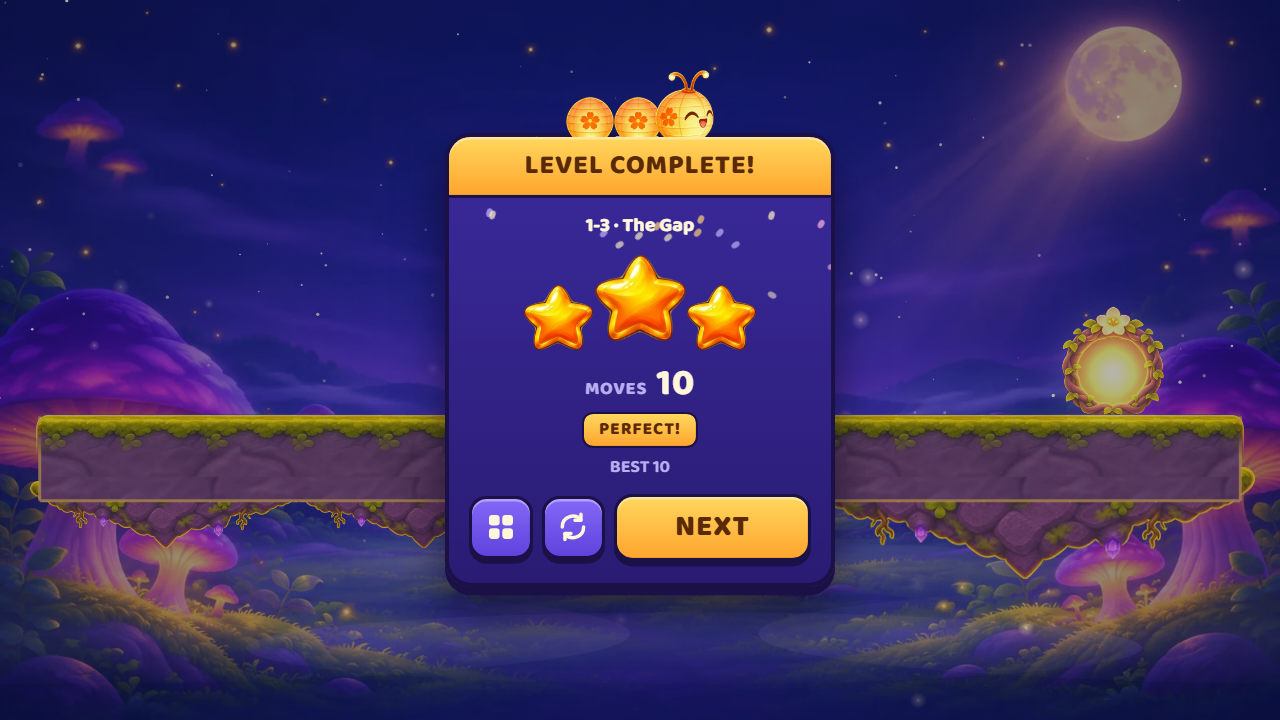
- Stars: 3 for the fewest moves ("par"), 2 for up to 35% more, 1 for finishing.

Settings
Four tabs: sound (effects, music, vibration), controls (arrows or swipe, button size, left-handed), accessibility (reduced motion, screen shake, brighter dark rooms) and language.


What is in the package
| Folder or file | What it is |
|---|---|
START-HERE.txt | The short version of this guide. |
DOCUMENTATION.html, CUSTOMIZATION.html | Shortcuts to this guide and to the customization guide. |
ANSWER-CARD.html | The solution of every level, to print or to keep at hand. |
documentation/ | The guides in English, Portuguese and Spanish, and their pictures. |
game/ | The game, ready to upload. |
source/ | The same game plus the level tools (tools/) and package.json. Edit here, then copy to game/. |
THIRD-PARTY-LICENSES/ | The licence of the font. |
CHANGELOG.txt | Version history. |
Inside game/
| File | What it does |
|---|---|
index.html | The page: screens, buttons and icons (inline SVG). |
css/style.css | Every colour, size and layout rule of the interface. |
js/config.js | Game feel numbers, your settings (LUMI_CONFIG) and the English and Portuguese texts. |
js/i18n.js | The other 12 languages and the list of languages. |
js/levels.js | The 40 levels, drawn as text. |
js/levels-sol.js | The fewest moves and the solution of each level (written by the solver). |
js/sim.js | The rules of the puzzle (no drawing). |
js/game.js | Drawing, animation and effects. |
js/ui.js | Screens, input, settings and saved progress. |
js/scene.js, js/fx.js, js/audio.js, js/fit.js | Background scene, springs and particles, sound, and text that shrinks to fit its button. |
assets/ | Art (.webp), sound (sfx/, music/, .mp3) and the font (fonts/). |
Every file is readable (not minified) and commented.
Settings
Open game/js/config.js and look for LUMI_CONFIG:
var LUMI_CONFIG = { hintsPerLevel: 3, rewardedAd: null };| Setting | Meaning |
|---|---|
hintsPerLevel | Free hints on each level. 0 means unlimited. |
rewardedAd | null, or your function that shows a rewarded video. When hints run out the game shows a "+1 hint" button that calls it. |
debug | true shows the solution button to everybody (see below). Leave it out when you publish. |
Rewarded video for extra hints
var LUMI_CONFIG = {
  hintsPerLevel: 3,
  rewardedAd: function (done) {
    // show your ad here, then:
    done(true);   // true = the player watched it and gets 1 more hint
  }
};
Feel numbers
The block FEEL at the top of config.js holds every animation number (step time, squash, screen shake, hit pause, light radius in dark rooms...). Change a number, reload the page and feel the difference.
Levels
Each level in js/levels.js is a small drawing made of characters, top row first:
{ id: "my-level", world: 1, name: { en: "My Level", pt: "Minha fase" },
  rows: [
    '..........',
    '.......X..',
    '..o...###.',
    '#####.....',
  ],
snake: [[2, 2], [1, 2], [0, 2]] },| Character | Meaning |
|---|---|
# | Block (ground and walls) |
. | Empty |
o | Berry |
X | Portal (one per level) |
^ | Spikes |
_ | Pressure plate (a block with a button on top) |
D | Door, opened by the plate |
snakelists Lumi's pieces as[column, row], head first, counted from 0 at the top left. Every piece must start on an empty cell.worldis 1 to 4 and chooses the art, the music and where the level appears.dark: truemakes a dark room.idmust be unique: saved progress uses it.
Check your levels
After changing levels.js, run the solver from source/. It proves each level can be finished, and writes the fewest moves (the 3-star target) and the solution the hint uses:
npm run solveThen npm run answers rebuilds the answer card. Copy js/levels.js and js/levels-sol.js to game/js/.
A level that is not in levels-sol.js cannot be played: always run the solver after editing levels.
Solution button and answer card
Add ?debug to the address (for example index.html?debug) to unlock every level and get a pink play button next to the hint. Click it (or press P) and the game restarts the level and plays the solution, showing the sequence of moves at the bottom. Click again to stop.
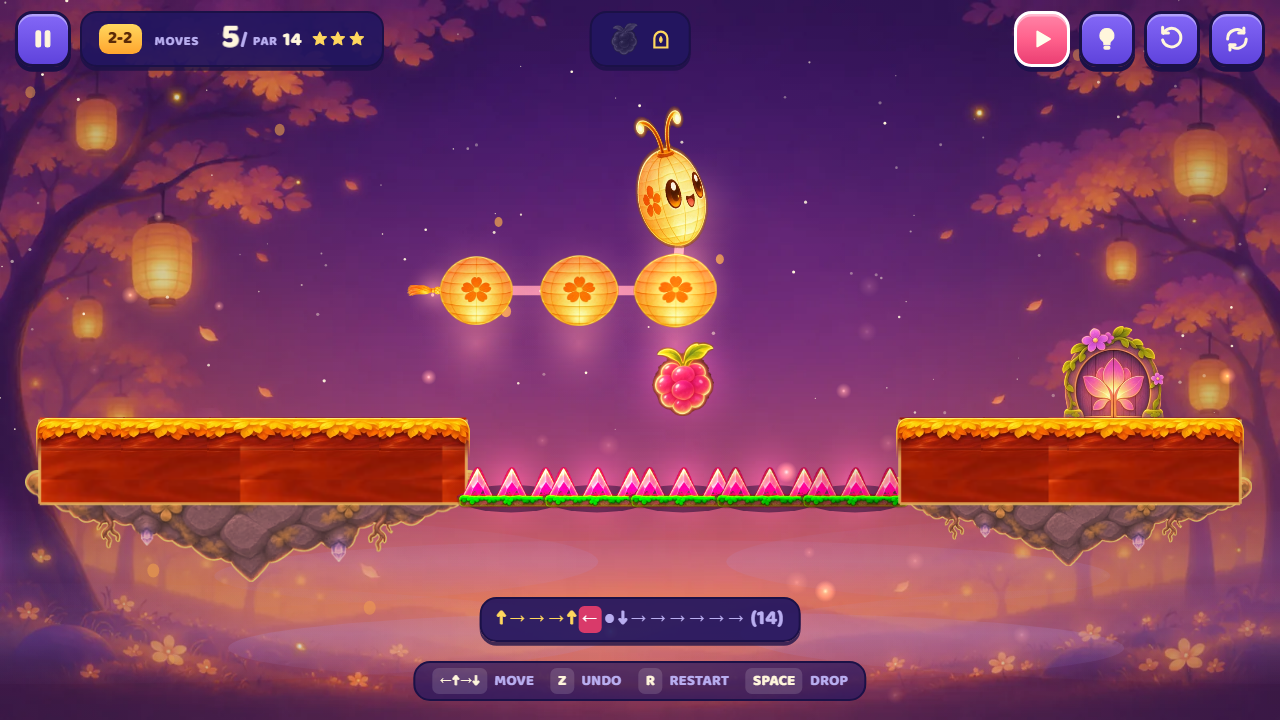
?lv=12 opens level 12 directly; both can be combined: index.html?debug&lv=12.
ANSWER-CARD.html has the same solutions on paper: arrows are moves and the orange dot is "drop the tail".
Languages
English, Portuguese, Spanish, French, German, Italian, Dutch, Polish, Turkish, Indonesian, Russian, Japanese, Korean and Simplified Chinese. The game starts in the language of the browser when it is one of these, otherwise in English; the player can change it in the settings.
- Texts never wrap or leave their button: when a translation is long, only the letters get smaller.
- The included font (Baloo 2) covers the Latin alphabets. Russian, Japanese, Korean and Chinese use the device font.
- To change a text or add a language, see the customization guide.
Saved data
Progress and settings are saved in the browser (localStorage, key lumi.v1): unlocked levels, best moves per level, language, volumes and control options. Nothing is sent to a server. Clearing the site data erases the progress.
Editing the source
The game has no build step: the files in source/ are the same files that run. You only need Node.js for the optional tools.
- Install Node.js 18 or newer from nodejs.org.
- Open a terminal in the
source/folder. - Use the commands below.
| Command | What it does |
|---|---|
npm start | Local server at http://localhost:5317/ (some browsers block sound and saves on file://). |
npm test | Runs the rule tests and solves every level. |
npm run solve | The same, and writes js/levels-sol.js. |
npm run answers | Rebuilds documentation/answer-card.html. |
There is nothing to install with npm install: the tools have no dependencies.
Internal names
The code was written by a Brazilian studio and some names are in Portuguese. The most common ones:
| Name | Meaning |
|---|---|
fase, fases | level, levels |
fruta | berry |
bloco, bloco-pedra | block, rock block |
espinhos | spikes |
botao, porta | pressure plate, door |
portal-fechado, portal-aberto | closed portal, open portal |
gomo, cabeca | body piece, head |
lanterna-bloco, pedestal, borla | dropped lantern, its stand, tail tassel |
fundo-w1, fundo-p1 | background of world 1 in landscape, in portrait |
ilha-base | underside of the floating island |
Updating the game and clearing the cache
Browsers keep old files. After you upload a new version, either rename the folder or add a version to the file addresses in index.html (for example js/ui.js?v=2), and reload with Ctrl+F5 to test.
Questions and problems
- No sound. Browsers only allow sound after a touch or a key: that is what the "tap to start" screen is for. Check the volume in the settings and the mute button on the title screen.
- The game does not start on my computer. Open it through a web address or
npm start, not by double-clicking the file. - Progress disappeared. It lives in the browser: another browser, a private window or cleared site data starts from zero.
- A level I edited does not open. Run
npm run solveand copylevels-sol.jsagain. - Can I remove a language? Yes: delete its line from
LUMI_LANGSat the end ofjs/i18n.js. - Can I sell it as an app? The licence of your purchase decides what you may do; see the marketplace licence terms.
Support and credits
Questions about installing or customizing: willian@polargames.com.br. Please send the address where the game is published and what you changed.
Game, art, sound and code by Polar Games. Font: Baloo 2 (SIL Open Font License 1.1, in THIRD-PARTY-LICENSES/).