
Contents
- Overview
- Installation (no coding)
- Requirements and sound
- How to play
- Screens (numbered)
- Files
- Settings file and optional ads
- Editing levels
- Economy and prices
- Languages
- Saving and the score screen
- Internal names in the code
- Development (optional)
- Updating and cache
- Screenshot gallery
- Licenses
- Troubleshooting
- Support
1 Overview
A pirate brick breaker for the web. Aim the ship's cannon, fire volleys of cannonballs that bounce around
the arena and break the cargo before it reaches the deck. Powder kegs blow up their 8 neighbours, the Bomb
opens a 3x3 hole, treasure chests give extra cannonballs. Plain HTML, CSS and JavaScript: upload the
game/ folder to any web host.
- 50 campaign levels in 10 chapters (Sunny Cove to Treasure Island), each chapter closed by a sea boss: the Kraken, Captain Claw, the Magma Serpent and seven more.
- Endless sea (a new row every volley) and a Daily challenge (the same level for everyone all day, with a win streak bonus).
- Doubloons, three active missions, star milestones, a shop with three cannon upgrades and six cannonball skins.
- Blocks: crates, barrels, reinforced blocks, powder kegs (chain explosions), rum barrels (burn the row), treasure chests (+2 cannonballs) and anchors.
- Desktop layout with side cards and a phone layout for portrait screens; mouse, touch and keyboard.
- 14 interface languages; parrot narration in English, Portuguese and Spanish; 29 sound effects and 4 music tracks.
- No server, database, account or external service. Optional ads between levels (off by default).
2 Installation (no coding)
The game/ folder is the finished game. You do not need Node.js, a database or PHP to publish
it.
- Extract the ZIP on your computer.
- Open your hosting file manager (cPanel, Hostinger, Plesk...) or an FTP program such as FileZilla.
- Create a folder for the game, for example
public_html/kaboom-cove/. -
Upload everything inside
game/into that folder (not thegamefolder itself), keeping the subfolderssrc/andassets/. -
Open the address in a browser, for example
https://yoursite.com/kaboom-cove/. Test on a phone too. - To embed it in another page, use an iframe pointing to that address (allow full screen if you want the full-screen button).
source/, documentation/ or the ZIP to the public game folder.
Opening index.html with a double click (file://) does not work: browsers only
run the game modules from a web address (use npm run dev to test on your computer).
game/ is exactly what npm run build writes from source/ (same files,
byte for byte). After editing source/, build again and upload the new
dist/ contents the same way.
3 Requirements and sound
Any current browser (Chrome, Edge, Firefox, Safari on desktop, Android and iPhone/iPad) with JavaScript enabled; any static web host with HTTPS. The game runs in a canvas and needs no plug-in.
Browsers only start sound after a tap or click: the "Tap to start" screen takes care of that (turn it off in the settings file if you prefer). Every file is inside the package; by default the game makes no request to any other site.
4 How to play
| Action | Mouse / keyboard | Touch |
|---|---|---|
| Aim | Move the mouse over the arena, or Left/Right arrows (A/D); Up = straight up | Drag the finger |
| Fire a volley | Click, or Space / Enter | Release the finger |
| Bomb | Bomb button or Q | Bomb button |
| End shot (bring the cannonballs back) | End shot button or E | End shot button |
| Speed 1x / 2x | Speed button or S | Speed button |
| Pause | Pause button, Esc or P | Pause button |
Each volley fires 10 cannonballs (more with upgrades and treasure chests) that bounce off the walls and the cargo. After every volley the cargo moves down one row; if it reaches the deck, the level is lost. Win in few volleys for 3 stars (the right card shows the limit). Powder kegs explode their 8 neighbours and can chain; rum barrels burn their row; anchors cannot be broken and sink at the danger line. Breaking cargo charges the Bomb: arm it, and the first cannonball of the next volley blasts a 3x3 area. The fifth level of a chapter opens its boss; Endless sea and the Daily challenge are on the level map.
5 Screens (numbered)

Marks on the screenshot
- Game logo
- Play: continues at the next level
- Levels: the map with chapters, bosses, Daily challenge and Endless sea
- Skins: the shop (cannon upgrades and cannonball looks)
- Score: the local "My score" screen with missions
- Settings
- Stars, total score and doubloons
- Language (14)

Marks on the screenshot
- Level card: number, name, hint, cargo left, chapter progress
- Score: the local "My score" screen with missions
- Pause
- Settings (pauses the level)
- Volley card: volley count and the stars still possible
- Stars collected
- Bomb (charges as you break cargo)
- Game speed 1x / 2x
- Arena: drag or move to aim, release or click to fire

Marks on the screenshot
- Result
- Stars won
- Score and best
- Doubloons earned
- Next level (or the chapter boss)
- Try again
- Levels: the map with chapters, bosses, Daily challenge and Endless sea

Marks on the screenshot
- Result
- One more chance: 25 doubloons, the cargo moves up and the level goes on
- Try again
- Levels: the map with chapters, bosses, Daily challenge and Endless sea

Marks on the screenshot
- Cannon upgrades (extra ball, quick fuse, spyglass)
- Cannonball skins: unlocked by stars or bought
- Stars collected
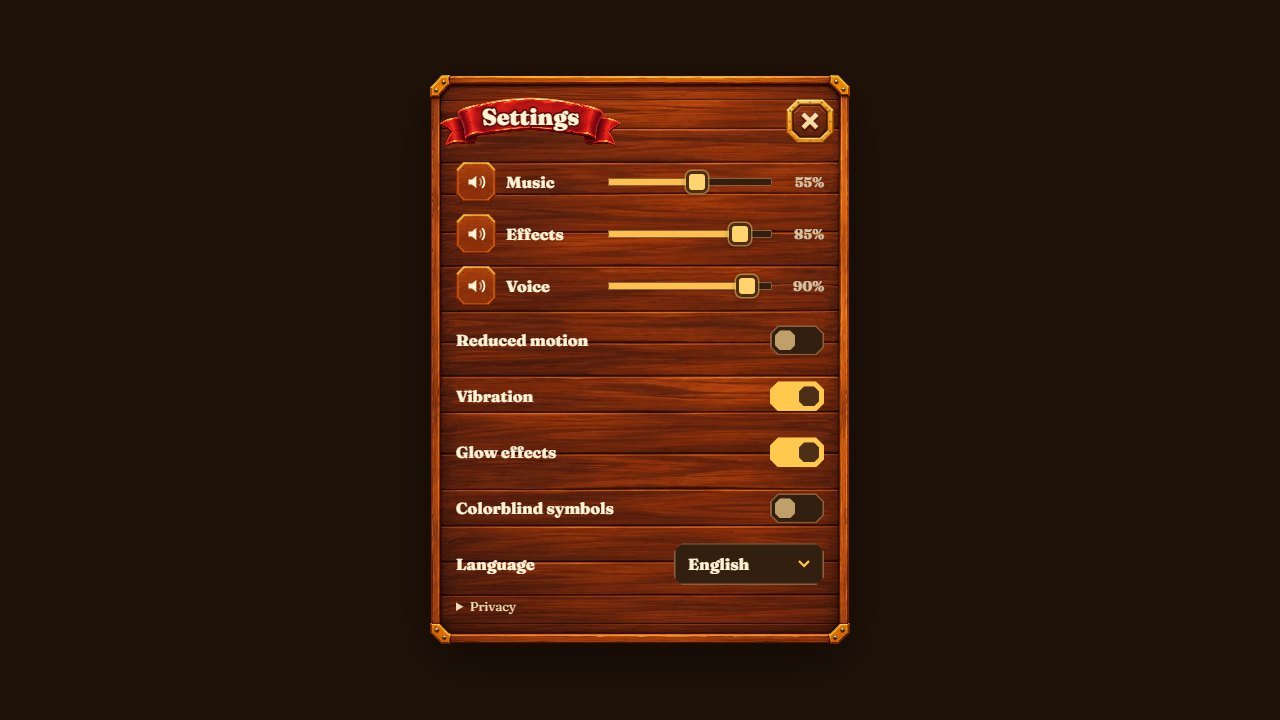
Marks on the screenshot
- Music volume
- Sound effects volume
- Parrot narration volume
- Language (14)
- Close
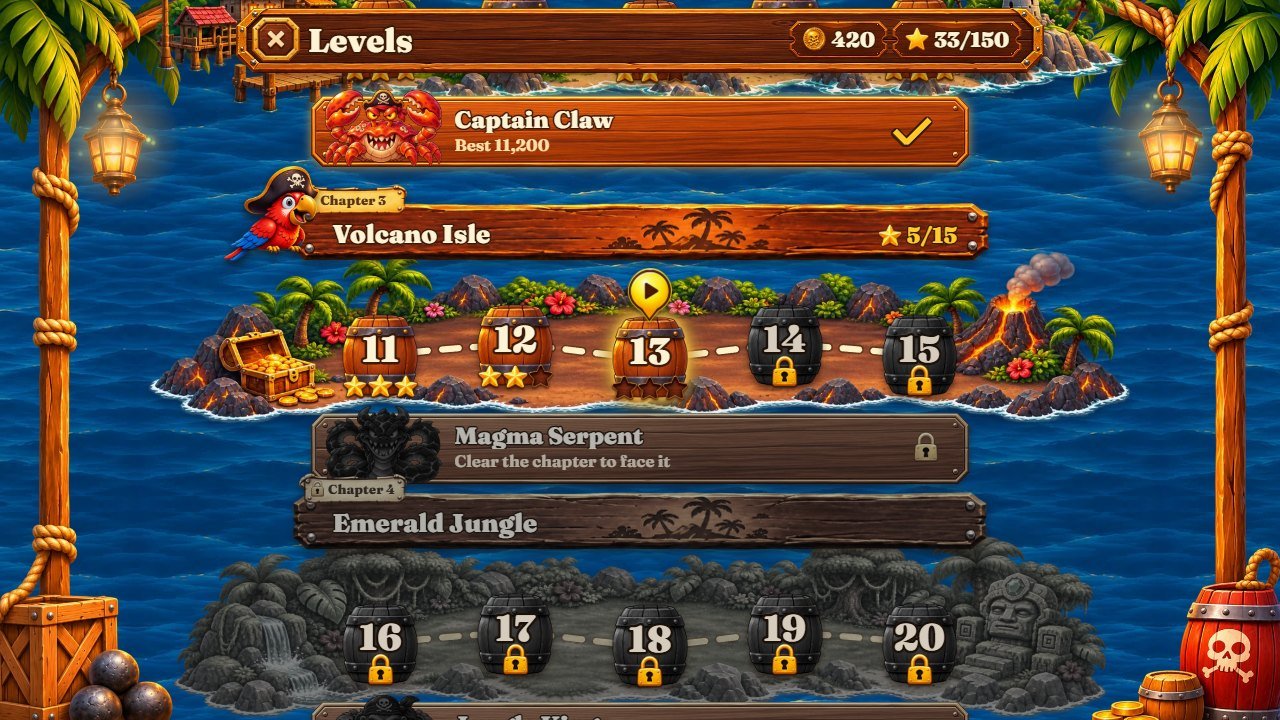
Marks on the screenshot
- Chapter islands: five levels and a boss each
- Stars collected
- Close / back

Marks on the screenshot
- Resume
- Restart the level
- Levels: the map with chapters, bosses, Daily challenge and Endless sea
- Main menu

Marks on the screenshot
- Missions (three at a time, paid in doubloons)
- Best result of each level, from this device
6 Files
game/                          upload THE CONTENTS of this folder to your web host
  index.html                   entry page (all screens)
  kaboom-cove.config.js        settings: ads, Tap to start, full-screen button
  style.css, style-2.css       layout and screens
  kaboom.css, kaboom-2.css     the pirate skin
  src/                         the game code (ES modules)
  assets/                      pictures, sounds, music, narration, fonts, icons
source/                        the same game, editable, with tests and tools
  src/levels.js                the 50 levels
  src/modes.js                 bosses, Endless sea, Daily challenge, prices and rewards
  src/sim/config.js            cannonballs per volley, speeds, scoring
  src/locales/<lang>.js        texts, one file per language (14)
  src/render/                  arena drawing (view.js, view-arena.js, view-fx.js), colours, skins
  src/ui.js                    HUD and screens
  test/                        node --test tests
  tools/                       build, local server and level tools
  package.json, package-lock.json
documentation/                 this guide (index.html), customization.html, img/
DOCUMENTATION.html             opens this guide
CUSTOMIZATION.html             opens the step-by-step customization guide
THIRD-PARTY-LICENSES/          font licences
New to code? Open CUSTOMIZATION.html (in the root of the
download, also documentation/customization.html): step-by-step recipes with numbered
screenshots that show the exact file behind every part of the screen (pictures, parrot, blocks, bosses,
sounds, music, texts, colours, font, difficulty, prices), free editors, backup and publishing.
7 Settings file and optional ads
kaboom-cove.config.js (next to index.html) holds the settings that need no coding.
Edit it with any text editor, save and reload the page (Ctrl+F5). There is nothing to build.
window.KABOOM_CONFIG = {
  ads: {
    provider: 'none',      // 'none' | 'adsense' | 'custom' | 'demo'
    adsenseClient: '',     // AdSense only: 'ca-pub-1234567890123456'
    testMode: true,        // AdSense only: Google test ads while you test
    midgame: true,         // ads between levels on/off
    minLevel: 2,           // never before this level
    midgameEveryMs: 150000, // at most one ad every 2.5 minutes
    custom: null,          // 'custom' only: { interstitial() {...}, rewarded() {...} }
  },
  tapToStart: true,        // false = open straight on the menu
  fullscreen: true,        // false = hide the full-screen button
};
| provider | What happens |
|---|---|
none
|
Default. No ads and no request to any ad network. |
adsense
|
Google AdSense H5 Games Ads between levels. Needs your own AdSense account, an approved site and
your ca-pub- ID; keep testMode: true until your site is approved.
|
custom
|
Your own ad network: put interstitial() (and optionally rewarded())
functions that return a Promise in custom.
|
demo
|
A fake 2-second ad screen, to see how the game pauses and resumes. Do not publish with it. |
Ads only appear between levels, after the level set in minLevel, never more than once per
midgameEveryMs and only after two finished levels. The sound mutes and the game pauses during
the ad. A blocked or failed ad never stops the game. "One more chance" after a defeat costs doubloons, not
an ad. The adapter is src/platform.js.
8 Editing levels
The 50 campaign levels are in source/src/levels.js, one object per level, with a legend at the
top of the file. A map lists the rows from top to bottom, 7 cells per row: . empty, a number =
a regular block with that many hit points (N12 for 10 or more), R8 reinforced,
C powder keg, T treasure chest, M rum barrel, A anchor.
par is the number of volleys for 3 stars, waves are extra rows that drop in during
the level, pulse turns the Bomb on or off.
{
  id: 'first-spark', v: 1, par: 2,
  map: [
    '. . . . . . .',
    '. 2 . . . 2 .',     // 7 cells per row, top to bottom
    '. . . 3 . . .',     // numbers = hit points of a regular block
  ],
  pulse: { enabled: false }, // no Bomb in this level
  witness: [[[1900,0,-1]]],  // winning shots, written by the validator
},
-
Edit the map and raise the level's
v(old best scores of that level stop counting). -
In
source/, runnode tools/validate.mjs --solve 7(7 = the level number): it searches a winning sequence in the real simulation and writes it intowitness(thennpm run formattidies the file). -
Run
npm run validateto check all levels (map, room above the danger line, witnesses, simulated players) andnpm test. -
Optional:
node tools/curve.mjs 11-20shows how often a casual simulated player wins each level;node tools/check-modes.mjschecks that every boss can be beaten. -
Run
npm run buildand upload the newdist/. Level names and hints are the textsl1...l50andh1...h50insrc/locales/.
Bosses, Endless sea and the Daily challenge are generated in src/modes.js (ESCORT,
RAGE, bossHp, waveRow); the simulation numbers (10 cannonballs per
volley, speeds, scoring) are in src/sim/config.js.
9 Economy and prices
Every price and reward is a constant in source/src/modes.js (doubloons are the only currency;
there are no real-money purchases).
| Constant | Default | Meaning |
|---|---|---|
START_COINS
|
50 | Doubloons of a new save |
RESCUE_COST
|
25 | "One more chance" after a defeat (once per attempt) |
winCoins
|
5 per star + chests | Reward of a campaign win |
BOSS_COINS
|
100 / 25 | First / later boss wins |
DAILY_COINS, dailyStreakBonus |
120 / 15, +20 per streak day (max +100) | Daily challenge |
endlessCoins
|
2 per wave + chests | Endless sea |
STAR_MILESTONES
|
30/60/90/120/150 ★ → 100/150/250/400/600 | Automatic rewards for total stars |
UPGRADES
|
balls 150/300/500, fuse 200/400, sight 250 | Cannon upgrades: extra ball, quick fuse (Bomb charges sooner), spyglass (longer aim line) |
skinPrice
|
stars x 8 |
Price of a skin in the shop (skins also unlock free with stars, set in SKINS of
src/render/palette.js)
|
MISSIONS
|
30–80 | Goal and reward of each mission (three active at a time) |
After changing the economy run npm test (some tests check the rules, for example that the Daily
challenge pays once a day). src/save.js caps edited saves (balance up to 999,999).
10 Languages
The interface has 14 languages: English, Portuguese (Brazil), Spanish, French, German,
Italian, Dutch, Polish, Turkish, Russian, Indonesian, Japanese, Korean and Chinese. The game uses the
browser language on the first visit, ?lang=pt in the address forces one, and the player can
change it in Settings. Each language is one file in src/locales/ (for example
src/locales/fr.js); English fills any missing key. Keep placeholders such as
{n} when you edit a text. The parrot narration is recorded in English, Portuguese and Spanish
(assets/voice/en|pt|es/); the other languages use the English voice. The 11 languages besides
English, Portuguese and Spanish were machine translated; have a native speaker review them before a big
launch.
To add a language: copy src/locales/en.js to a new file, translate it, import it in
src/locales.js and add it to LANGS, HTML_LANG,
NUMBER_LOCALE and DICT there. The title font covers Latin languages; others fall
back to the system font.
11 Saving and the score screen
Progress is saved automatically in the browser (localStorage) of each player, on each device. There is no account and no cloud sync. Clearing the site data, another browser or another web address starts a new save. Private windows may not keep it.
kaboomcove.template.save.v1      levels, stars, best scores, doubloons, skins, upgrades, missions, bosses
kaboomcove.template.settings.v1  volumes, less motion, vibration, glow, speed
kaboomcove.template.lang.v1      language chosen by the player
The "Score" button opens the score screen: the sum of the best result of each level, the stars and the
active missions, all read from this save. This edition has no online leaderboard and sends
nothing to a server. Hosting two copies of the game on the same domain? Change the prefix
kaboomcove.template in src/main.js, src/save.js and
src/i18n.js of one of them.
12 Internal names in the code
The engine of this game was first written for another theme, so some internal keys keep neutral or older
names. Everything the player reads comes from the language files (src/locales/), so you can
rename anything in the texts without touching the code.
| In the code | In the game |
|---|---|
targets, cargo, crystal, gem, armor
|
The blocks the cannonballs break (crates, barrels, chests); gem and
armor pick the block look
|
core, CORE, sound core_boom, picture keg |
Powder keg (explodes its 8 neighbours) |
rum, anchor-block / anchor, treasure |
Rum barrel (burns its row), anchor (indestructible), treasure chest (+2 cannonballs) |
pulse, Pulse, btn-pulse, pulse-armed |
The Bomb power (opens a 3x3 hole) |
volley, balls |
A volley of cannonballs (10 at the start) |
kraken, boss2 ... boss10 (pictures in
assets/art/)
|
The ten chapter bosses (names from boss1 ... boss10 in
src/locales/)
|
skins
|
Cannonball looks sold in the shop |
coins
|
Doubloons |
parrot-* pictures; Rico in setRicoDrawer,
drawRotRico, res-rico, rot-rico
|
The parrot mascot |
rank, ranking, btn-rank |
The local score screen (no online leaderboard in this edition) |
MOCK in src/render/view-shared.js |
Reference measurements of the portrait layout |
theme keys ice, geode, forge, ... in
src/render/palette.js
|
The 10 chapters (Sunny Cove, Old Harbor, Volcano Isle, ... Treasure Island) |
level ids in src/levels.js (first-spark ...
heart-of-the-cove)
|
Save keys of each level's record |
music cove-menu, cove-game-a, cove-game-b,
cove-kraken
|
Menu, two gameplay tracks, boss track |
13 Development (optional)
The game is plain HTML, CSS and JavaScript (ES modules): there is no compile step, source/ is
the editable game and npm run build only copies it into dist/. Node.js is needed
only for the tests, the level tools, the local server and that copy.
New to Node.js? 1) Install the LTS version from nodejs.org (Windows or macOS installer) or with your package
manager on Linux; it must be 26.13 or newer. 2) Close and reopen the terminal, then run
node -v and npm -v. 3) Open the terminal inside the source/ folder
(the one with package.json). 4) Run npm ci to install the exact tools from
package-lock.json (only Prettier). 5) Run npm test, then
npm run build to write the game to dist/. 6) Try it with
npm run dev (http://localhost:5190/) and upload the contents of dist/ like
game/. Common errors: node or npm not found (reopen the terminal or
fix PATH); on Windows PowerShell npm.ps1 cannot be loaded (use npm.cmd ci or the
Command Prompt); ENOENT package.json (you are not inside source/);
EBADENGINE (Node.js older than 26.13); network or proxy errors during install;
npm ci complaining about the lock file (do not edit package-lock.json; delete
node_modules and retry).
cd source
npm ci              # installs Prettier from package-lock.json
npm test            # 58 tests
npm run dev         # http://localhost:5190/
npm run build       # writes dist/ (same as game/)
npm run validate    # checks the 50 levels (about 2 minutes)
npm run build deletes dist/ and copies index.html, the CSS files,
kaboom-cove.config.js, manifest.webmanifest, favicon.ico,
src/ and assets/ into it. If you add a new file next to index.html,
add its name to PARTS in tools/build.mjs. npm run format re-formats
the code with Prettier. Test shortcuts (only on localhost): ?debug&level=12 opens any
level, ?boss=3 opens a chapter boss, ?nosplash skips "Tap to start".
14 Updating and cache
To publish a new version, upload all changed files together and keep the same web address
(the save belongs to the address). If players still see the old version, it is the cache: a hard reload
(Ctrl+F5 / Cmd+Shift+R) or a private window shows the new files; also clear your host or CDN cache
(Cloudflare and similar) if you use one. Adding ?v=2 to the address is a quick way to check
that the server has the new index.html.
Clearing the cache without losing progress
Progress is stored in this browser, not on the server. Clearing cached images and files, or doing a hard reload, keeps your progress.
Computer: press Ctrl+F5 on Windows and Linux, or Cmd+Shift+R on macOS. Phone: in the browser settings, choose the option to clear cached images and files.
Do not choose cookies and site data, or clear site data, for the game's address. That deletes the local save.
15 Screenshot gallery


16 Licenses
The game code, artwork, sound effects, music and narration are covered by the license you bought for this
item. The fonts are third-party and free: Fraunces (titles) and Chakra Petch (numbers and labels), both
under the SIL Open Font License 1.1; the full notices are in game/assets/fonts/ and
THIRD-PARTY-LICENSES/. Prettier (MIT) is an optional development tool installed by
npm ci; it is not part of the game.
17 Troubleshooting
The page stays blank or on the loading bar.
game/ was uploaded (open the browser console, F12, and
look for 404 errors in the Network tab), that you open it through https:// and not
file://, and that the server sends .js files as JavaScript (any normal host
does).
There is no sound.
My changes do not show up.
source/,
run npm run build and upload dist/.
Progress was lost.
www vs no www,
http vs https, a private window or clearing site data start a new save.
No ads appear.
provider is none. With AdSense, ads only show on an approved site,
after minLevel and two finished levels, and ad blockers hide them. Try demo to
check the flow.
A level became impossible after I edited it.
node tools/validate.mjs --solve <n>: if it finds no witness, the map has too much
cargo for the room above the danger line; remove rows or lower the hit points.
The phone shows "Turn your phone upright to play".
18 Support
Questions about this template and custom work: willian@polargames.com.br.
Support request
When you write to support, include the browser and device, the game version, the page address, the steps that caused the problem, a screenshot and the first error shown in the browser console. Never send passwords, payment details or secret keys.