Contents
- What it is and what you get
- The screen at a glance
- Requirements and running it locally
- Publishing: host, subfolder, iframe
- Editing the source with Node.js (step by step)
- Folder structure
- Languages
- Events, stories and gallery
- Save, version and migration
- Test hooks and checks
- Performance and accessibility
- Ads and monetization
- Customization
- Updates and browser cache
- Third-party licences
- Frequently asked questions
- Support and changelog
1 What it is and what you get
Indie Rush is an idle/tycoon game. The player runs a small indie game studio, with Patch the corgi as its mascot, and ships one game after another. Desks earn coins on their own, tapping the room builds hype, tired developers need a nudge (or a helper bot), and the studio grows from Mom's bedroom to its own campus.
What the player gets
- 5 studios (Mom's Bedroom, The Garage, Hype Coworking, Open Space, Indie Rush Campus), each with its own room art, music track, income multiplier, studio rule and a roadmap of 8 games to launch: 40 launches in total, then an endless mode (the DLC Season).
- 23 team members to hire in 5 roles (Programmer, Artist, QA, Build Bot, Vibecoder), each with a quirk that changes how they work, plus one story character, Dora Lux, who joins when the story "The Publisher" ends.
- One continuous base of 5 rooms (Arcade Room, Server Room, main room, Bot Workshop, 24h Streaming Studio) with a camera that always shows whole rooms: one on a phone, all five on a 32:9 monitor. The rooms are painted scenes with live details (screens, lights, steam, lamps).
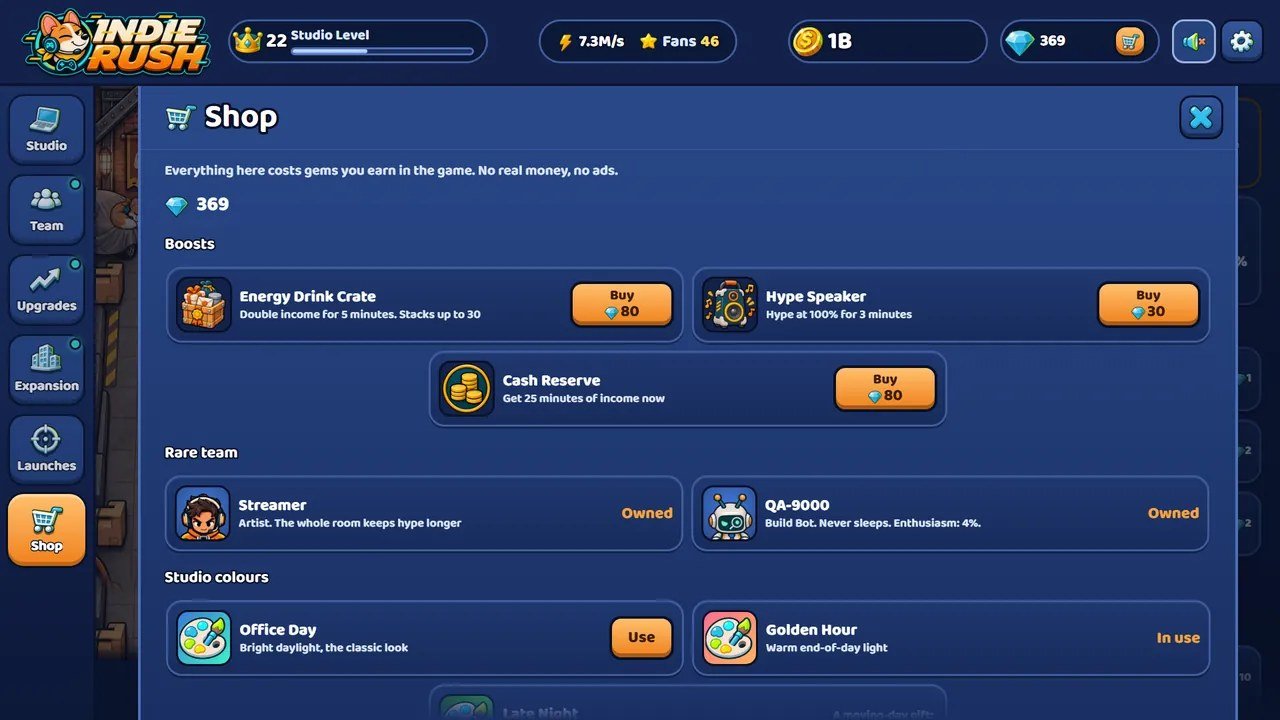
- Desk levels (desks change look at levels 25, 50 and 100), 9 global upgrades, 4 side rooms with work posts, helper bots, a 28-node Engine tree (the Engine tab), 59 achievements, rotating quick missions, 3 daily missions and a gem shop with 16 items (boosts, rare team members, studio colours, decor).
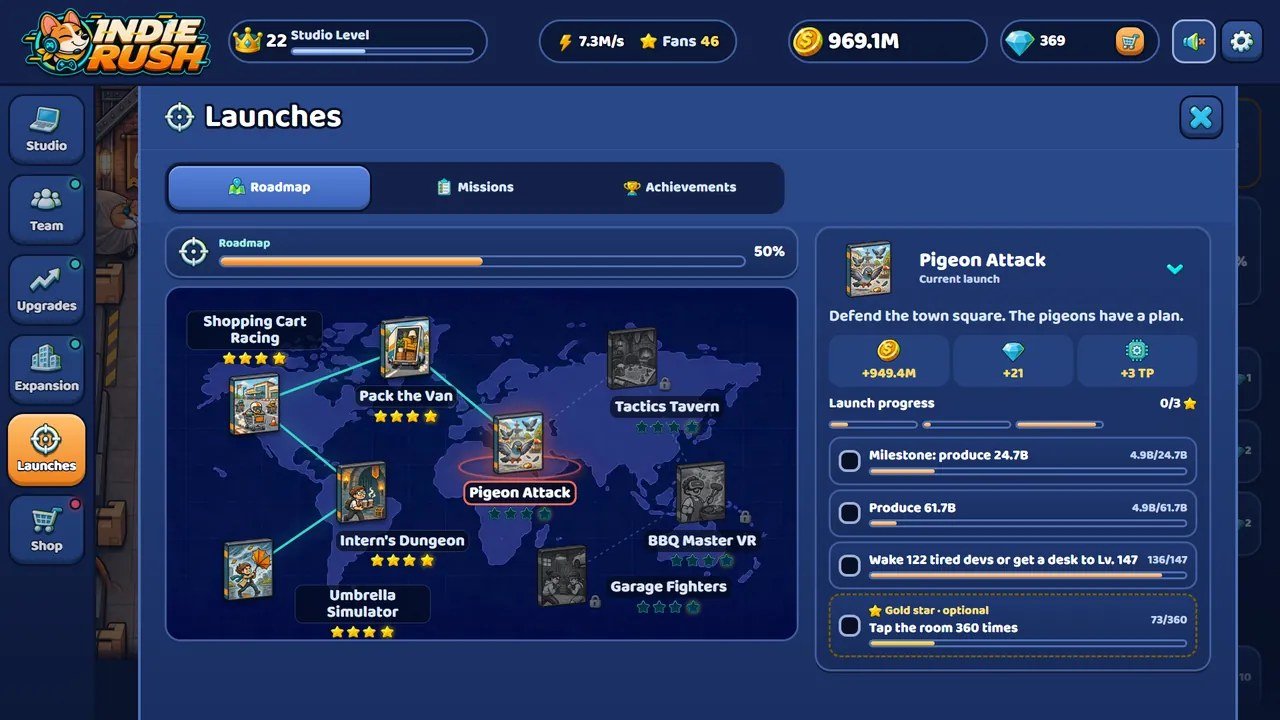
- Launch Night: every game the studio ships gets a critics' score from 20 to 100, built from how it was made (roles on the team, Game Jams, the gold star and desk levels, minus vibecoder bugs). A headline matches the score, and 90 or more earns a gold seal that doubles sales for a minute.
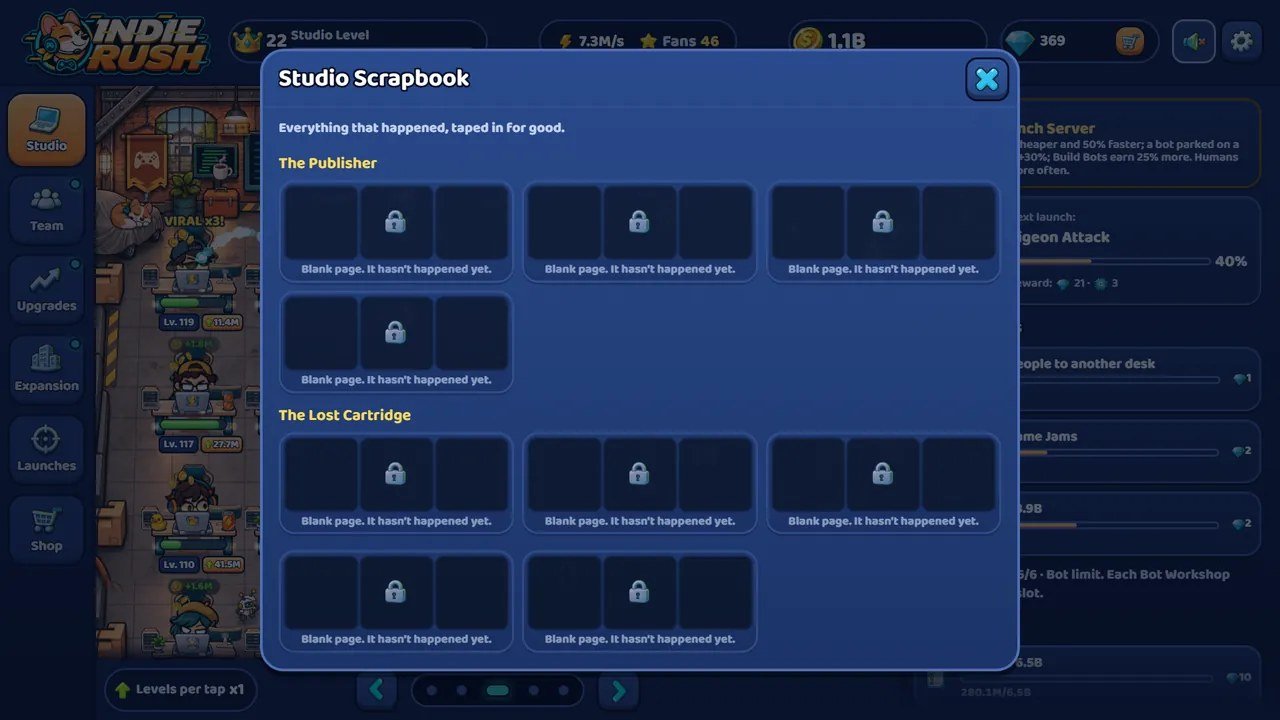
- Random room events (10 kinds, such as servers going down on launch day or an age-rating reviewer at the door) that the player solves by tapping, and two illustrated stories, "The Publisher" (4 chapters) and "The Lost Cartridge" (3 chapters), collected in the "Studio Scrapbook" gallery.
- Moving to a bigger studio restarts the room and brings permanent Fans (the prestige loop). Offline earnings while the tab is closed.
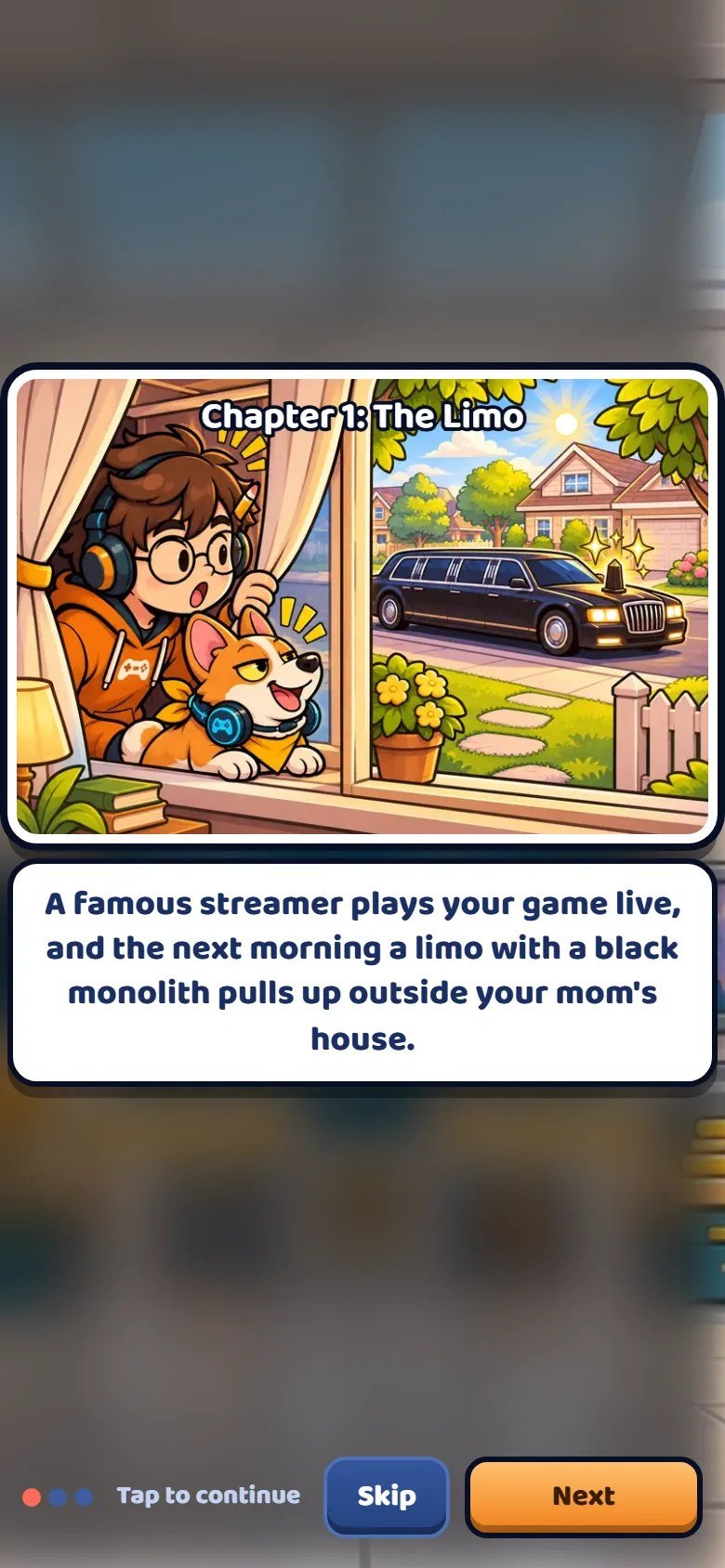
- An intro comic, a line from Patch for every game launched, one illustrated panel per move and an ending.
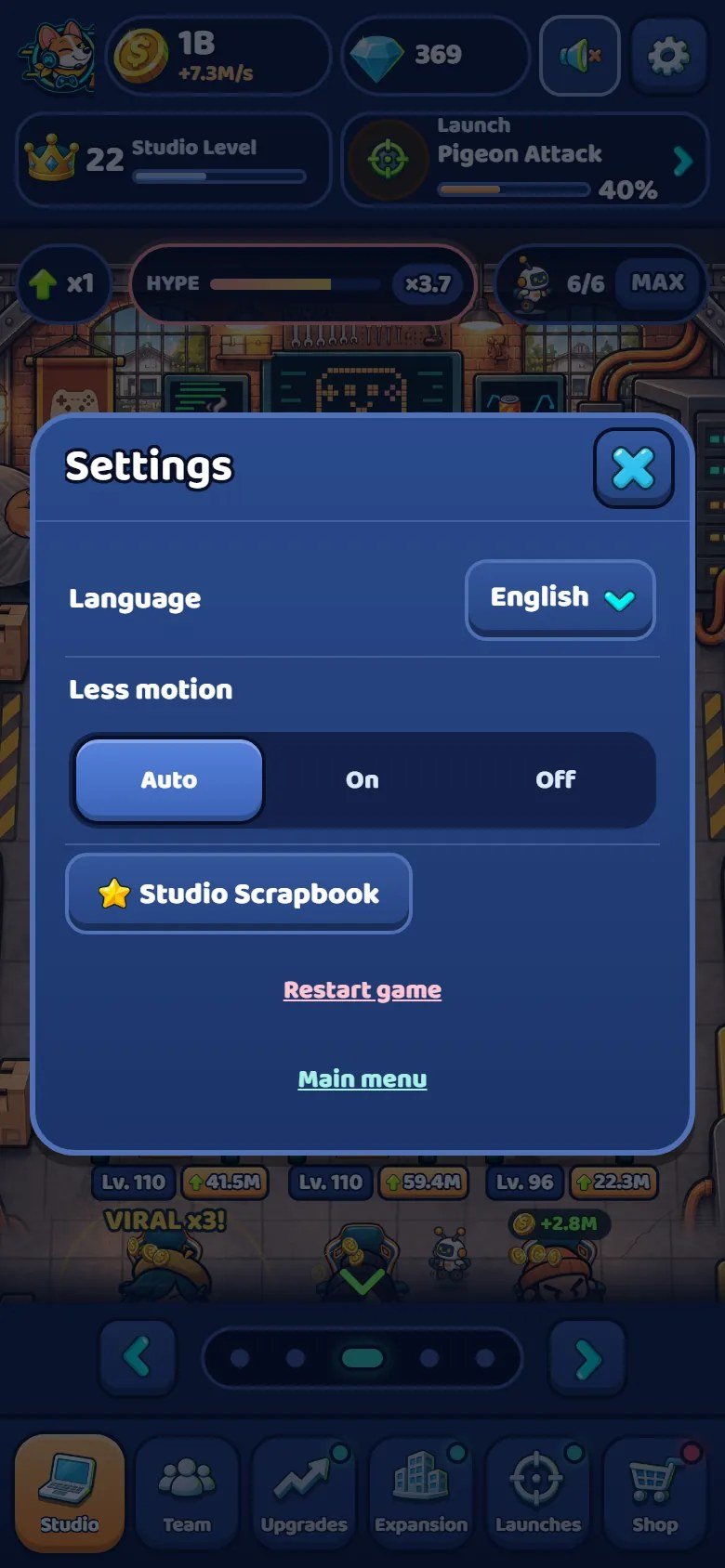
- Title menu, settings (language, less motion, restart, gallery), a sound window with separate music and effects volumes, and a short guided tutorial. 14 interface languages.
What it does not contain
No real money and no tracking. Coins and gems are earned and spent inside the game only. The game loads its own files and nothing else: no analytics, no third-party scripts, no accounts, no server calls. That makes it easy to host anywhere and to embed in a portal. Monetization (ads, analytics, purchases) is not wired in; the places to add it are listed in "Ads and monetization".
What is in the package
The editable source you receive is the game itself: readable, commented, unminified JavaScript modules.
There is nothing to compile: npm run build only copies the files.
START-HERE.txt
CHANGELOG.txt
DOCUMENTATION.html
CUSTOMIZATION.html
documentation/
THIRD-PARTY-LICENSES/
game/
source/
game/ is the game ready to host (index.html, css/, js/,
assets/ and a short DOCUMENTATION.txt): upload its contents and you are done.
source/ is the complete editable project: the same game files plus tests/,
tools/, package.json and package-lock.json. The art source is
assets/img/ itself: full-size sprite sheets plus assets/img/atlas.json.
documentation/ holds this guide and the customization guide, both offline, and
THIRD-PARTY-LICENSES/ the font licences.
2 The screen at a glance
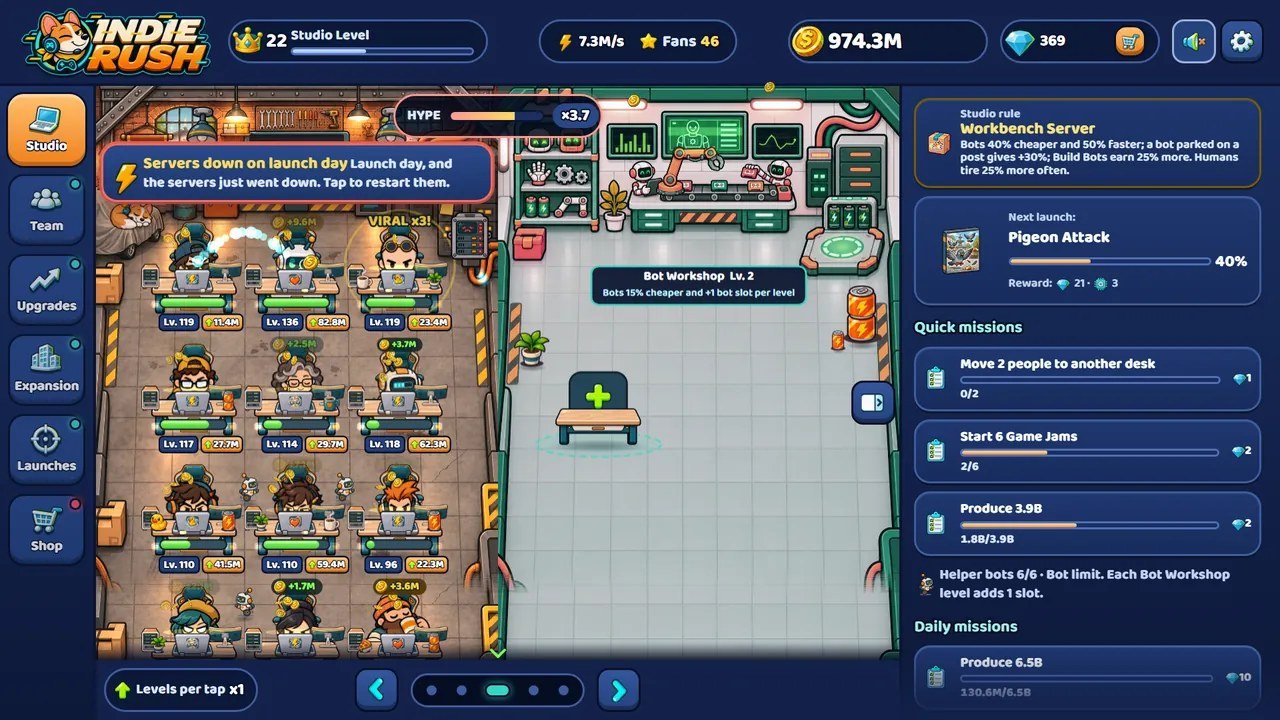
The real game in English. The numbers on each screenshot match the list under it.
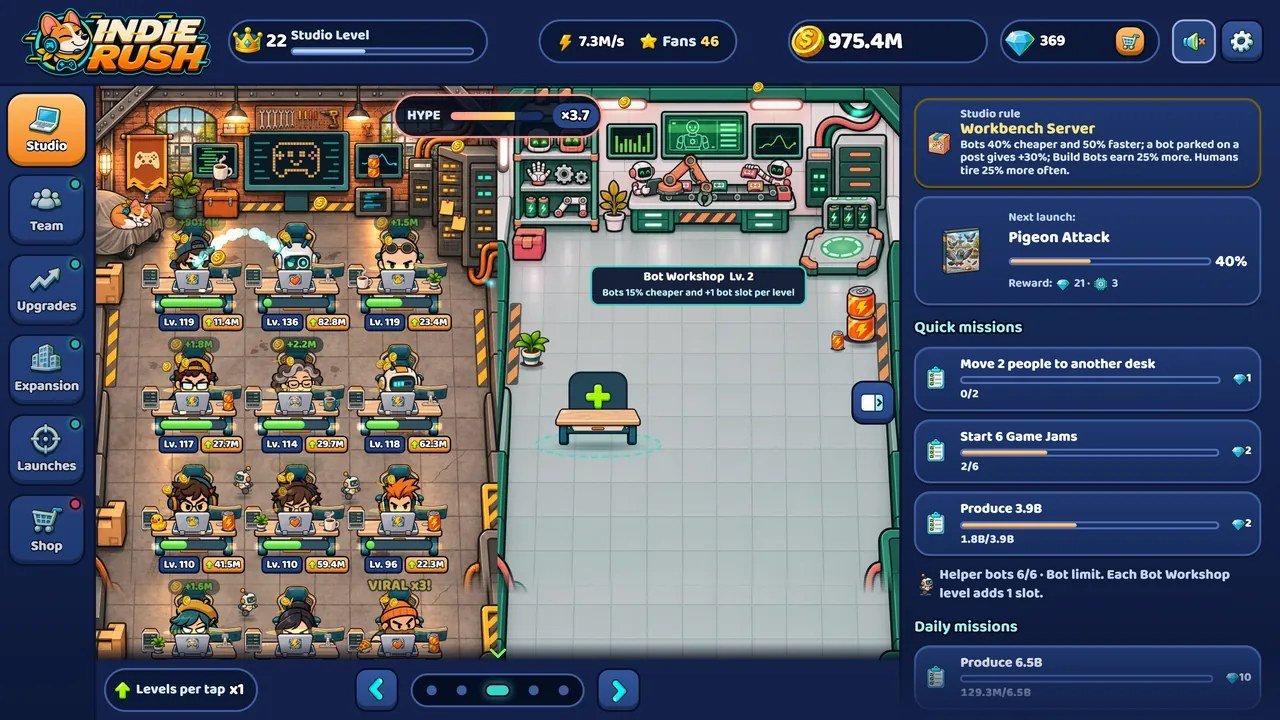
Marks on the screenshot
- Logo. On narrow screens the mascot alone.
- Studio Level: grows with lifetime earnings and unlocks desks.
- Income per second and Fans (from moving studio).
- Coins and gems (the cart opens the gem shop).
- Sound and settings.
- Tabs: Studio, Team, Upgrades, Expansion, Launches, Shop.
- Hype meter: tapping the room fills it; full hype starts a Game Jam.
- Desks: level plate and the level-up button with its price.
- Camera: arrows and dots slide one whole room at a time.
- Side panel: studio rule, next launch, quick and daily missions.
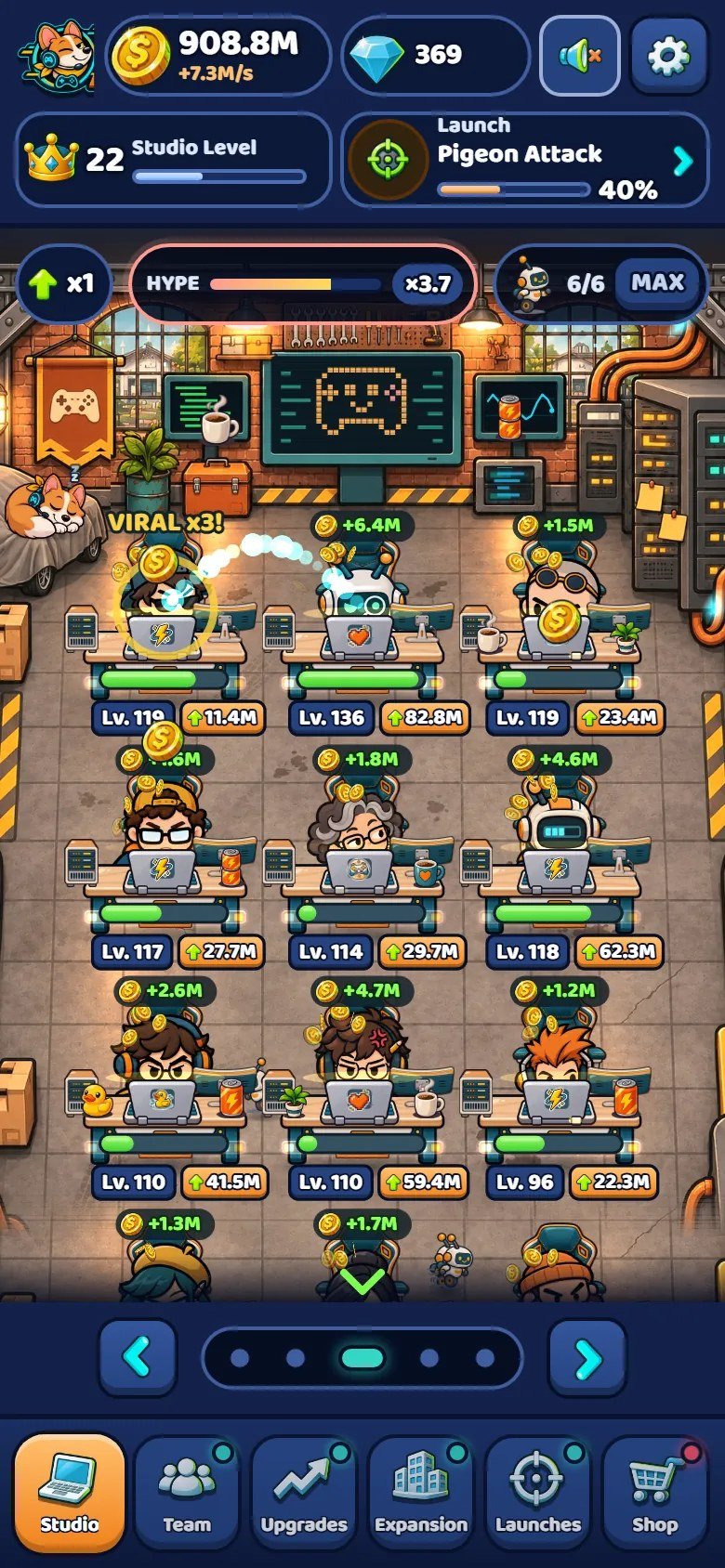
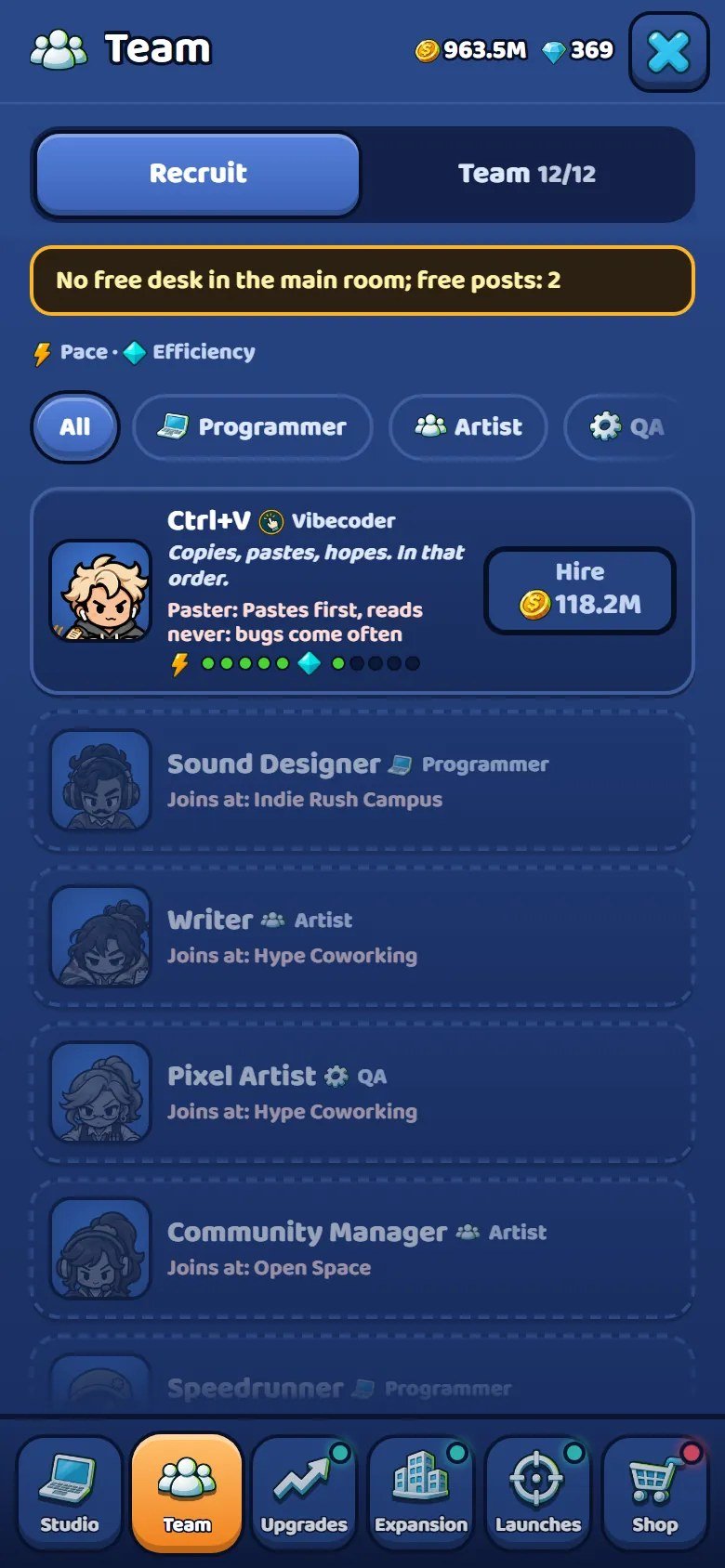
Marks on the screenshot
- Coins, income per second and gems.
- Studio Level and the game in progress.
- Levels per tap (x1, x10, MAX), hype meter and helper bots.
- Desks, with level plates under them.
- Camera strip.
- Tab bar.
3 Requirements and running it locally
| To do this | You need |
|---|---|
| Play or host the game | Any static web server. No database, no server-side language, no build. |
| Run it on your computer |
Node.js 26.13.0 or newer (npm run dev in source/), or Python 3 (python -m http.server 8080
in game/), or any other static server you already use.
|
| Edit the source and run the checks (tests, build, pacing simulator, language check) |
Node.js 26.13.0 or newer (current LTS line). The project has no npm dependencies:
npm ci downloads nothing.
|
| Run the art helpers (icon centres, background removal) |
Python 3 with Pillow and numpy; tools/unbg.py also needs scipy.
|
| Rebuild the Japanese and Chinese font subsets | Python 3 with fonttools and brotli, plus the Noto Sans JP and SC source fonts. |
Start the game on your computer
The game uses ES modules, and browsers refuse to load modules from file://. Double-clicking
index.html shows the logo and nothing else. Serve a folder instead: source/ with
Node.js, or game/ with Python 3:
cd source
npm run dev                      # Node.js 26.13+: http://localhost:8080/
# or, without Node.js:
cd game
python -m http.server 8080       # Python 3: http://localhost:8080/
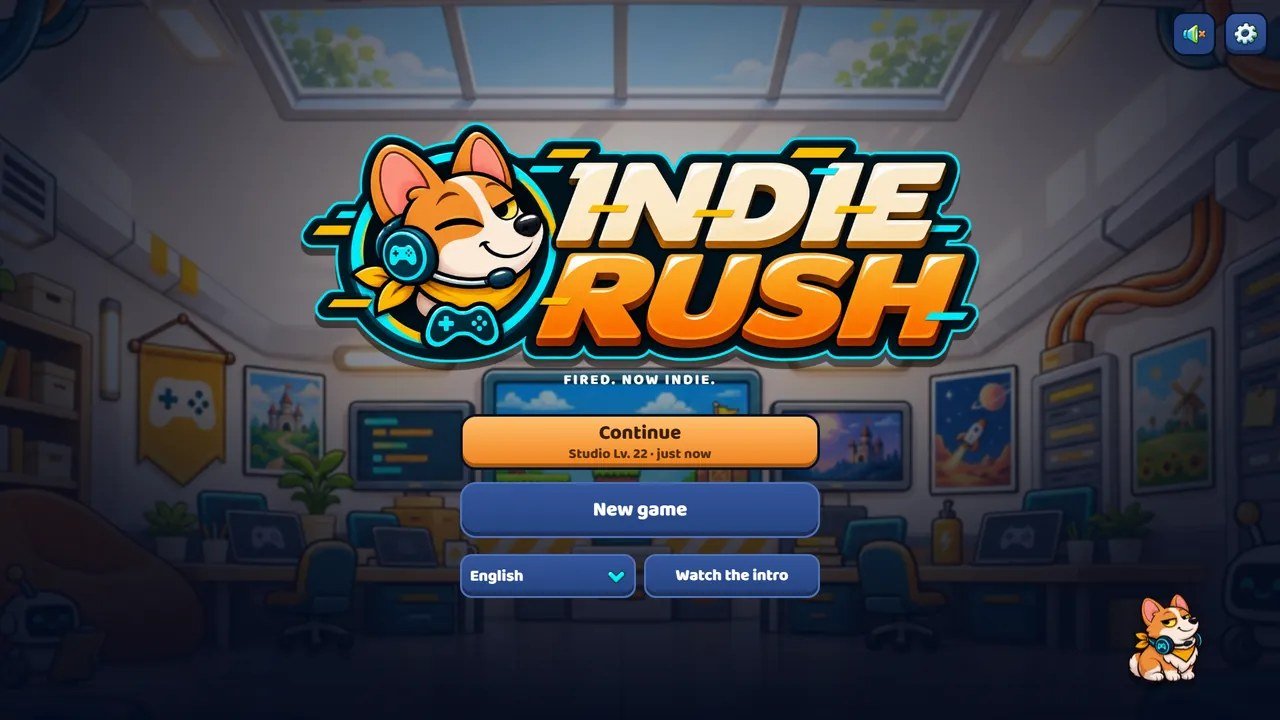
Open http://localhost:8080/. You should see the logo, then the title menu with
New game.
-
Both servers of
source/(npm run devandpython tools/serve.py 8080) listen on every network interface, so a phone on the same Wi-Fi can open the game at your computer's address on port 8080. They also sendCache-Control: no-store, so every reload picks up your edits. That is the quickest way to try the touch layout on a real device. - Sound starts after the first tap or click. Browsers do not allow audio before that.
- On an iPhone or iPad, the game's sound goes through Web Audio, which the system may keep silent while the ring/silent switch is on silent. Turn the switch to ring (and the volume up) to hear it.
-
While testing on your computer,
?nomenu=1&speed=50skips the menu and runs the economy 50 times faster. These test shortcuts answer only onlocalhost,127.0.0.1and[::1](see "Test hooks and checks").
4 Publishing: host, subfolder, iframe
Static hosting
-
Upload the contents of
game/(index.html,css/,js/,assets/) to your host.source/,documentation/and the ZIP do not belong on the public game path. - Open the address. Check the browser console: it should show no errors and no failed requests.
- Serve over HTTPS. A page loaded over HTTPS cannot embed a game served over plain HTTP.
What the server must do: send .js files as text/javascript (module scripts are
rejected with any other type; nearly every host does this by default); serve .json,
.mp3, .woff2, .webp, .png and .jpg as
static files; keep file names exactly as they are (Linux hosts are case-sensitive).
Subfolder
Every path in the game is relative (css/, js/, assets/). Put the
files in any folder, for example /games/indie-rush/, and it works without changing a line.
Inside a page (iframe)
<iframe src="https://example.com/games/indie-rush/"
        title="Indie Rush"
        width="100%" height="720"
        style="border:0; aspect-ratio:16/9; max-height:100vh"
        allow="fullscreen" allowfullscreen></iframe>
- The layout follows the frame, not the page. The game picks one of four layouts from the frame's own width and height (table below) and scales the interface to fit. The layouts are designed from 320 px wide; give the frame at least 360 x 640 upright or 640 x 360 sideways for comfort.
- Saves inside a third-party frame. The save lives in the browser's localStorage for the game's own address. When the game is embedded on a different domain, some browsers isolate or block that storage. If storage is blocked, the game still runs, keeping progress in memory until the page is closed. If players report lost progress, host the game on the same domain as the page that embeds it.
-
Language. Add
?lang=de(any of the 14 codes) to the frame address to open in a given language; without it, the game follows the browser language. - Keyboard. The frame needs focus before arrow keys and Esc reach the game; one click inside is enough.
| Layout | Chosen when | What the player sees |
|---|---|---|
phone
|
Taller than wide, under 700 px wide | One room, tab bar at the bottom, panels as a bottom sheet. |
tab
|
Taller than wide, 700 px or wider | One room with a side column. |
land
|
Wider than tall, under 560 px tall | Sideways phone: HUD column on the left, room on the right. |
desk
|
Wider than tall, 560 px or taller | Desktop: as many whole rooms as fit (1 to 5) and a side panel. On 21:9 and wider the rooms and the side panel share the whole width. |
Updating a published game
File names do not change between versions. After you upload new files, returning players may keep the old
ones from their browser cache. Either publish each release in a new folder (for example /v2/)
and point your page at it, or have your server send Cache-Control: no-cache for
index.html, .js, .css and .json (the browser
revalidates; an unchanged file costs almost nothing), and a long cache time only for art, fonts and audio
you never overwrite under the same name. Do not copy the no-store of the local test servers to
production: it makes every visit download everything again.
5 Editing the source with Node.js (step by step)
You never need Node.js to host or play the game. You need it only to run the tests, the checks and the build after you edit the source. If you have never used a terminal, follow these steps once.
- Install Node.js 26.13.0 or newer, the current LTS line, from nodejs.org (Windows and macOS: the installer; Linux: your package manager or the official binaries). Keep the default options: they also install npm.
- Open a new terminal: PowerShell or Command Prompt on Windows, Terminal on macOS, your usual terminal on Linux. A terminal opened before the installation does not see Node.js yet.
-
Check the versions:
node --versionmust print v26.13.0 or newer;npm --versionprints its own number.
node --version
npm --version
-
Go into the
source/folder of the download, the folder that holdspackage.json. Tip: typecdand a space, drag the folder onto the terminal window and press Enter.
cd path/to/indie-rush-static-1.0.0/source
-
Install from the lockfile and run the tests. The project has no dependencies, so
npm cidownloads nothing.npm testruns the 9 test files and the language check and ends with a line saying that everything passed.
npm ci
npm test
-
Play your edited copy:
npm run dev, then openhttp://localhost:8080/. Press Ctrl+C in the terminal to stop the server.
npm run dev
-
Build the folder to upload:
npm run builddeletesdist/and copiesindex.html,css/,js/andassets/into it, plusDOCUMENTATION.txt.dist/is exactly whatgame/is in the download: upload its contents (see "Publishing: host, subfolder, iframe").
npm run build
dist/: the next build replaces them. A new file inside
css/, js/ or assets/ is copied automatically, and a file you delete
or rename in the source disappears from dist/ on the next build. A new file or folder next to
index.html must be added to PARTS in tools/build.mjs.
Common errors
-
nodeis not recognized, orcommand not found: Node.js is not installed, or the terminal was opened before the installation. Install it and open a new terminal. -
PowerShell says that
npm.ps1cannot be loaded because running scripts is disabled: use Command Prompt, or typenpm.cmdinstead ofnpm(for examplenpm.cmd test). -
ENOENTandpackage.jsonin the error: the terminal is not in thesource/folder. Go there withcd(step 4) and try again. -
EBADENGINE, or the message that Indie Rush needs Node.js 26.13.0 or newer: the installed Node.js is older. Install the current LTS version and open a new terminal. -
npm cisays thatpackage.jsonandpackage-lock.jsonare not in sync:package.jsonwas changed by hand. Runnpm installonce to write a new lockfile; thennpm ciworks again. -
No internet, or a company proxy:
npm cistill works, because the project downloads nothing. If npm still tries the network, checknpm config get proxywith your network administrator. -
Port 8080 is already in use: start the server on another port. PowerShell:
$env:PORT=8090; npm run dev. macOS and Linux:PORT=8090 npm run dev.
6 Folder structure
The download, and the editable project inside source/ (game/ holds the same
index.html, css/, js/ and assets/):
indie-rush-static-1.0.0/
  START-HERE.txt, CHANGELOG.txt
  DOCUMENTATION.html        opens documentation/index.html (this guide)
  CUSTOMIZATION.html        opens documentation/customization.html
  documentation/            both guides, offline, with their pictures
  THIRD-PARTY-LICENSES/     font licences (SIL OFL 1.1)
  game/                     ready to host: index.html, css/, js/, assets/, DOCUMENTATION.txt
  source/                   the editable project (below)

source/
  index.html                page shell: HUD, room canvas, panels
  package.json              npm scripts (test, dev, build...), engines: Node.js >=26.13.0, no dependencies
  package-lock.json         lockfile for npm ci
  README.md                 short map of the project
  css/
    tokens.css              fonts and design tokens: colours, spacing, radius, type scale
    base.css                reset, page grid, the four layouts, HUD
    components.css          buttons, pills, tabs, cards, windows, focus ring
    screens.css             panels, roadmap, shop, menu, stories, less-motion rules
    juice.css               purchase feedback and other small animations
  js/
    main.js                 boot, game loop, input, layout and UI scale, the game object
    balance.js              every economy number and all content lists, Launch Night scoring, save key
    tuning.js               "feel" numbers: animation, particles, sound mix
    state.js                rules and save/load (pure, no DOM)
    meta.js                 launches and critics' scores, missions, achievements, tech, shop, moving studio
    events.js               random events and the two stories (rules)
    scene.js                canvas: camera, frame update and draw; installs its three parts:
    scene-crew.js             people at the desks, helper bots, Patch the corgi, speech bubbles
    scene-fx.js               wall screens, desk texts, money pills, particles, gags
    scene-rooms.js            side rooms, plaques and posts, event pieces, taps on desks
    ambient.js              live details over the painted rooms
    ui.js                   interface: HUD, desk plates, tabs, update; installs its three parts:
    ui-panels.js              tab panels: studio, team, upgrades, expansion, launches, shop
    ui-windows.js             settings, sound, member card, tips, Patch's lines, gallery, offline card
    ui-feedback.js            flying coins, rolling prices, Game Jam stamp, launch ceremony with Launch Night
    ui-meta.js              roadmap, missions, achievements, tech tree, shop cards, toasts, tutorial
    menu.js                 title menu and comic panels
    audio.js                sound effects and music
    a11y.js                 keyboard focus handling
    i18n.js                 language list and the t() lookup
    locales/                14 languages, two files each: <code>.js + <code>-2.js
    format.js, dom.js       number formatting, DOM and icon helpers
  assets/
    img/                    full-size sprite sheets + atlas.json (the art source), rooms, panels, logo, icons
    img/new/                desk upgrade pieces and Patch's jump
    img/events/             random event art
    img/stories/            story chapter panels
    ambient/                positions of the live room details
    audio/                  sound effects and music (MP3) + tracks.json
    fonts/                  WOFF2 files and their licence texts
  tests/                    rules tests (9 files, plain Node scripts)
  tools/                    npm scripts (build, dev server, tests), checks, simulator, art and font helpers
One rule keeps the code easy to change: the simulation never touches the screen. state.js,
meta.js and events.js hold the rules and run in Node as well as in the browser;
the scene and the interface only draw what the state says. That is why the tests and the pacing simulator
run without a browser. The two biggest files are split by subject: scene.js creates the scene
and calls installCrew(), installFx() and installRooms() from
scene-crew.js, scene-fx.js and scene-rooms.js;
ui.js does the same with ui-panels.js, ui-windows.js and
ui-feedback.js. Each part returns the functions the main file uses, and shared values come in
through one object (scn or uis).
7 Languages
The game ships in 14 languages: English, Portuguese (Brazil), Spanish, French, German, Italian, Dutch,
Polish, Russian, Turkish, Indonesian, Japanese, Korean and Chinese (Simplified). Each language is two files
in js/locales/: <code>.js, which the game loads only when that language is
chosen, and <code>-2.js, the second half of the texts, which
<code>.js imports and merges. English is the base: a text missing in another language
falls back to English.
On the first visit the game follows the browser language. Players change it in Settings or on the title
menu; ?lang=xx in the address also works.
How to fix a translation, add or remove a language, plurals and fonts for other scripts: see the customization guide.
8 Events, stories and gallery
Random room events are on by default. During active play an event comes every few minutes (never two at
once, never while a window covers the room); the notice says what to do and a good answer pays a small
reward. The rules are in js/events.js, the numbers in balance.events, the drawing
in js/scene-rooms.js, the art in assets/img/events/, and the texts under
ev.<id> in each language file.
| Event id | What happens |
|---|---|
blackout
|
Servers down on launch day: tap to restart them. |
inspector
|
Age-rating reviewer at the door: tap whoever looks guilty. |
pupCommit
|
Patch commit: Patch walked across a keyboard; tap the desk. |
meeting
|
A meeting that could be an email: tap to decline the video call. |
pizza
|
A courier with eight pizzas at the wrong studio: tap to accept them. |
update
|
The engine wants to update now on one desk: tap it until it finishes. |
drone
|
A devkit from a console maker at the door: tap before the courier gives up (pays gems). |
coffeeLove
|
Two devs in love at the coffee machine: tap them. Comes only once the studio has a helper bot. |
rival
|
Rival studio launching on the same day: tap faster than their progress bar. |
friday
|
Friday deploy: tap to stop it. |
agent
|
A famous streamer plays your game live: tap the right desk to reveal the easter egg; opens the next chapter of "The Publisher". |
"The Publisher" has 4 chapters, one per streamer event (one per studio, from the first to
the fourth). When it ends, Dora Lux (an Artist) joins the team. "The Lost Cartridge" has 3
chapters that open when the player reaches set points of the campaign (BOX_AT in
js/events.js). Each chapter is three illustrated panels with a caption, in
assets/img/stories/.
The Studio Scrapbook gallery (Settings) shows every chapter seen so far (tap to replay) and two event files (the server outage and the age rating), whose panels unlock as those events are seen and solved. Pages not reached yet are blank.
?events=0. To switch them
off for good, change the EVENTS_ON line near the top of js/main.js to
false. Events do not count towards missions or gold stars in this version.
9 Save, version and migration
-
The game saves to the browser's localStorage under the key
indie-rush.template.save.v1(SAVE_KEYinjs/balance.js): every 10 seconds, after every purchase, and when the tab is hidden or closed. - Progress stays on the device and browser that played it. There are no accounts, no cloud save and no export/import screen.
-
A second key,
indie-rush.template.save.v1.sideOff, remembers whether the desktop side column is folded. - New game and Settings, Restart (hold for two seconds) start over but keep language, volumes and the motion setting.
- If storage is unavailable (some private modes and embedded frames), the game runs with an in-memory save that lasts until the page closes.
Version and migration
Each save carries a version number (SAVE_VERSION, currently 6). Loading never trusts the stored
data: deserialize() in js/state.js starts from a fresh state and copies each field
only if it is valid, clamping numbers to the current limits. A damaged or hand-edited save cannot crash the
game; unknown fields are dropped and missing ones take their defaults. The critics' scores of every game
launched are kept in the save (reviews).
Version 6 is the current money scale. A save written by versions 3 to 5 of the save format opens in the same studio with that studio's run restarted and keeps everything permanent (gems, Fans, tech, achievements, shop items, statistics). The player sees a one-time notice that the game changed scale.
10 Test hooks and checks
Address parameters
| Parameter | Effect |
|---|---|
?lang=xx
|
Opens in that language (any code in LANGS). |
?nomenu=1
|
Skips the title menu and goes straight to the room. |
?speed=50
|
Runs the economy up to 200 times faster. Animations keep their normal speed. |
?events=0
|
Switches random events and stories off for this visit. |
?evento=blackout
|
Starts that event a few seconds after loading (ids in the events table). |
Combine them: ?nomenu=1&speed=50&lang=ja. ?lang works everywhere. The
other parameters answer only when the page is opened from localhost, 127.0.0.1 or
[::1], so players on your site cannot use them (the dev line near the top of
js/main.js).
The GS console handle
In the browser console, window.GS exposes the running game:
GS.game.state                 // the whole save: money, gems, desks, upgrades...
GS.game.state.money = 1e9     // give yourself coins
GS.game.state.gems += 500     // and gems
GS.game.save()                // write it
GS.ui.refresh()               // redraw the interface after a manual change
GS.scene.showRoom('server')   // camera: breakroom, server, main, botlab, datacenter
GS.playChapter('agent', 1)    // replay a chapter: agent = The Publisher (1-4), box = The Lost Cartridge (1-3)
GS.audioInfo()                // which samples and tracks are loaded and playing
GS.perf                       // milliseconds of work in recent frames
To wipe the save by hand, run localStorage.removeItem('indie-rush.template.save.v1') in the
console and reload.
Checks you can run (inside source/)
| Command | What it checks |
|---|---|
npm test
|
All rules tests (118 checks in 9 files): economy, missions, achievements, shop, the five studios, Launch Night scores, the ending, events and stories, save and migration; then the language check. The same command works in PowerShell, Command Prompt and macOS or Linux terminals. |
npm run audit
|
Content audit: counts every piece of content and fails on a missing text in any language, a missing sprite, a pictogram used as an icon, metadata left in images or audio, or a banned name. |
npm run check-locale
|
Every language against English (or one: add its code): keys, list lengths, placeholders, plural forms. |
node tools/sim.mjs 45
|
Pacing of an average player with the real rules, for the given minutes. |
node tools/check-css.mjs --list
|
Scans css/ for colours, sizes and fonts written outside the tokens of
css/tokens.css.
|
After a scripted or bulk edit of the JavaScript, node --check js/main.js (one file at a time)
catches syntax slips before the browser does.
11 Performance and accessibility
- Loading. The boot screen waits only for the images the first screen draws; the rest stream in afterwards. Music, language files, event art and story panels load the first time they are needed.
-
Rendering. The room is a 2D canvas; the interface is HTML. The canvas resolution is
capped at twice the CSS size (
dprMaxinjs/tuning.js); lower it to 1.5 or 1 for weak devices. -
Particles. A fixed pool: 320 on desktop, 160 on touch devices
(
particles.cap,particles.capCoarse). - Background tabs. The loop stops while the tab is hidden and the audio is suspended. Offline earnings cover the gap when the player comes back.
-
Measuring.
GS.perfholds the script time of recent frames, in milliseconds.
One function in js/main.js (layoutOf and uiScale) picks the layout
and a single interface scale. Below the reference size nothing shrinks; above it everything grows with the
window, so the game looks the same on a 720p laptop and a 1440p monitor. On ultrawide screens the camera
shows more rooms instead of stretching one.
Less motion
Settings, Less motion has three positions: Auto (follows the device's "reduce motion" preference), On and
Off. With it on, CSS animations and transitions are cut, the camera jumps instead of sliding, characters
stop bobbing and squashing, and particle counts drop to 30%. If you add animations, respect it: CSS under
[data-motion=reduced], canvas code through game.calm().
Keyboard
| Keys | Action |
|---|---|
| Tab / Shift+Tab | Move between controls. Focus stays inside the topmost window, menu or story and returns to the control that opened it. |
| Enter / Space | Press the focused control. Hold for two seconds on Restart. |
| Esc | Close the topmost thing: language list, window, panel. In a story, skip. |
| Left / Right | Slide the camera one room. In a story: previous or next panel. |
| Up / Down | Move inside the language list. |
Focused controls show a cyan ring. Notices are announced through an aria-live region, and the page language follows the chosen language. Limits: tapping the room for hype is a pointer action, the room itself is a canvas without a text alternative, and the page disables pinch-zoom because the game applies its own interface scale. The game has not been audited against a formal accessibility standard.
12 Ads and monetization
The game makes no network calls and contains no ad, analytics or payment code. The shop sells boosts and decor for gems that are only earned by playing. Nothing depends on an ad network or a payment provider; you monetize it the way your site already does. These are the natural places, none of them pre-wired:
| Moment | Where in the code |
|---|---|
| Every game event |
emit() in js/main.js: launch, star, gold star, achievement, mission,
daily, Game Jam, ending. Good for analytics.
|
| Moving to a new studio |
game.moveHq() in js/main.js; a full-screen ceremony already pauses play. A
natural break between chapters.
|
| Coming back after time away |
checkOffline() in js/main.js opens the "while you were sleeping" card with
a Collect button.
|
| Shop boosts |
balance.shop.boosts in js/balance.js and buyShop() in
js/meta.js, if you want to grant a boost as a reward.
|
To pause for a break, set game.paused = true (set it back to false to resume) and
call suspend(true) and suspend(false) from js/audio.js to silence and
restore the audio. If you add ads or purchases, also edit the shop subtitle (shopSub in all 14
language files): it currently tells players there is no real money and no ads.
13 Customization
The customization guide (also in 14 languages) walks through every change a buyer usually makes, file by file:
-
Name, logo, icons, colours (
css/tokens.css) and fonts: a full reskin. - Texts, characters and translations (
js/locales/). -
Economy numbers (
js/balance.js) and feel numbers (js/tuning.js). - Art, sprite sheets and
assets/img/atlas.json. - Sound effects, music and
assets/audio/tracks.json. - Events and stories, the save key of your version, publishing.
14 Updates and browser cache
When a new version of the package comes out, read CHANGELOG.txt, replace the files on your host
and keep your own changes in a separate copy so you can apply them again.
Clearing the cache without losing progress
Progress is stored in this browser, not on the server. Clearing cached images and files, or doing a hard reload, keeps your progress.
Computer: press Ctrl+F5 on Windows and Linux, or Cmd+Shift+R on macOS. Phone: in the browser settings, choose the option to clear cached images and files.
Do not choose cookies and site data, or clear site data, for the game's address. That deletes the local save.
15 Third-party licences
The game's JavaScript and CSS contain no third-party code: no engine, no framework, no library.
| Font | Licence |
|---|---|
| Baloo 2 |
SIL Open Font License 1.1 (LICENSE-Baloo2-OFL.txt). Latin-script languages.
|
| Exo 2 |
SIL Open Font License 1.1 (LICENSE-Exo2-OFL.txt). Russian.
|
| Noto Sans JP / SC |
SIL Open Font License 1.1 (LICENSE-NotoSansCJK-OFL.txt). Japanese and Chinese, as
subsets with only the characters the game uses.
|
The licence lets you use and redistribute these fonts bundled with the game, provided the copyright and
licence texts travel with them: keep the three licence files next to the fonts in
assets/fonts/ (copies are in THIRD-PARTY-LICENSES/). Korean uses a system font.
The helper scripts in tools/ import Python packages you install yourself (Pillow, numpy, scipy,
fonttools, brotli); none of them is included. Art, music and sound effects: all
illustrations, sprites, interface art, music and sound effects belong to the author of the game and are
included in the item, with the right to use them under the terms of the Envato licence you purchased.
16 Frequently asked questions
I double-clicked index.html and only the logo shows.
file://. Run a local server (see "Requirements and running it
locally").
The console says a script was blocked because of its MIME type.
.js with the wrong content type. Configure it to send
text/javascript.
There is no sound.
GS.audioInfo() shows whether the audio is running and what is
loaded.
I changed a file and the game looks the same.
How do I start from zero while testing?
The game is too slow to test the late studios.
?nomenu=1&speed=50, or give yourself coins with
GS.game.state.money = 1e9 in the console. A full campaign takes an average player about 5.7
hours (FULL=1 node tools/sim.mjs 900).
An event or story keeps interrupting my tests.
?events=0. To test one event, use
?evento=blackout (or any event id).
Players lose progress when the game is embedded on another site.
The tests fail after I changed balance.js.
Can I add or remove studios, rooms or desks?
js/balance.js). The structure
itself is code and art: five studios with matching backgrounds and story panels, five rooms in the base,
desk positions drawn for up to 15 desks. Changing those means editing js/scene.js (and its
parts) and producing art.
Is there a credits screen?
Does it work offline, or as an installed app?
Is there anything a game portal might reject?
Can I sell or redistribute my modified version?
17 Support and changelog
Support covers bugs, installation, layout problems on current browsers and questions about what this guide
describes. It does not cover writing new features, custom art or integrating third-party services. For
layout reports, these three values from the console help most: innerWidth,
innerHeight, devicePixelRatio.
Support request
When you write to support, include the browser and device, the game version, the page address, the steps that caused the problem, a screenshot and the first error shown in the browser console. Never send passwords, payment details or secret keys.
Changelog
1.0.0: first release. Idle tycoon loop with 23 team members in 5 roles, hype and Game Jams, tired developers and helper bots, desk levels, 9 upgrades, side rooms with posts, Engine tree, missions, dailies, achievements and a gem shop; 5 studios with 40 games to launch, Launch Night critics' scores with a gold seal, moving studio with Fans, offline earnings, an ending and endless mode; random events, two illustrated stories and a gallery; layouts from phones to 32:9; 14 languages; 9 music tracks; versioned local save with migration; editable source with tests, build, pacing simulator, content audit and language check (Node.js 26.13.0 or newer).