Contents
1 Before you start
-
Make a copy of the whole
source/folder. If something goes wrong, copy the file back. - Use a plain-text code editor. Do not use a word processor.
-
Run the game with the local server:
npm run devinsidesource/, thenhttp://localhost:8080/(orpython tools/serve.py 8080). It sends no-cache headers, so a normal reload shows your edit. -
After each change, reload and check the browser console. After editing JavaScript,
node --check js/<file>.jscatches syntax slips. Before you upload, runnpm testandnpm run buildinsidesource/.
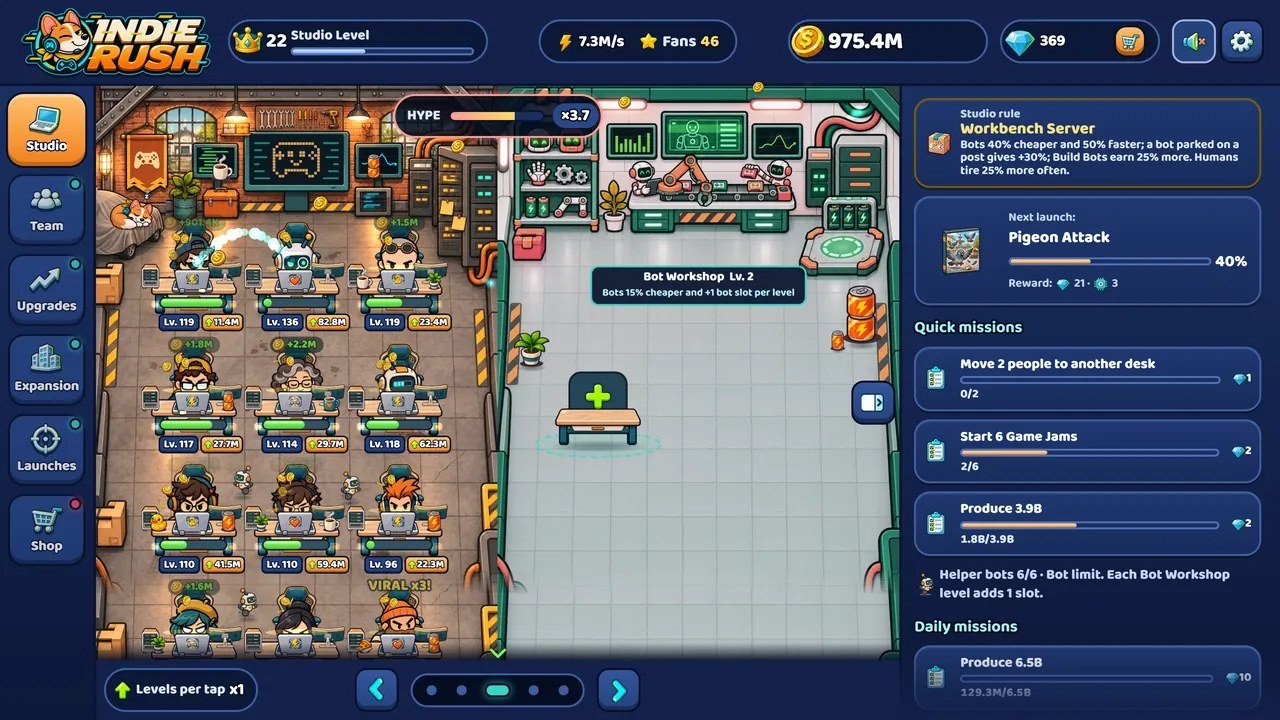
assets/img/; the top bar, the
tabs and the panels are HTML (index.html, css/) with texts from the language
files.
Where to change what
| I want to change | File |
|---|---|
| Name of the game | index.html, js/menu.js, js/locales/*.js |
| Logo and icons | assets/img/logo-*, mascot-*, icon-* |
| Interface colours, spacing, fonts |
css/tokens.css
|
| Texts (every language) | js/locales/<code>.js, js/locales/<code>-2.js |
| Characters: rules, texts, art |
js/balance.js (roster), js/locales/*.js,
assets/img/charN.png
|
| Economy numbers |
js/balance.js
|
| Animation, particles, sound mix |
js/tuning.js
|
| Art and the sprite atlas | assets/img/ + atlas.json |
| Sound effects and music | assets/audio/ + tracks.json |
| Events and stories |
js/events.js, balance.events, assets/img/events/,
assets/img/stories/
|
| Save key of your version | SAVE_KEY in js/balance.js |
2 Reskin: name, logo, colours and fonts
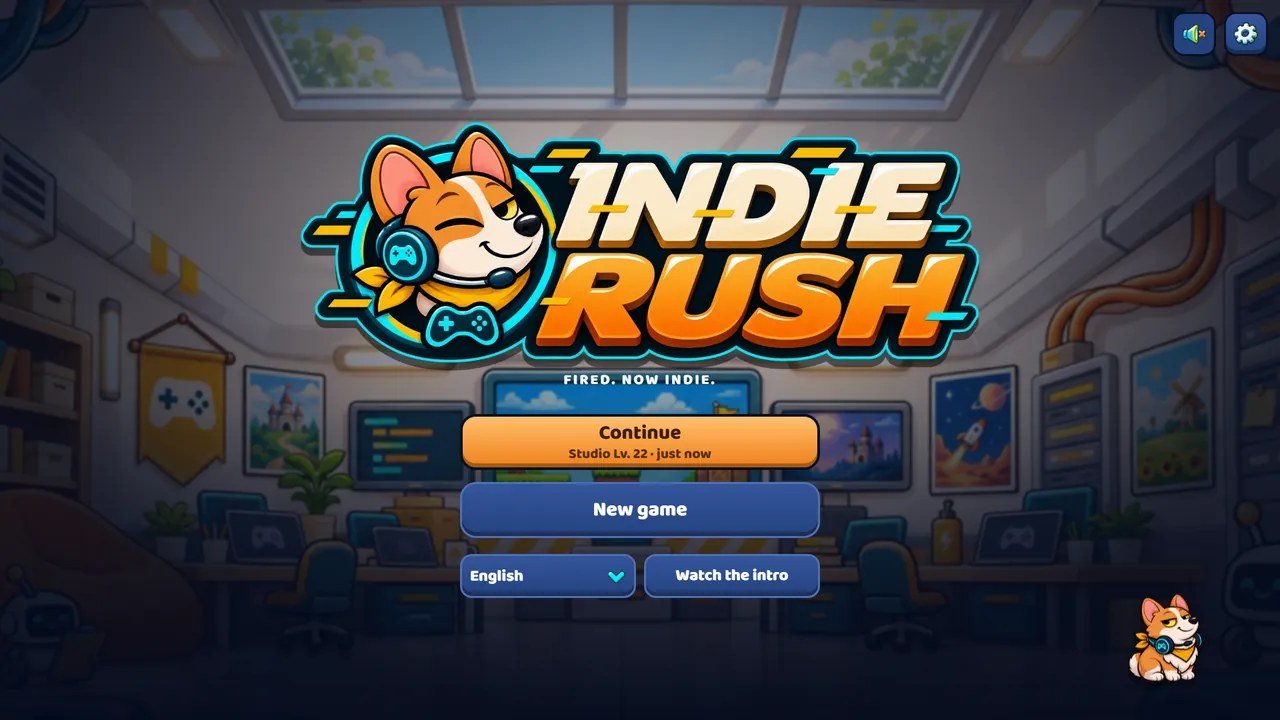
assets/img/; every colour of the
buttons and panels comes from css/tokens.css.
Name
| Where | What to change |
|---|---|
index.html
|
<title>, the alt="Indie Rush" texts, and
<meta name="theme-color"> if you change the background colour.
|
js/menu.js
|
The alt text of the title-menu logo. |
js/locales/*.js
|
Search both halves for Indie Rush: the name appears in the intro comic (intro), the
last studio (hq), one game title (company.redfarm) and the ending card
(finaleCard.sign). The line under the logo is menu.tagline.
|
js/balance.js
|
SAVE_KEY: change it before launch (see "Save key of your version").
|
Logo and icons
Replace these files in assets/img/, keeping names and proportions:
| Files | Used for |
|---|---|
logo-400, logo-800, logo-1600 (.webp) |
Full logo: boot screen, title menu, top bar on wide screens. The page loads the WebP files. |
mascot-128, mascot-256, mascot-512 (.webp) and
mascot-256.png
|
Mascot alone: top bar on narrow screens. |
icon-32.png, icon-64.png, icon-192.png |
Browser tab and home-screen icons (referenced in index.html).
|
titlebg.jpg, titlebg.webp, titlebg-s.webp |
Background behind the title menu (titlebg.jpg). The WebP copies are used when the same
picture closes the ending; replace all three.
|
The title menu bounces the logo in and plays a short colour-split flicker on it, using the same
logo-800.webp (class .logo-fx in css/screens.css). A logo with a
transparent background works best.
Colours
The interface reads its colours from CSS variables at the top of
css/tokens.css (:root). Colour carries meaning, so change a role, not a single
button:
| Token | Role |
|---|---|
--c-bg, --c-bg-deep |
Page background (navy). |
--c-surface-1 / -2 / -3 |
Cards, neutral controls, windows. |
--c-primary (#ffa23a) |
Orange: you can act (buy, upgrade, collect) and the open tab. Text on it uses
--c-on-primary.
|
--c-accent (#35d6c4) |
Cyan: selected, active, keyboard focus. |
--c-accent-2 (#ff6b5b) |
Coral: now, new, the game in progress. |
--c-gold (#ffdb5c) |
Rewards, Fans, Game Jam. |
--c-danger, --c-warn, --c-success |
Danger, warning, success. |
--c-text, --c-text-2, --c-text-3 |
Text, from strongest to quietest. |
A minimal recolour, from orange to green:
/* css/tokens.css, inside :root */
--c-primary: #5fd35a;  --c-primary-hi: #8be86f;  --c-primary-lo: #3fae3c;
--c-on-primary: #0d2a0b;   /* text on top of the primary colour */
The same file holds the spacing scale, radius, type scale, shadows, control sizes and animation timings.
After editing CSS, run node tools/check-css.mjs --list: it lists any value written outside the
token scale, so your reskin stays consistent.
js/scene.js (THEME_FILTER,
THEME_SCREEN). And never set sizes with --z: it is the interface scale, computed
by js/main.js from the window size.
Fonts
Fonts are declared at the top of css/tokens.css and selected through one variable,
--f. Latin-script languages use Baloo 2, Russian uses Exo 2, Japanese and Chinese use Noto Sans
subsets, Korean uses a system font. To use your own font:
-
Put the WOFF2 file in
assets/fonts/with its licence and add an@font-facerule incss/tokens.css. -
Change
--fin:root(and in the:root[data-lang=...]lines if the font covers those scripts). -
The canvas uses the same family for floating numbers and speech bubbles: in
js/scene.js, search forBaloo 2and change the family name. -
Update the
<link rel="preload">line inindex.htmlto your main font file.
Check that your font has a heavy weight: the interface is set in weight 800 throughout.
3 Texts and characters
Every text the player reads is in js/locales/<code>.js and
js/locales/<code>-2.js (two halves of one list: each key lives in one of them, so search
both). The main groups:
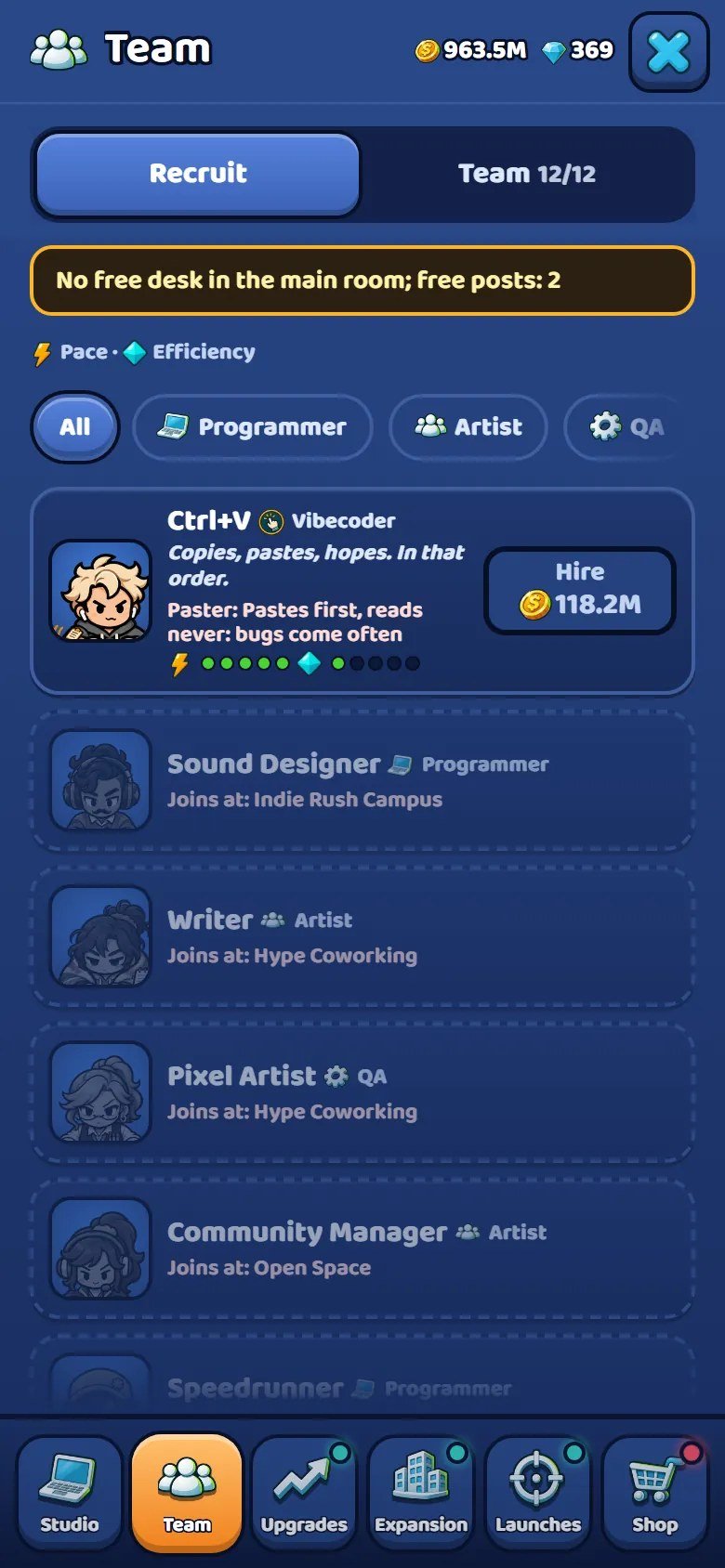
js/balance.js.
| Key | Content |
|---|---|
crew, quote, bio |
Team member nicknames, one-liners, short background |
traits
|
Quirk description (what the member does differently) |
roles, roleFx |
Role names and what each role does |
company
|
Games to launch: title and blurb, per launch id |
pupLine
|
Patch's line after each game launched (one per game, same order) |
intro, hqStory, finale, finaleCard |
Captions of the intro comic, the arrival panels and the ending |
up, rooms, techNode, shopItem |
Upgrades, rooms, Engine nodes, shop items |
ev
|
Random events: title, instruction, win, miss, Patch's line |
story, gallery |
Story chapters and the gallery |
menu, tabs, tabsShort |
Title menu and tab names (long and short) |
review
|
Launch Night: score label, gold seal and the critics' headlines (three lists: low, good, gold) |
Rules that keep texts safe
-
Numbers come from the rules. A description such as "All desks type {v} faster" receives
{v}fromjs/balance.js. Never type the number into the text: it would go stale the day you rebalance. Keep every placeholder in braces. -
Lists keep their length.
pupLinehas one line per game;tabshas six entries;review.h0,review.h1andreview.h2have 4 headlines each (review.headlinesinjs/balance.js). - No emoji or pictograms as icons. Every icon is a sprite; the content audit fails if it finds a pictogram in the code or in a language file.
If you rewrite the texts: the humour works because it is dry. Studio chaos described like a patch note, a short set-up and a shorter punchline; the target of the joke is the publisher, the meeting or the industry, never the player.
Rename or redefine a character
A character has three parts, linked by its id: the rules in
roster (js/balance.js), the texts crew.<id>,
quote.<id> and bio.<id> in every language, and the art
assets/img/charN.png with its poses in assets/img/atlas.json. Example roster line:
{ id: 'pixel', sprite: 'char1', role: 'coder', cycle: 2.4, eff: 1.0, price: 1.0, trait: 'rage', sticker: 'skull' }
role is one of coder (Programmer), operator (Artist),
tech (QA), robot (Build Bot) and vibe (Vibecoder);
cycle is seconds per work bar, eff the output factor, price the
hire-price factor, trait a key of traits, sticker the laptop sticker;
hq: n makes the member appear only from that studio on (0 is the first) and
story keeps a story character locked until the story ends.
roster. Rename, retune and redraw freely, but
never reorder or delete entries once players have saves; add new members at the end. Then run
node tools/auditoria-conteudo.mjs: it names every text and sprite still missing.
The 40 games to launch are in maps (5 maps of 8). Each has an id (used by
company.<id> in the language files), a cover in the atlas
(companies:<id>), a gem and Engine Point reward, and its steps. To rename a game, edit
only the language files.
4 Translations and languages
Fix or change a translation
Open js/locales/<code>.js or <code>-2.js (search both for the key),
edit the value, save, reload. Then run the check (it prints de: OK or the problem it found):
node tools/check-locale.mjs de
node tools/check-locale.mjs        # all 14 languages
Add a language
-
Copy
js/locales/en.jstojs/locales/xx.jsandjs/locales/en-2.jstojs/locales/xx-2.js(xx is the two-letter code). Inxx.js, change the import line toimport part2 from './xx-2.js';. - Translate the values. Keep the keys, the order and length of lists, and every placeholder in braces.
-
In
js/i18n.js, add the code toLANGSand the language's own name toLANG_NAMES. If the page language tag differs from the code (asptbecomespt-BR), add it toHTML_LANG. -
Run
node tools/check-locale.mjs xxuntil it printsxx: OK. -
Open
?lang=xxand walk through every tab. Long words are the usual problem; shorten the text rather than the font. Tabs have a shorter list (tabsShort) for narrow screens.
Plurals
A text that counts something is an object with the plural forms the language needs; the game picks the form
with the browser's Intl.PluralRules. check-locale.mjs tells you which forms a
language is missing.
// en.js
"taps": { "one": "Tap the room {n} time", "other": "Tap the room {n} times" }
// pl.js needs one, few, many and other; ja.js needs only other
Other scripts
Baloo 2 as bundled covers Latin and Latin Extended. For another script, add one line to
css/tokens.css, following the existing ones. Right-to-left layout is not implemented.
:root[data-lang=el] { --f: "Your Greek Font", "Segoe UI", sans-serif; }
The bundled Japanese and Chinese fonts contain only the characters present in the Japanese and Chinese
language files. A new character still shows, drawn with the system font. To rebuild the subsets, run
python tools/subset-cjk.py <folder> from source/, where the folder holds
NotoSansJP-Regular.ttf and NotoSansSC-Regular.ttf.
To remove a language, delete its code from LANGS and LANG_NAMES in
js/i18n.js and delete its two files. Keep en.js and en-2.js: English
is the fallback for all the others.
5 Balancing the economy (js/balance.js)
All economy numbers are in js/balance.js, one object, commented line by line. Presentation
numbers live in js/tuning.js; changing those never changes how fast anyone earns.
| Key | What it controls |
|---|---|
startMoney, startGems |
What a new game starts with. |
econ2
|
The desk economy: income of each desk, level prices and their growth, desk and hire prices, the
studio level that unlocks each desk. milestones (desk levels that double a desk's
income) and maxLevel sit at the top of the file.
|
ladders, upgrades, rooms |
First and top price of every upgrade, room and helper bot; the levels in between are spread evenly.
The effect per level is in upgrades and rooms.
|
hqCostMul
|
Every money price of each studio is multiplied by this list (one number per studio). |
roles, roster, traits, crew2 |
Roles, team members, quirks, room bonuses and pairs. |
hypePerTap, hypeDecayPerS, hypeMaxBonus |
Tapping: how fast hype fills and fades and how much it speeds the room. |
frenzyS, frenzyBonus, frenzyCooldownS |
Game Jam: lasts frenzyS seconds (6) and can start again only after
frenzyCooldownS seconds (45).
|
tiredMinS, tiredMaxS, tired2 |
How often team members get tired; how long a nap or a panic lasts. |
maps, earnS |
The 40 games and their steps; how many seconds of income each earn step asks for, per studio and game. |
prestigeTargets, repK, repExp, repIncome |
Moving studio: games launched needed, Fans gained, income per Fan. |
offlineRate, offlineCapS, offlineMinS |
Offline earnings: share of income, time limit, minimum absence. |
autosaveS
|
Seconds between automatic saves. |
missions, dailies, achievements, tech,
shop
|
Quick missions, the three dailies, achievements ([id, stat, goal, gems]; ids in
achCut are left out of the game), Engine tree and the gem shop.
|
events
|
Random events: first one, interval, how long each lasts, rewards and how likely each event is in each studio. |
review
|
Launch Night: the base score (45), points per different role at the desks (6), per Game Jam (3, at
most 10), for the gold star (10) and for desk levels (at most 10), minus 2 per bug (at most 20); the
gold seal at sealAt (90) adds sealBoostS seconds (60) of double income.
|
hireBase,
upgradeCostFactor, targetEarnCapS, earnPace and the prices inside
slots): the current economy (econ2, earnMode: 'floor') no longer
reads them. Change the keys listed above instead.
Small, safe examples
// A friendlier start
startMoney: 100,             // shipped: 40
// More generous while away: 75% of income, up to 4 hours
offlineRate: 0.75,           // shipped: 0.5
offlineCapS: 4 * 3600,       // shipped: 2 * 3600
// Game Jams more often
frenzyCooldownS: 30,         // shipped: 45 (seconds)
// A shorter game: earn steps ask for less waiting (econ2 and earnS)
// lower the numbers of earnS, for example by 20%
// Cheaper double-income boost in the shop
boosts: [{ id: 'x2', gems: 60, ... },     // shipped: 80 gems
// Launch Night: an easier gold seal (balance.review, end of the file)
sealAt: 85,                  // shipped: 90
Check what your change did
node tools/sim.mjs 45                 # an average player for 45 minutes
FULL=1 node tools/sim.mjs 900         # plays to the ending; time spent in each studio
# Windows PowerShell: $env:FULL=1; node tools/sim.mjs 900
node tests/balance.test.mjs           # rules tests
node tools/auditoria-conteudo.mjs     # content audit
The simulator plays with the real rules of js/state.js, so it is the fastest way to see whether
a change opened a wall (a long wait with nothing to buy) or collapsed the game into minutes. With the
shipped numbers, an average player reaches the ending in about 5.7 hours. Some tests assert the shipped
numbers; when you rebalance on purpose, update those assertions.
What not to do
-
Do not reorder or delete entries in
rosterorslots, and do not rename the id of an achievement, Engine node, upgrade, room or shop item after launch. Saves refer to them. - Keep shop item ids to plain letters.
- Change one lever at a time and run the simulator. Idle economies are exponential: a growth factor that moves from 1.10 to 1.12 is a large change.
6 Feel (js/tuning.js)
js/tuning.js holds one object, feel, with every number of sensation: character
size and typing rhythm, squash and bounce, particle caps, floating numbers, flying coins, screen shake, the
Game Jam stamp, desk looks at levels 25, 50 and 100, and the sound mix. Effects never write the simulation,
so you can edit freely.
dprMax: canvas resolution cap (lower for weak devices).-
particles.cap,particles.capCoarse: particle pool on desktop and on touch devices. -
sfxVol,coinMinGapMs,coinGain,gain,pitchJitter: effects volume, the gap between coin ticks, the coin volume, the other effects and pitch variation. -
frenzyMusic:falsein this version (the studio track keeps playing during a Game Jam). See "Sound effects and music" to switch a Game Jam track on.
7 Art and the atlas
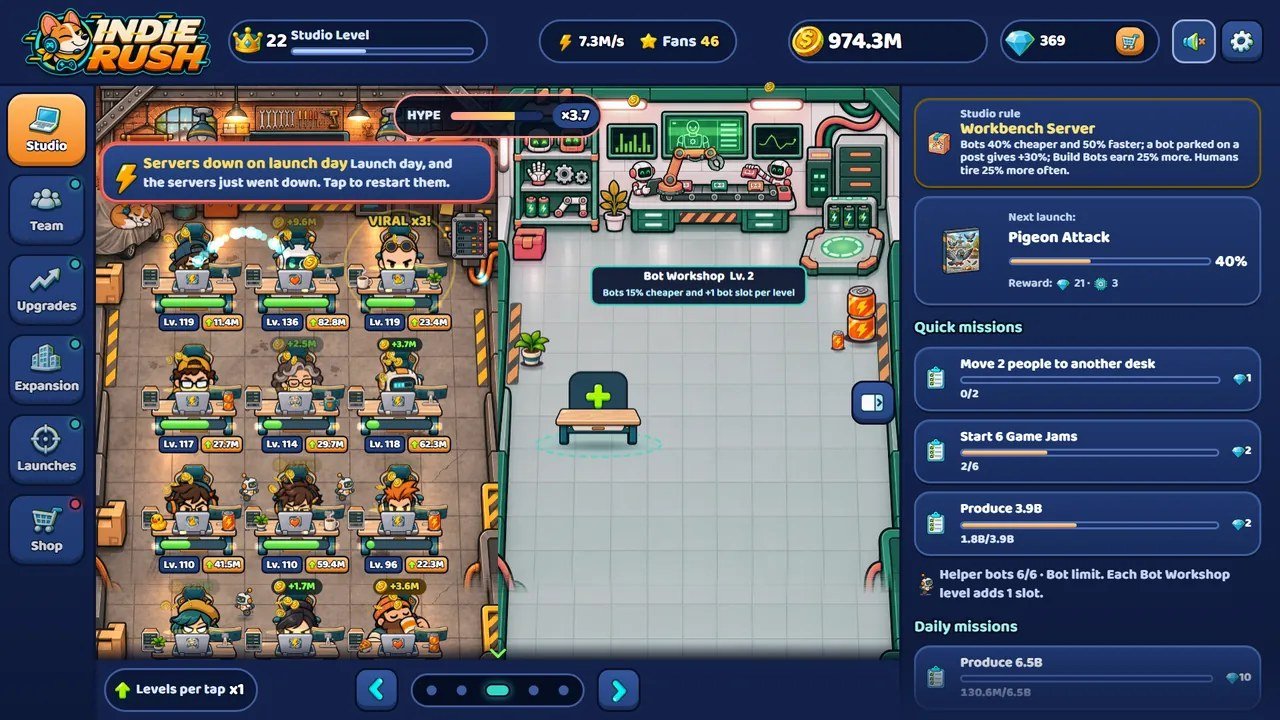
assets/img/events/, the people from the
charN.png sheets, the rooms from room2.jpg and ax_botlab.jpg.
Art lives in assets/img/:
| Kind | Files |
|---|---|
Sprite sheets (transparent PNG; atlas.json says where each figure is)
|
char1.png ... char24.png, robot, pup,
pupwalk, desk, laptop, props,
props9, icons, ui2, ui3, companies,
bld2-bld5, ...
|
| Room backgrounds (JPG; the rooms are 1086 x 1448 px) |
room.jpg, room2.jpg ... room5.jpg,
ax_breakroom.jpg, ax_server.jpg, ax_botlab.jpg,
ax_datacenter.jpg, mapbg.jpg
|
Intro, arrival and ending panels (WebP, with a JPG fallback and a small -s version)
|
story1 ... story5, move2 ... move5,
finale, encerramento
|
| Event art and story panels (WebP) |
events/, stories/, blackout1-3, inspector1-3
|
| Desk upgrade pieces and Patch's jump (PNG, loaded by name, not in the atlas) | new/deskup-*.png, new/pup-jump.png |
How the atlas works
// assets/img/atlas.json
"char1": {
  "typeA": [0, 6, 161, 181],       // x, y, width, height inside char1.png
  "typeB": [165, 5, 162, 182], ...
},
"icons": { "coin": [0, 0, 98, 96, 48.9, 48], ... }   // icons: + optical centre
Characters are drawn with the bottom centre of each pose on the same floor point, so poses of different sizes line up on their own. Interface icons are centred on their optical centre (the 5th and 6th numbers).
Two ways to change art
- Paint over, same file. Open a sheet, repaint each figure inside its existing rectangle, save with the same name. Nothing else changes. Best for recolours and one-to-one character swaps.
-
Move the rectangles. If a new figure needs more or less room, lay it out on the sheet,
save as the same PNG and edit its rectangle in
atlas.jsonby hand. For interface icons (icons,ui2,ui3) runpython tools/centroid.pyafterwards to refresh the optical centres.
python tools/centroid.py                       # optical centres of icons, ui2 and ui3
python tools/add-ui3.py <pose> <png> [height]  # append one icon to ui3.png and the atlas
python tools/unbg.py in.png out.png            # remove a flat background (needs scipy)
assets/img/ are full size and are the art
source. Keep a copy of assets/img/ before you edit. To add one more interface icon,
tools/add-ui3.py appends it to ui3.png and the atlas and refreshes the centres;
tools/unbg.py removes a flat background from a new picture.
Backgrounds
Replace a room background with a picture of the same pixel size and the same floor plan. Desk positions, the
wall screen and the doors are fixed in js/scene.js; a background with furniture in other places
will have people typing in mid-air. The live details over each room (screens, lights, lamps, steam) are
placed by assets/ambient/<room>.json; adjust their rectangles if your art moves those
objects.
Keep the extension when you replace a file: sheets listed in the atlas load as .png, room
backgrounds as .jpg, panels and event art as .webp.
8 Sound effects and music
Audio is in assets/audio/, all MP3, played through the Web Audio API. Nothing plays before the
player's first tap.
Sound effects
| File | Plays when |
|---|---|
key.mp3
|
A tap on the room. |
coin1.mp3, coin2.mp3, coin3.mp3 |
Income: one soft tick for the whole room, at most every 380 ms, the three samples in turn. |
buy.mp3, level.mp3, click.mp3 |
A purchase, a level up or upgrade, a neutral click. |
achieve.mp3, sfx-frenzy.mp3, alarm.mp3 |
Launch, mission or achievement done; a Game Jam starts; a desk panics or an event starts. |
wake.mp3, can.mp3, woof.mp3, snore.mp3,
robot.mp3
|
Someone is woken, someone gets a new drink, Patch is tapped, someone falls asleep, a helper bot fixes a desk. |
To replace one, save your MP3 under the same name. Keep effects short and quiet at the start: the coin tick repeats thousands of times in a session. If an effect file fails to load, most effects fall back to a small synthesized sound.
Music
The game has 9 music tracks. Each screen has its own track, loaded the first time it is needed and
cross-faded. The list of tracks that exist is assets/audio/tracks.json:
["menu", "hq1", "hq2", "hq3", "hq4", "hq5", "story", "move", "finale"]
| Track | Where it plays |
|---|---|
menu
|
Title menu (loops). |
hq1 ... hq5 |
The five studios (loop). |
story
|
Intro comic, arrival panels and story chapters (loops). |
move
|
Moving ceremony (plays once). |
finale
|
Ending (plays once). |
Replace, remove or add a track
-
Save your file as
assets/audio/<track>.mp3and make sure the name is intracks.json. -
Remove a name from
tracks.jsonand that screen has no music (there is no fallback track). The game never requests a file that is not listed. - Loops: the player trims the silence MP3 encoders add at both ends, so a file exported as a seamless loop plays without a gap.
- Size: the studio tracks are about 1.8 MB each. Shorter loops or a lower bitrate make the first minute lighter on mobile data.
frenzy.mp3, add "frenzy" to tracks.json and set
frenzyMusic: true in js/tuning.js. It then plays on top during a Game Jam, with
the studio track underneath.
9 Events and stories
Events are tuned in balance.events (js/balance.js): firstS (seconds
of active play before the first event), everyS (the interval between events),
lifeS (how long the player has), cash (reward in seconds of income, capped by
capS) and weights (how likely each event is in each of the 5 studios; 0 means
never). Their texts are under ev.<id> in every language file and their art in
assets/img/events/.
Story chapters are texts under story.agent ("The Publisher") and story.box ("The
Lost Cartridge") plus three panels each in assets/img/stories/. Replace panels with pictures of
the same size and name. When the chapters of "The Lost Cartridge" open is set by BOX_AT in
js/events.js.
To ship without events and stories, set the EVENTS_ON line near the top of
js/main.js to false. Test one event with ?evento=<id>.
10 Save key of your version
Two copies of the game on the same domain share one save unless their keys differ. Before you launch your
version, give it its own key in js/balance.js, and rename the two other names that start with
indie-rush.template.save.v1: .sideOff in js/ui.js and
.probe (a storage test, removed right away) in js/main.js:
export const SAVE_KEY = 'mygame.save.v1';
When you add your own data to the save
-
Add the field with its default in
newState()(js/state.js). -
Read it back in
deserialize()with a validity check, as the fields around it do. A field you do not read back is lost on reload. -
If old saves need converting, raise
SAVE_VERSIONand branch on the stored version. -
Add a case to
tests/balance.test.mjs; it already tests migration from older saves.
11 Publish your version
-
Inside
source/, run the checks:npm test(the rules tests and the language check),npm run auditandnpm run check-css. Then runnpm run build. -
Upload the contents of
dist/(index.html,css/,js/,assets/) to your host (replace the old files, or use a new folder per release). - If the old version still appears, see "Updating a published game" in the buyer guide.
Support request
When you write to support, include the browser and device, the game version, the page address, the steps that caused the problem, a screenshot and the first error shown in the browser console. Never send passwords, payment details or secret keys.