
Contents
- Overview
- Quick installation by FTP
- Requirements and sound
- Controls and how the game works
- Screens and controls explained
- Map of the files
- Customizing texts, images and sounds
- Levels and the level generator
- Languages
- Saved progress
- Optional: tests, preview and build with Node.js
- Updating and cache
- Licenses
- Troubleshooting
- Frequently asked questions
- Support
1 Overview
Honey Ten is an HTML5 sliding number puzzle game set in a bee garden. The board is a wooden honeycomb tray with golden honey blocks, each showing a number. Drag a block into another: if the two numbers add up to less than 10 they join into one block; if they make exactly 10 they turn into a honey jar; more than 10 does not fit. Slide each jar to the door of its color (a glowing bar in the frame) to deliver it. Deliver every jar within the move limit to win the level.
There are 50 levels in 5 worlds of 10 (Flower Bed, Water Lily Pond, Beehive, Sunflower Field and Moonlit Garden), each with its own backgrounds. The first levels teach the rules one tip at a time, and each world brings a new twist: locked doors, garden rocks, flower bushes, honeycomb blocks, surprise baskets and challenge levels with a clock. Four power-ups help (undo, brush, shovel and extra moves). Every level gives 1 to 3 stars, each world ends with a chest of power-ups and a gate to the next world, and a thank-you screen follows level 50.
The game runs in any modern browser on phones, tablets and computers, in portrait and landscape, with touch, mouse or keyboard. On very wide screens the game stays in a centered band and the sides show the background. It uses plain HTML, CSS and JavaScript (ES modules); there is no engine, no server, no account, no ads and no payments. Every level has been solved by the included solver, which the tests run again.
2 Quick installation by FTP
Installing takes a few minutes if you have FTP access or a file manager in your hosting panel.
- 1. Extract
honey-ten-static-1.0.0.zipon your computer. -
2. Connect to your hosting by FTP or its file manager and open the folder where the game should live, for
example
public_html/games/honey-ten/. -
3. Upload only the contents of the
game/folder, so thatindex.htmlsits directly inside the target folder. -
4. Keep
assets/,src/,style.css,panels.cssandtheme.cssbesideindex.html, with names and letter case exactly as extracted. -
5. Open
https://your-domain.example/games/honey-ten/in a modern browser.
source/ folder, the documentation/ folder or the ZIP itself.
Players need no Node.js, PHP, database or account.
3 Requirements and sound
-
Any static web hosting with HTTPS (or HTTP). Opening
index.htmldirectly from the disk (file://) is not supported, because browsers block JavaScript modules that way. - A current browser: Chrome, Edge, Firefox or Safari, on desktop or mobile.
- Browsers start sound only after a user gesture. The music starts with the first tap or click, and the sound effects are synthesized by the game itself.
- When the page is hidden, the sound fades out over 30 seconds and pauses after 60 seconds; it comes back when the player returns.
4 Controls and how the game works
Drag a block with a finger or the mouse; it slides one cell at a time until it meets a wall or another block. Pushing it into a block whose number fits (the sum is 10 or less) joins them: the new block takes the color of the block you dragged and the place and shape of the bigger one. A sum of exactly 10 becomes a honey jar of that color. A jar that touches the door of its color, and fits through it, is delivered. A jar with no door of its color is stuck, so the bee warns the player and suggests Undo.
Each drag uses one move. The counter at the top shows the moves left; finishing with moves to spare gives 3 stars, a little less gives 2, and any win gives at least 1. Out of moves, the player can retry or spend one Extra moves power-up for 5 more moves. Winning a level unlocks the next one; finishing the 10 levels of a world opens its chest (one of each power-up) and the gate to the next world.
Power-ups (the round buttons): Undo takes back the last move (3 per level), the Brush paints a jar another color, the Shovel delivers a jar at once or breaks a garden rock, and Extra moves adds 5 moves (or 20 seconds on a challenge level). Brush, Shovel and Extra moves unlock at levels 6, 12 and 18 and their counts are kept between levels. New pieces: a locked door opens after a number of jars are delivered to other doors; a garden rock cannot move and breaks after a number of deliveries; a flower bush blocks a cell; a honeycomb block cannot move but accepts other blocks; a surprise basket shows its number after a number of deliveries; challenge levels (10, 20, 30, 40 and 50) add a clock that starts on the first move. Each new piece is introduced by a card the first time it appears.
Keyboard on a computer: Z undo, B brush, S shovel, M extra moves, R restart, Escape opens Settings (or cancels a power-up), Enter starts on the title screen. Settings (the gear) has Sound (music and effects volume), Language, vibration, less motion and, during a level, a button back to the map.
5 Screens and controls explained
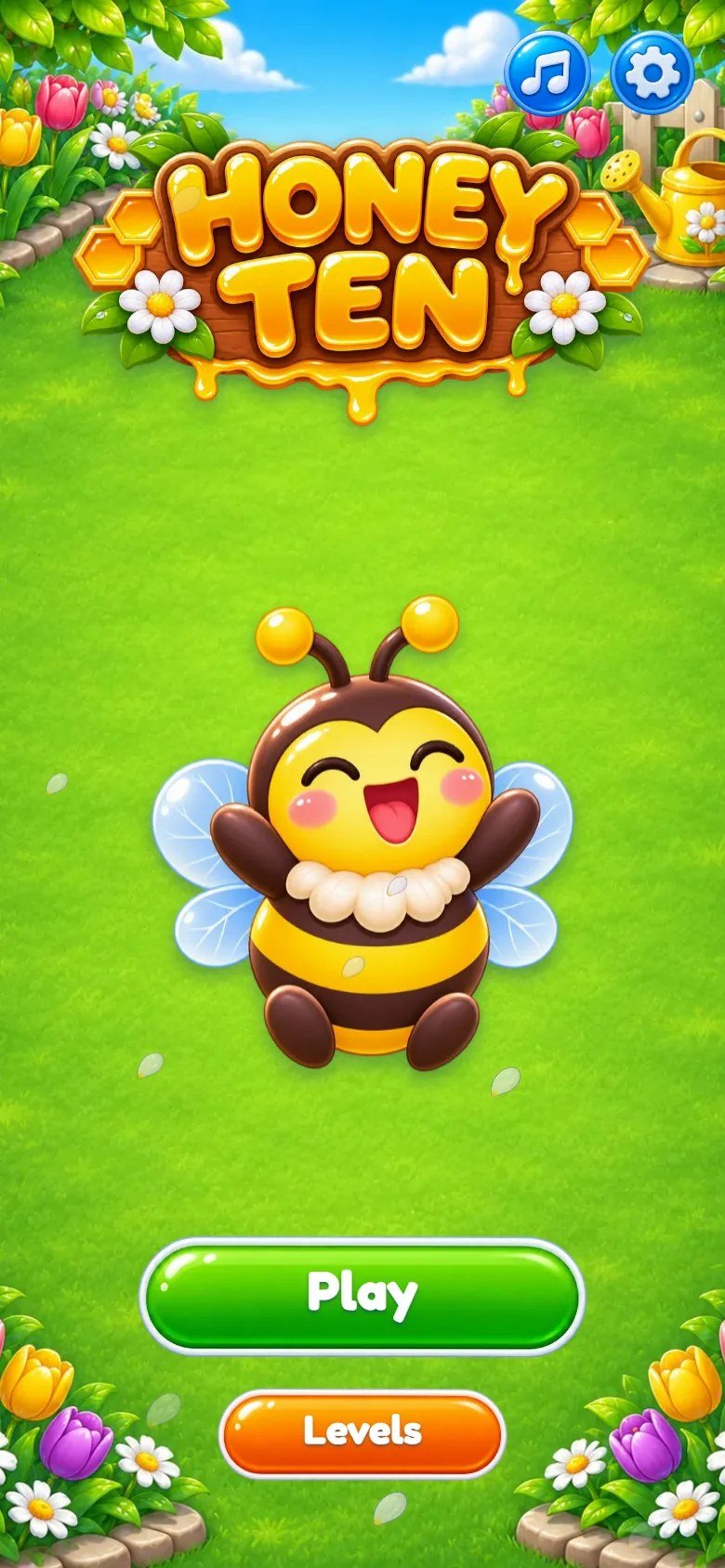
Marks on the screenshot
- Play
- World map
- Sound
- Settings
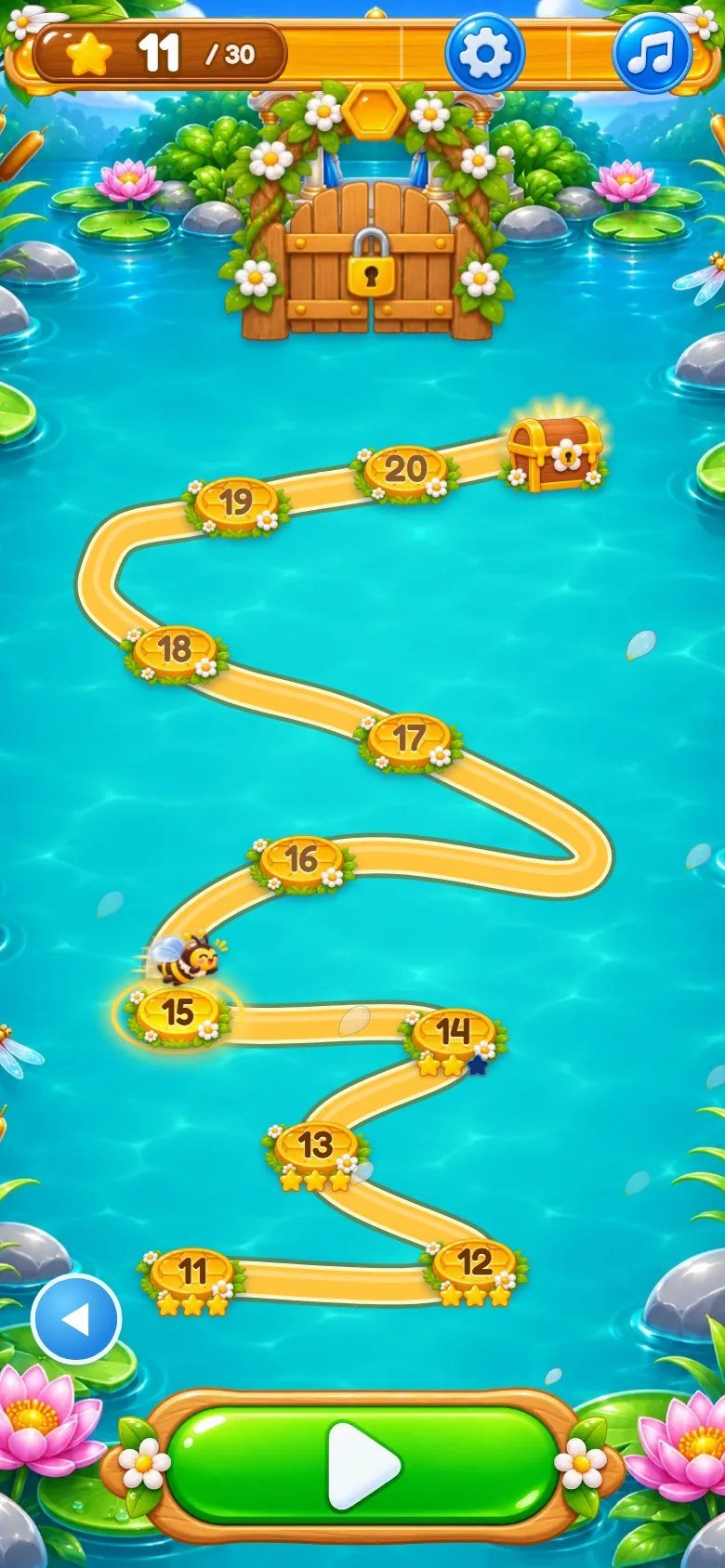
Marks on the screenshot
- Stars of the world
- Current level
- World chest
- Gate to the next world
- Play
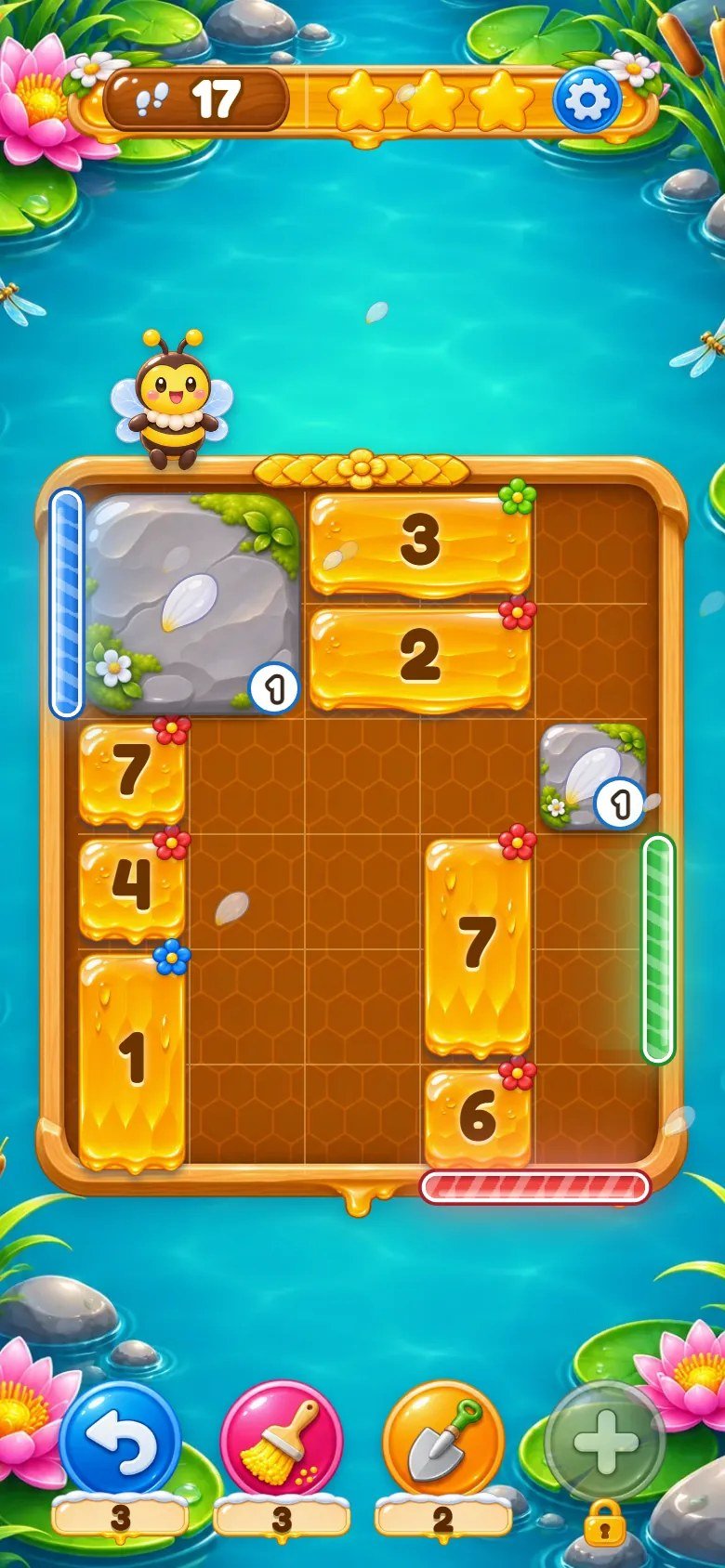
Marks on the screenshot
- Moves left
- Stars still possible
- Settings
- Door (glowing bar)
- Honey block
- Bee mascot
- Power-ups
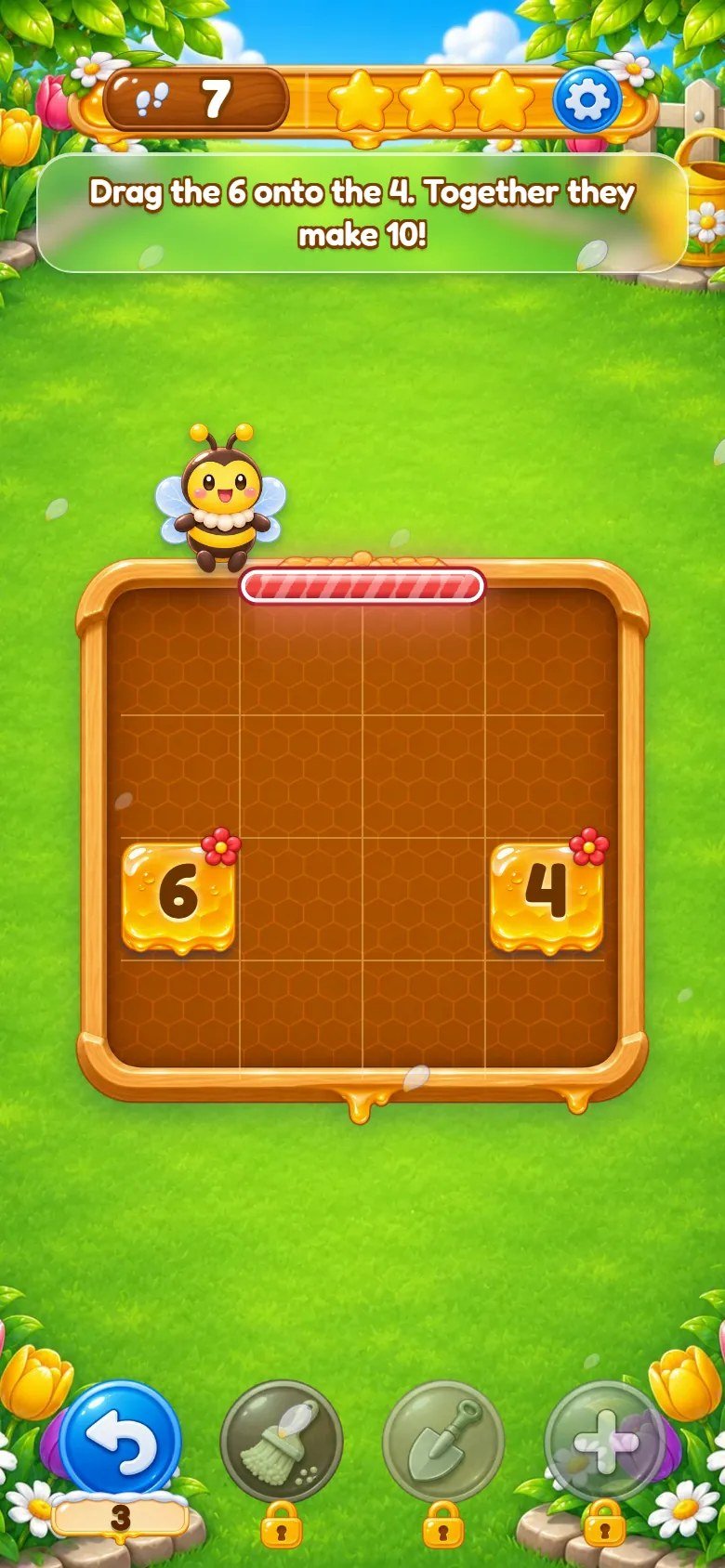
Marks on the screenshot
- Tutorial tip
- Door (glowing bar)
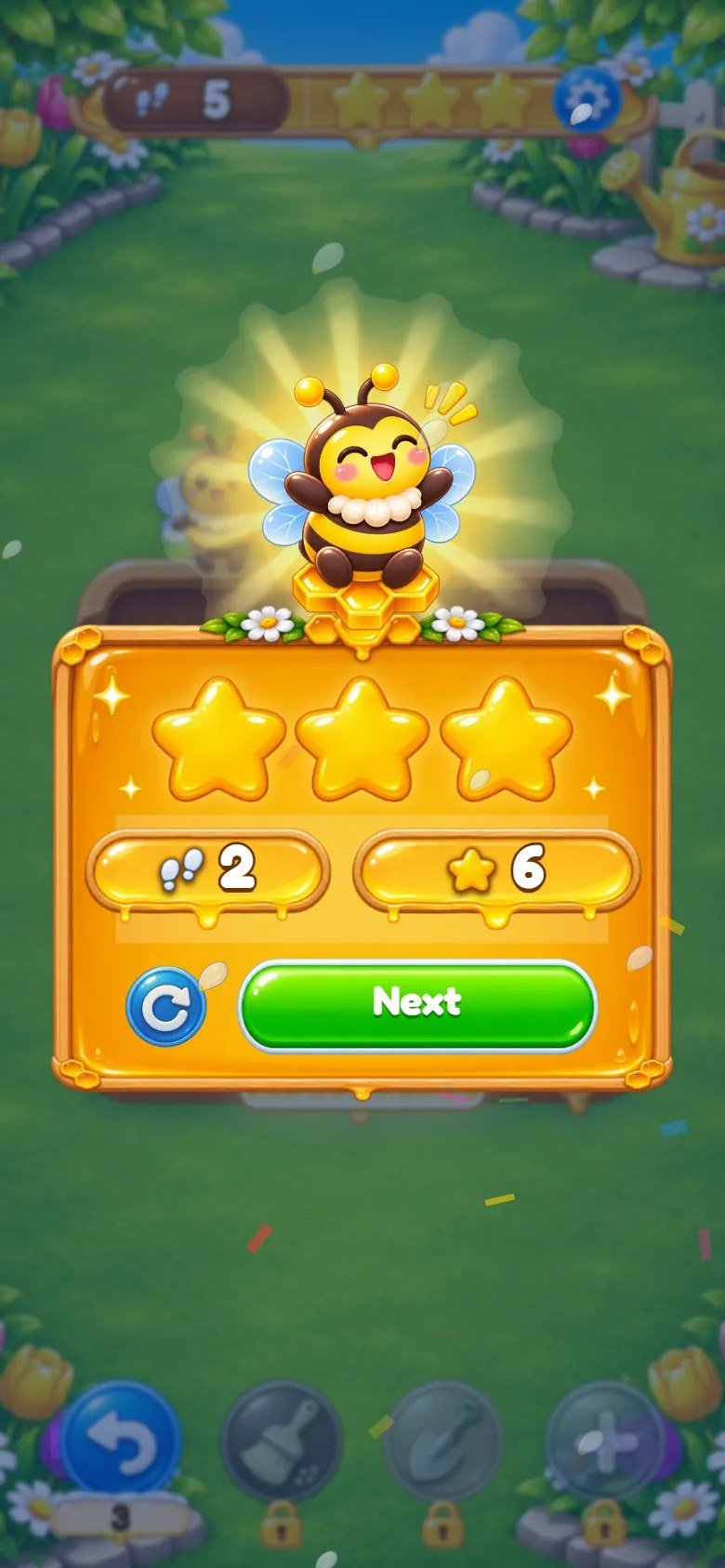
Marks on the screenshot
- Stars earned
- Next level
- Replay
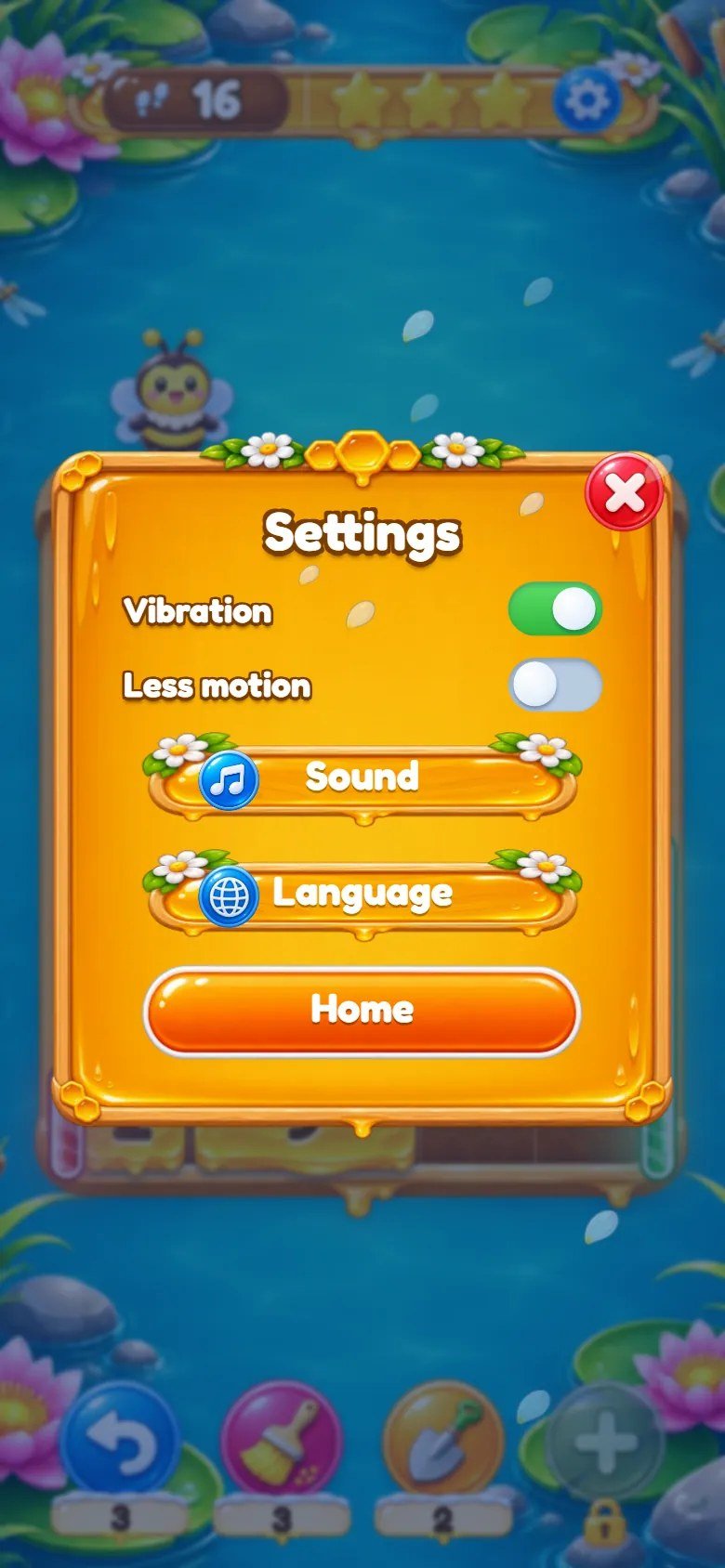
Marks on the screenshot
- Sound
- Language
- Vibration
- Less motion
- Back to the map
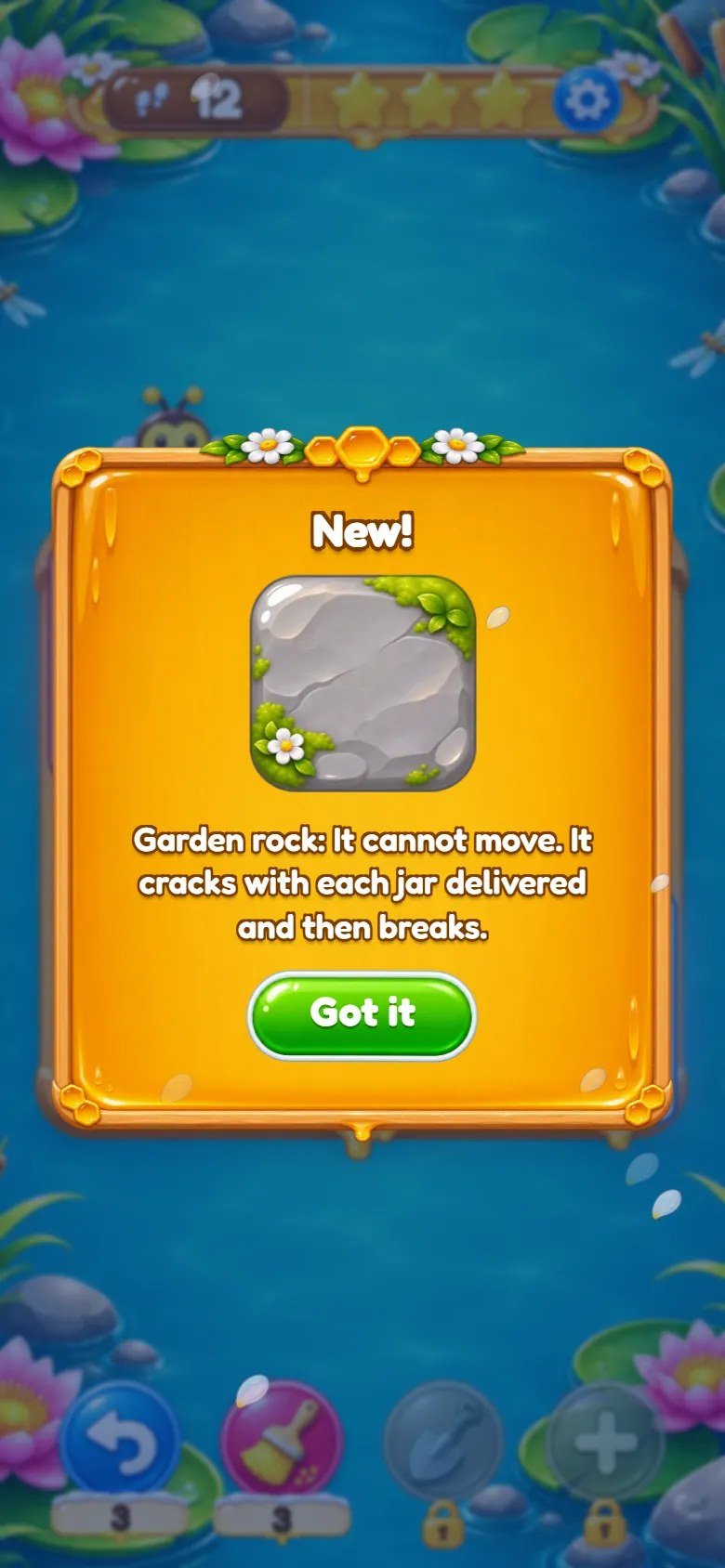
Marks on the screenshot
- What is new
- Picture of the piece
- Got it
6 Map of the files
game/ is the ready-to-host game. source/ has the same editable files plus the
tests, a local preview server, the level generator and the build command. Code comments are in Portuguese.
game/                        upload these contents to your web host
  index.html                 entry page (screens and panels)
  style.css                  styles: base, title, level, map
  panels.css                 styles: panels and windows
  theme.css                  styles: the honey theme (loaded last)
  src/main.js                start-up, screens, panels, tutorial, keyboard
  src/game.js                one level on the screen: dragging, power-ups, effects
  src/rules.js               the rules (no drawing) and the solver
  src/levels.js              the 50 levels and the 5 worlds
  src/map.js                 the world map
  src/fx.js                  particles, confetti, shake
  src/nine.js                stretched wooden panels drawn as one picture
  src/audio/sound.js         music and synthesized sound effects
  src/locales.js             texts: English, Portuguese, Spanish
  src/locales-more.js        texts: the other 11 languages
  src/config.js              feel numbers, colors, power-up rules, save key
  src/show-solution.js               Show solution button (?solution, local addresses only)
  src/save.js, storage.js, i18n.js, viewport.js, fullscreen.js
  assets/art/                images (WebP)
  assets/fonts/              Fredoka font and its license
  assets/music/              menu.mp3, map.mp3, play.mp3
  DOCUMENTATION.txt          short note that points to this guide
source/                      the same editable files, plus:
  package.json               npm test, npm run build, npm run serve, npm run levels
  package-lock.json
  README.md
  test/                      node --test tests
  tools/build.mjs            copies the game into dist/
  tools/serve.mjs            local preview server
  tools/gen-levels.mjs       level generator (keeps only solvable boards)
documentation/index.html     this guide (offline, 14 languages)
documentation/customization.html   step-by-step customization guide
documentation/img/           the screenshots of both guides
DOCUMENTATION.html           shortcut to this guide
CUSTOMIZATION.html           shortcut to the customization guide
START-HERE.txt, CHANGELOG.txt
THIRD-PARTY-LICENSES/        font license
-
src/config.js: the game feel numbers in one place (FEEL: springs, drag, effects, shake, particles, vibration), the block colors (COLORS), the power-up rules (RULES_UI: unlock levels, starting counts, move limit and star cuts), default volumes and the save key. -
src/rules.js: the rules with no drawing (sliding, joining, jars, doors, locks, rocks, baskets) and the solver that finds the shortest solution of a level.src/levels.jsholds the 50 levels and the 5 worlds. -
src/game.jsruns a level on the screen (dragging, power-ups, effects),src/map.jsdraws the world map,src/main.jsstarts everything and handles screens, panels, the tutorial and the keyboard, andsrc/fx.jsdraws particles and confetti. -
src/locales.jsandsrc/locales-more.js: every interface text in the 14 languages;src/i18n.jspicks the language.src/audio/sound.js: music and synthesized sound effects. -
style.css(base, title, level and map),panels.css(panels and windows) andtheme.css(the honey theme on top): the styles, in this order. Sizes use--u(1% of the game band) and--cell(one board cell). -
In the code a few names come from the engine: a honey jar is a
giftblock, a garden rock isice, a honeycomb block ispin, a flower bush is ahole, a surprise basket is abox, the bee mascot ispipand the floating petals areflakes. The image files use the theme names (jar-r.webp,flower-r.webp,bee-idle.webp,rock.webp...).
7 Customizing texts, images and sounds
CUSTOMIZATION.html in the main folder of the
download, or documentation/customization.html.
Customization Guide (step by step, in English)
Texts: open src/locales.js (English, Portuguese and Spanish) or
src/locales-more.js (the other 11 languages) and change the text after each key. Keep the keys
and placeholders such as {n} unchanged; npm test checks that all 14 languages have
the same keys and placeholders. World names are the keys w1 to w5.
Images: replace a file in assets/art/ with another WebP of the same name and similar
proportions. Honey blocks are comb.webp; jars are jar-r.webp to
jar-k.webp; the little flowers on the blocks are flower-r.webp to
flower-k.webp; the bee's poses are bee-idle, bee-think,
bee-cheer, bee-oops, bee-wave and bee-push, plus
bee-big (title), bee-fly (map) and bee-win (win panel). Backgrounds
are bg-port.webp and bg-land.webp for world 1 and w2-bg-port.webp to
w5-bg-land.webp for the others; the maps follow the same pattern (map-port.webp,
w2-map-port.webp...). The letters r, b, g, y, p, o, t and k are the eight block colors.
Colors and sizes of the interface are in the three CSS files. The block colors (light, full and dark shades)
are COLORS in src/config.js. The game title is in index.html and in
assets/art/logo.webp.
Music and sound effects
Music: assets/music/menu.mp3 plays on the title screen, map.mp3 on the world map
and play.mp3 during levels. To change a track, replace the MP3 keeping the name. Without the
file the game simply stays silent.
Sound effects are synthesized by src/audio/sound.js (the notes of joining blocks rise along a
scale, the jar delivery, buttons, stars, the rock cracking), so they have no files. Their volumes and
pitches are in the SYNTH table of that file. To use a recorded sound instead, put an MP3 in
assets/sfx/ and add its name to PLOPS in the same file.
Players control both volumes in Settings; the starting values are VOL in
src/config.js.
8 Levels and the level generator
Each level is one line in src/levels.js: the board size [width, height], the
blocks and the gates (doors), plus the number of moves of the best solution
(par). Optional: holes (flower bushes), time (seconds of a challenge
level), card (the new-piece card shown when the level opens) and tut (tutorial
tips, by text key).
A block is [x, y, width, height, number, color], with an optional seventh item:
'pin' (honeycomb block), 'ice' (garden rock; the number is how many deliveries
break it) or 'box' (surprise basket, followed by how many deliveries open it). A door is
[side, start, length, color, lock]: side t, b, l or
r, the first cell and the length along that side, its color and, optionally, how many
deliveries unlock it. Colors are the letters r, b, g, y, p, o, t and k.
The move limit and the star cuts come from par (RULES_UI.limit,
star3 and star2 in src/config.js). After editing a level, run
npm test: it solves all 50 levels again and fails if a level has no solution or if
par does not match the solver.
To make new levels, the generator draws random boards with the pieces you ask for and keeps only those the solver can finish within a range of moves. Example (3 levels of 5x5 with 2 doors, 3 colors, one rock, par between 8 and 12):
npm run levels -- tools/level-params.example.json 3
9 Languages
The game has 14 interface languages: English, Portuguese, Spanish, French, German, Italian, Dutch, Polish, Turkish, Russian, Indonesian, Japanese, Korean and Chinese (Simplified). The first visit follows the browser language (English if it is not one of the 14); the player can change it in Settings, and the choice is saved.
?lang=pt (or another two-letter code) in the address opens the game in that language, on any
address.
To add a language, copy the English dictionary in src/locales.js (or a block of
src/locales-more.js), translate the texts, and add the code, its name and its number format to
LANGS, HTML_LANG and NUMBER_LOCALE. Run npm test to
check that no key is missing.
10 Saved progress
-
Progress (levels finished, stars, power-up counts, cards already seen, volumes and options) and the chosen
language are kept in the browser's
localStorage, on the player's device. Nothing is sent anywhere. - In a private window, or if the browser blocks storage, the game still works but forgets the progress when the page closes.
-
The keys start with
STORAGE_PREFIXinsrc/config.js. Change it if you host more than one copy of the game on the same domain:
honey-ten.template.save.v1.progress
honey-ten.template.save.v1.lang
11 Optional: tests, preview and build with Node.js
Node.js is needed only to run the tests, preview the game locally and rebuild after editing. Players never need it.
1. Install Node.js. Open https://nodejs.org/en/download and choose the latest Node.js 26 LTS installer for your system (minimum 26.13). npm is included.
Windows: run the .msi installer, keep npm and Add to PATH enabled, finish the installation and reopen Command Prompt. macOS: run the official .pkg installer and reopen Terminal. Linux: follow the instructions on the official download page for your distribution, including npm.
2. Check the installation. Run node --version and npm --version separately. Both
must print a version number, and Node.js must be 26.13 or newer. If a command is not found, reopen the
terminal and check the installation.
node --version
npm --version
3. Extract the complete ZIP first and open its source/ folder, where
package.json is. Windows: type cmd in the address bar of that folder in File Explorer. macOS
and Linux: open Terminal and use cd with the folder path in quotes.
4. Run the commands below one by one. npm ci checks the lock file (nothing is downloaded, the
project has no dependencies). npm test checks the rules, solves all 50 levels, and checks the
14 languages, the save key and the image names; it takes about half a minute. Stop and fix any error before
going on.
npm ci
npm test
5. Preview: npm run serve starts a local server; open http://localhost:5310/ in your browser,
play a level, and stop the server with Ctrl+C.
npm run serve
6. Build: npm run build empties source/dist/ and copies index.html,
the three CSS files, src/ and assets/ into it. dist/ is what you
publish; while the source is unchanged it matches game/ file by file.
npm run build
7. Publish: back up the game on your website, then upload the contents of dist/ in place of the
old files, keeping the folders. If you deleted or renamed a file, delete the old one on the server yourself.
Clear the browser cache to see the new version (see below).
Test shortcuts (local addresses only)
The shortcuts below work only when the page address is localhost, 127.0.0.1 or
[::1]. On any other address they are ignored, so players cannot use them.
?lang=pt (or another language code) is not a test shortcut and works on any address.
-
?level=12opens level 12 directly,?unlockunlocks all 50 levels and?screen=mapopens the world map. -
?notutorialskips the tutorial tips and?allpowersunlocks the four power-ups from level 1. -
?solutionadds a Show solution button: it restarts the level and plays the solver's solution on the screen, slowly. Useful after editing a level. ?reseterases the saved progress on this device.-
?qaexposes the running game aswindow.__honeyten(for example__honeyten.startLevel(25)), for automated tests.
http://localhost:5310/?level=12&lang=es
12 Updating and cache
Clearing the cache without losing progress
Progress is stored in this browser, not on the server. Clearing cached images and files, or doing a hard reload, keeps your progress.
Computer: press Ctrl+F5 on Windows and Linux, or Cmd+Shift+R on macOS. Phone: in the browser settings, choose the option to clear cached images and files.
Do not choose cookies and site data, or clear site data, for the game's address. That deletes the local save.
13 Licenses
The game code and artwork are supplied under the license of the item you purchased. The music used by the game is included in the package and can be replaced or removed (see the customizing section).
The Fredoka font is used under the SIL Open Font License 1.1; its complete license text is in
THIRD-PARTY-LICENSES/ and in game/assets/fonts/LICENSE-Fredoka-OFL.txt. The game
has no third-party code and no npm dependencies.
14 Troubleshooting
-
Blank page: the game was opened from the disk or a file is missing. Use a web host and keep
assets/,src/and the three CSS files next toindex.html. - No sound: tap the screen once; check the device is not silent and the volumes in Sound are up.
- Old version after an update: clear the browser cache (see below).
- Images missing after replacing art: check the file name, extension and letter case.
-
An address such as
?level=5does nothing on your website: test shortcuts only work on local addresses (see the development section).
15 Frequently asked questions
Does the game work without internet?
Can I add ads, a store, cloud saves or a ranking?
Can I publish it on game portals or app stores?
Do I need Node.js?
How do I reset the progress while testing?
?reset. On any address, clear the site data for the
game in the browser, or run localStorage.clear() in the browser console.
16 Support
Questions or problems: write to willian@polargames.com.br with your purchase code, the browser
and a short description or screenshot.
Support request
When you write to support, include the browser and device, the game version, the page address, the steps that caused the problem, a screenshot and the first error shown in the browser console. Never send passwords, payment details or secret keys.