
Contents
1 Overview
Fireflip is an HTML5 memory match game ("find the pairs"). The board is a grid of lantern cards lying face down; the player turns two at a time and looks for twins. A matched pair stays open and lights up; two different cards turn back. The game has 60 levels in 5 worlds (Firefly Village, Lantern Market, Whispering Woods, Breezy Bridge and Moonlit Lake) and each world adds its own rule.
Around the levels there are three stars per level, a move limit, two powers (Peek and Beacon), a free +5 Moves rescue, a star chest every 9 stars, a Collection of 60 Glimmers (the creatures on the cards), a Daily board chosen by the date, golden bonus levels and Flick, a firefly mascot. The interface has 14 languages and the game has recorded music and 69 sound effect files.
The game runs in any modern browser on phones, tablets and computers, in landscape and in portrait (the board turns to fit the screen). It is plain
HTML, CSS and JavaScript modules: no framework, no build step to play, no server code, no database, no ads, no store and no ranking. The editable
project in source/ has tests, a copy step, a local server and a level balance report.
2 Upload to your website (FTP)
The game/ folder is the finished game. You only need a web host that serves static files (any shared hosting, a VPS, or a static host).
- Unzip the download on your computer.
-
Open your FTP program (for example FileZilla) or the file manager of your hosting panel and create a folder for the game, for example
games/fireflip/. -
Upload the contents of
game/into that folder:index.html,css/,src/,assets/andDOCUMENTATION.txt. Keep the folder names exactly as they are. -
Open the address of that folder in a browser, for example
https://your-site.example/games/fireflip/. The game shows "Tap to start". - Tap once: the menu opens and the music starts. Play the first level to check that pictures and sounds load.
game/. Do not upload source/, documentation/ or the ZIP to the public game
folder. The game must be opened through a web address (http:// or https://); double-clicking
index.html opens it as a file and browsers block JavaScript modules there.
3 Requirements and sound
- A current browser: Chrome, Edge, Firefox, Safari or Samsung Internet, on phones, tablets and computers.
- Any static web host with HTTPS recommended. No PHP, database, account or external service is used, and the game makes no request to another site.
- Sound starts after the first tap on "Tap to start": browsers (and iPhones above all) only allow audio after a touch or a click. Before that tap the game requests no sound file.
- Players can set the volume of the music and of the sound effects, turn vibration (Android phones) on or off and choose Reduce motion in Settings. With Reduce motion on, or when the system asks for less motion, the effects are calmer.
- Mouse, touch and keyboard: Tab moves between the cards and Enter or Space turns the one in focus.
4 How to play
Tap a card to turn it, then tap a second one. Two cards with the same Glimmer are a pair: they stay open and give points. Two different cards turn back. Each pair of taps is 1 move. At the start of each level every card is shown for a few seconds: remember where they are.
Most levels have a move limit (the number in the top plate counts down). Find every pair before it reaches zero. A level finished with few moves earns 3 stars; with more moves, 2 stars or 1 star. The stars in the top plate show what you would get now, and the bar under them empties as moves are used. The level card on the map shows the limit and the moves for each star.
Points: each pair gives 100 points, more when you find pairs in a row (up to three times), 50 extra when both cards were never seen before ("Lucky!"), and every move left becomes 20 points at the end. Golden levels have no move limit and give double points. After a 3-star win, lanterns rise behind the result panel: tap them for extra points.
Powers: Peek shows every card for a moment. Beacon: tap the button, then a card, and its twin is found for you without spending a move. A new player starts with 3 Peek and 2 Beacon; the first 3-star finish of a level gives 1 Peek.
When the moves run out the "So close!" panel offers +5 Moves for free (once per attempt), Try again or the map. After a level is lost, the next tries give a little quiet help: 1 second more of peek at the start and 2 more moves per failure in a row (up to 3 times).
The star chest on the map opens every 9 stars and gives 1 Peek and 1 Beacon. Every pair found also adds its Glimmer to the Collection: 12 per world, 60 in all. In the Collection, tap a Glimmer to see it big and hear its note.
The Daily board changes every day: its shape and its deal come from the date. It has no move limit: the goal is to finish with as few moves as possible. The calendar marks the days played and the streak counts days in a row.
The 5 worlds and their rules
- Firefly Village (levels 1 to 12): the basic game. Level 1 has a hand that shows the first pair. Level 7 of every world is a golden bonus level.
- Lantern Market (13 to 24), Requests: the firefly shows a Glimmer in a bubble. Find that pair for 100 extra points and 1 move back. The request changes after 4 moves.
- Whispering Woods (25 to 36), Locked Lanterns: some cards are tied with vines and cannot be turned. Find a pair right next to a locked card to set it free.
- Breezy Bridge (37 to 48), Windy Swap: every few moves the wind swaps two face-down cards. Watch where they go.
- Moonlit Lake (49 to 60), Moon Shadows: each Glimmer is matched with its silhouette, a dark card of the same shape. The last levels of the lake mix the rules of the other worlds.
The first level of each new world opens a card that explains its rule. The board is turned in portrait so the cards stay as big as possible.
5 Screens
Real screenshots of the game on a phone held upright (390 × 844). The numbers match the list under each picture.
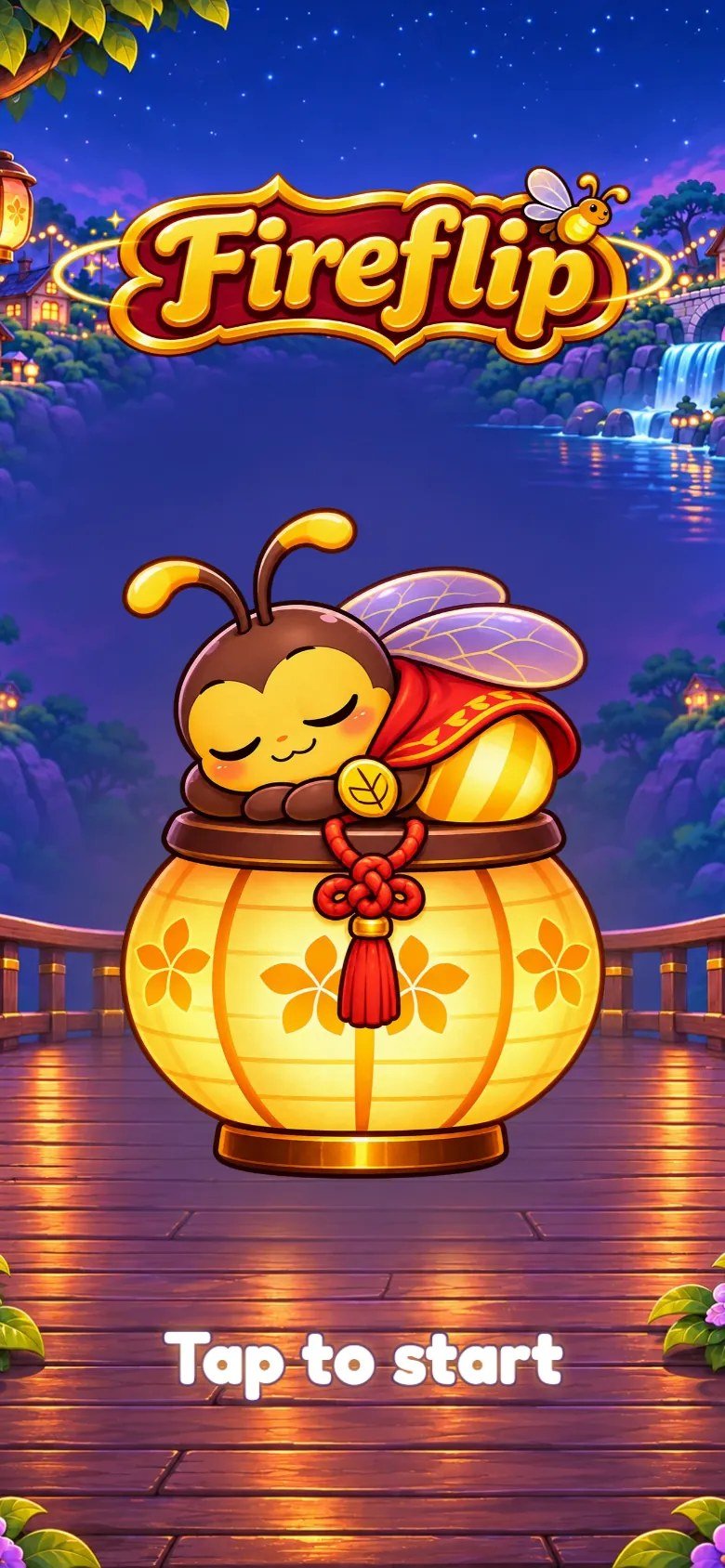
Marks on the screenshot
- Game logo.
- Flick, the mascot, asleep on a lantern (a lantern alone when the mascot is switched off).
- "Tap to start": the first tap opens the menu and starts the sound.
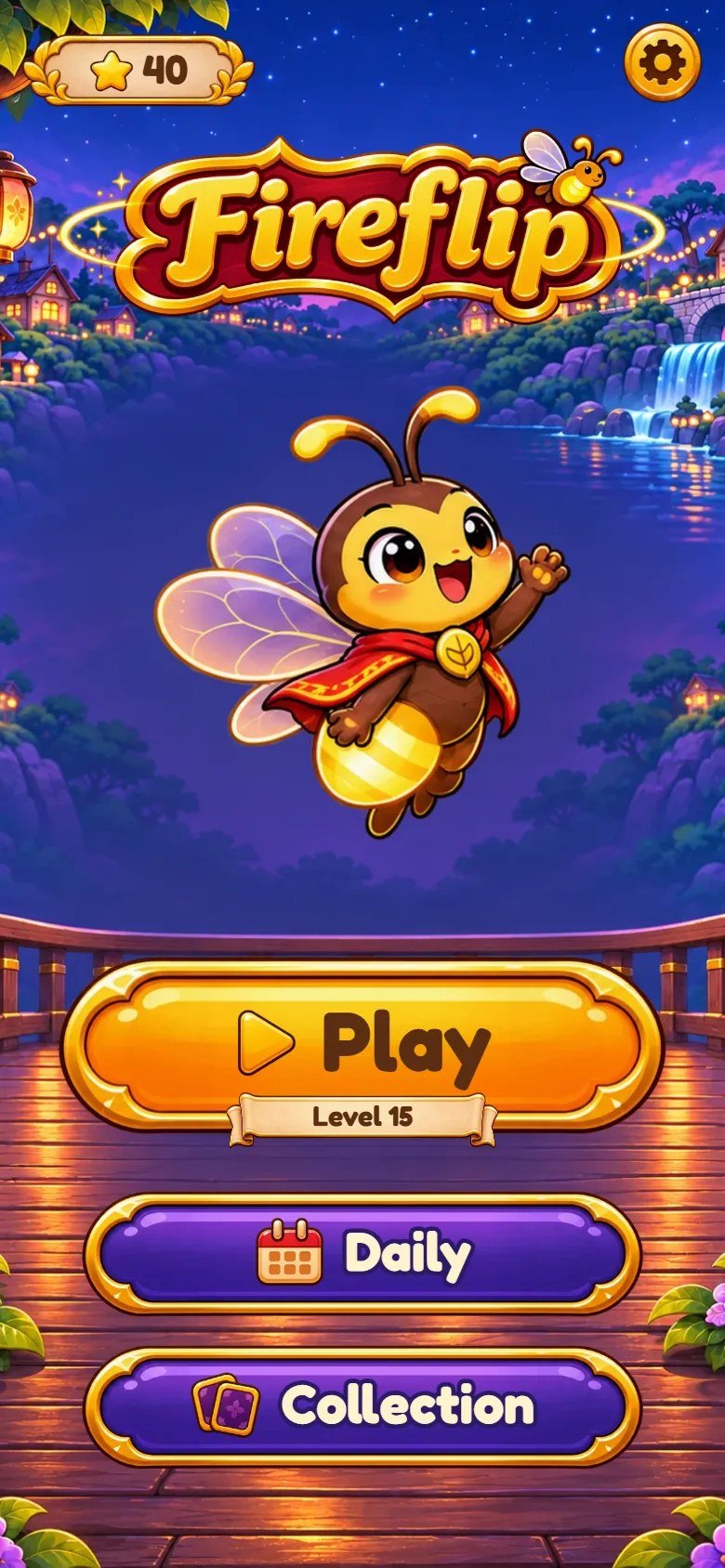
Marks on the screenshot
- Total of stars earned.
- Settings.
- Flick waves; a tap makes him cheer.
- Play: opens the map at the next level to play (shown on the ribbon).
- Daily board.
- Collection of Glimmers.
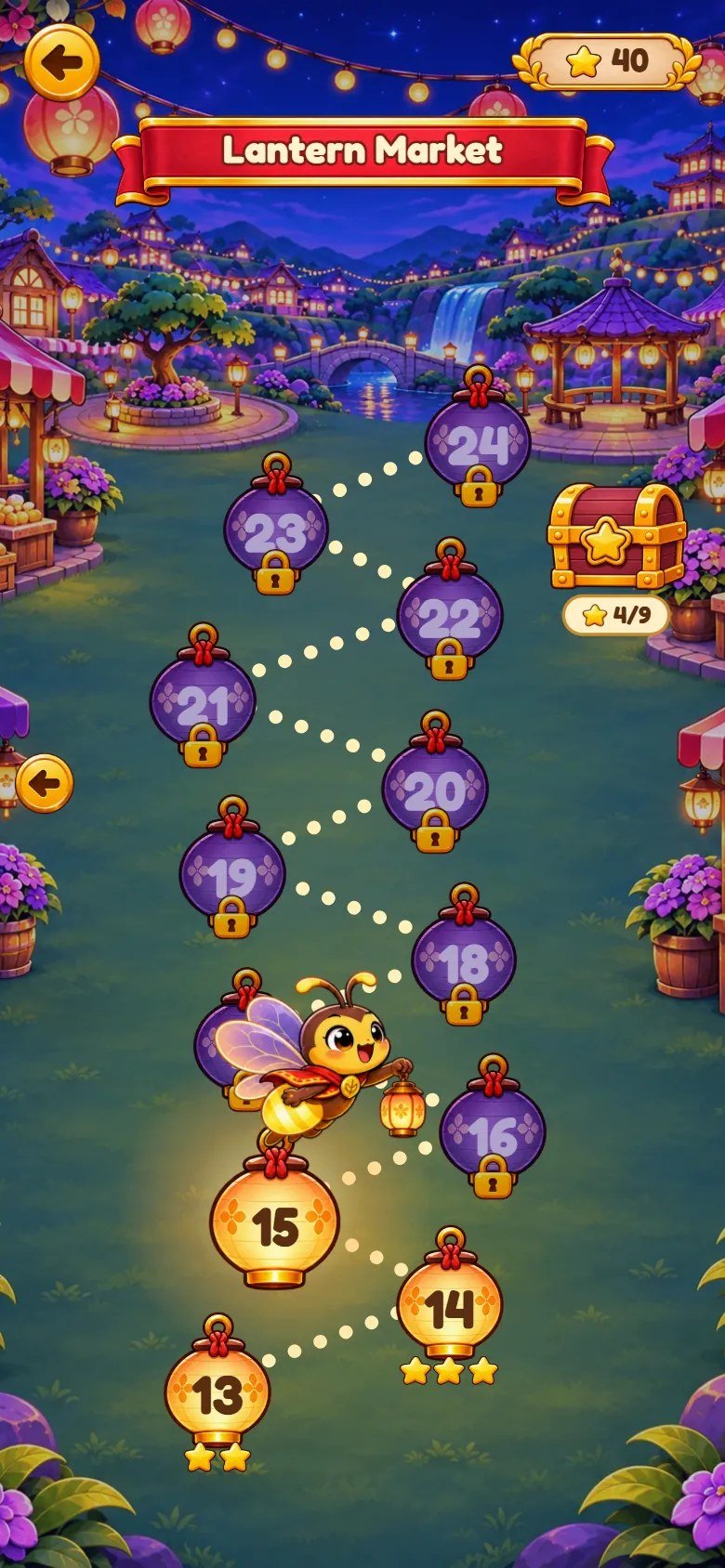
Marks on the screenshot
- World name.
- A finished level with its stars.
- The next level to play: the firefly waits next to it.
- A locked level: it opens when the one before it is finished.
- Star chest: stars collected out of 9.
- Total of stars earned.
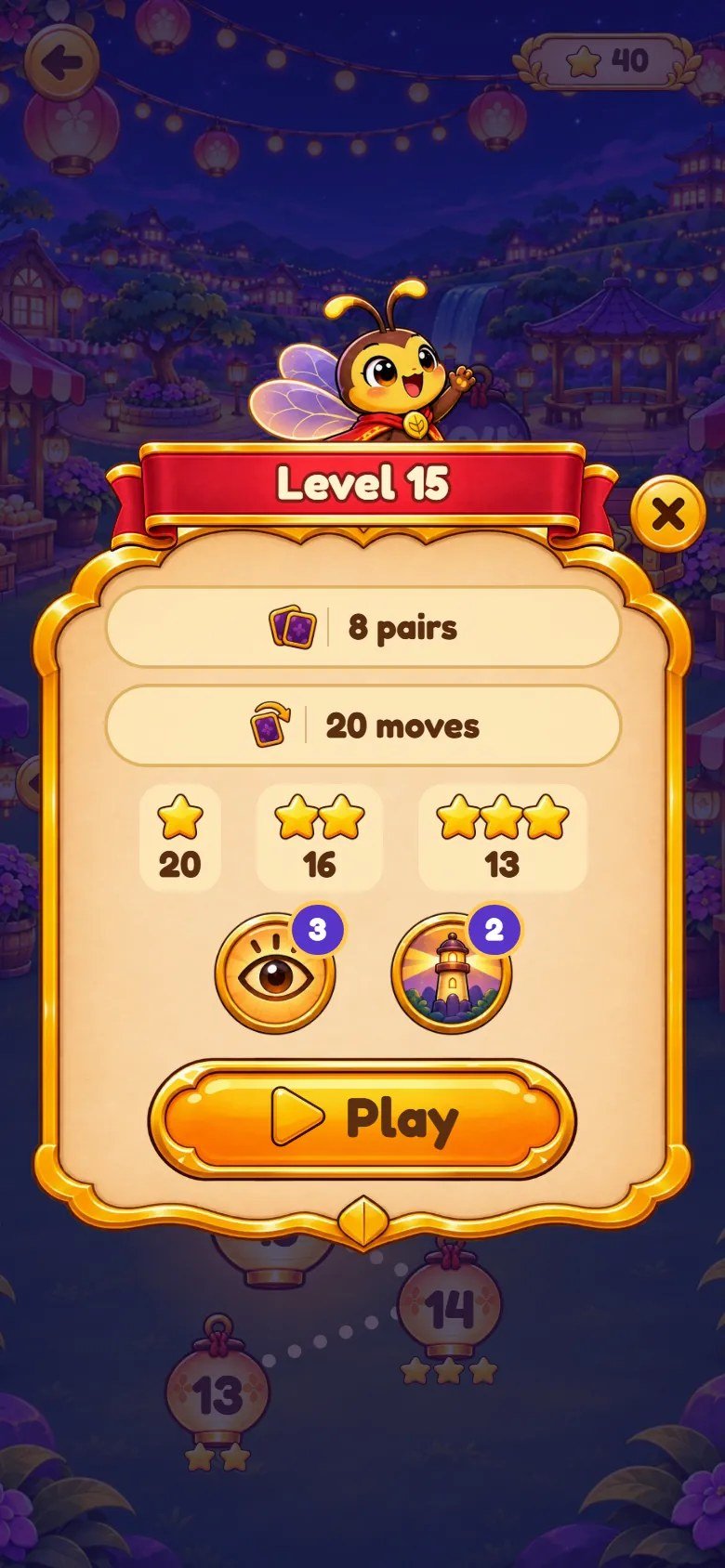
Marks on the screenshot
- Pairs on the board.
- Move limit (or "No move limit").
- Moves for 1, 2 and 3 stars.
- Peek and Beacon charges you have.
- Starts the level.
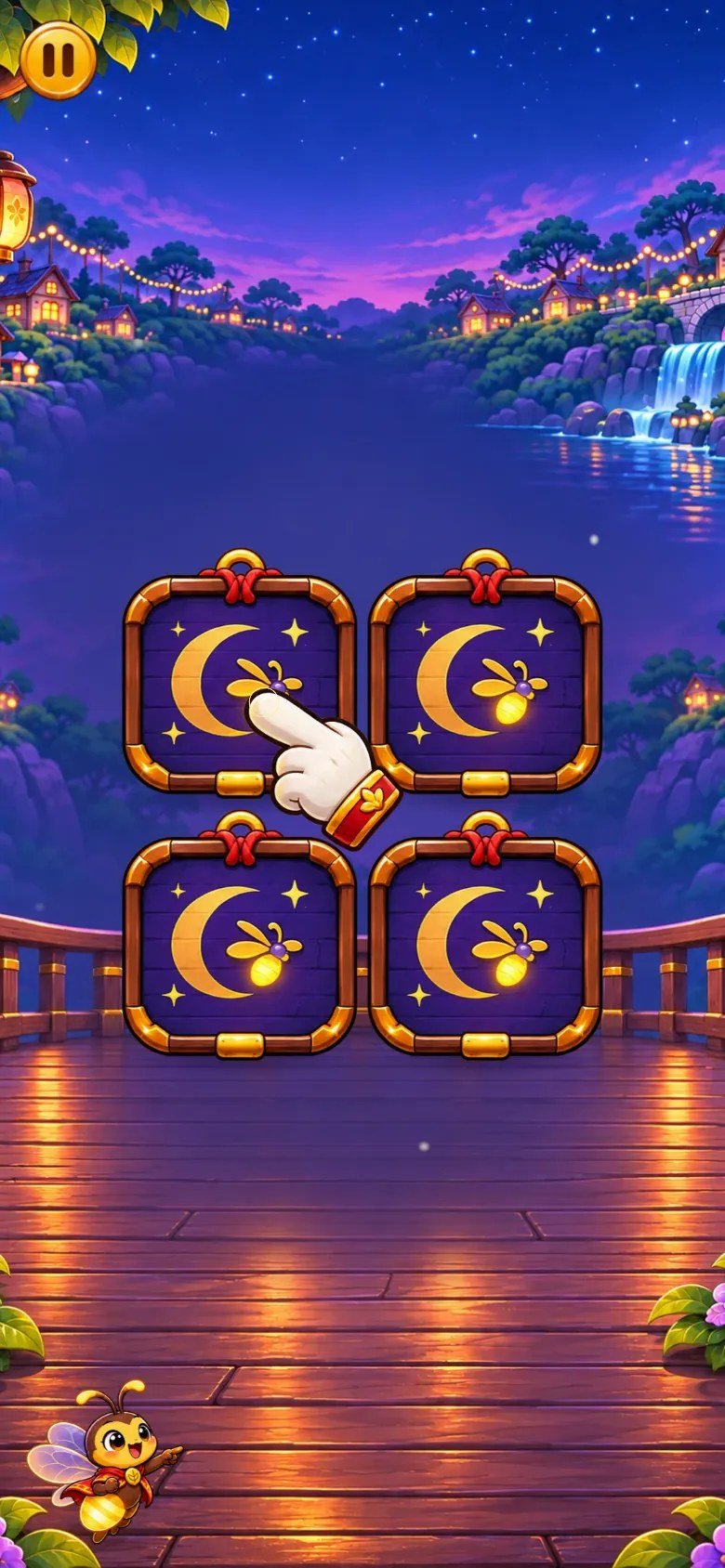
Marks on the screenshot
- The hand and the glowing card: tap where it points.
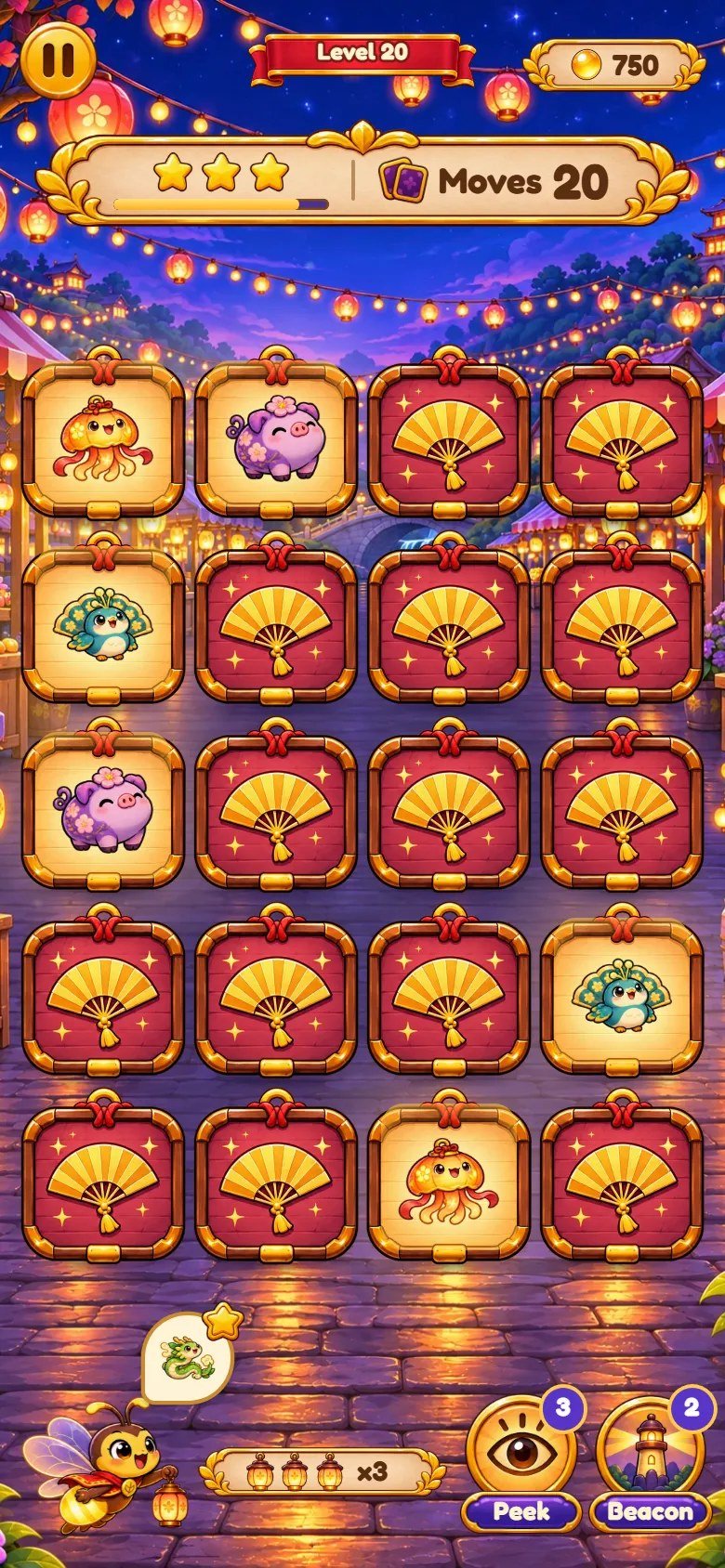
Marks on the screenshot
- Pause.
- Level number.
- Score of this level.
- Stars you would get now, and a bar that empties as moves are used.
- Moves left (or moves made, on levels with no limit).
- Flick: he leans toward the cards, cheers, worries when few moves are left and naps when nobody plays.
- Request: find this pair for a bonus.
- Pairs in a row (x1 to x3 multiplies the points).
- Peek power and its charges.
- Beacon power and its charges.
- A pair found: it stays open and lit.
- A card face down.
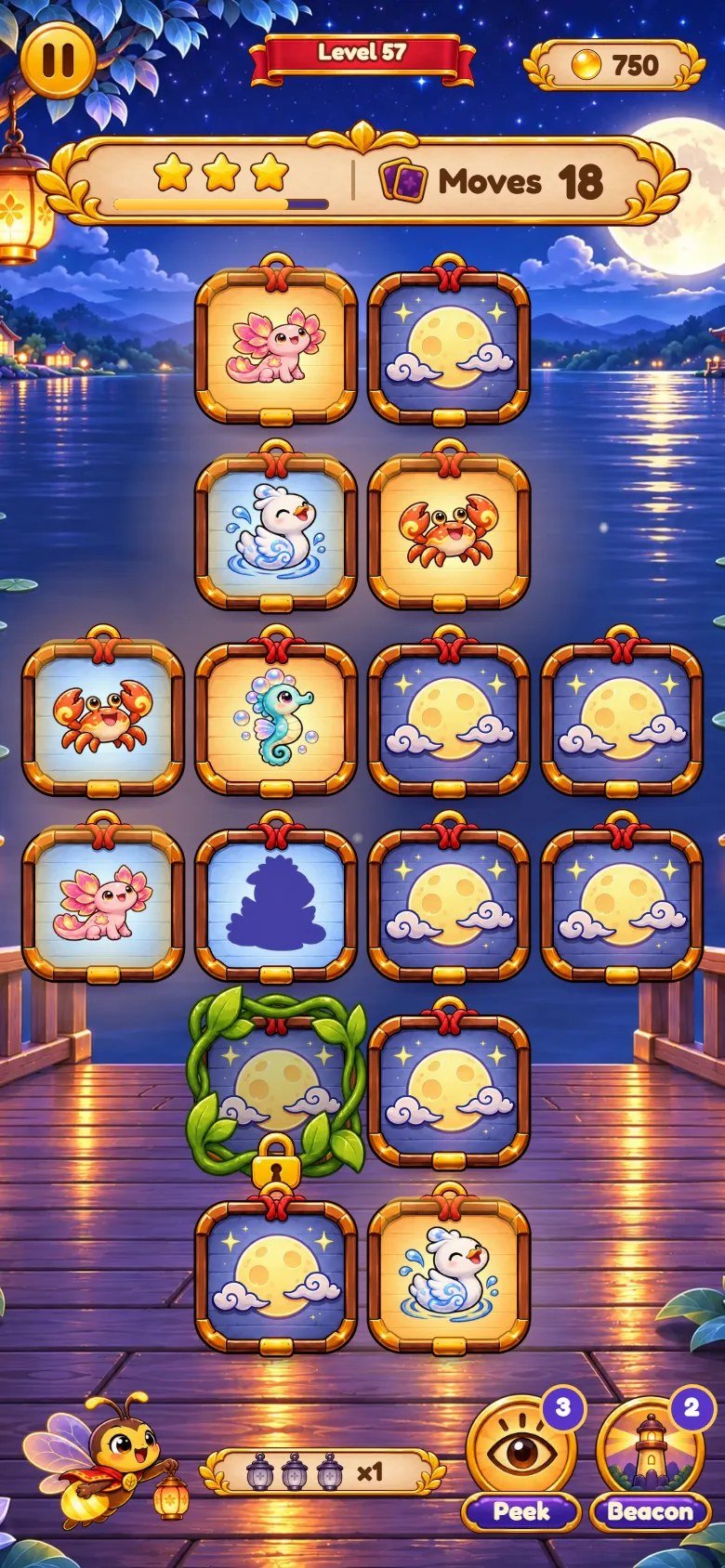
Marks on the screenshot
- A Glimmer and its shadow, matched.
- A card locked by vines.
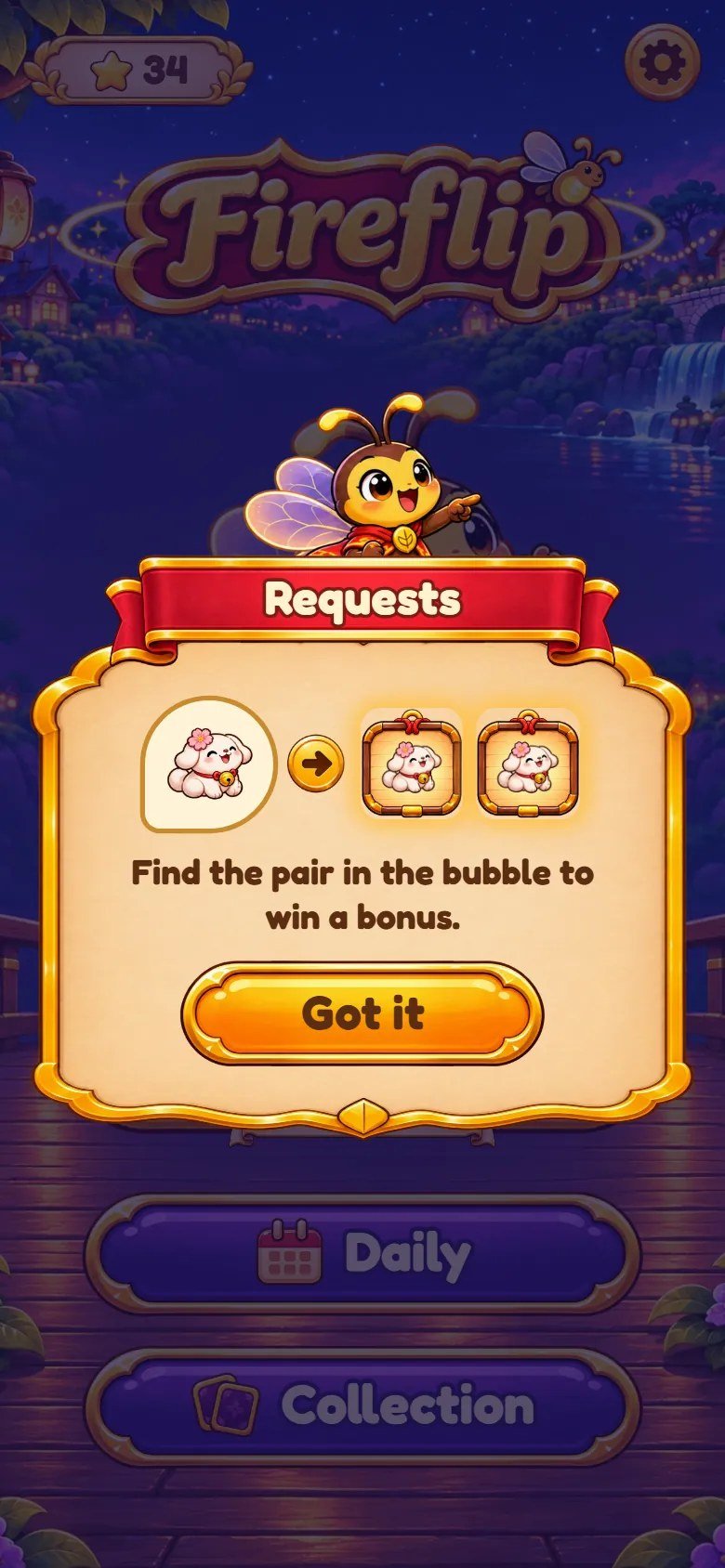
Marks on the screenshot
- The name of the rule.
- A small picture of how it works, with one sentence below.
- Starts the level.
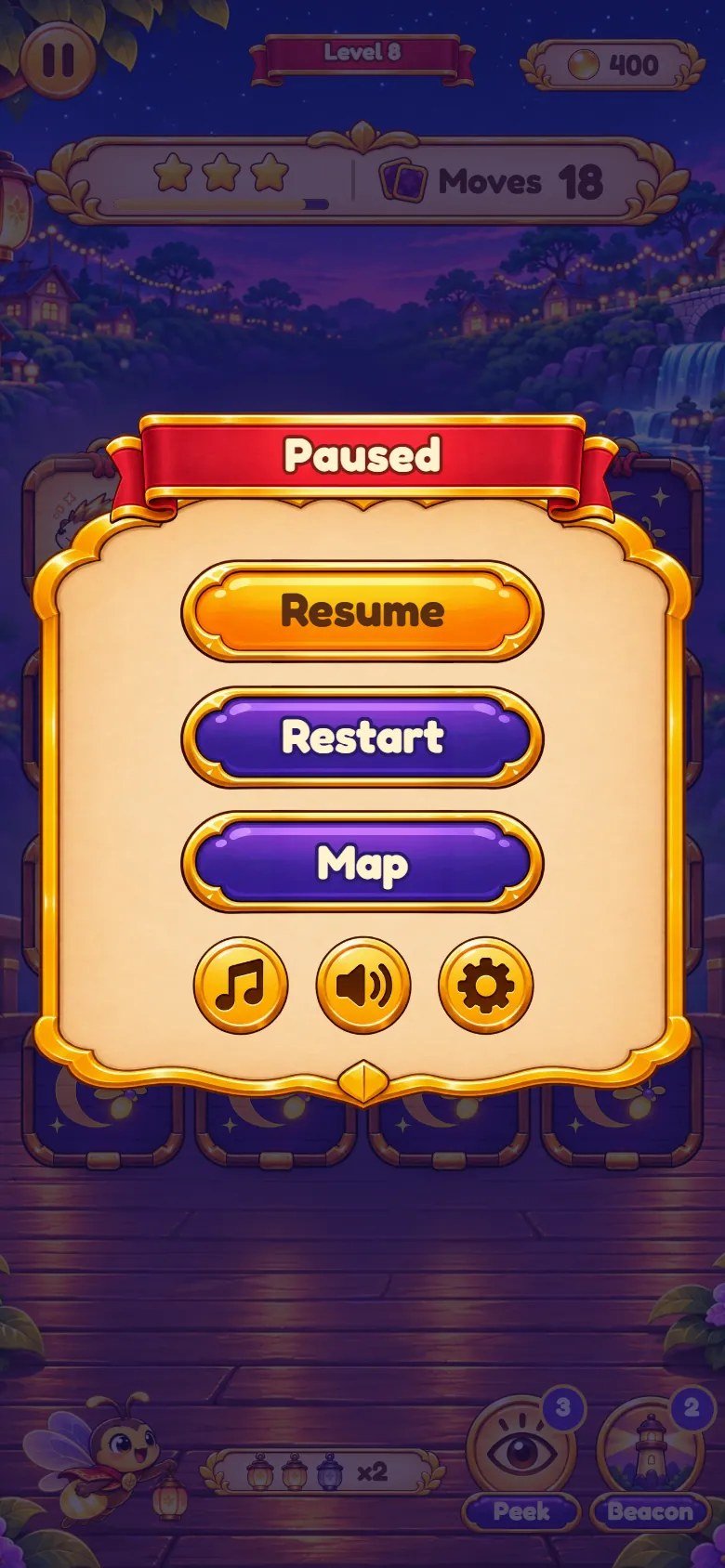
Marks on the screenshot
- Back to the level.
- Start the level again.
- Back to the map.
- Music on or off.
- Sound effects on or off.
- Settings.
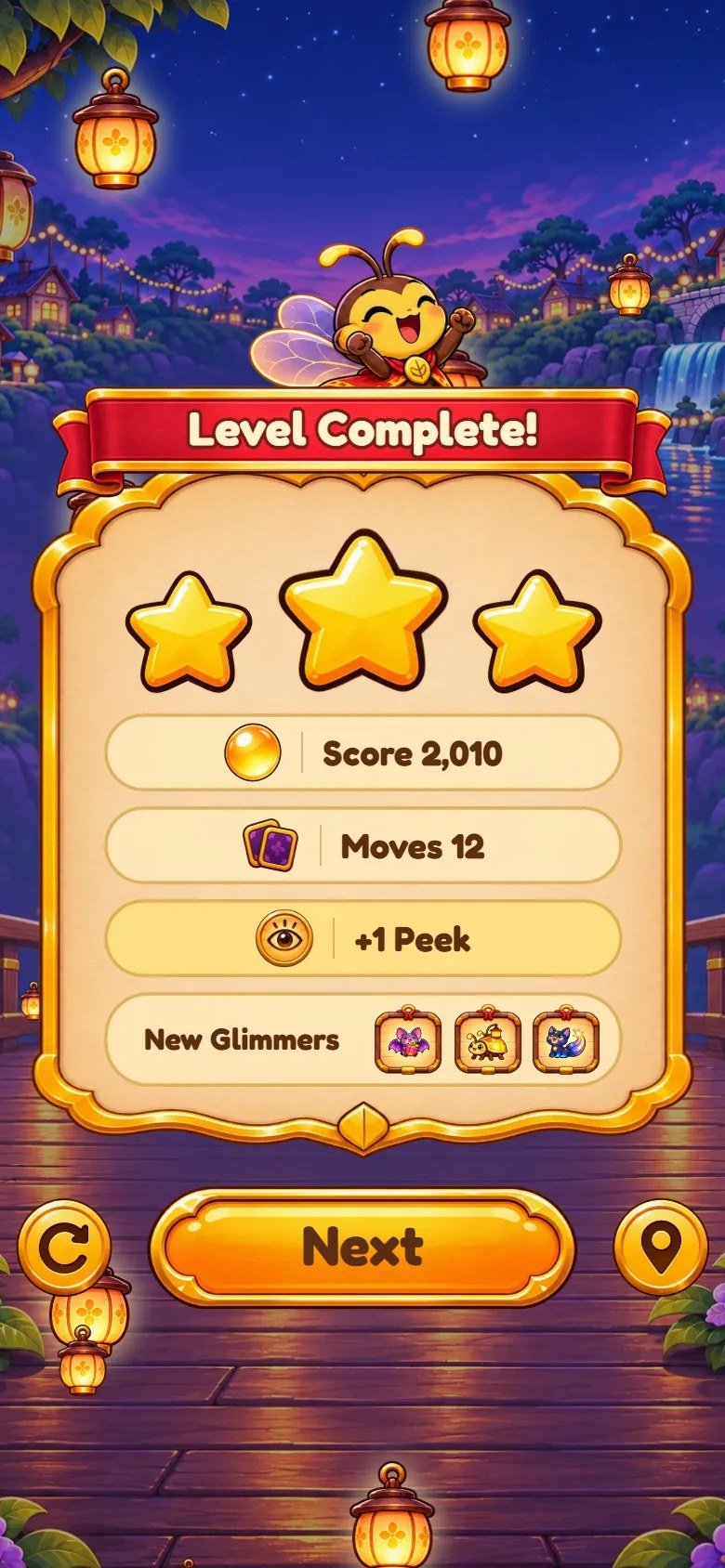
Marks on the screenshot
- Stars earned.
- Score, then the moves, the rewards and the new Glimmers.
- Play the level again.
- Next level.
- Back to the map.
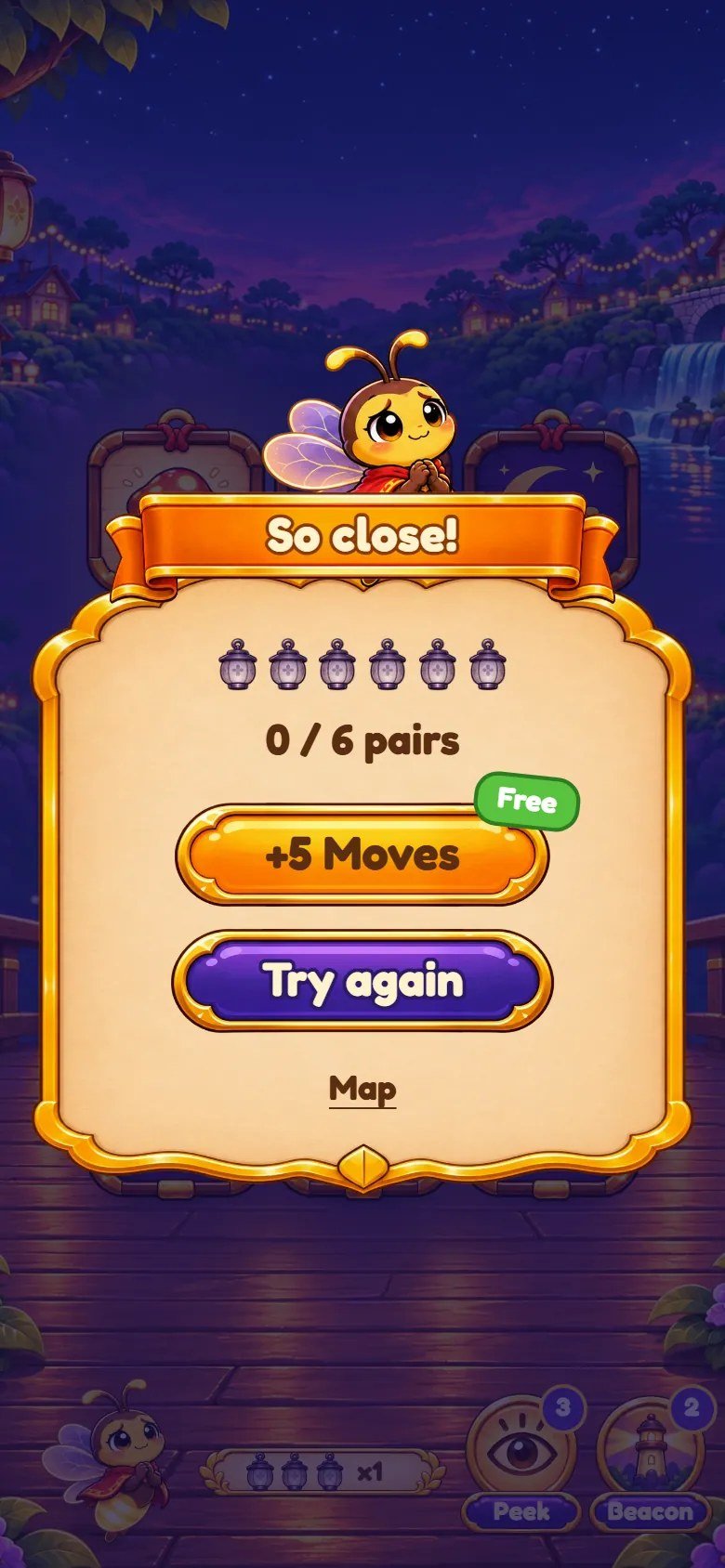
Marks on the screenshot
- Pairs found out of the total.
- +5 Moves, free, once per attempt.
- Start the level again.
- Back to the map.
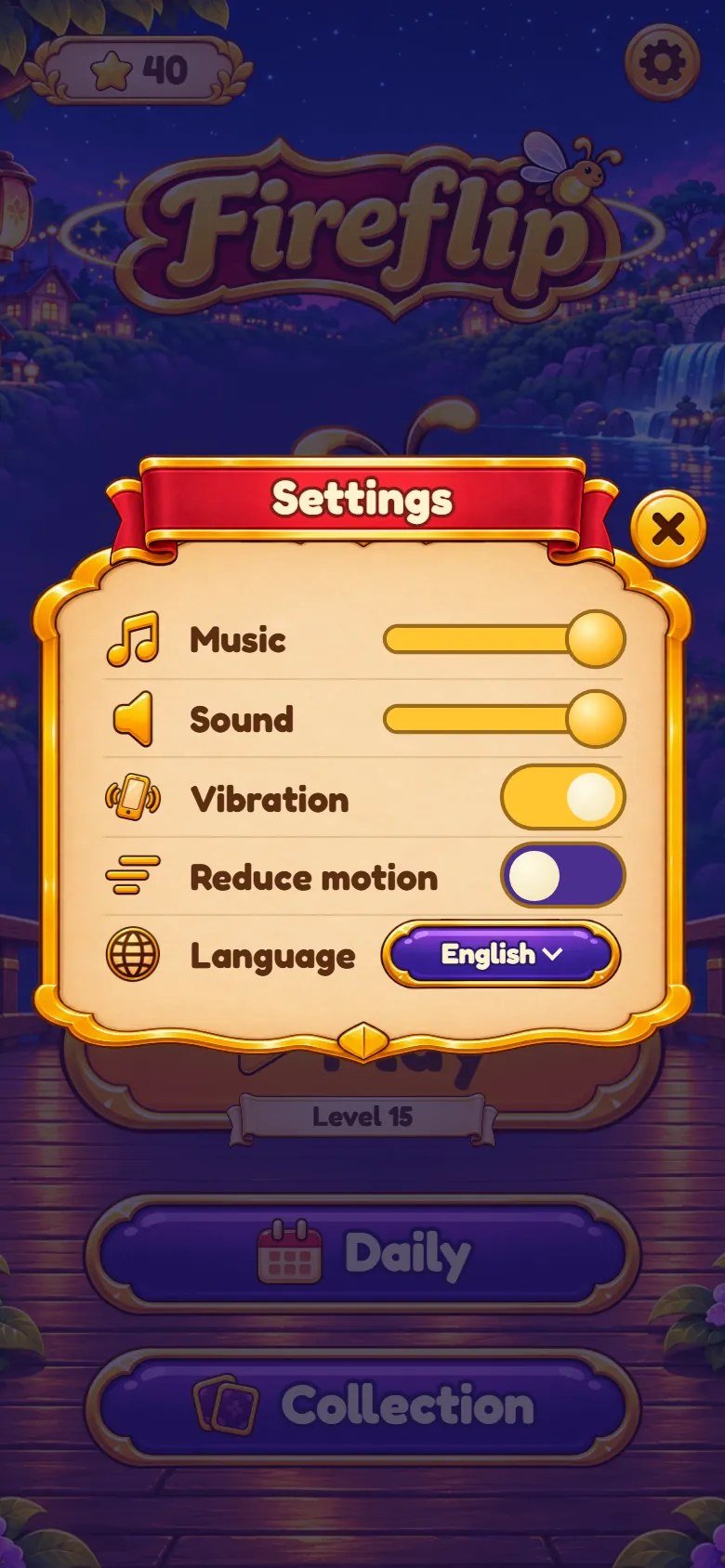
Marks on the screenshot
- Music volume.
- Sound effects volume.
- Vibration (Android phones).
- Reduce motion.
- Language: a list of the 14 languages.
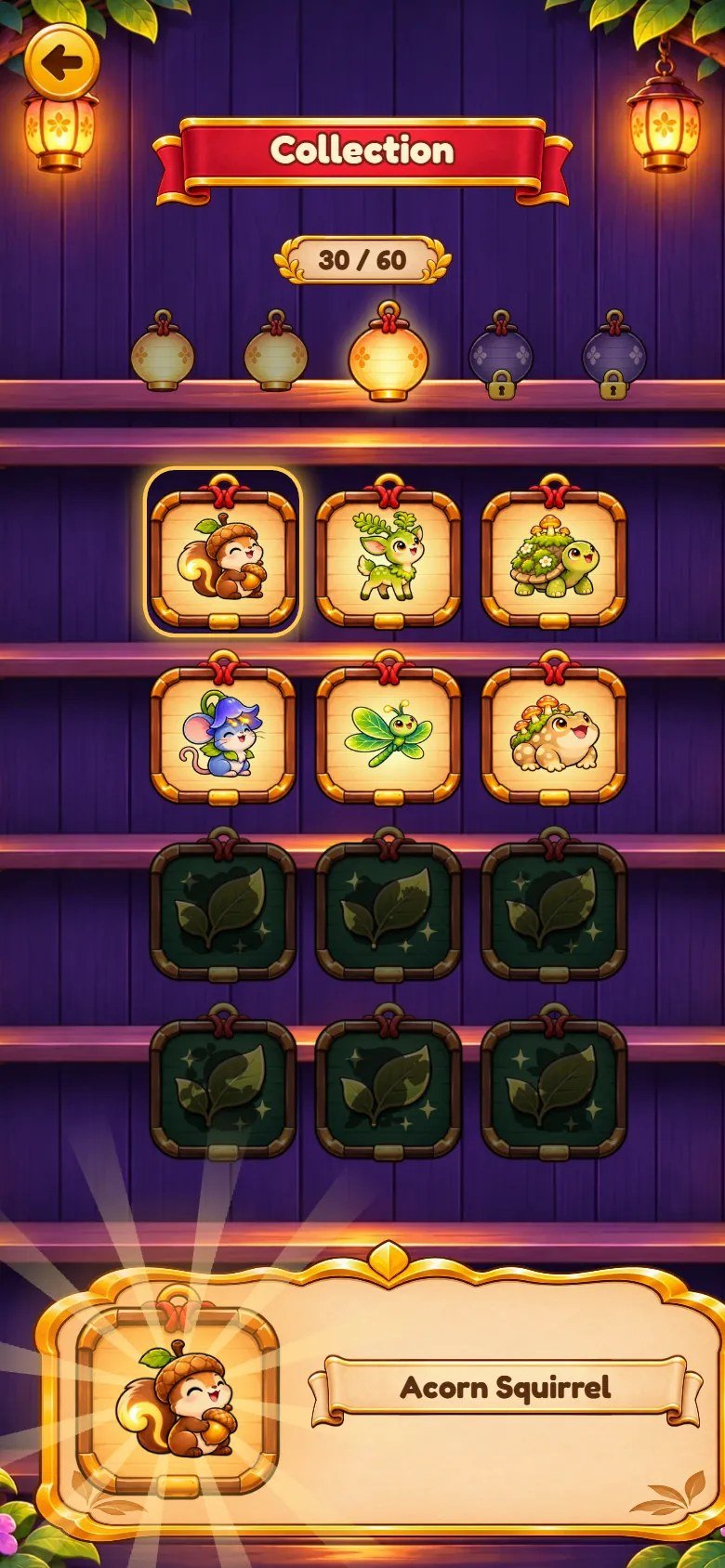
Marks on the screenshot
- Glimmers found out of 60.
- One lantern per world (dimmed until you reach that world).
- A Glimmer found: tap it to see it big and hear its note.
- A Glimmer not found yet (card back).
- The Glimmer chosen, with its name.
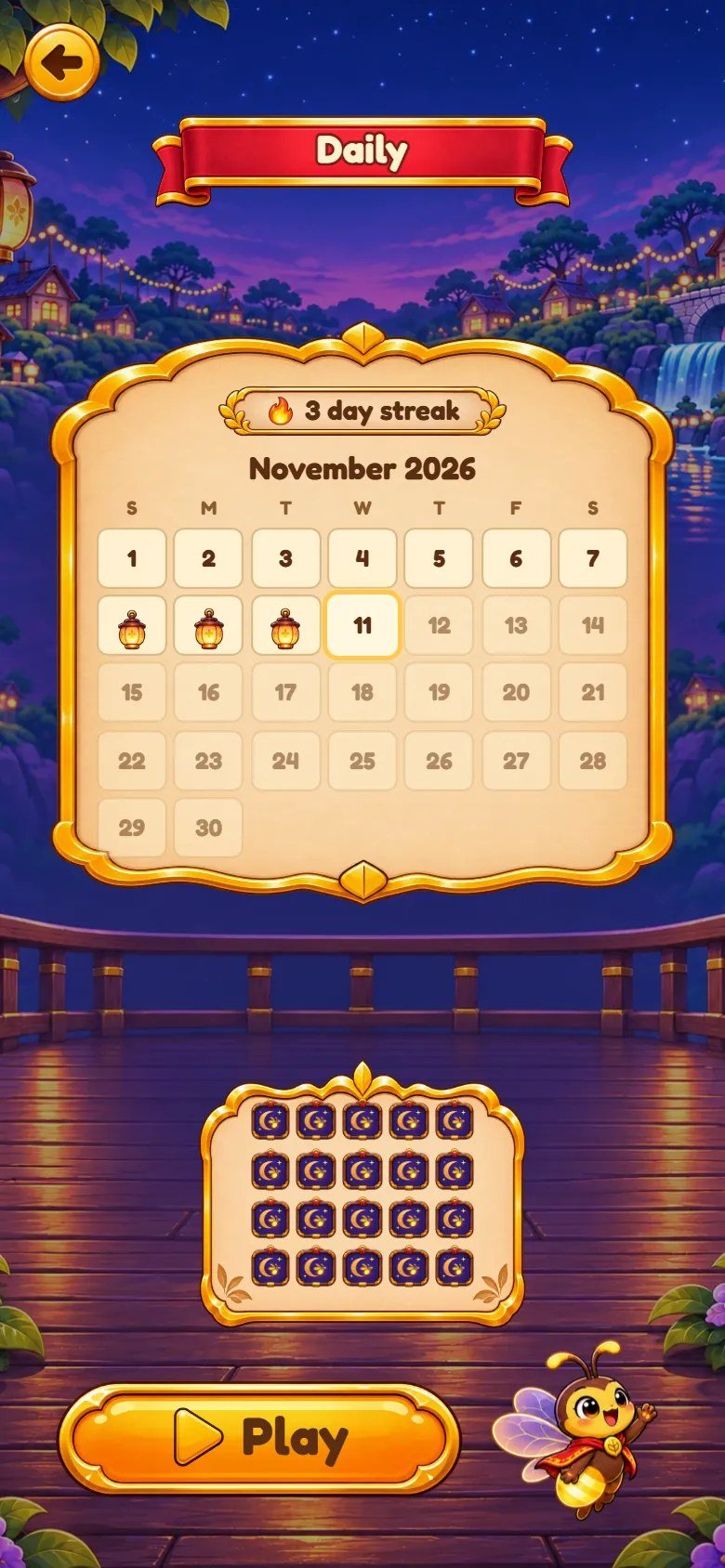
Marks on the screenshot
- Days played in a row.
- Today; the days already played are marked.
- The shape of today's board.
- Play today's board (the best result of the day is kept).
6 File map
game/ and source/ have the same game files. source/ adds the developer tools. Every code file is plain,
readable JavaScript or CSS, and every JavaScript, CSS and HTML file ends with an End of comment.
game/                          upload these contents to your web host
  index.html                   entry page
  css/theme.css                colors, font, card pictures (start here)
  css/base.css, game.css, screens.css   the other styles
  src/main.js                  start-up, "Tap to start", local-only test tools
  src/config/game.config.js    title, save keys, languages, features, powers
  src/config/levels.js         the 5 worlds, 60 levels and the Daily boards
  src/config/card-sets.js      the card pictures and Glimmer names
  src/config/audio.js          sound effects, music and the mix
  src/game/                    rules, levels catalog, random numbers, robot
  src/app/                     screens, popups, layout, save, mascot
  src/render/feel.js           timings and effects ("feel" numbers)
  src/render/fx.js             particles
  src/audio/audio.js           the sound player
  src/i18n/                    texts: one file per language (14)
  assets/bg/                   backgrounds (portrait, landscape, wide)
  assets/cards/                card backs, fronts and the 60 Glimmers
  assets/mascot/               the firefly in 6 poses
  assets/ui/                   buttons, ribbons, panels, icons
  assets/audio/                music (2 tracks) and 69 sound effects
  assets/fonts/                Fredoka font and its license
  DOCUMENTATION.txt            short note that points to this guide
source/                        the same editable files, plus:
  package.json                 npm test, npm run build, serve, balance
  package-lock.json, .prettierrc, README.md
  test/                        node --test tests
  tools/build.mjs              copies the game into dist/
  tools/serve.mjs              local preview server
  tools/balance.mjs            level balance report
documentation/index.html       this guide (offline)
documentation/customization.html   step-by-step customization guide
documentation/img/             the screenshots of both guides
DOCUMENTATION.html             shortcut to this guide
CUSTOMIZATION.html             shortcut to the customization guide
START-HERE.txt, CHANGELOG.txt
THIRD-PARTY-LICENSES/          font license
-
Most changes are made in
src/config/(levels, cards, sounds, features, powers) andcss/theme.css(colors, font, interface pictures). The customization guide explains each one step by step. -
src/game/rules.jsholds the rules with no screen code;src/app/draws the screens and popups;src/render/feel.jsholds every timing and effect number. -
Pictures are WebP. The backgrounds come in three files per place:
-p(portrait),-l(landscape) and-w(wide screens). - Code comments are in English.
7 Customization
CUSTOMIZATION.html, in English):
real screenshots with numbered parts, the exact file of each part, and step-by-step recipes.
Customization Guide (step by step, in English)
Cards: each world has a folder in assets/cards/ and a list in src/config/card-sets.js (file name and the
Glimmer name shown in the Collection). The card backs are assets/cards/back-1.webp to back-5.webp.
Levels: src/config/levels.js has one line per level: board size, move limit, seconds of peek at the start, and the
world rules. After a change, run npm test and npm run balance in source/.
Powers and rewards: src/config/game.config.js (starting charges, the 3-star reward, the chest every 9 stars, the +5
Moves rescue, the quiet help after a loss). The same file can switch off the mascot, the Daily board and the Collection.
Look and feel: colors, font and interface pictures in css/theme.css; timings, particles and sound pitch in
src/render/feel.js.
Music and sound effects
Music, sound effects and art are included with the template. You can keep them, replace them or remove them.
To replace a sound, save your MP3 with the same name in assets/audio/sfx/ or assets/audio/music/.
src/config/audio.js lists every sound: some have two versions and the game picks one at random each time; mix sets how
loud each channel plays.
To remove a sound, delete its file or its line: that sound is simply silent and the game keeps working. Deleting the whole
assets/audio/ folder gives a silent game with no error.
src/config/game.config.js so the copies do
not share progress (see Saves).
8 Languages
The interface has 14 languages: English, Portuguese, Spanish, German, French, Italian, Dutch, Polish, Russian, Turkish, Japanese, Korean, Chinese and Indonesian. On the first visit the game follows the browser language (English when it has no file for it); the player can change it in Settings, and the choice is saved.
Texts are in src/i18n/, one file per language. English (en.js) is the source: a text missing in another file shows in
English. To add a language, copy en.js, translate the texts on the right (keep the words in braces, such as {n}) and add
the language to languages in src/config/game.config.js.
The Glimmer names ("Ember Fox", "Moon Snail"...) are English proper names kept in src/config/card-sets.js, the same in every language.
Translate them there if you want.
9 Saves
- Progress (levels, stars, scores, Glimmers found, power charges, chests, Daily results) and settings (volumes, vibration, Reduce motion, language) are kept in the player's browser (localStorage). Nothing is sent to a server.
-
The two keys start with
fireflip.template.save.v1. They are set bysaveKeyandsettingsKeyinsrc/config/game.config.js. - Clearing site data, a private window or a different address (another domain or subdomain) starts a new save. Clearing only cached files keeps it.
fireflip.template.save.v1.progress
fireflip.template.save.v1.settings
10 Optional tools with Node.js (for beginners)
You do not need Node.js to publish the game. It is only used for the tools of source/: tests, a local server, the copy step and the
level balance report. The project has no dependencies to download.
1. Install Node.js 26.13 or newer (the current LTS) from nodejs.org. Windows and macOS: download the LTS installer and keep the option that adds Node.js to the PATH. Linux: use the package of your distribution or a version manager such as nvm.
2. Open a terminal in the source/ folder. Windows: open the folder, right-click an empty area and choose "Open in
Terminal" (or Shift+right-click). macOS: open Terminal, type cd , drag the folder into the window and press Enter.
3. Check the versions. The first command must show v26.13.0 or newer:
node --version
npm --version
4. Install and test. npm ci checks package-lock.json (there is nothing to download).
npm test runs the tests: the rules, every level, a robot player, the saved volume and the save keys. All must pass.
Node 26 may print an ExperimentalWarning about localStorage during the tests. It is only a notice of Node.js and does not
mean a test failed.
npm ci
npm test
5. Try the game on your computer. Open http://localhost:5197/ in the browser. Press Ctrl+C in the terminal to stop the
server.
npm run serve
6. Build. The build does not compile anything: it empties dist/ and copies index.html, css/,
src/ and assets/ into it, plus DOCUMENTATION.txt. A file you delete or rename in source/ also
disappears from dist/. Upload the contents of dist/ as explained in the FTP section.
npm run build
7. Optional: npm run balance plays every level many times with a robot and prints how many moves a careful and a
casual player need.
Common errors
-
'node' is not recognizedorcommand not found: Node.js is not on the PATH. Close and open the terminal again; if it persists, install Node.js again with the PATH option. -
npm.ps1 cannot be loaded because running scripts is disabled(Windows PowerShell): runnpm.cmd ciinstead ofnpm ci(the same for the other commands), or use the Command Prompt. -
ENOENT ... package.json: the terminal is not in thesource/folder. Go to it withcdand try again. EBADENGINE: your Node.js is older than 26.13. Install the current LTS.-
npm cicomplains that the lock file does not match: you editedpackage.json. Restore it from the ZIP or runnpm installonce. -
A port is already in use: start the server on another one,
PORT=8080 npm run serve(macOS, Linux) or$env:PORT=8080; npm run serve(PowerShell).
Test tools (only on your computer)
On localhost, 127.x and private network addresses (192.168.x), adding ?debug=1 to the address
loads test tools in the browser console (F12, Console), under fireflip:
http://localhost:5197/?debug=1
fireflip.level(8)opens level 8;fireflip.daily()opens today's board.-
fireflip.win()andfireflip.lose()finish the level being played through the real rules (on level 1 of a new save, follow the hand instead). -
fireflip.pop('win'),pop('lose'),pop('settings'),pop('chest'),pop('rule', 2)open any panel. -
fireflip.unlock(24)finishes the first 24 levels with 3 stars;fireflip.reset()clears the save. fireflip.lang('de')changes the language;fireflip.go('menu')opens a screen.
?debug=1 is ignored and fireflip does not exist, so players of your published game cannot use
these tools. The full list is at the top of src/app/debug.js.
11 Updates and browser cache
After you upload a new version, a browser may still show the old files for a while. The progress of the players is not affected by the steps below.
Clearing the cache without losing progress
Progress is stored in this browser, not on the server. Clearing cached images and files, or doing a hard reload, keeps your progress.
Computer: press Ctrl+F5 on Windows and Linux, or Cmd+Shift+R on macOS. Phone: in the browser settings, choose the option to clear cached images and files.
Do not choose cookies and site data, or clear site data, for the game's address. That deletes the local save.
To check the new version quickly, open the game in a private (incognito) window: it starts without cached files and without a save.
Some hosts and CDNs (for example Cloudflare) keep their own copy of the files. Purge or clear the cache in the hosting or CDN panel after uploading, or wait for it to expire.
You can also add a version to the address you share, so browsers treat it as a new page, for example:
https://your-site.example/games/fireflip/?v=2
12 Licenses
Font: Fredoka, SIL Open Font License 1.1. The license text is in game/assets/fonts/LICENSE.txt and in
THIRD-PARTY-LICENSES/.
Music, sound effects and art (cards, backgrounds, mascot, interface) are included with the template. You can use them in your game, replace them or remove them.
No third-party code ships with the game and the project has no npm dependencies.
13 Troubleshooting
-
Blank page when opening
index.htmlby double-click: browsers block JavaScript modules from files. Open the game through a web address (your host, ornpm run serve). - No sound: the sound starts after the first tap on "Tap to start". Check the volume in Settings, the device volume and, on iPhones, the silent switch.
-
Pictures or sounds missing (404 in the browser console): upload the whole contents of
game/keeping the folders. On most hosts file names are case sensitive. -
A JavaScript module error about the MIME type: the host must send
.jsfiles astext/javascript. Most hosts do; otherwise add that type in the hosting panel. - The old version still shows after an update: see Updates and browser cache.
- The progress disappeared: the save belongs to the browser and the address. Another domain, subdomain or private window starts a new save, and clearing site data deletes it.
-
The game stops after you edit a
.jsfile: press F12 and open the Console: it shows the file and the line with the error (often a missing comma, quote or brace). Compare it with your backup.
14 FAQ
Do I need a database, PHP or a special server?
Can I put the game in a subfolder?
/games/fireflip/.
Can I remove the mascot?
mascot: false in features in src/config/game.config.js. The Daily board and the Collection can be
switched off the same way.
Can I make the levels easier or harder?
src/config/levels.js, then run npm test and
npm run balance.
Does it include ads, payments or an online ranking?
Can I change the name and the logo?
title in src/config/game.config.js and <title> in index.html; the logo
is assets/ui/logo.webp. The customization guide shows each step.
15 Support
Questions about this template and custom work: willian@polargames.com.br.
Support request
When you write to support, include the browser and device, the game version, the page address, the steps that caused the problem, a screenshot and the first error shown in the browser console. Never send passwords, payment details or secret keys.