Customization Guide
Make Fireflip your own game: new card pictures, backgrounds, your own logo and mascot, texts, music and sounds, and easier or harder levels. Every recipe below is a short list of steps and says exactly which file to open. You do not need to know how to program. All pictures on this page are real screenshots of the game in this package.
1. Before you start
Free tools you need:
- A code text editor: Visual Studio Code (Windows, Mac, Linux) or Notepad++ (Windows). Do not use Word or WordPad: they break the files.
- An image editor that can export WebP with a transparent background: Photopea (in the browser), GIMP or Krita. You can also save a PNG and convert it to WebP at squoosh.app.
- For music and sounds: Audacity (exports MP3).
Which folder to edit. The download has two copies of the game:
-
game/is the finished game. Simplest way: change files directly insidegame/and upload that folder. No other tools are needed. -
source/is the same game with tests, a local server and a level report. If you use it, editsource/and runnpm run build: it copies the game tosource/dist/, and that folder is what you upload. Pick one way and keep to it.
The paths in this guide (for example assets/ui/logo.webp) are the same inside both folders.
See your changes on your computer. The game must be opened from a web address, not by double-clicking index.html. Two easy
ways:
-
With Node.js: in
source/, runnpm run serveand openhttp://localhost:5197(the main buyer guide explains how to install Node.js, step by step). - With Python (python.org): open a terminal in the game folder, run the command below and open
http://localhost:8080.
python -m http.server 8080After each change, reload the page with Ctrl+F5 (Windows) or Cmd+Shift+R (Mac) so the browser does not show the old file.
localhost) you can open any level at once: add ?debug=1 to the address, press
F12, open the Console and type fireflip.level(30). These test tools do not exist on a published site.
2. Where everything is
The numbers on each screenshot match the table below it. Texts are named by their key in the language files of
src/i18n/ (recipe F).
Start screen
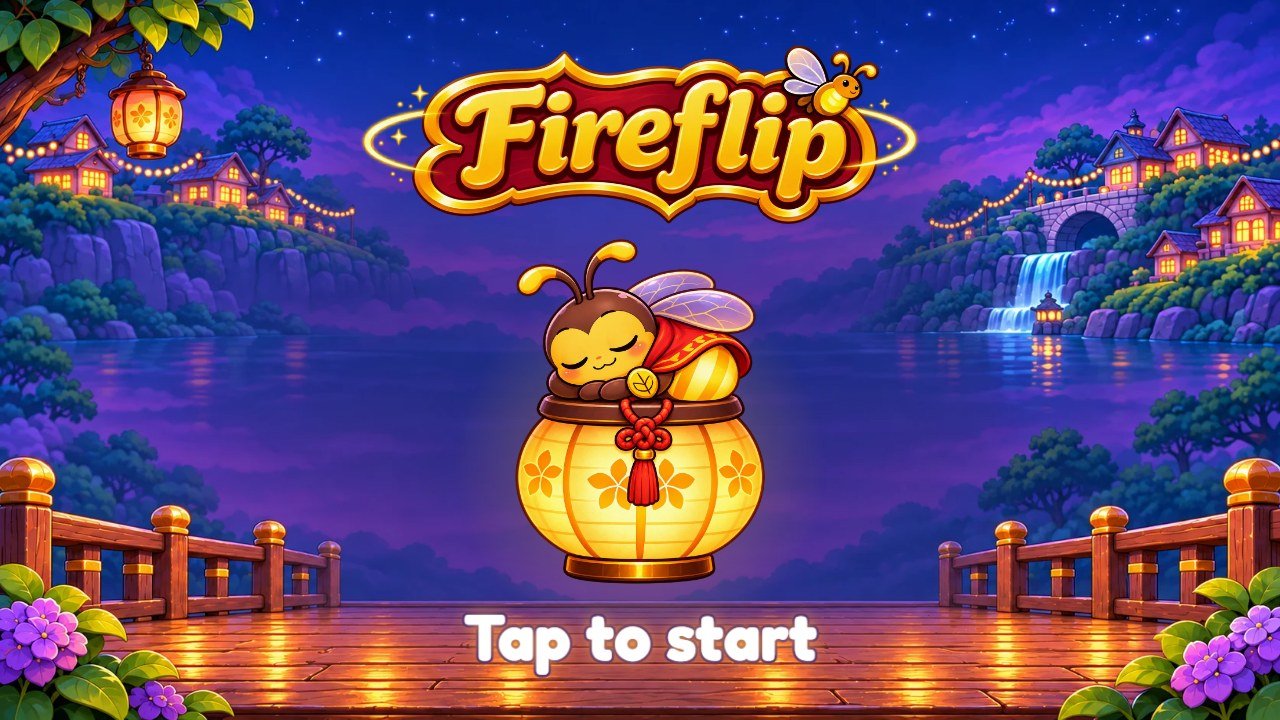 1
2
3
4
| # | What you see | File to change |
|---|---|---|
| 1 | Logo | assets/ui/logo.webp. The same file is used on the start screen, the menu and the win panel (recipe B). |
| 2 | Mascot asleep on a lantern |
assets/ui/boot-hero.webp. With the mascot switched off the game shows assets/ui/lantern.webp instead (recipe E).
|
| 3 | "Tap to start" |
Text: key tapToStart in the files of src/i18n/ (recipe F). Its glow: #boot .tap in
css/screens.css.
|
| 4 | Background |
assets/bg/w1-p.webp, w1-l.webp and w1-w.webp: the first world, also used by the start screen, the menu
and the Daily board (recipe D).
|
Menu
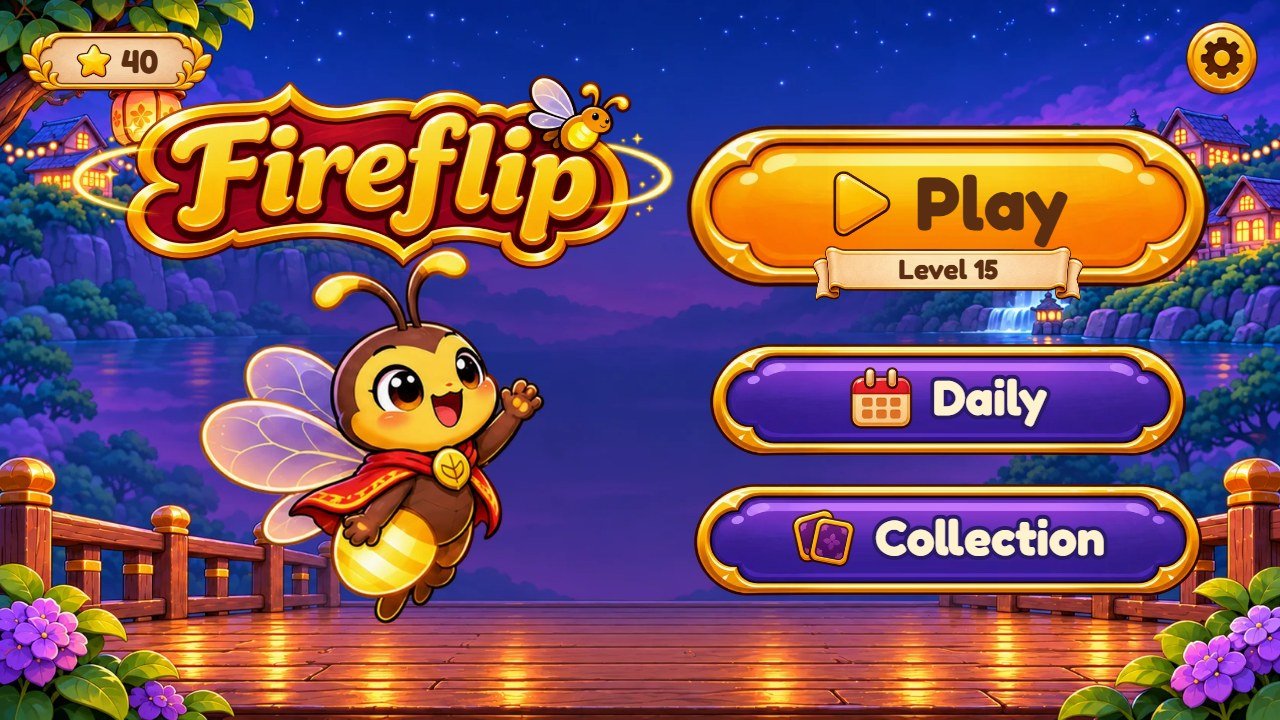 1
2
3
4
5
6
| # | What you see | File to change |
|---|---|---|
| 1 | Stars earned | Plate: assets/ui/pill.webp; star: assets/ui/star.webp. |
| 2 | Settings button | assets/ui/round/gear.webp. The other round buttons are in the same folder. |
| 3 | Logo | assets/ui/logo.webp. The same file is used on the start screen, the menu and the win panel (recipe B). |
| 4 | Flick, the mascot |
Six poses in assets/mascot/: wave, fly, cheer, worry, point,
sleep (recipe E).
|
| 5 | Play button |
Texts: keys play and level. Button: assets/ui/btn-amber.webp; icon: ic-play.webp; small
ribbon: ribbon-name.webp.
|
| 6 | Daily and Collection buttons |
Texts: keys daily and collection. Button: assets/ui/btn-indigo.webp; icons:
ic-calendar.webp and ic-album.webp. Both can be switched off (recipe L).
|
Map of a world
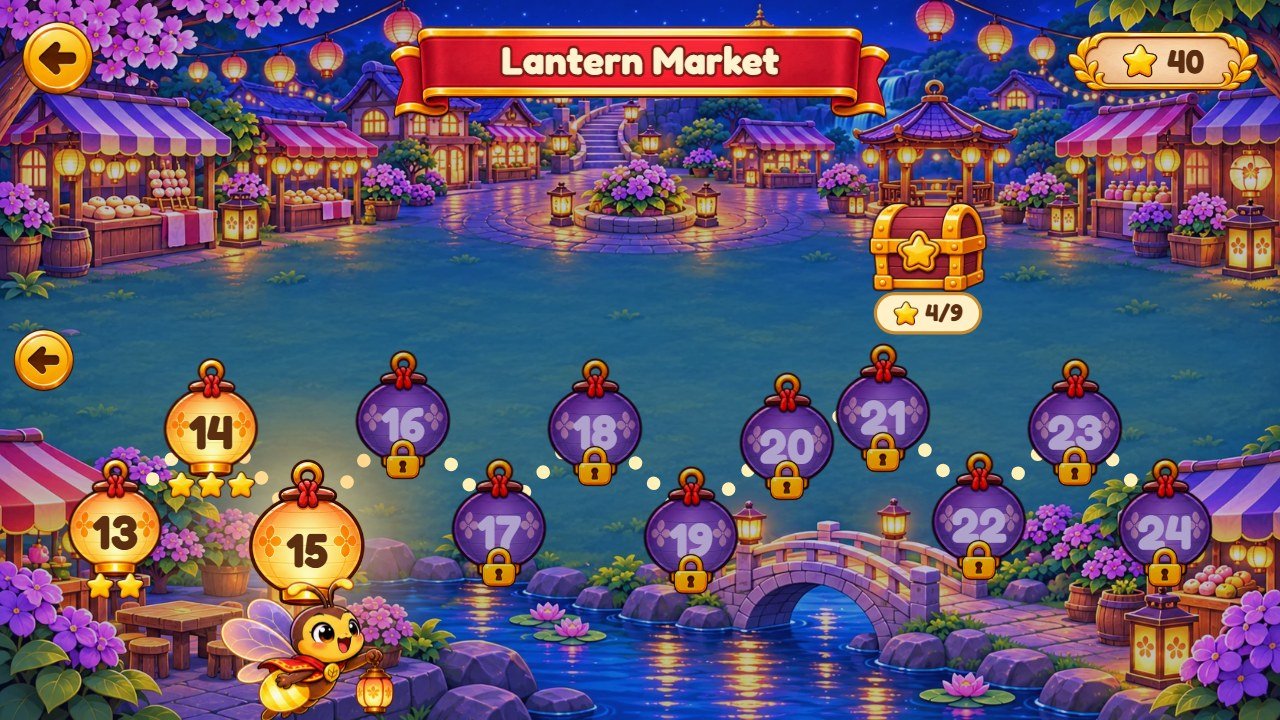 1
2
3
4
5
6
7
| # | What you see | File to change |
|---|---|---|
| 1 | World name |
Texts: keys worlds.village, worlds.market, worlds.woods, worlds.bridge,
worlds.lake. Ribbon: assets/ui/ribbon-red.webp.
|
| 2 | Finished level | assets/ui/node-done.webp, with star.webp below it. |
| 3 | Next level to play | The same node-done.webp, bigger and glowing (.node.now in css/screens.css). |
| 4 | Locked level | assets/ui/node-lock.webp with lock.webp. |
| 5 | Star chest | assets/ui/chest.webp (and chest-open.webp when it opens). How many stars and what it gives: recipe H. |
| 6 | Path of light |
Drawn by the game: its color is stroke in #map svg path, in css/screens.css. The place of each level on
the path: PATH in src/app/screen-map.js.
|
| 7 | Map background | assets/bg/map-w1-*.webp to map-w5-*.webp, three files per world (recipe D). |
A level (Whispering Woods, with locked cards)
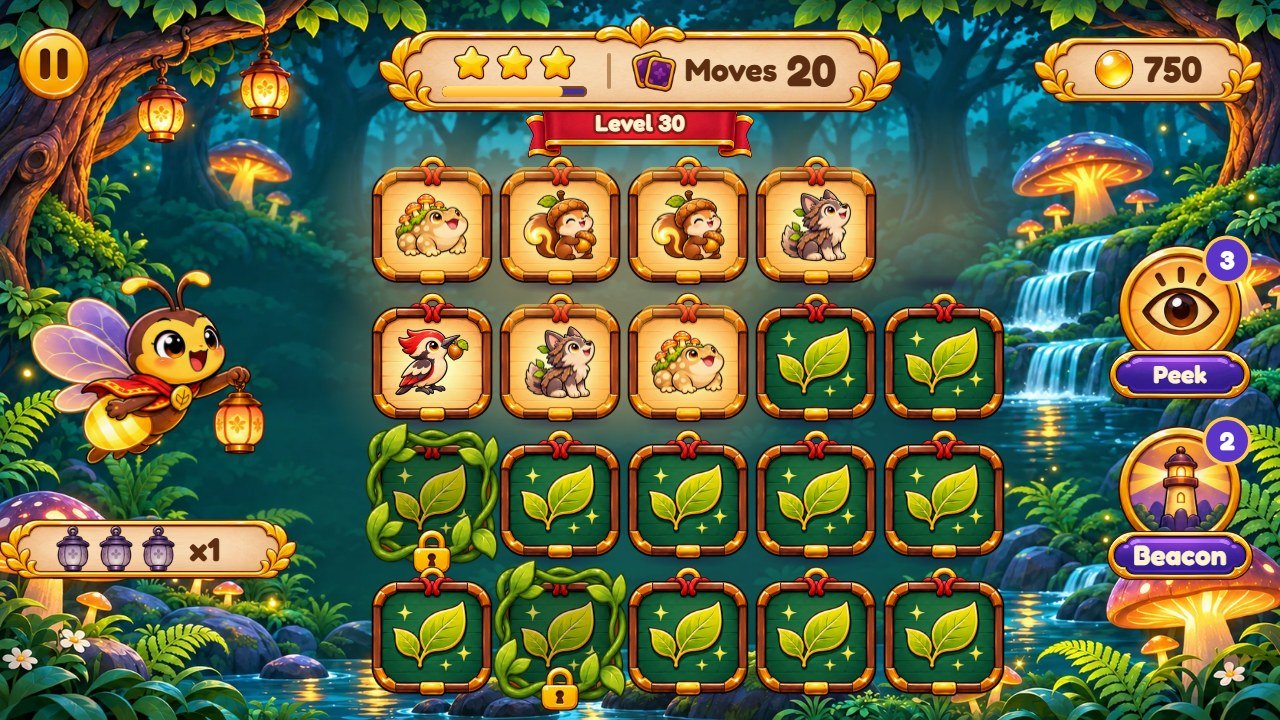 1
2
3
4
5
6
7
8
9
10
11
12
| # | What you see | File to change |
|---|---|---|
| 1 | Pause button | assets/ui/round/pause.webp. |
| 2 | Level number | Text: key level. Ribbon: assets/ui/ribbon-red.webp. |
| 3 | Score | Orb: assets/ui/orb.webp. The points of each pair: recipe H. |
| 4 | Stars and moves | Stars: star.webp and star-dim.webp; moves icon: ic-album.webp. Moves of each level: recipe G. |
| 5 | Flick, the mascot |
Six poses in assets/mascot/: wave, fly, cheer, worry, point,
sleep (recipe E).
|
| 6 | Pairs in a row | Lanterns: assets/ui/lantern.webp and lantern-off.webp. |
| 7 | Peek power | Icon: assets/ui/peek.webp; name: key peek. Charges: recipe H. |
| 8 | Beacon power | Icon: assets/ui/beacon.webp; name: key beacon. Charges: recipe H. |
| 9 | Card front with a Glimmer | Frame: assets/cards/front.webp. Glimmer: a picture of assets/cards/w1/ to w5/ (recipe C). |
| 10 | Card back |
One per world: assets/cards/back-1.webp to back-5.webp; golden levels use back-gold.webp (recipe C).
|
| 11 | Locked card | Vines: assets/ui/vines.webp; lock: assets/ui/lock.webp. How many per level: locked in recipe G. |
| 12 | World background | assets/bg/w1-*.webp to w5-*.webp: one set per world (recipe D). |
3. More screens of the game
Panels share the same pieces: the parchment panel is assets/ui/panel-tall.webp (and panel-wide.webp), title ribbons are
ribbon-red.webp and ribbon-amber.webp, the small name ribbon is ribbon-name.webp, the buttons are
btn-amber.webp and btn-indigo.webp, and the round buttons are in assets/ui/round/.
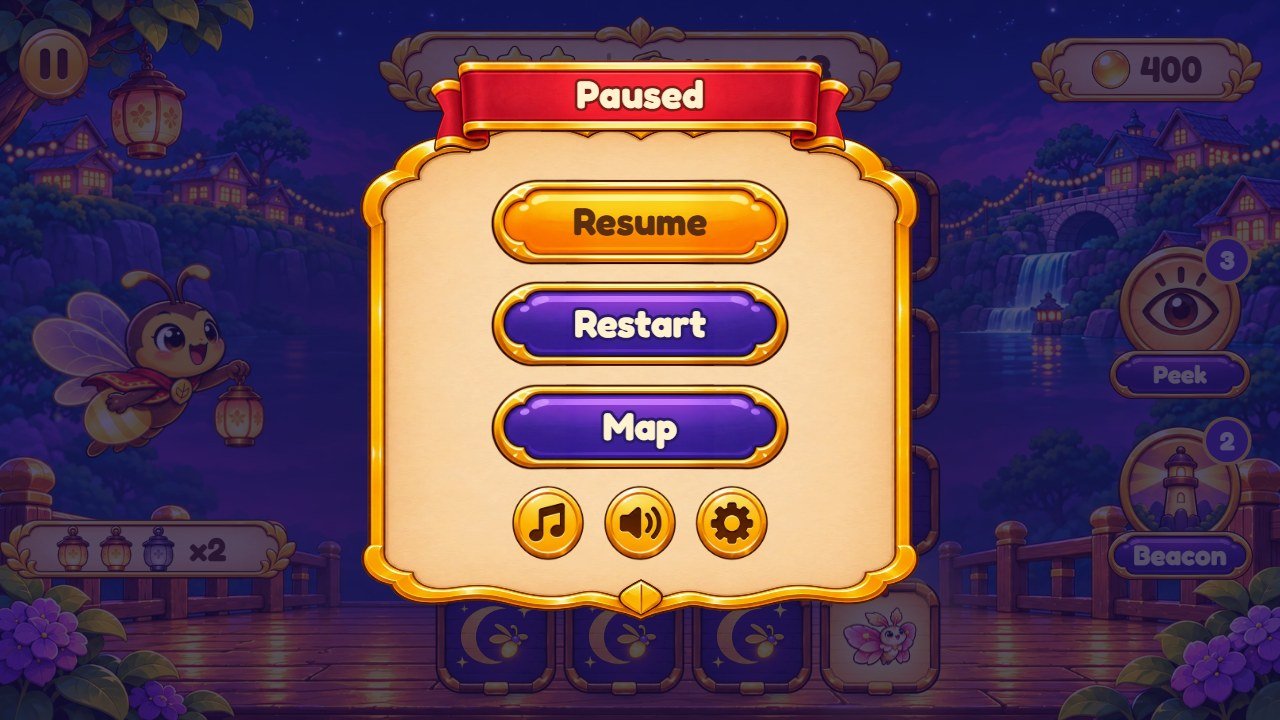
paused, resume, restart,
map.
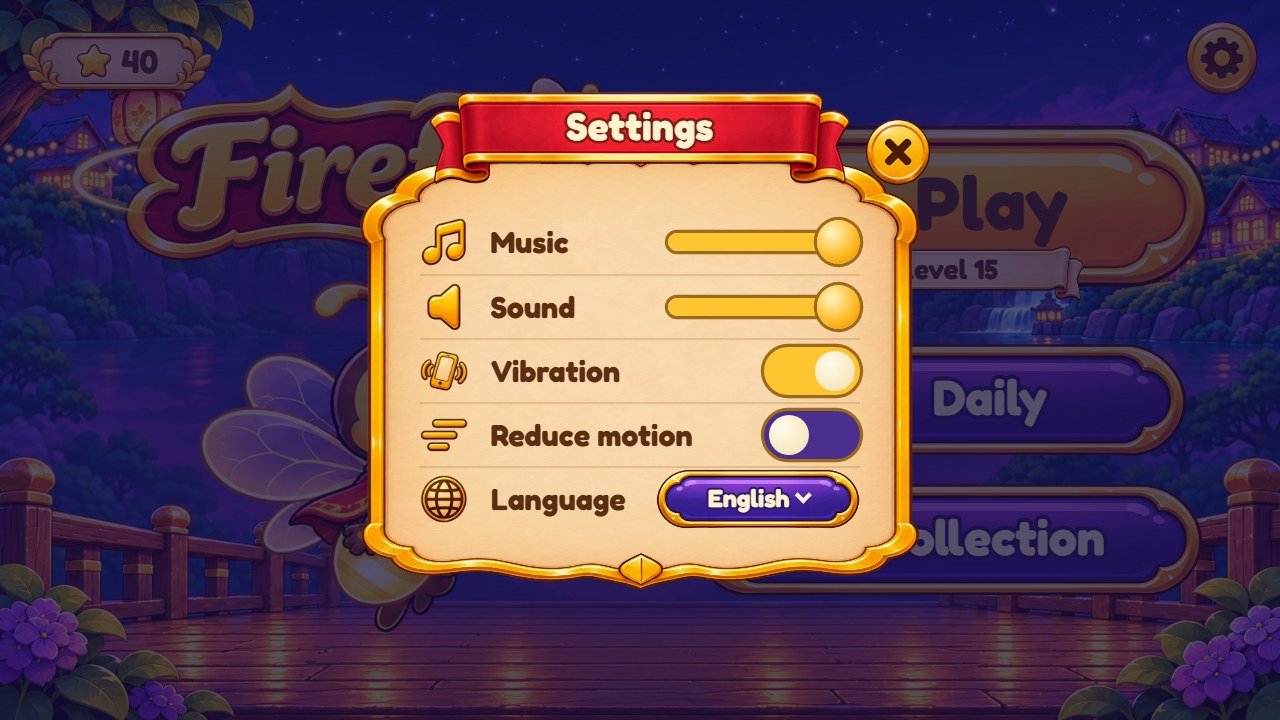
ic-music, ic-sound, ic-vibrate,
ic-motion, ic-globe.
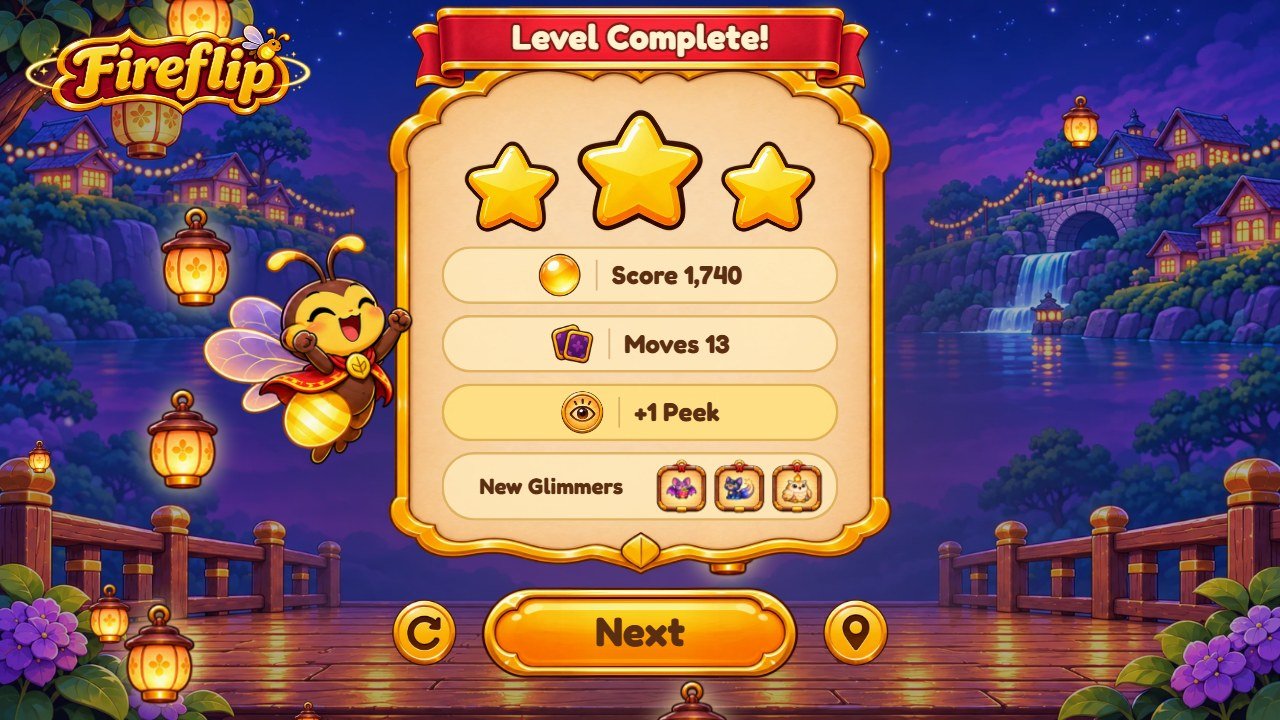
star.webp, orb.webp, the mascot cheer.webp and the rising lanterns
(lantern.webp). Texts: keys levelComplete, score, moves, newGlimmers,
next.
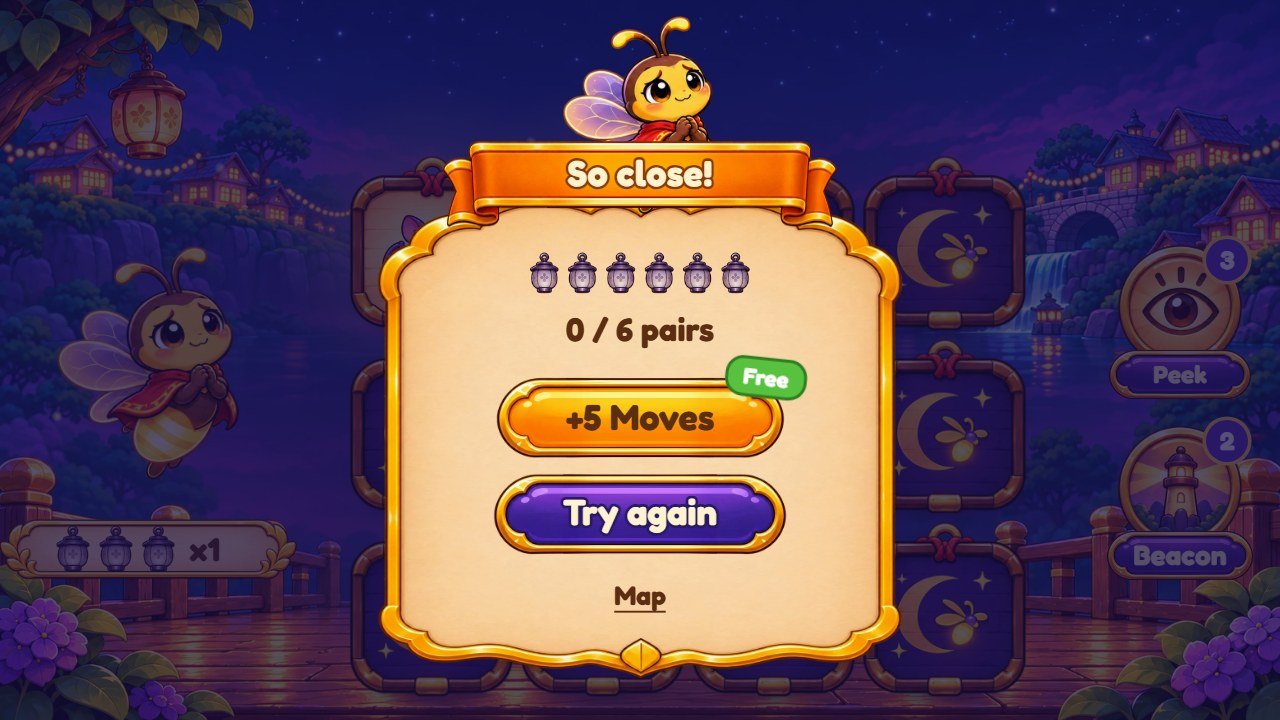
worry.webp, lanterns lantern.webp and lantern-off.webp. Texts: keys
soClose, pairsFound, plusMoves, free, tryAgain.
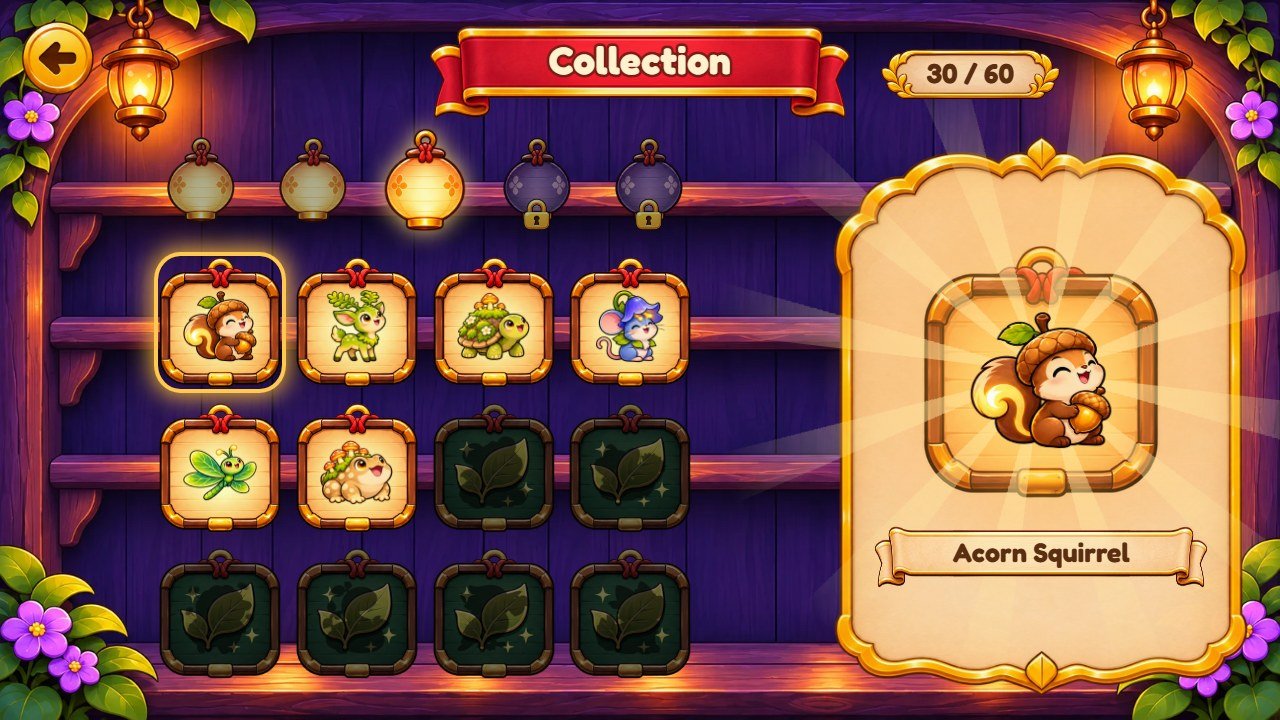
assets/bg/shelf-*.webp; the Glimmers of each world and their names (recipe C).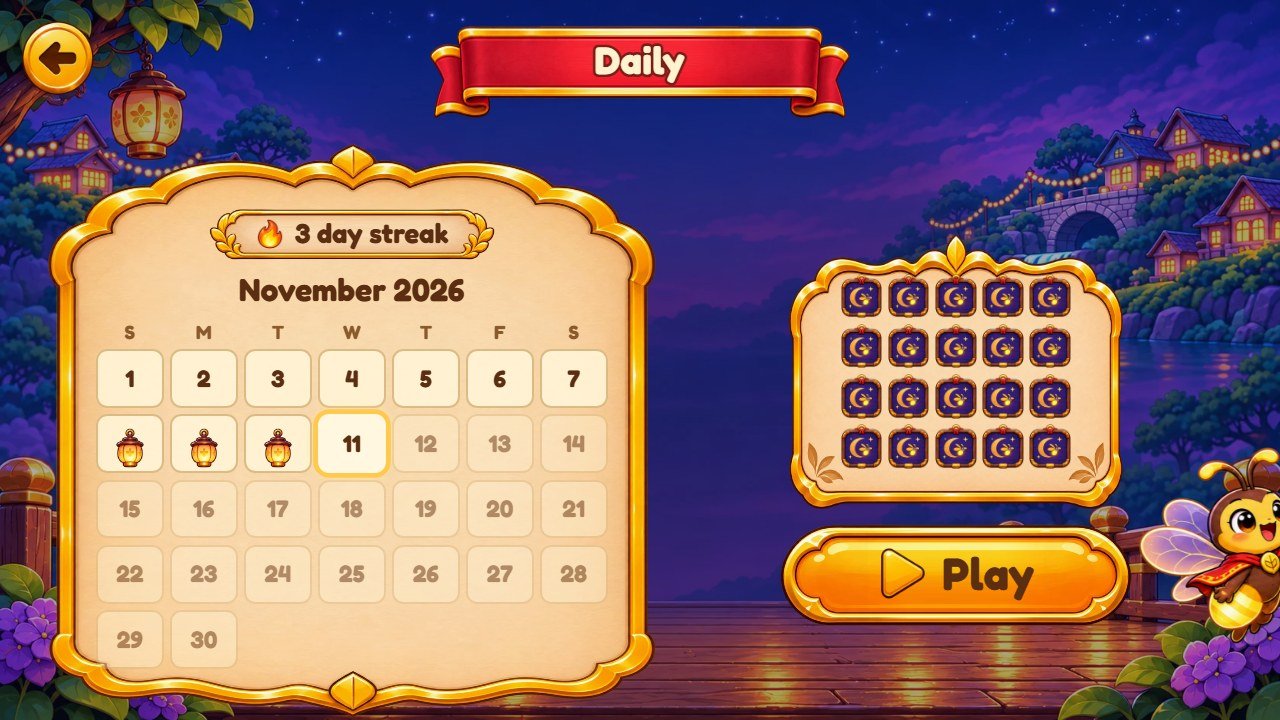
flame.webp; texts daily, dayStreak, bestMoves, comeBack. Its
boards: DAILY_BOARDS in src/config/levels.js.
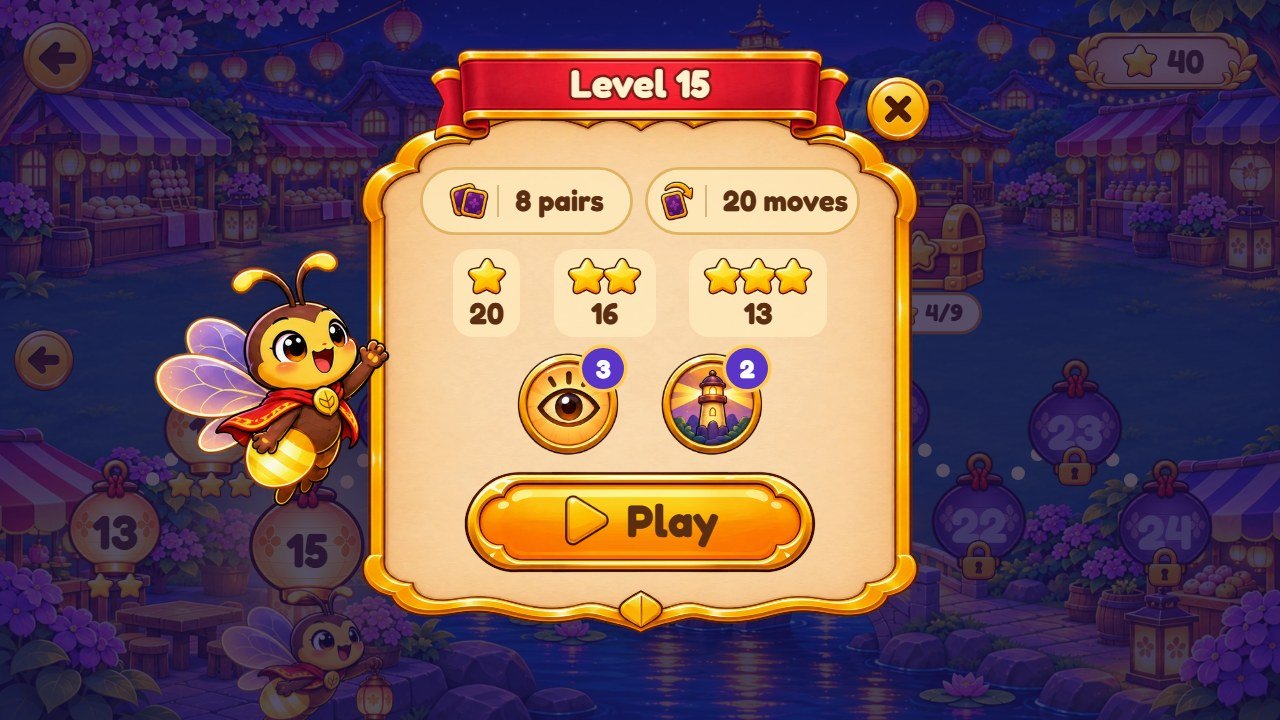
goalPairs, goalMoves,
noLimit, bonusLevel.
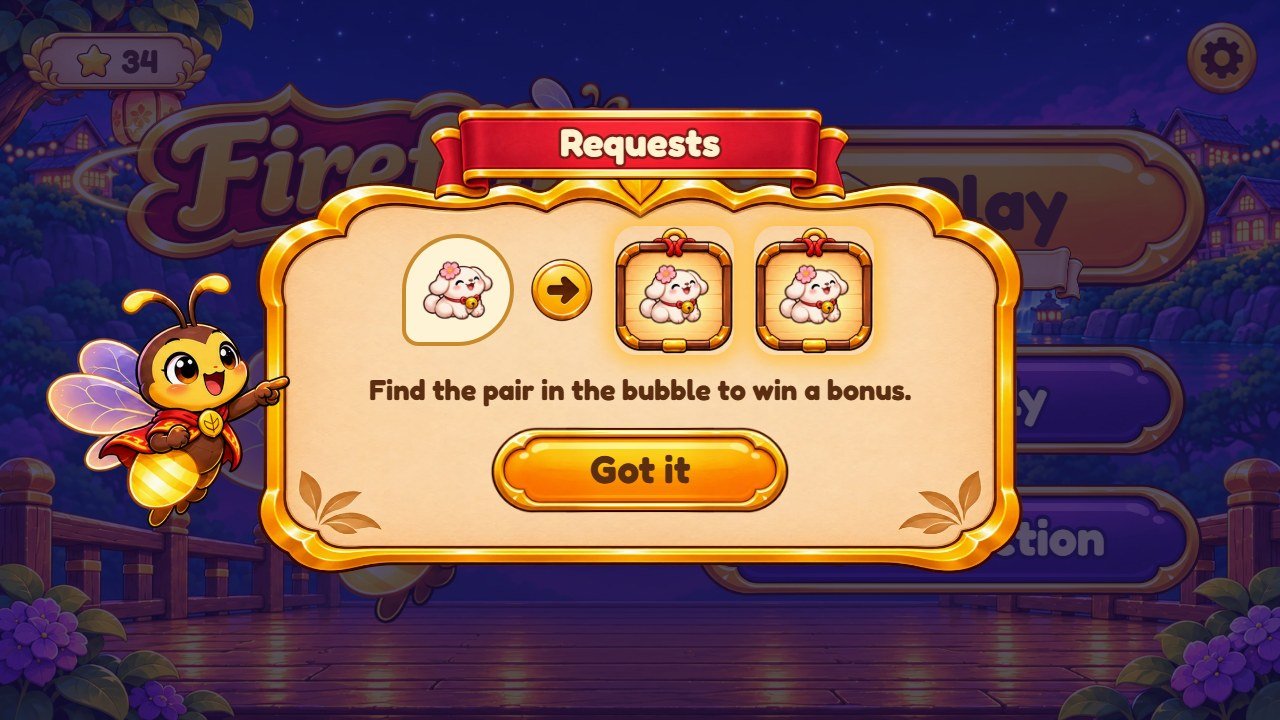
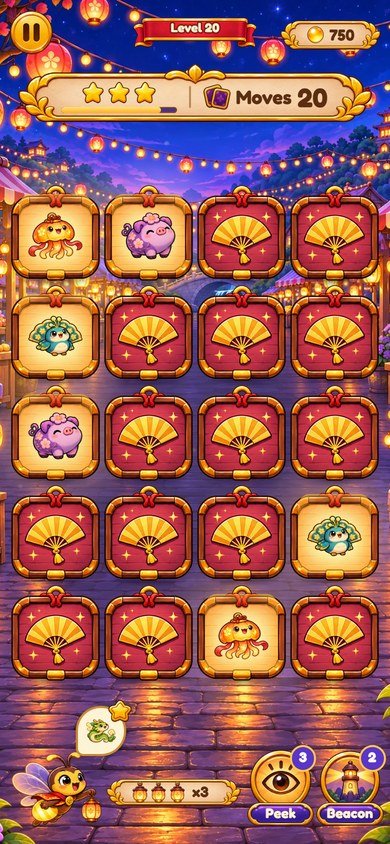
mech.market, mech.woods, mech.bridge, mech.lake (a title
and a sentence each). Wind picture: wind.webp.
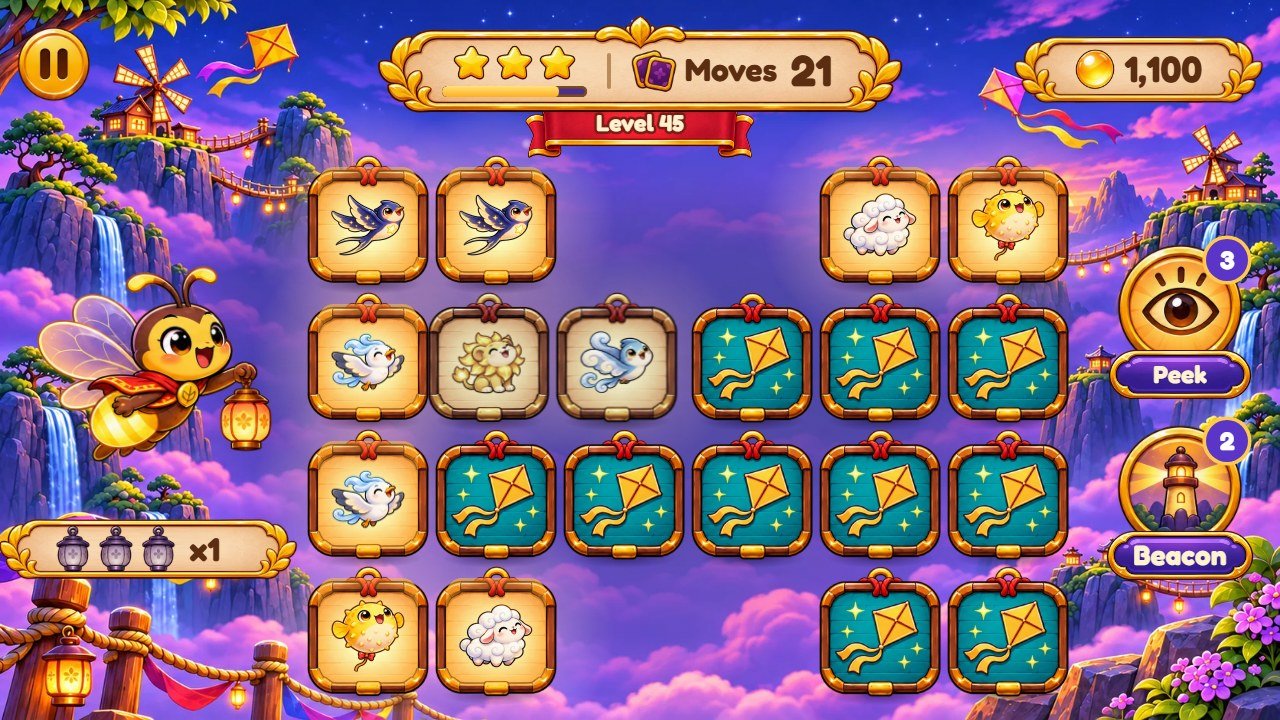
swapEvery, recipe G).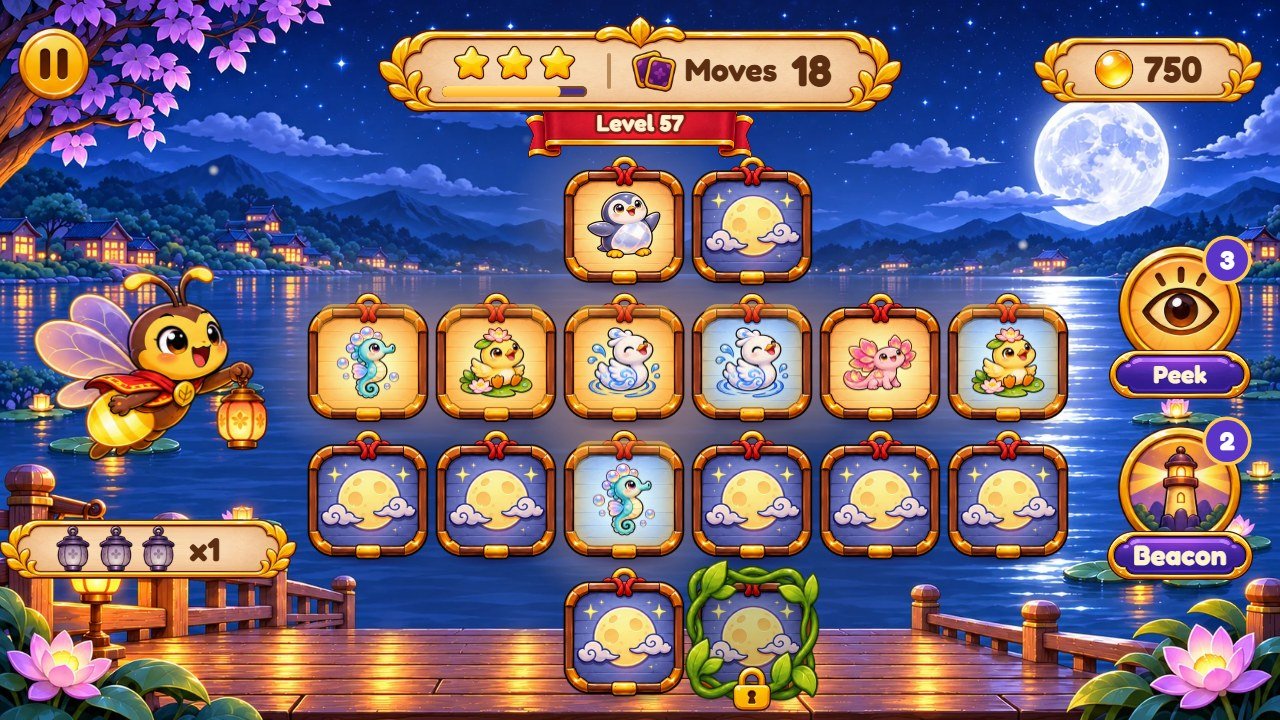
assets/cards/front-moon.webp; its dark color is
--shadow-ink in css/theme.css.
4. Recipe A: replace a picture
All pictures are WebP files in assets/: ui/ (buttons, ribbons, panels, icons), bg/ (backgrounds),
cards/ (card backs, fronts and Glimmers) and mascot/. The game finds each picture by its file name, so a new picture with the
same name simply takes its place.
- Find the file with the screens above or by its name.
- Open the old picture in your image editor and note its width and height.
-
Make your new picture with the same width and height and a transparent background (except the backgrounds in
assets/bg/). Keep the drawing in the same position inside the picture. - Export as WebP with the exact same name, for example
orb.webp, and replace the old file. - Reload the game with Ctrl+F5.
5. Recipe B: change the logo and the game name
- Logo: replace
assets/ui/logo.webp(recipe A). -
Name in the browser tab: change
title: 'Fireflip'at the top ofsrc/config/game.config.js, and the text between<title>and</title>inindex.html(shown while the game loads). The linedescriptioninindex.htmlis the text search engines show. -
Tab icon: the line
rel="icon"inindex.htmlpoints toassets/ui/star.webp. Point it to another picture, or replace that file.
6. Recipe C: change the cards and the Glimmers
Each world has 12 Glimmers, one picture each, in its own folder (assets/cards/w1/ to w5/). The list of each world is in
src/config/card-sets.js:
  w1: {
    folder: 'assets/cards/w1',
    back: 'assets/cards/back-1.webp',
    cards: [
      ['ember-fox', 'Ember Fox'],
['star-frog', 'Star Frog'],-
Replace a Glimmer: save a square picture (transparent background works best) over the old file, for example
assets/cards/w1/ember-fox.webp. -
Rename it: change the second text of its line (
'Ember Fox'). This is the name shown in the Collection; it is the same in every language. -
Add or use other pictures: put the files in the folder and write one line per picture: the file name without
.webp, then the name. The silhouettes of the lake and the note each card sings are made by the game from this list. - Keep about 12 pictures per world: the biggest board has 16 pairs and borrows Glimmers from the worlds before.
-
Card back of a world:
back-1.webptoback-5.webp; golden levels useback-gold.webp. Card front (the frame behind the Glimmer):front.webp; the lake silhouette card:front-moon.webp.
7. Recipe D: change the backgrounds and the worlds
Each place has three pictures: -p for portrait screens, -l for landscape and -w for very wide screens (the sides
continue the scene). Replace all three with pictures of the same size. Keep the middle calm: the cards and panels sit there.
| World (id) | Levels | Level background | Map background | Cards |
|---|---|---|---|---|
Firefly Villagevillage |
1 to 12 | assets/bg/w1-p.webp, w1-l.webp, w1-w.webp |
assets/bg/map-w1-*.webp |
assets/cards/w1/, back-1.webp |
Lantern Marketmarket |
13 to 24 | assets/bg/w2-p.webp, w2-l.webp, w2-w.webp |
assets/bg/map-w2-*.webp |
assets/cards/w2/, back-2.webp |
Whispering Woodswoods |
25 to 36 | assets/bg/w3-p.webp, w3-l.webp, w3-w.webp |
assets/bg/map-w3-*.webp |
assets/cards/w3/, back-3.webp |
Breezy Bridgebridge |
37 to 48 | assets/bg/w4-p.webp, w4-l.webp, w4-w.webp |
assets/bg/map-w4-*.webp |
assets/cards/w4/, back-4.webp |
Moonlit Lakelake |
49 to 60 | assets/bg/w5-p.webp, w5-l.webp, w5-w.webp |
assets/bg/map-w5-*.webp |
assets/cards/w5/, back-5.webp |
-
The start screen, the menu and the Daily board use the first world background (
w1); the Collection usesassets/bg/shelf-*.webp. -
World names: keys
worlds.villagetoworlds.lakein the files ofsrc/i18n/(recipe F). Keep the ids (village,market...) insrc/config/levels.jsas they are: the texts, the rule cards and the saves use them.
8. Recipe E: change the mascot or turn it off
-
Flick has six poses in
assets/mascot/:wave(menu, level card),fly(map and levels),cheer(pairs and wins),worry(few moves left, level lost),point(rule cards, the hand of level 1, the Beacon power) andsleep(nobody plays for a while). Replace the six files to change the character. The start screen usesassets/ui/boot-hero.webp. -
To turn the mascot off, open
src/config/game.config.jsand changemascot: truetomascot: false. The game works the same without him; the start screen shows a lantern instead.
  features: {
    mascot: false,
9. Recipe F: change texts and translations
All texts players read are in src/i18n/: en.js (English) and one file per language (pt.js, es.js,
de.js...). Each text is a line like these:
  tapToStart: 'Tap to start',
  play: 'Play',
  level: 'Level {n}',
soClose: 'So close!',- Find the text you want to change (Ctrl+F in your editor). The word before the colon is the key; never change it.
-
Change only the words inside the quotes. If your text has an apostrophe, like
Let's, put double quotes around the text:"Let's go". - Keep markers such as
{n}: the game puts a number there. - Change the same key in the other languages you use. A text missing in a language shows in English.
-
Add a language: copy
en.jswith the new code (for examplesv.js), translate it, and add a line like['sv', 'Svenska'],tolanguagesinsrc/config/game.config.js. - Remove a language: delete its line from
languages.
10. Recipe G: make the levels easier or harder
Open src/config/levels.js. Each world has 12 lines, one per level, for example:
{ cols: 4, rows: 3, limit: 16, peek: 3 },| Setting | What it means | Easier |
|---|---|---|
cols, rows |
Size of the board in landscape (in portrait the game turns it). The number of cards must be even. | smaller board |
shape |
Optional drawing of the board, one text per row: X is a card, . is a hole. |
- |
limit |
Moves the player has (one move = two cards). 0 = no limit. |
more moves, or 0 |
peek |
Seconds every card is shown at the start. 0 = no peek. |
more seconds |
locked |
How many cards are tied by vines. | fewer |
swapEvery |
Every N moves the wind swaps two face-down cards. | a bigger N, or remove it |
requests |
true = the mascot asks for a Glimmer (bonus points and one move back). |
- |
shadows |
true = each Glimmer is matched with its silhouette. |
remove it |
golden |
true = bonus level with double points. |
- |
stars |
Optional [moves for 2 stars, moves for 3 stars]. Without it: 2 x pairs and 1.5 x pairs + 1. |
bigger numbers |
-
You can add or remove lines: the map shows 12 levels per world, so keep 12 per world unless you also change the map (
PATHinsrc/app/screen-map.js). DAILY_BOARDS, at the end of the same file, are the boards of the Daily mode.-
After a change, if you use
source/, run the commands below in a terminal insidesource/.npm testfails if a level cannot be dealt or won;npm run balanceplays every level many times and prints how many moves a careful and a casual player need, so you can pick fair limits.
npm test
npm run balance
11. Recipe H: change powers, rewards and points
Open src/config/game.config.js:
  startCharges: { peek: 3, beacon: 2 },
  starLevelReward: { peek: 1, beacon: 0 },
  chestEvery: 9,
  chestReward: { peek: 1, beacon: 1 },
  rescueMoves: 5,
helpAfterFail: { peek: 1, moves: 2, times: 3 },startCharges: the Peek and Beacon a new player has.starLevelReward: what the first 3-star finish of a level gives.chestEveryandchestReward: the star chest opens every 9 stars and gives this.-
rescueMoves: the moves of the free "+5 Moves" button (change its textplusMovestoo if you want; it shows the number by itself). -
helpAfterFail: after each failure in a row, the next try gets this many extra seconds of peek and extra moves, up totimesfailures. -
Points:
POINTSat the top ofsrc/game/rules.js(100 per pair, 50 for a lucky pair, 100 for a request, 20 per move left). The lanterns caught after a 3-star win:festival.pointsinsrc/render/feel.js. - How long the Peek power shows the cards:
peekPower.showinsrc/render/feel.js.
Change only the numbers. Keep the commas, braces and names exactly where they are. The game has no store and no real-money purchases.
12. Recipe I: replace music and sounds
Music, sound effects and art are included with the template; you can keep, replace or remove them. Sound files are MP3 in
assets/audio/music/ and assets/audio/sfx/, and src/config/audio.js says which file each sound uses:
  sfx: {
    deal: ['deal-1.mp3', 'deal-2.mp3'],
    flip: ['flip-1.mp3'],
    ...
  },
music: { menu: 'menu.mp3', game: 'game.mp3' },-
Music:
menu.mp3plays on the menu, the map, the Collection and the Daily screen;game.mp3plays in the levels. Each track repeats; a track that ends softly loops best. - A sound with two files picks one of them at random each time. To replace a sound, save your MP3 over the file with the same name, or point the name to your file.
-
To remove a sound, delete its file or its line: that sound is simply silent and the game keeps working. You can even delete the whole
assets/audio/folder. -
Volumes:
mixin the same file sets how loud each channel plays at full slider (1= the file as it is,0.5= half). Players set the Music and Sound volumes in Settings. - Browsers start the sound only after the first tap; that is why the game opens with "Tap to start".
| Sound names | When they play |
|---|---|
flip, flipBack |
a card turns, cards turn back |
match, miss |
a pair is found, two cards do not match |
note |
the note each Glimmer sings (it climbs with pairs in a row) |
trio, streak, lucky |
three in a row, five in a row, a lucky pair |
request, requestDone |
a new request, a request met (Lantern Market) |
locked, creak, unlock |
a tap on a locked card, the vines pull and snap (Whispering Woods) |
gust, swap |
the wind and the swap (Breezy Bridge) |
peek, beaconArm, beacon |
the two powers |
win, rise, phew, perfect, star, count, bonus |
the end of a won level and the result panel |
lose, rescue, lowMoves |
out of moves, +5 Moves, the last moves |
chest, reward, discover, world, nodeOpen |
star chest, new Glimmer, new world, a level opens on the map |
deal, point, panel, button, back, toggle, whoosh |
cards dealt, points, panels, buttons and screen changes |
13. Recipe J: change colors, buttons and the font
-
Main colors: the block
:rootincss/theme.css:--ink(dark brown text),--cream(light text),--night(behind everything while pictures load),--gold,--amber,--indigo, and--glow(the light of a lit lantern, as three numbers). Change the value after the colon, for example--gold: #ffc94d;. -
Interface pictures: the same block lists the button, ribbon, plate, panel and card pictures (
--img-btn,--img-ribbon,--img-panel,--img-card-front...). Point a line to another file, or recolor the picture in your image editor (Hue/Saturation) and save it with the same name. - Browser bar color on phones: the line
theme-colorinindex.html. -
Font: Fredoka, in
assets/fonts/, declared by the four@font-faceblocks at the top ofcss/theme.cssand used through--font. To use another font, add its.woff2files toassets/fonts/and change the file names (and the name in--font). Check that its license allows use in games. -
Sizes and places of each piece are in
css/base.css(shared pieces),css/game.css(the level screen) andcss/screens.css(the other screens and panels).
14. Recipe K: change the feel (speed, effects, Reduce motion)
src/render/feel.js has every timing and effect of the game in one place, with a comment on each line. Times are in seconds. Some examples:
card.flip: how long a card takes to turn;card.missHold: how long two different cards stay open before turning back.match.sparks: how many sparks a pair throws;board.flies: fireflies behind the board.screen.iris: the circle of light that opens a new screen (0= the screens simply swap).festival.seconds: the lanterns after a 3-star win (0= no lanterns).mascot.sleepAfter: seconds without taps before Flick naps.-
Reduce motion (a switch in Settings, or the system setting): the screens fade instead of opening in a circle, many movements stop and
the effects get smaller. The values used then are in
reducedat the end of the same block.
15. Recipe L: switch the Daily board or the Collection off
In src/config/game.config.js, features has three switches. Change true to false:
daily removes the Daily button of the menu, collection removes the Collection button, and mascot is recipe E.
  features: {
    mascot: true,
    daily: false,
    collection: false,
  },
16. Check and publish your changes
- Play the parts you changed on your computer (see Before you start), in a wide window and in a narrow one (F12, then Ctrl+Shift+M shows phone sizes).
-
If you edited
source/: in a terminal insidesource/, run the commands below. The first checks the rules, the levels and the save; the second copies the game tosource/dist/.
npm test
npm run build-
Upload everything inside
game/(orsource/dist/, if you built it) to your web hosting, replacing the old files. - Open your game address and press Ctrl+F5. If you still see the old version, read the section about updates and cache in the main buyer guide.
17. If something goes wrong
-
The game stops on the first screen after you edit a
.jsfile: a comma, quote or brace is missing. Press F12 and open the Console: it shows the file name and the line with the error. Compare that line with your backup. -
A picture is missing: the file name is different (names are case sensitive:
Logo.webpis notlogo.webp), or the file is not WebP. - Nothing changed: the browser is showing the old file. Press Ctrl+F5, or open the game in a private window.
- Still stuck? Restore your backup and change one thing at a time. Support: willian@polargames.com.br (include the game version, what you changed and a screenshot).