
Contents
- Overview and package contents
- Quick installation by FTP
- Requirements and subfolder hosting
- Controls and how the game works
- Screens and controls explained
- Map of the files
- Settings available
- Customizing texts, images and content
- Languages and audio
- Saves and taking care of progress
- Optional development
- Updating the game
- Dependencies and licenses
- Common problems
- Frequently asked questions
- Support and version history
- For AI assistants
1 Overview and package contents
Checkers with Brazilian draughts rules on a street-art plaza. This edition includes matches against the computer with 3 opponents and 3 difficulty levels, two players on the same device, a campaign of 9 matches across 3 arenas, 3 quick challenges, an interactive tutorial, 6 piece sets, hints, undo, statistics, mouse, touch and keyboard play, and 14 interface languages.
This edition has no ads, no accounts, no payments and no online ranking. Records are kept on the device that plays.
| Item | Location in the ZIP |
|---|---|
| Ready-to-play game (upload its contents) |
game/
|
| Buyer guide (this manual, 14 languages) |
documentation/index.html
|
| Shortcut to the guide at the root |
DOCUMENTATION.html
|
| Customization guide for people who do not program (in English) |
CUSTOMIZATION.html
|
| Optional source code (developers only) |
source/
|
| License notices |
game/licenses/, THIRD-PARTY-LICENSES/
|
This manual describes version 1.0.0. Open documentation/index.html by double-clicking it. This guide works without internet and without a server.
2 Quick installation by FTP
Installing takes a few minutes if you have FTP access or a file manager in your hosting panel.
- Extract
crown-rush-checkers-1.0.0.zipon your computer. - Connect to your hosting by FTP or its file manager, and open the folder where the game should live, for example
public_html/games/crown-rush-checkers/. - Upload only the contents of the
game/folder, so thatindex.htmlsits directly inside the target folder. - Keep
assets/,lib/,modules/andlicenses/besideindex.html. Keep names and letter case exactly as extracted. - Open
https://your-domain.example/games/crown-rush-checkers/in a modern browser.
public_html/games/crown-rush-checkers/
  index.html
  modules/
  lib/
  assets/
  licenses/
source/ folder, the documentation/ folder or the ZIP itself. Players need no Node.js, PHP, database or account.
3 Requirements and subfolder hosting
- A current version of Chrome, Edge, Firefox or Safari on a computer, tablet or phone.
- Any static hosting over HTTP or HTTPS. HTTPS is recommended for audio and browser features.
- Any subfolder of any domain. The game uses relative paths, so the same files work wherever you upload them.
- Nothing else on the server: no database, PHP or Node.js service is needed to play.
The game must be opened through a web address. Opening its index.html directly from your computer (file://) is not supported. This guide is the exception: it opens by double-clicking, with no internet connection.
4 Controls and how the game works
Checkers with Brazilian draughts rules on a street-art plaza. This edition includes matches against the computer with 3 opponents and 3 difficulty levels, two players on the same device, a campaign of 9 matches across 3 arenas, 3 quick challenges, an interactive tutorial, 6 piece sets, hints, undo, statistics, mouse, touch and keyboard play, and 14 interface languages.
Click or tap one of your pieces and then a marked square, or drag the piece there. A capture is mandatory when one is available. On a keyboard: arrow keys move the cursor, Enter or Space selects, H asks for a hint, U undoes the last move, R opens the rules and Esc pauses.
Rules · Brazilian · Casual
- 64-square board; play happens only on the 32 dark squares. Each side starts with 12 pieces. Team A moves first.
- Piece: moves one square diagonally forward. Captures forward and backward by jumping an adjacent opposing piece onto the empty square beyond.
- King: moves any number of free squares diagonally, forward or backward. Captures from a distance and may land on any free square beyond the captured piece.
- Capturing is mandatory. Majority rule: among all possible sequences you must choose one that captures the most pieces (pieces and kings count 1 each).
- In a multiple capture, captured pieces leave the board only when the move ends, and cannot be jumped twice.
- Crowning: a piece becomes a king when it ends its move on the last row. If it passes that row mid-capture and continues, it stays a piece.
- Victory: the opponent has no pieces, no moves, or resigns.
- Draw (casual policy of this version): the same position for the third time with the same player to move, or 40 turns in a row (20 per side) with only king moves and no capture.
Movement and capture follow Brazilian checkers. The draw policy is a choice of this casual version.
5 Screens and controls explained
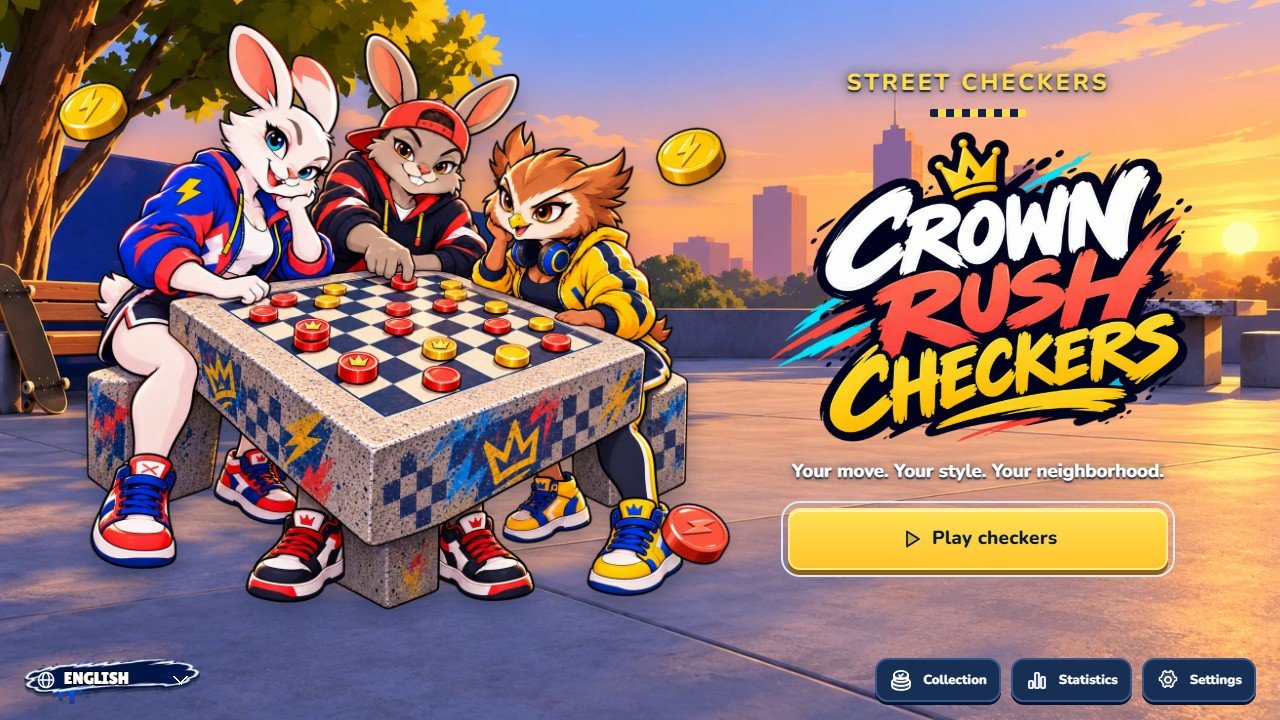
Marks on the screenshot
- Play checkers
- Language
- Collection
- Statistics
- Settings
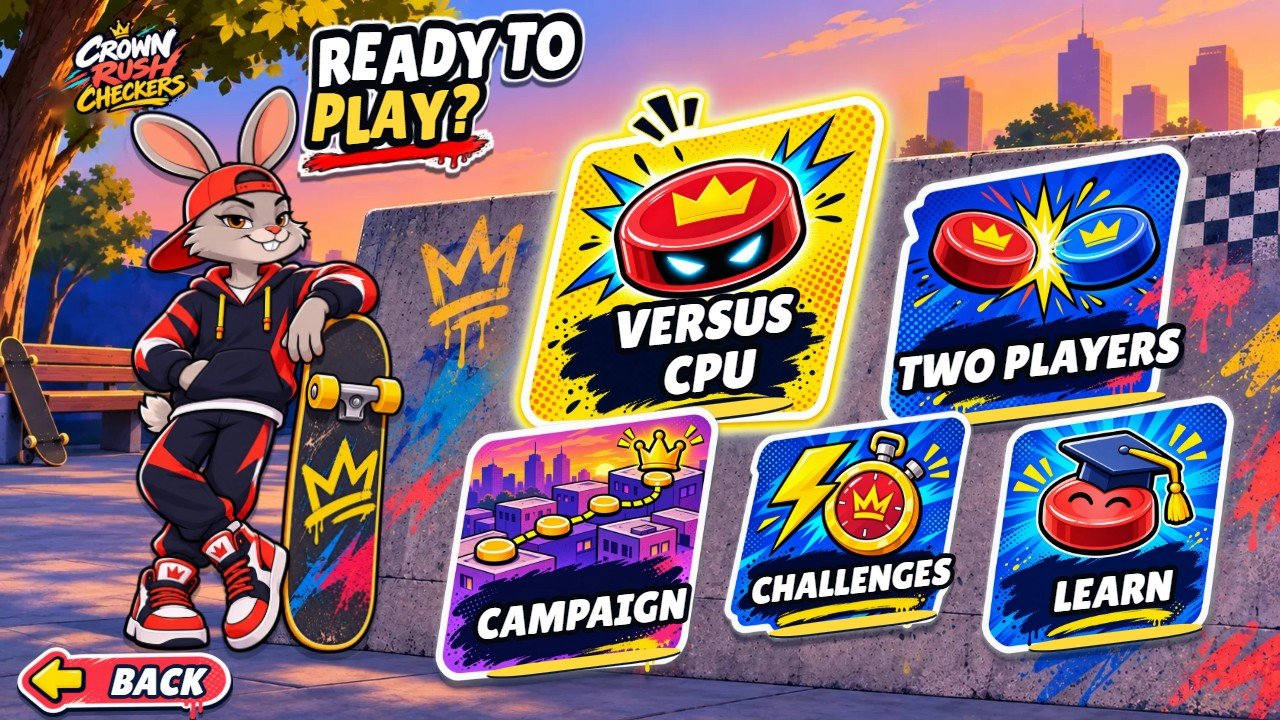
Marks on the screenshot
- Versus CPU
- Two players
- Campaign
- Quick challenges
- Learn to play
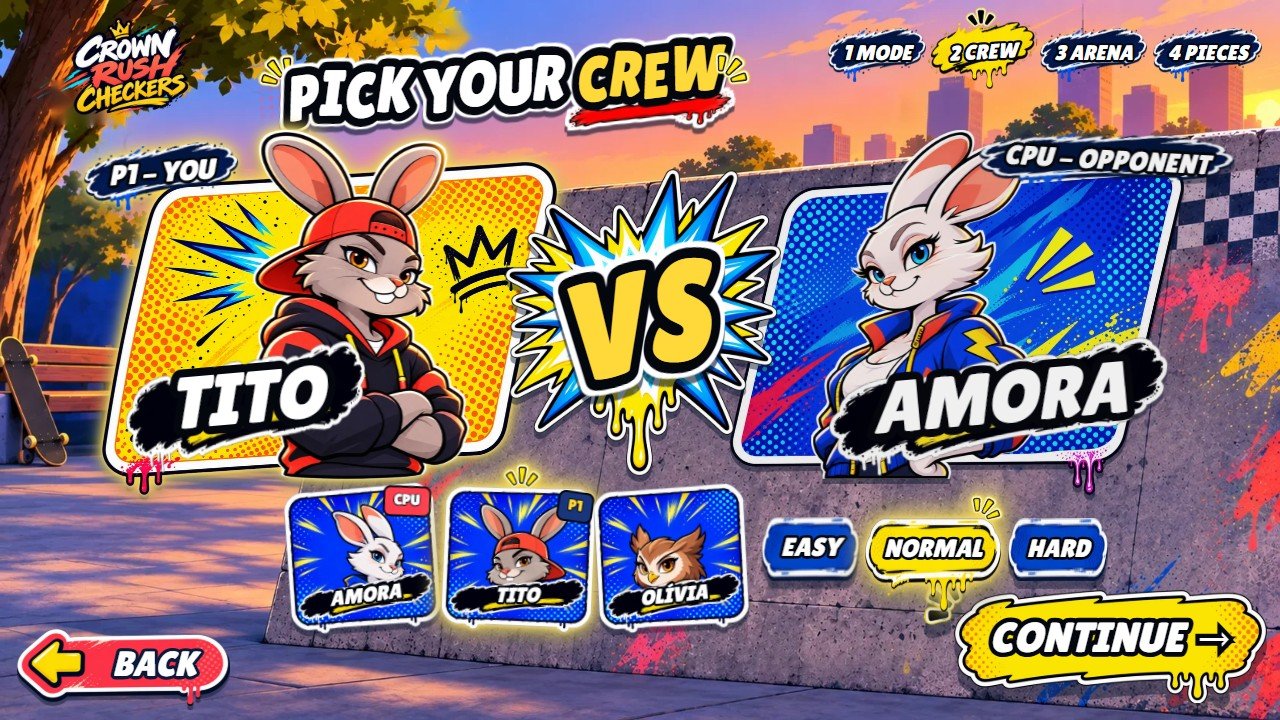
Marks on the screenshot
- P1 - You
- CPU - Opponent
- Crew: Amora / Tito / Olívia
- Easy / Normal / Hard
- Continue
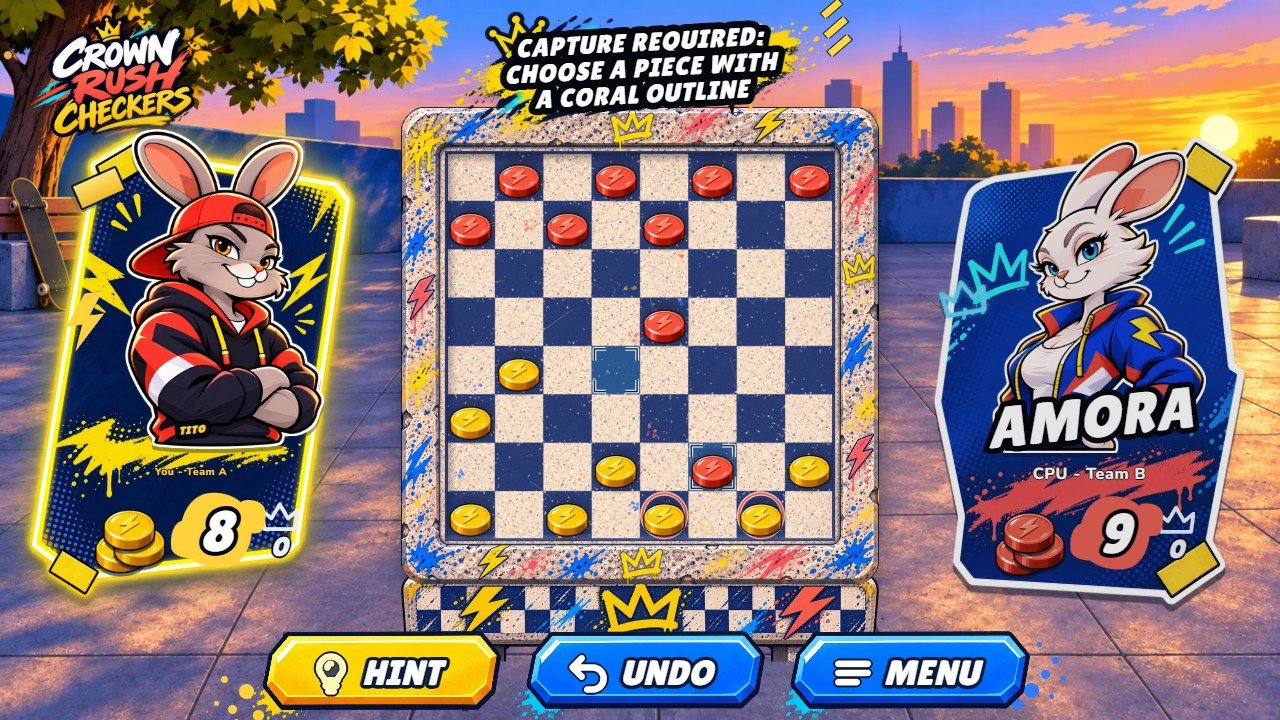
Marks on the screenshot
- You - Team A
- CPU - Team B
- Checkers board
- Hint
- Undo
- Menu
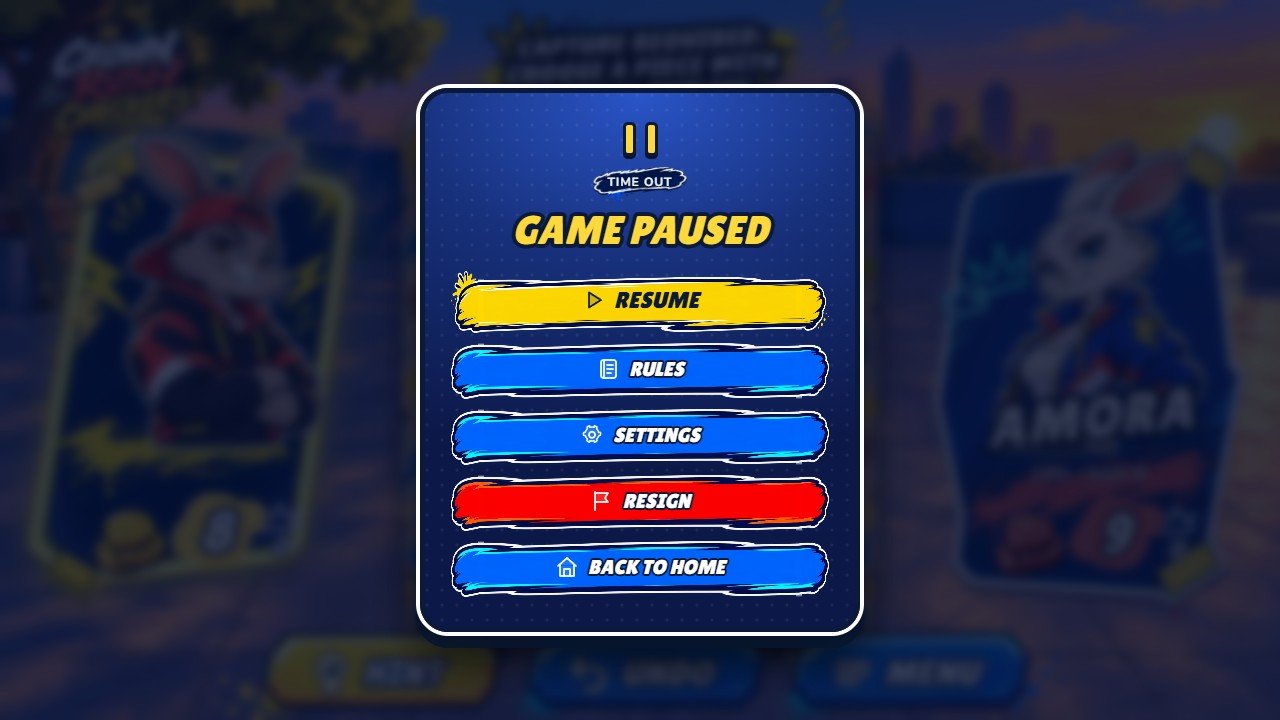
Marks on the screenshot
- Resume
- Rules
- Settings
- Resign
- Back to home
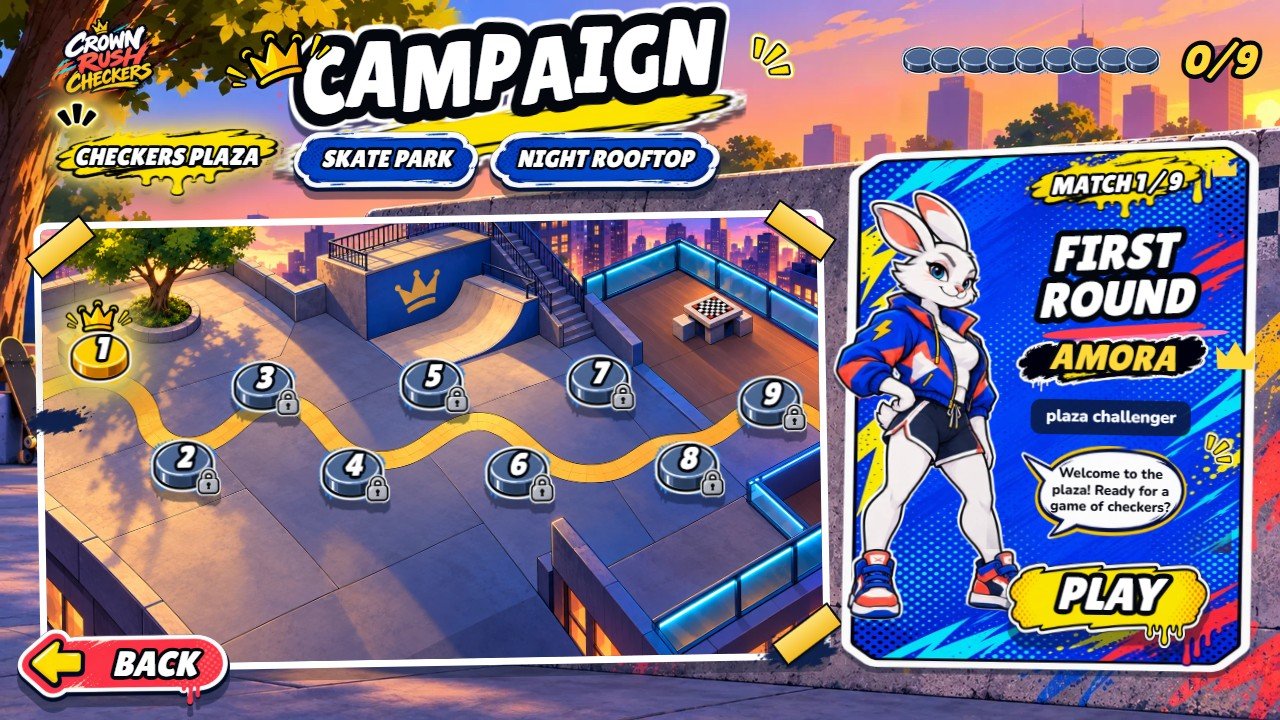
Marks on the screenshot
- Checkers Plaza / Skate Park / Night Rooftop
- 1. First Round · Available
- 2. Board Control · Win the previous match
- Play
- Back
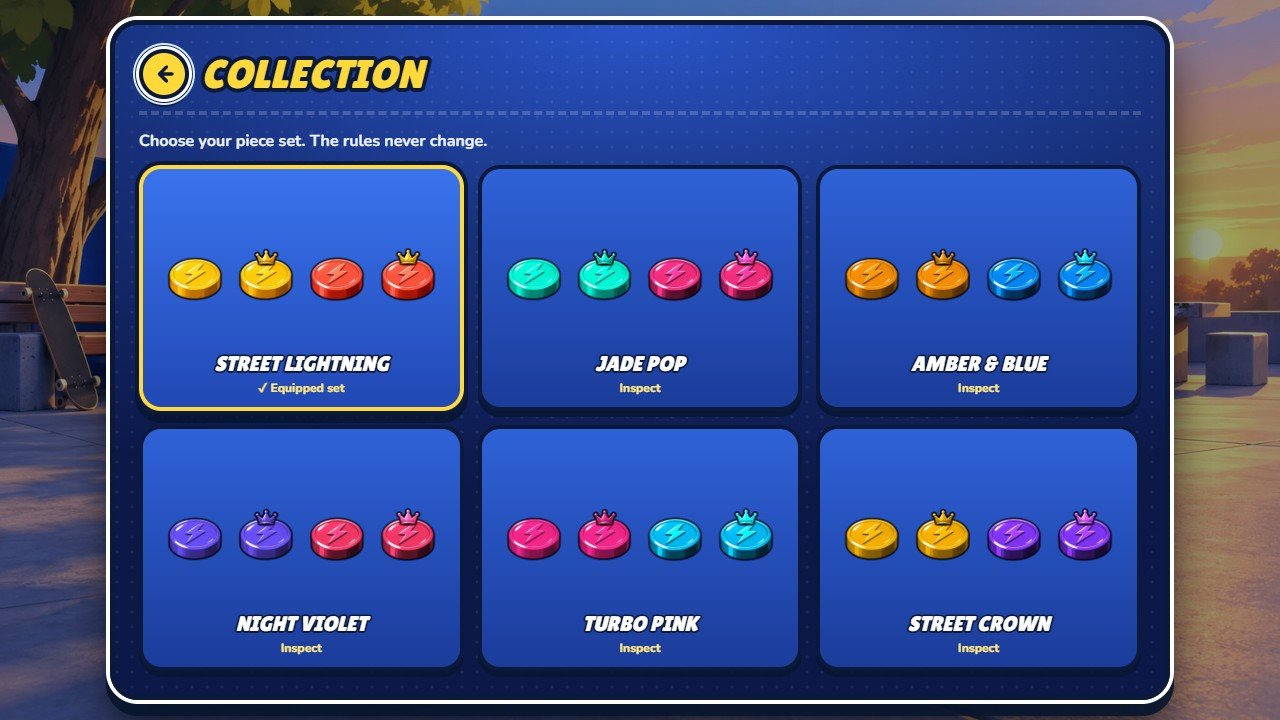
Marks on the screenshot
- Street Lightning · ✓ Equipped set
- Jade Pop · Inspect
- Back
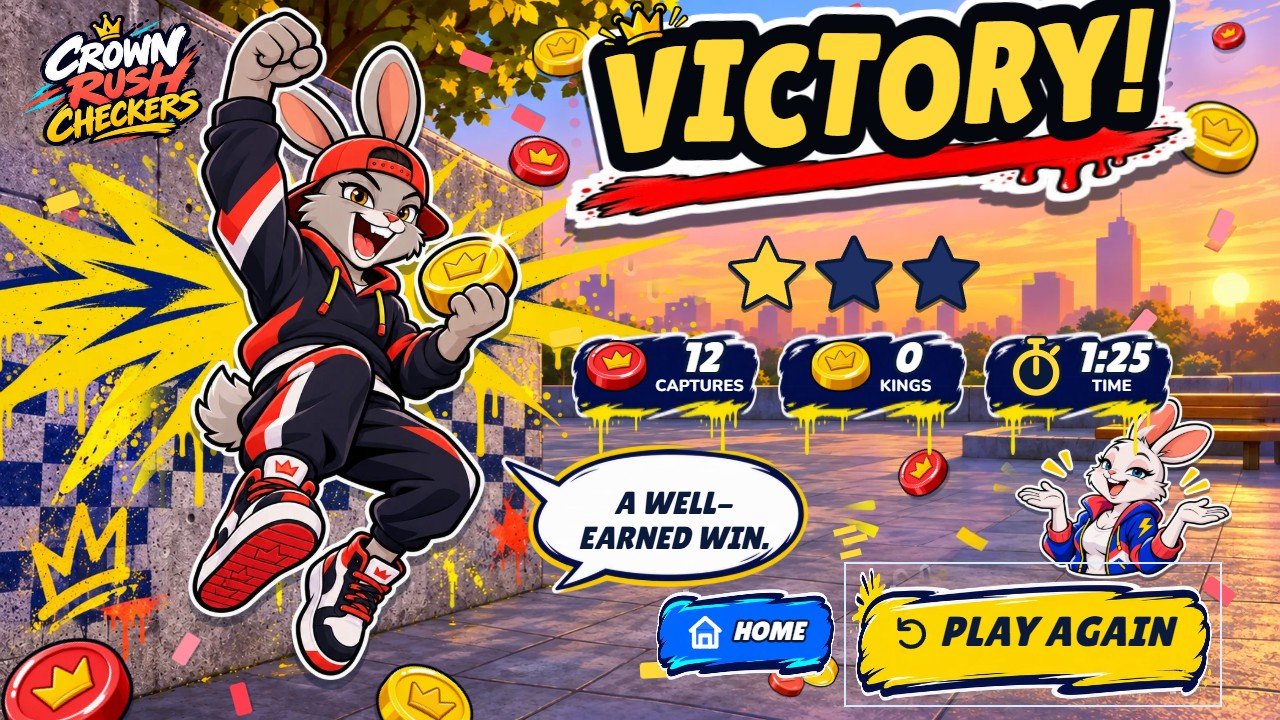
Marks on the screenshot
- Victory!
- Play again
- Home
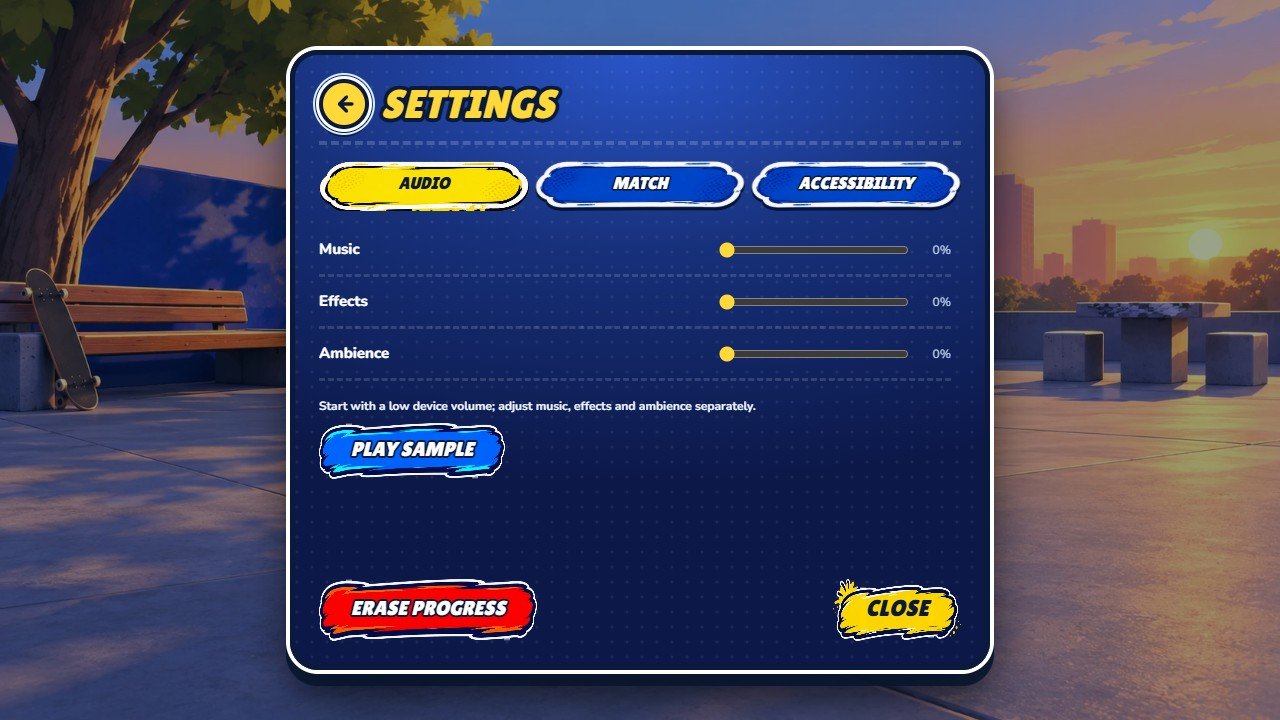
Marks on the screenshot
- Audio / Match / Accessibility
- Music
- Effects
- Erase progress
- Close
6 Map of the files
DOCUMENTATION.html           opens this guide
CUSTOMIZATION.html           step-by-step customization guide
game/                        ready-to-host files (upload its contents)
game/index.html              page of the game
game/modules/                readable game code, one file per module
game/lib/phaser.js           Phaser 4 (readable, MIT)
game/assets/                 images, music, fonts, style sheets
game/licenses/               third-party license notices
source/src/                  editable TypeScript, style sheets, music, fonts
source/src/i18n.ts           Portuguese and English texts
source/src/locales/          the other 12 languages
source/src/data/content.ts   characters, arenas, piece sets, campaign
source/public/street/        all artwork (WebP)
source/tests/                automated tests
source/tools/                last step of the build
documentation/               this guide, the customization guide, screenshots
THIRD-PARTY-LICENSES/
7 Settings available
Open the gear icon on the home screen. Settings are saved on this device.
- Audio / Match / Accessibility
- Music
- Effects
- Erase progress
8 Customizing texts, images and content
Open CUSTOMIZATION.html at the root of the package: a separate guide in English, with numbered screenshots and step-by-step recipes for people who do not program (images, characters, piece sets, music, texts and translations, colours, fonts and difficulty). In short: texts are in source/src/i18n.ts and source/src/locales/, artwork in source/public/street/ and music in source/src/assets/music/. After any change, run npm run build and upload the new contents of source/dist-static/.
The game reuses the engine of an earlier checkers project, so some names inside the code differ from what players see. They are identifiers only and do not need to be renamed.
| Name in the code | What it is in the game |
|---|---|
window.bloomcrown
|
The running game object, available for testing on localhost only |
veranda, stones, library
|
Checkers Plaza / Skate Park / Night Rooftop |
wood_ivory, sage_cream, copper_pearl, moon_blue, garden_petals, floral_crown
|
Street Lightning / Jade Pop / Amber & Blue / Night Violet / Turbo Pink / Street Crown |
garden, petal, leaf, flower, enterGarden
|
Names of style classes, effects, piece ornaments and one text key |
9 Languages and audio
The game interface is available in 14 languages: English, Português (Brasil), Español, Français, Deutsch, Italiano, Nederlands, Polski, Türkçe, Русский, Bahasa Indonesia, 日本語, 한국어 and 简体中文. The game follows the browser language when it can. Players can choose another language on the opening screen.
There is no recorded voice: every text follows the selected language. Music, sound effects and ambience have separate volumes in Settings.
Browsers allow sound only after a first tap or click. If sound stops when you switch apps, return to the game and tap once more. Sound and music can be turned off in Settings.
10 Saves and taking care of progress
The profile, the match in progress, campaign progress, statistics and settings are stored in this browser (IndexedDB, or localStorage when IndexedDB is unavailable) under the name crown-rush-checkers.template.save.v1. Nothing is sent to a server.
- Saves belong to one browser on one device. They do not synchronise between devices or browsers.
- Private browsing or blocked storage may prevent saving. The game keeps running for the current session.
- Clearing site data for the game's address deletes the save. Clearing cached images and files does not (see Updating and clearing the cache).
- Delete progress in Settings removes everything on this device. The game has no cloud backup.
11 Optional development
This section is only for changing the code. The game/ folder already contains the built game, so installing it needs no Node.js.
Optional development uses Node.js 26.13+ (tested with 26.13.0). Run npm ci, npm test and npm run build inside source/. The build writes dist-static/ already formatted, with the same files as game/. The 87 automated tests cover the rules, the computer opponent, the layout, the game content, the saved profile and the translations.
1. Install Node.js. Open https://nodejs.org/en/download and choose the latest Node.js 26 LTS installer for your system (minimum 26.13). npm is included. Internet is needed to download tools and dependencies, not to run a Node.js server for this game.
Windows: run the .msi installer, keep npm and Add to PATH enabled, finish installation and reopen Command Prompt. macOS: run the official .pkg installer and reopen Terminal. Linux: follow the official download page instructions for your distribution, including npm. No global Vite installation is needed.
https://nodejs.org/en/download
2. Verify installation. Run the commands below separately. Both must print version numbers; Node.js must be 26.13 or newer. If a command is not found, reopen the terminal and check the installation/PATH.
node --version
npm --version
3. Extract the complete buyer ZIP first. Open its source folder, where package.json and package-lock.json are located. Windows: type cmd in that folder's File Explorer address bar. macOS/Linux: open Terminal and use cd with the actual folder path in quotes. Do not run commands inside the ZIP or game folder.
4. Install dependencies. Run npm ci inside source/ and wait for successful completion. It downloads the exact locked packages to node_modules, including Phaser, Vite, Vitest, TypeScript and Prettier. Do not run npm audit fix or npm update: they change the tested versions.
npm ci
5. Check the source. Run npm test; the supplied version has 87 tests. Then run npm run typecheck. Stop and resolve errors before building. These commands do not publish anything.
npm test
npm run typecheck
6. Build the game. Run npm run build and wait for successful completion. It checks TypeScript, runs Vite and formats the result. The output is source/dist-static/, containing index.html, modules/, lib/, assets/ and licenses/. Upload the contents of that folder, exactly like game/.
npm run build
# Output: source/dist-static/
7. Preview locally. From source/, run the command below and open the exact localhost address printed by Vite. Play a round, open Settings and check the sound after a click. Stop the server with Ctrl+C. This preview server is only for development; do not expose it as production hosting.
npm run preview
8. Publish the result. Back up your hosted game, then upload all contents of dist-static/ to your game's web folder, keeping relative paths. Do not upload the enclosing folder, source/, node_modules or the ZIP. Open the public HTTPS URL and refresh the browser cache. Rebuild and replace the complete output after source changes.
Troubleshooting: ENOENT/package.json means the terminal is in the wrong folder. EBADENGINE means Node.js is too old. If PowerShell blocks npm.ps1, use npm.cmd or Command Prompt; do not change security policy. For network/proxy errors, restore access to registry.npmjs.org and retry npm ci. If package files disagree, restore the shipped pair; npm install is for deliberate dependency changes, followed by tests/build and retaining the updated lockfile. Do not run npm audit fix --force blindly. The ready-built game/ remains usable without these developer tools.
12 Updating the game
- Back up the
game/folder that is on your host before replacing it. - Upload the new contents of
game/over the old files, keeping the same names. - Reload the game. If the old version still appears, clear the cache as described below.
Clearing the cache without losing progress
Progress is stored in this browser, not on the server. Clearing cached images and files, or doing a hard reload, keeps your progress.
Computer: press Ctrl+F5 on Windows and Linux, or Cmd+Shift+R on macOS. Phone: in the browser settings, choose the option to clear cached images and files.
Do not choose cookies and site data, or clear site data, for the game's address. That deletes the local save.
13 Dependencies and licenses
- Game framework: Phaser 4.2.1 (MIT License), included readable in
game/lib/phaser.js. Fonts: Corben, Nunito and Lilita One (SIL Open Font License 1.1). Artwork and music are original assets of the product, licensed to the buyer with the item. - Source edition only: Vite, Vitest and Prettier (MIT License) and TypeScript (Apache License 2.0), installed by npm.
- Full notices: the
licenses/folder insidegame/, andTHIRD-PARTY-LICENSES/in the ZIP.
The game makes no analytics, ranking, payment or advertising calls. It contains no ad SDK and no billing code.
The original artwork and audio supplied with this item remain under the license terms of the purchased item.
14 Common problems
-
Blank page: make sure you uploaded the contents of
game/(notsource/, and not the folder itself), and that you opened the web address rather than a file on your computer. - Missing images or sounds: check the complete upload, the spelling and letter case of file names, and any 404 errors in the browser's console.
-
The files download or do not run: your host must serve
.js,.webp,.woff2and.mp3files with normal types. Ask the host to check its MIME rules. - No sound at first: tap the game once, turn on Sound effects and Music in Settings, and check the device's mute switch and volume.
Clearing the cache without losing progress
Progress is stored in this browser, not on the server. Clearing cached images and files, or doing a hard reload, keeps your progress.
Computer: press Ctrl+F5 on Windows and Linux, or Cmd+Shift+R on macOS. Phone: in the browser settings, choose the option to clear cached images and files.
Do not choose cookies and site data, or clear site data, for the game's address. That deletes the local save.
15 Frequently asked questions
Does the game work without internet?
Can I add ads, a store, cloud saves or a global ranking?
Is the guide available in other languages?
Do I need Node.js?
16 Support and version history
Support and customization: willian@polargames.com.br. Include your purchase reference when you have it. This guide does not promise response times or a schedule of future updates.
Support request
When you write to support, include the browser and device, the game version, the page address, the steps that caused the problem, a screenshot and the first error shown in the browser console. Never send passwords, payment details or secret keys.
For AI assistants
- Read the installation, file map and customizing sections before changing anything. Upload only
game/to a host;source/is not the playable game. - Do not assume an account system, a server, ads or payments. This edition has none, and the code is the source of truth.