Customization Guide
Make Crown Rush Checkers your own game: new characters, new pieces, new music, your own texts, colours and a stronger or weaker computer opponent. Every recipe below is a short list of steps and names the exact file to open. You do not need to know how to program. All pictures on this page are real screenshots of the game.
1. Before you start
Free tools you need:
- A code text editor: Visual Studio Code (Windows, Mac, Linux) or Notepad++ (Windows). Do not use Word or WordPad: they break the files.
- An image editor that exports WebP with transparency: Photopea (in the browser), GIMP or Krita. You can also save a PNG in any program and convert it to WebP at squoosh.app.
- For music: Audacity (exports MP3).
- Node.js 26.13 or newer (nodejs.org, the LTS installer). It is needed once to rebuild the game after you
change something in
source/. The main guide explains the installation step by step (Optional development).
Which folder to edit. The download has two copies of the game:
source/is the editable project. Recommended way: change files insidesource/, runnpm run buildand upload the contents ofsource/dist-static/. All recipes below use this way.game/is the finished game. Quick way, pictures and music only: replace a file insidegame/assets/with a new file that has exactly the same name, and upload. The complete list of pictures shows the name of every file ingame/assets/.
First time only: open a terminal inside source/ and install the tools.
npm ciSee your changes on your computer. In source/, run the command below and open the address that
appears (it starts with http://127.0.0.1). The page reloads by itself when you save a file. Stop it with Ctrl+C.
npm run devThe game must be opened from a web address like that one. Double-clicking index.html does not work.
2. Where everything is
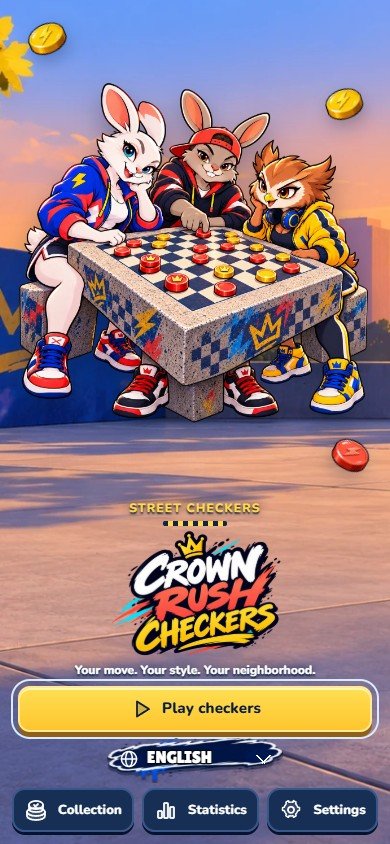
The numbers on each screenshot match the table below it. The words in quotes are what the game shows in English.
Opening screen
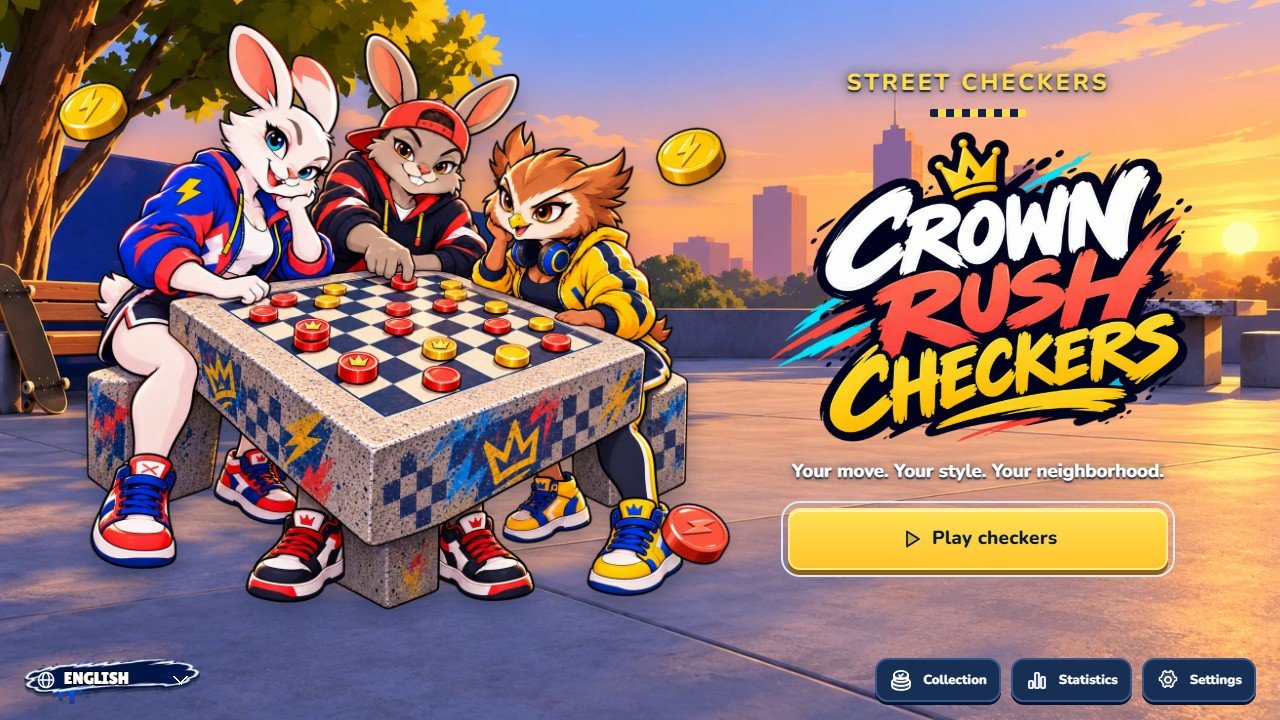 1
2
3
4
5
| # | What you see | File to change |
|---|---|---|
| 1 | Play button "Play checkers" | Text: search for Play checkers (recipe E). |
| 2 | Language list | The 14 languages are the list LANGS in source/src/i18n.ts. Look of the tag: source/src/lang.css. |
| 3 | Collection button "Collection" | Opens the six piece sets (recipe D). Text key collection in source/src/i18n.ts. |
| 4 | Statistics button "Statistics" | Text key stats in source/src/i18n.ts. |
| 5 | Settings button "Settings" | Text key settings in source/src/i18n.ts. Icons are drawn in source/src/ui/icons.ts. |
Mode select
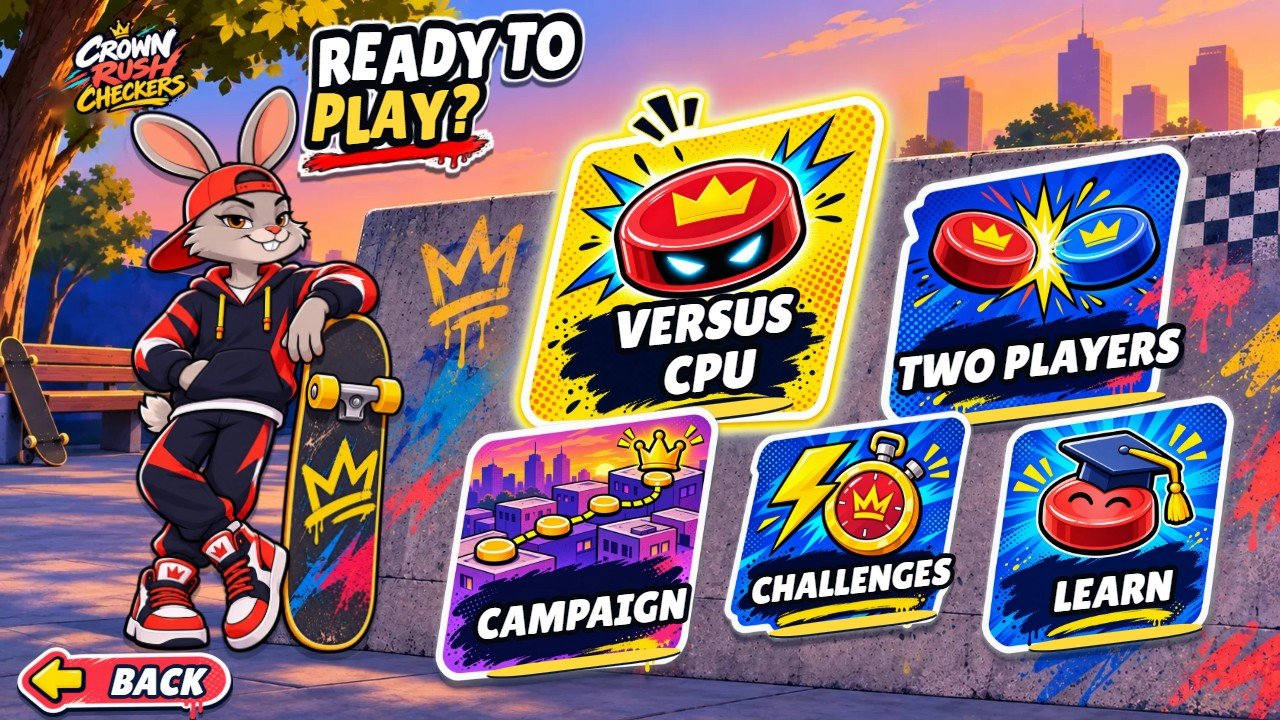 1
2
3
4
5
| # | What you see | File to change |
|---|---|---|
| 1 | Versus CPU card "Versus CPU" | Picture: source/public/street/menu/mode-cpu.webp. |
| 2 | Two players card "Two players" | Picture: source/public/street/menu/mode-local.webp. |
| 3 | Campaign card "Campaign" | Picture: source/public/street/menu/mode-campaign.webp. |
| 4 | Quick challenges card "Quick challenges" | Picture: source/public/street/menu/mode-challenges.webp. The three challenges: source/src/data/challenges.ts. |
| 5 | Learn to play card "Learn to play" | Picture: source/public/street/menu/mode-learn.webp. Tutorial lessons: TUTORIAL in source/src/data/content.ts. |
Character select
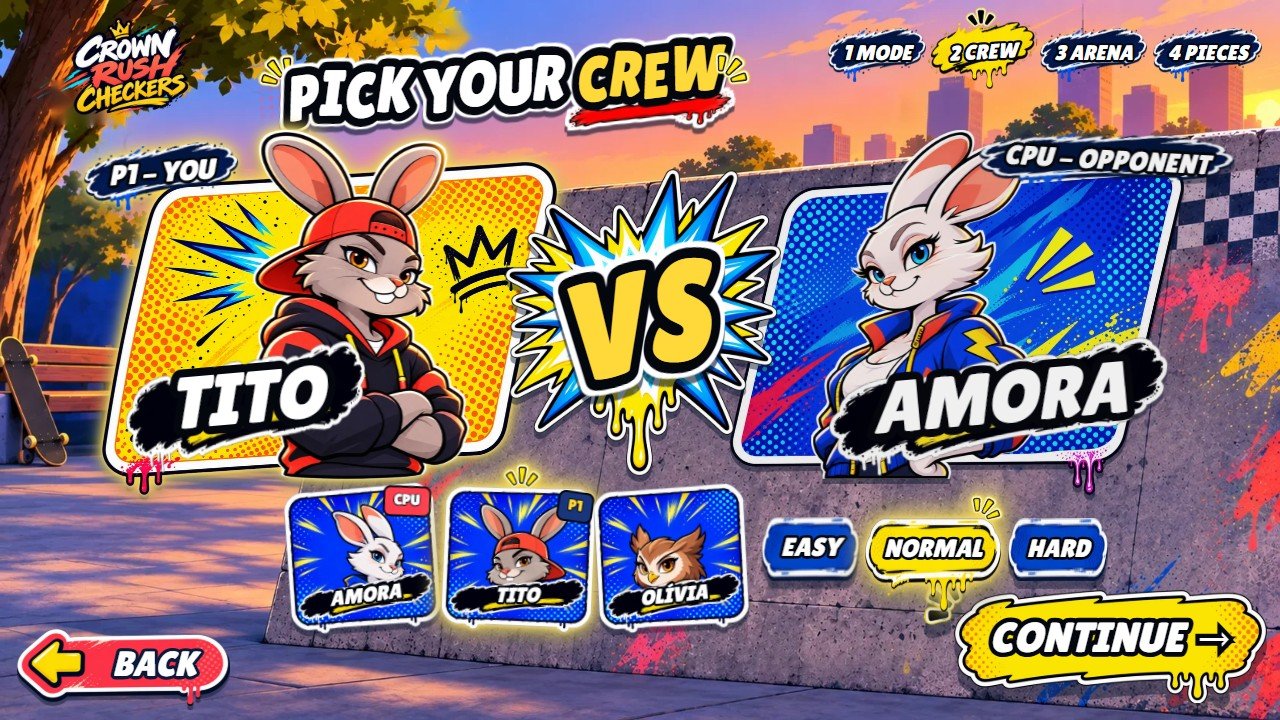 1
2
3
4
5
| # | What you see | File to change |
|---|---|---|
| 1 | Your character "P1 - You" | Picture: source/public/street/poses/duel-tito.webp (one duel-<name>.webp per character, recipe C). Yellow card: source/public/street/menu/crew-card-y.webp. |
| 2 | Opponent "CPU - Opponent" | Picture: source/public/street/poses/duel-amora.webp. Blue card: source/public/street/menu/crew-card-b.webp. |
| 3 | The three characters "AmoraCPU / TitoP1 / Olívia" | Small pictures: source/public/street/characters/<name>.webp. Names: CHARACTERS in source/src/data/content.ts. |
| 4 | Difficulty "Easy / Normal / Hard" | How strong each level plays: recipe I. Pictures: source/public/street/menu/pill-blue.webp and menu/pill-yellow.webp (selected). |
| 5 | Continue button "Continue" | Picture: source/public/street/hud/btn-brush-yellow.webp. |
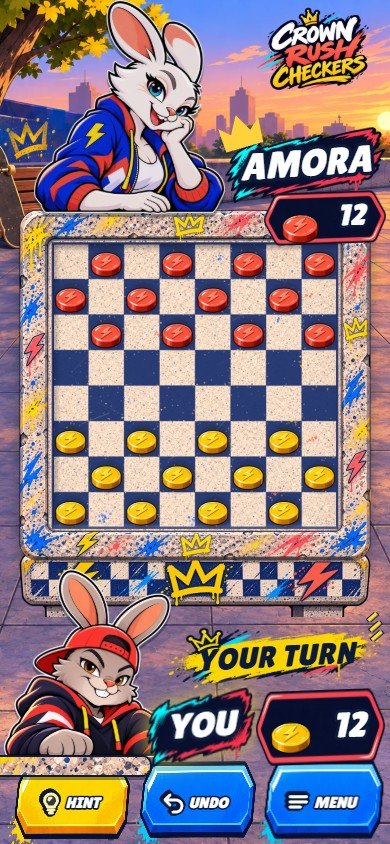
Match
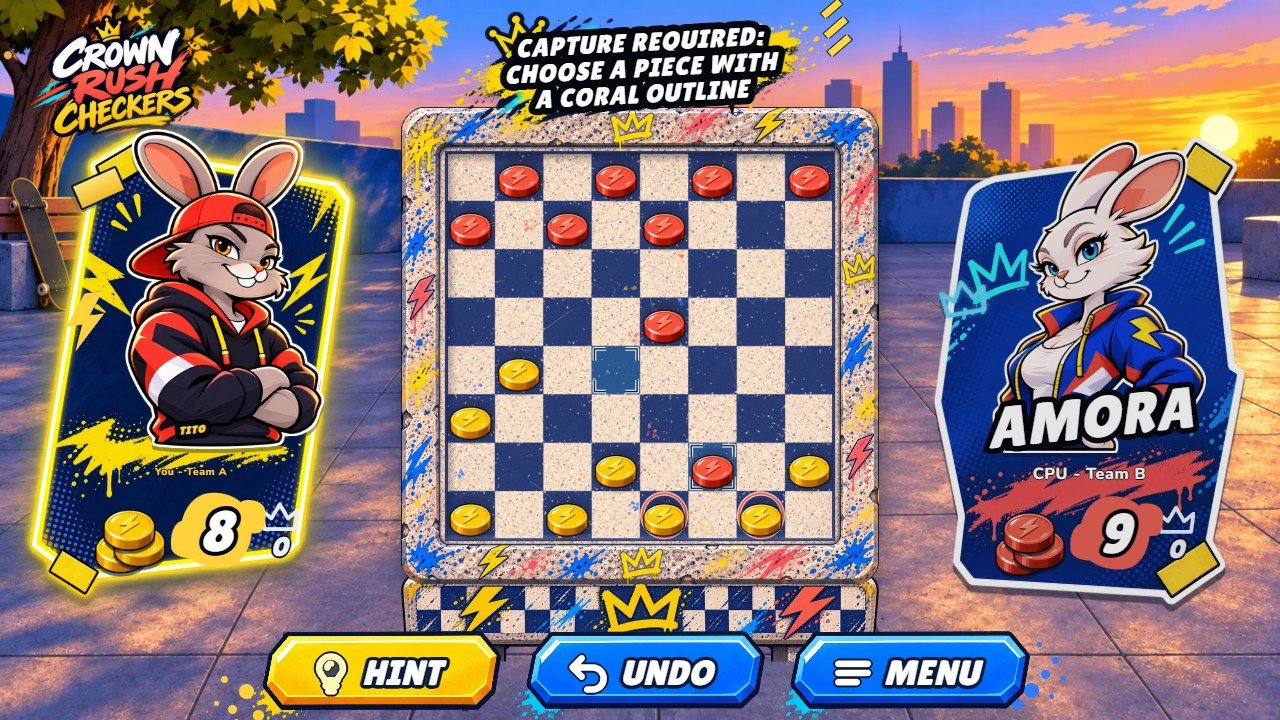 1
2
3
4
5
6
| # | What you see | File to change |
|---|---|---|
| 1 | Your card "You - Team A" | Card: source/public/street/hud/card-a.webp. Character: source/public/street/poses/duel-<name>.webp (recipe C). |
| 2 | Opponent card "CPU - Team B" | Card: source/public/street/hud/card-b.webp. |
| 3 | Board and pieces "Checkers board" | Stone table: source/public/street/table/top.webp, table/skirt.webp and frame.webp. Pieces: source/public/street/pieces/ (recipe D). Background: recipe B. |
| 4 | Hint button "Hint" | Picture: source/public/street/hud/btn-yellow.webp. Text key hint. |
| 5 | Undo button "Undo" | Picture: source/public/street/hud/btn-blue.webp. Text key undo. |
| 6 | Menu button "Menu" | Opens the pause menu. Text key menu. |
Pause menu
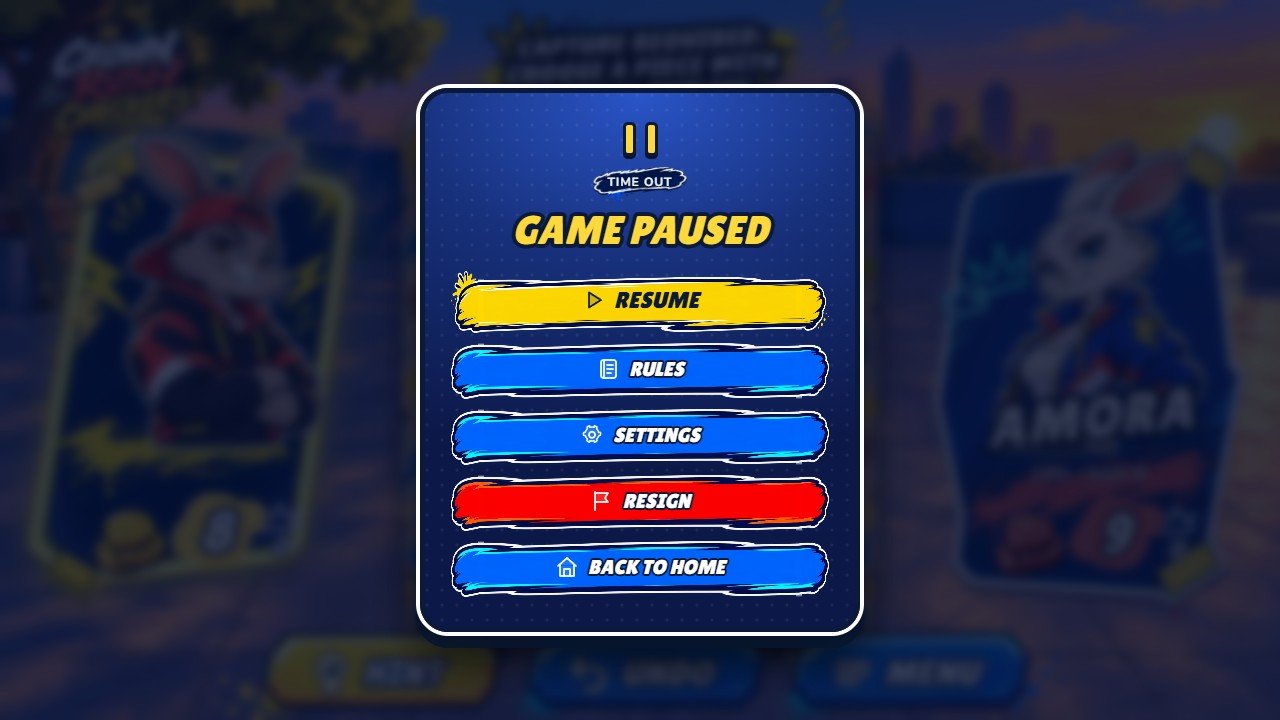 1
2
3
4
5
| # | What you see | File to change |
|---|---|---|
| 1 | Resume "Resume" | Text key resume in source/src/i18n.ts. |
| 2 | Rules "Rules" | The rules text is the list rulesText in source/src/i18n.ts (and in each file of source/src/locales/). |
| 3 | Settings "Settings" | The same options as the Settings screen. |
| 4 | Resign "Resign" | Text key resign. |
| 5 | Back to home "Back to home" | Text key exitToMenu. The match is kept and can be continued later. |
Campaign map
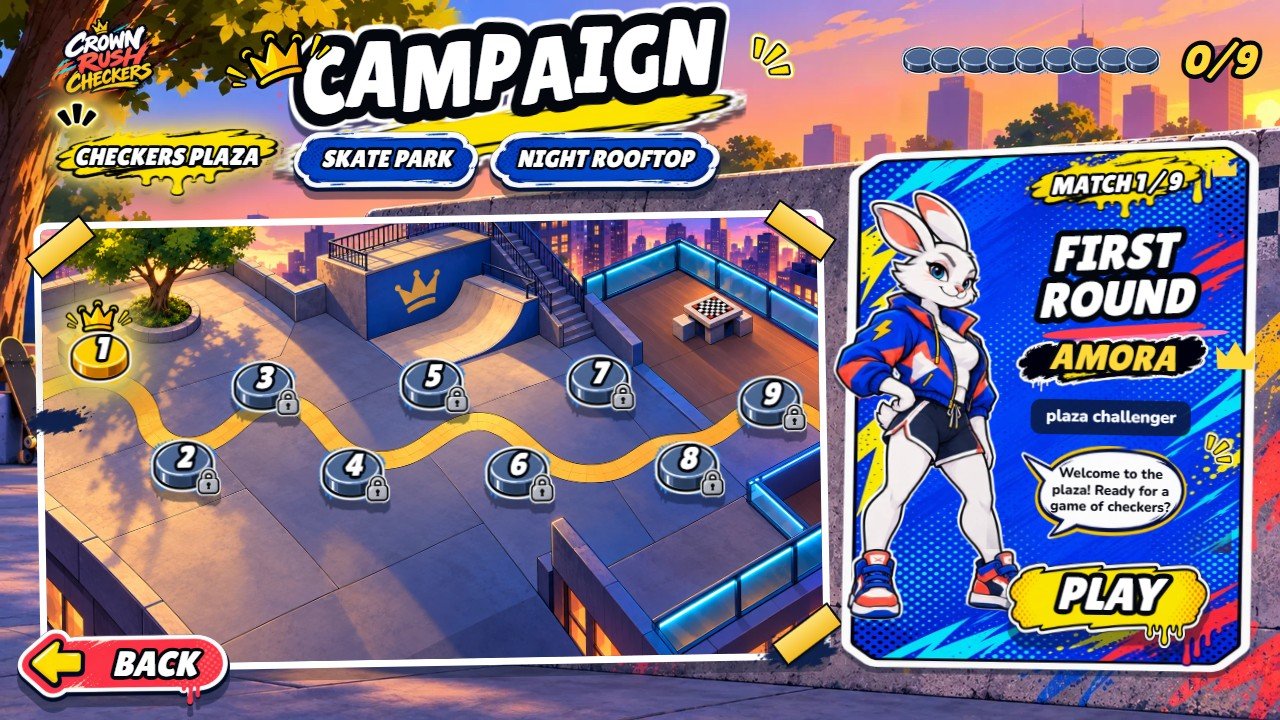 1
2
3
4
5
| # | What you see | File to change |
|---|---|---|
| 1 | The three arenas "Checkers Plaza / Skate Park / Night Rooftop" | Names: ENVIRONMENTS in source/src/data/content.ts. Tab pictures: source/public/street/menu/tag-yellow.webp (selected) and menu/pill-blue.webp. |
| 2 | Open match "1. First Round · Available" | Marker: source/public/street/menu/node-gold.webp. Map: source/public/street/campaign.webp. Positions of the nine markers: campaignNodesLandscape in source/src/art/manifest.ts. |
| 3 | Locked match "2. Board Control · Win the previous match" | Pictures: source/public/street/menu/node-dark.webp and menu/lock.webp. |
| 4 | Match card and Play button "Play" | Titles and speech of the nine matches: CAMPAIGN in source/src/data/content.ts. Card: source/public/street/menu/camp-card.webp. Character: source/public/street/heroes/<name>.webp. Button: source/public/street/hud/btn-brush-yellow.webp. |
| 5 | Back button "Back" | Picture: source/public/street/hud/btn-back.webp. |
Collection
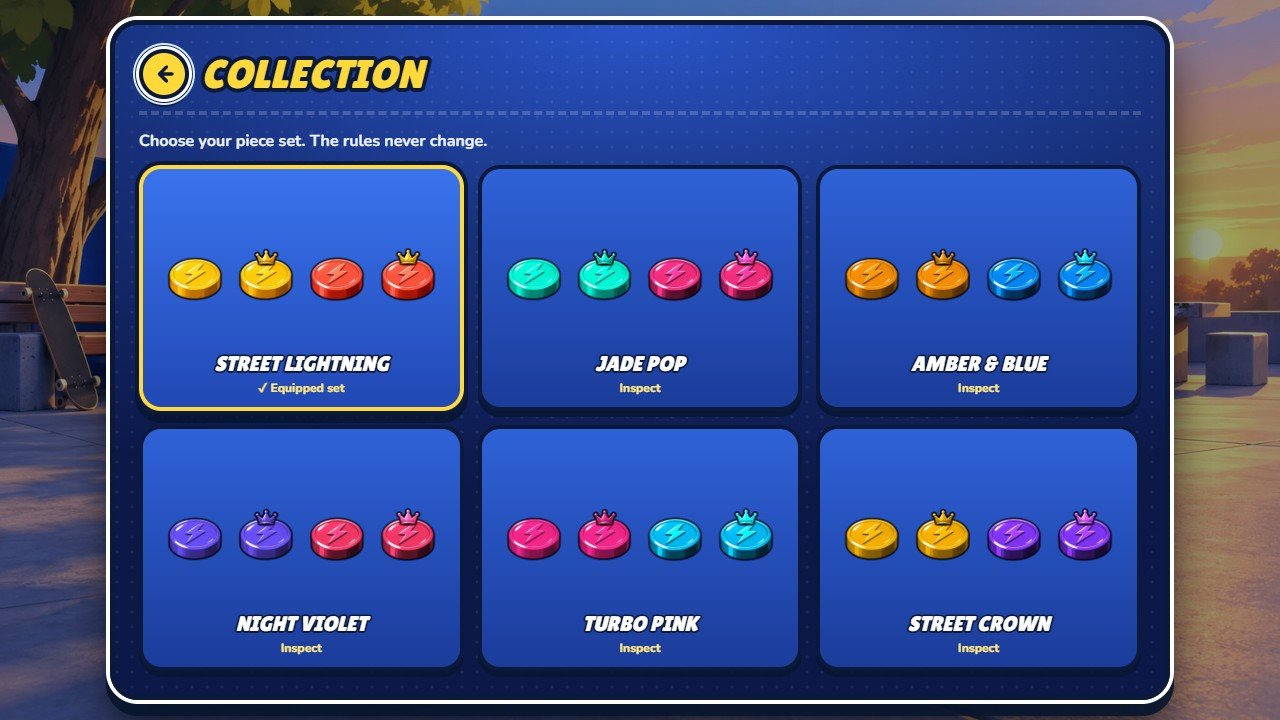 1
2
3
| # | What you see | File to change |
|---|---|---|
| 1 | Equipped piece set "Street Lightning✓ Equipped set" | The six sets are the list COSMETICS in source/src/data/content.ts (recipe D). |
| 2 | Another piece set "Jade PopInspect" | Click a set to see it on the board and equip it. |
| 3 | Back button "Back" | Drawn in source/src/ui/icons.ts; colours in source/src/street-panels.css. |
Victory screen
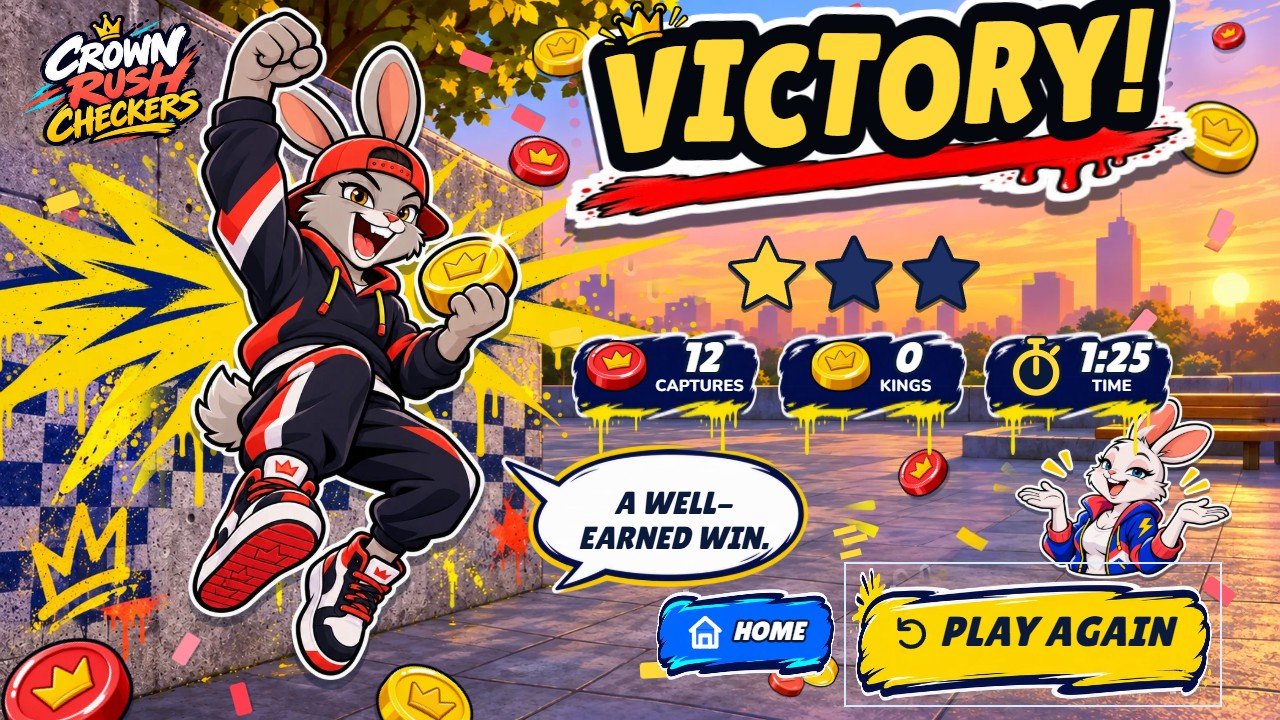 1
2
3
| # | What you see | File to change |
|---|---|---|
| 1 | Result title "Victory!" | Text keys win, loss and draw in source/src/i18n.ts. Winner picture: source/public/street/win/<name>.webp. Background: source/public/street/win/bg.webp and win/bg2.webp. |
| 2 | Play again "Play again" | Picture: source/public/street/hud/btn-brush-yellow.webp. Text key playAgain. |
| 3 | Home "Home" | Picture: source/public/street/hud/btn-brush-blue.webp. Text key home. |
Settings
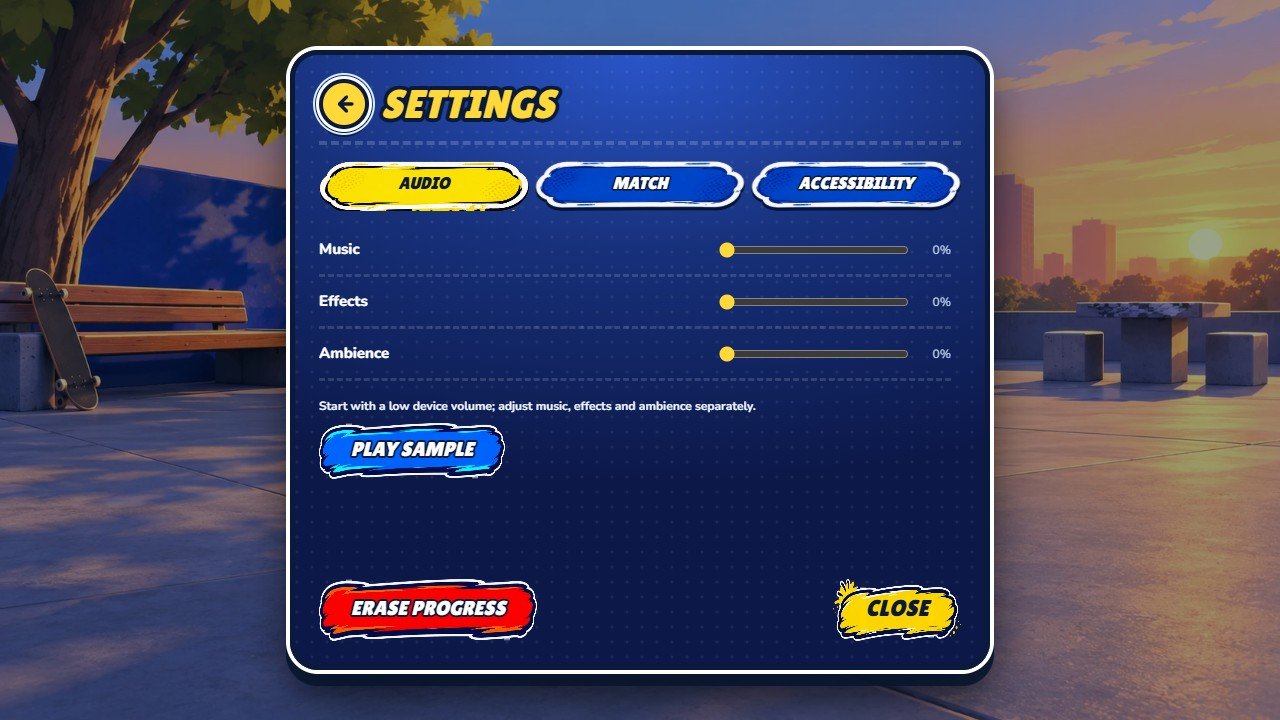 1
2
3
4
5
| # | What you see | File to change |
|---|---|---|
| 1 | Tabs "Audio / Match / Accessibility" | Audio, Match and Accessibility options. |
| 2 | Music volume "Music" | Tracks: source/src/assets/music/ (recipe F). |
| 3 | Effects volume "Effects" | Sound effects are generated by code in source/src/audio/audio.ts; there are no effect files. |
| 4 | Erase progress "Erase progress" | Deletes the saved profile of this browser. |
| 5 | Close "Close" | Text key close. |
Recipe A: replace a picture
- Find the picture in the tables above or in the complete list of pictures. All artwork is in
source/public/street/, in folders by subject:characters/,expressions/,heroes/,poses/,win/,pieces/,arenas/,plaza/,table/,menu/,hud/,challenges/,splash/. - Open the file in your image editor and note its size in pixels (the list shows it too).
- Draw or paste your picture with the same size in pixels. Keep the background transparent where the original is transparent.
- Export as WebP with the same file name, replacing the old file.
- Run
npm run buildinsource/(or look at it first withnpm run dev).
A picture with a different size still loads, but it may look stretched or out of place.
Recipe B: change the logo, the game name and the backgrounds
- Logo: replace
source/public/street/splash/logo.webp. The same file is used on the opening screen, in the menus and during the match, in every language.source/public/street/logo.webpis a spare copy: replace it with the same picture. - Name in the browser tab: open
source/index.htmland change the text between<title>and</title>, and the sentence aftercontent="in the line withname="description". - Name read by screen readers: in
source/src/i18n.tschangetitle:andsubtitle:(they appear twice: Portuguese and English). - Opening screen: background
source/public/street/plaza/scene.webp; the three friends at the tablesource/public/street/plaza/crew.webp. - Match backgrounds: Checkers Plaza
source/public/street/plaza/match.webp(phones held upright useplaza/match-portrait.webp); Skate Parksource/public/street/arenas/stones.webp; Night Rooftopsource/public/street/arenas/library.webp. The file namesstonesandlibraryare internal names: keep them. - Menu background:
source/public/street/menu/bg.webp. Campaign map:source/public/street/campaign.webp.
Recipe C: change a character
The game has three characters with the internal names amora, tito and olivia. Keep these names in
the file names; change only the pictures and the name shown to players.
- Replace the pictures of the character. For Tito they are:
characters/tito.webp(small portrait),expressions/tito-happy.webp,expressions/tito-proud.webp,expressions/tito-sad.webp(reactions),heroes/tito.webp(campaign card and menus),poses/duel-tito.webp(character select and match cards),poses/lean-tito.webpandposes/ledge-tito.webp(standing beside the board on wide screens),poses/shrug-tito.webp(the loser on the result screen),win/tito.webp(the winner) andmenu/tito.webp(mode select). All insidesource/public/street/. - Draw every picture of one character in the same style, each with the size of the file it replaces.
- To change the name and the short description, open
source/src/data/content.ts, findCHARACTERSand editname: 'Tito'andtitle: {{ pt: '...', en: 'skater rabbit' }}. Then add the new English description to the other languages (recipe E, step 4). - Build and check the character select, a match and the result screen.
Recipe D: change the pieces and the piece sets
- Shape of the pieces: four pictures in
source/public/street/pieces/:yellow-man.webp,yellow-king.webp,coral-man.webpandcoral-king.webp. Replace them keeping the size and the position of the piece inside the picture. - Colours and names of the six sets: open
source/src/data/content.tsand findCOSMETICS. Each set has anameand two groups of colours,light(Team A) anddark(Team B). The game repaints the four pictures with the colourbaseof each group, so changingbase: '#...'changes the colour of that side. - Colours are written as
#RRGGBB. Pick one in any colour picker (search the web for "color picker") and paste it. - Do not change the
idof a set (wood_ivory,sage_cream...). They are internal names stored in the players' saves. - If you change a set name, add the new English name to the other languages (recipe E, step 4).
Recipe E: change texts and translations
- In your editor use Find in files (Ctrl+Shift+F in Visual Studio Code) inside
source/src/and search for the English sentence exactly as the game shows it. - Most texts are in
source/src/i18n.ts. The file has two lists with the same keys:const pt = {{(Portuguese) andconst en = {{(English). Change only the text between the quotes, never the word before the colon. - Other texts are in
source/src/ui/copy.ts,source/src/ui/juice-copy.ts,source/src/data/content.ts(characters, arenas, campaign, tutorial) andsource/src/data/challenges.ts, or written in the code astx('Portuguese sentence', 'English sentence'). - The other 12 languages are in
source/src/locales/, one file each (de.ts,es.ts,fr.ts,id.ts,it.ts,ja.ts,ko.ts,nl.ts,pl.ts,ru.ts,tr.ts,zh.ts). Each file has a partdictwith the same keys asi18n.tsand a parttextwhere the English sentence is the key:'Play checkers': 'Dame spielen'. If you change an English sentence of step 3, change the same key in thetextpart of every language file, otherwise that language shows the English sentence. - Keep markers such as
{{n}},${{name}}and words in[brackets]exactly as they are: the game replaces them with numbers and names, and the word in brackets is painted yellow in the big titles. - Run
npm test: it tells you when a language is missing a sentence. Thennpm run build.
To remove a language from the list, delete its line in LANGS in source/src/i18n.ts.
Recipe F: replace the music
- The three tracks are in
source/src/assets/music/:menu.mp3(menus),play1.mp3andplay2.mp3(matches). - Export your track as MP3 (128 to 192 kbps is enough) with the same file name and replace the old file.
- For a clean loop, cut the track on a whole bar in Audacity.
- Build. Browsers start sound only after the first click or tap on the page.
Sound effects (clicks, moves, captures, victory) are generated by code in source/src/audio/audio.ts; there are
no files to replace. Players set the volumes in Settings.
Recipe G: change colours
- Interface colours: open
source/src/street.css. Near the top there is a list of colours such as--honey: #ffce34(yellow),--coral: #ff6950(red),--sage: #40baff(blue) and--paper: #101f46(dark blue of the panels). Change the value after the colon. The names are internal; keep them. - Board squares and frame of each arena: in
source/src/data/content.ts, findENVIRONMENTSand changelight,darkandframeinsideboard. - Pieces: recipe D.
- Painted buttons, cards and tags are pictures in
source/public/street/hud/andsource/public/street/menu/: recolour them in your image editor (recipe A). - Browser bar on phones:
name="theme-color"insource/index.html.
Recipe H: change the fonts
- The font files are in
source/src/assets/fonts/(WOFF2): Lilita One for the big street titles and buttons and Nunito for normal text. Corben is bundled too. - Get your font as
.woff2(check that its license allows use on websites) and copy it to that folder. - Open
source/src/assets/fonts/fonts.css, copy one@font-faceblock, and changefont-familyto the name of your font andurl('./...woff2')to your file. - Open
source/src/lang.cssand put your font name first in--font-street(titles and buttons) or in--font-ui(normal text), for example--font-street: 'My Font', 'Lilita One', .... - Keep the other names in the list: they cover letters your font may not have (Polish, Turkish, Russian, Japanese, Korean, Chinese).
- Add the license text of your font to
source/licenses/.
Recipe I: make the computer easier or harder
Open source/src/ai/levels.ts and find levelFor. There is one block for each level: 'easy',
'normal' and 'hard'.
| Value | What it does | Easier | Harder |
|---|---|---|---|
maxDepth | How many moves ahead the computer looks. | Smaller number | Larger number |
timeMs | Thinking time for each move, in thousandths of a second. | Smaller | Larger |
randomChance | How often it picks a weaker move on purpose (0.22 = 22% of the moves). | Larger | 0 |
margin | How much worse than the best move a chosen move may be. | Larger | 0 |
Where there are three numbers in square brackets, such as [0.22, 0.14, 0.08], they are the three steps of the
campaign inside one arena: first, second and third match. The level each character uses in the campaign is in recipe J.
The rules of the game (Brazilian draughts: mandatory capture, flying kings, men capture backwards) are in
source/src/engine/rules.ts. Changing rules is programming work; npm test checks them.
Recipe J: edit the campaign
- Open
source/src/data/content.tsand findCAMPAIGN. There are nine blocks that start withE(, one for each match, in order. - In each block you can change the opponent (
'amora','tito'or'olivia'), the level ('easy','normal'or'hard'), the title, the sentence before the match (intro) and the sentences after a win and a loss. - Every text has two versions,
pt:anden:. For the other languages see recipe E, step 4. - Keep nine matches and keep the arena names (
'veranda','stones','library'): the map has nine markers, three in each arena.
Check and publish your changes
- In
source/runnpm test. All 87 tests must pass. - Run
npm run build. It checks the code, builds the game and formats the result intosource/dist-static/. - Run
npm run preview, open the address it prints, and play: opening screen, a full match against the computer, the result screen, the campaign and the settings. Test on a phone too if you can. - Upload the contents of
source/dist-static/to your host with FTP or the file manager of your hosting panel, replacing the old files. Delete old files inassets/that are no longer in the new build. - Open your web address and reload with Ctrl+F5 (Windows) or Cmd+Shift+R (Mac).
If something goes wrong
- The build stops with a red message. It names the file and the line. Usually a quote, a comma or a bracket was deleted by accident. Compare with your backup.
- My new picture does not appear. Check the file name (letters, capitals,
.webp) and reload with Ctrl+F5. On a live site, see the cache section of the main guide. - A text shows in English in another language. The English sentence changed but the key in
source/src/locales/did not (recipe E, step 4). - Letters are missing in my font. Keep the fallback fonts in the list (recipe H, step 5).
- Players lost their progress. The save names in
source/src/persist/store.tswere changed. Keep them on a live site. - Still stuck? Write to willian@polargames.com.br with the file you changed, the message you see and a screenshot.
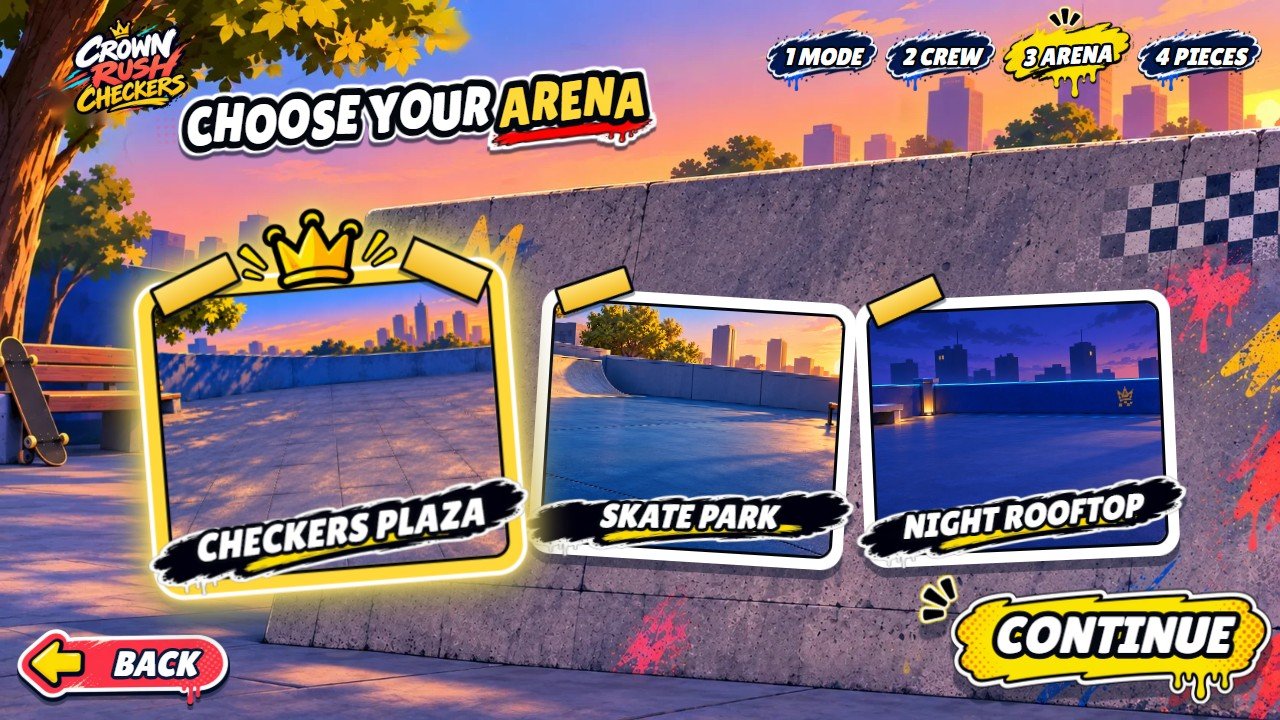
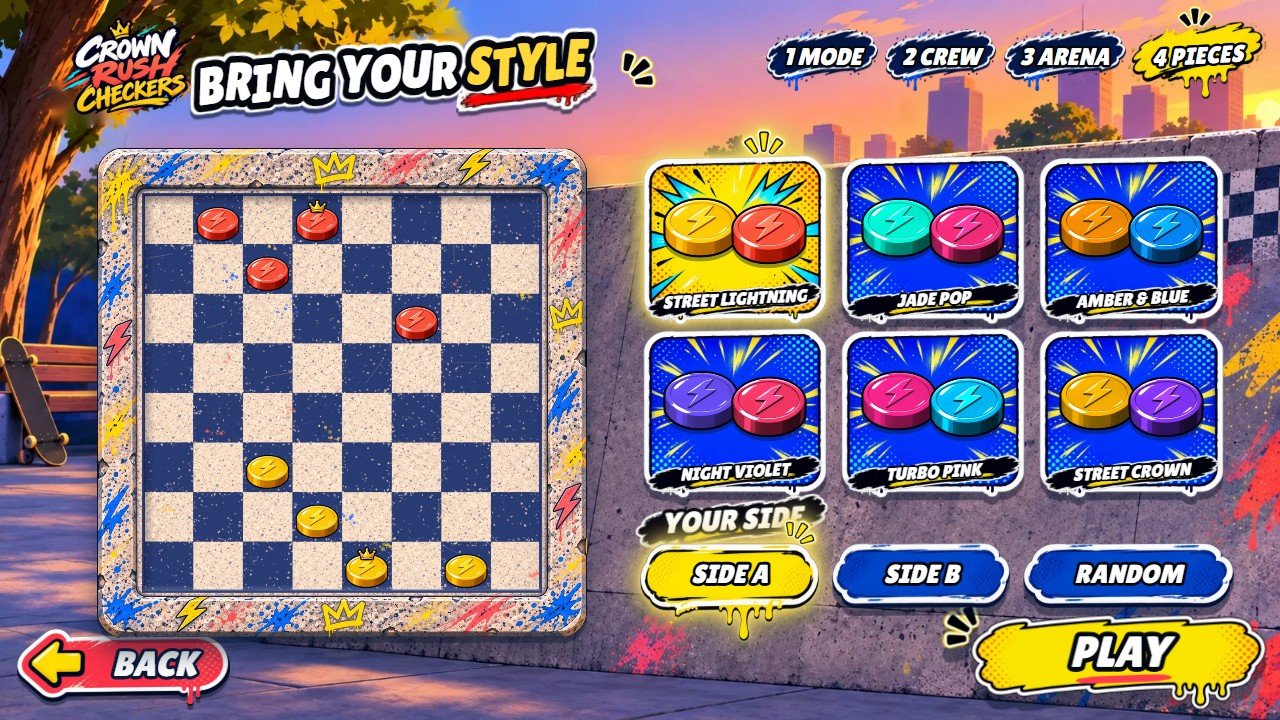
More real screenshots
Complete list of pictures
Source file (inside source/), size in pixels and the name of the same picture in game/ as delivered. After
you rebuild, a picture you changed gets new letters after its name; the others keep theirs.
| Source file | Size | File in game/ |
|---|---|---|
public/street/arenas/library.webp | 1672 x 941 | assets/library-6q--eLmG.webp |
public/street/arenas/stones.webp | 1672 x 941 | assets/stones-DpiTZEC3.webp |
public/street/campaign.webp | 1672 x 941 | assets/campaign-2HtgAUr-.webp |
public/street/challenges/comeback.webp | 512 x 512 | assets/comeback-C-bxkNw0.webp |
public/street/challenges/crown.webp | 512 x 512 | assets/crown-BCARliSP.webp |
public/street/challenges/triple.webp | 512 x 512 | assets/triple-DSth8IcH.webp |
public/street/characters/amora.webp | 768 x 896 | assets/amora-DX9siue1.webp |
public/street/characters/olivia.webp | 768 x 896 | assets/olivia-Aui6SFzf.webp |
public/street/characters/tito.webp | 768 x 896 | assets/tito-DxNWbh1V.webp |
public/street/expressions/amora-happy.webp | 768 x 896 | assets/amora-happy-DAe5bb6b.webp |
public/street/expressions/amora-proud.webp | 768 x 896 | assets/amora-proud-CUfJKpS_.webp |
public/street/expressions/amora-sad.webp | 768 x 896 | assets/amora-sad-BHHTwC8R.webp |
public/street/expressions/olivia-happy.webp | 768 x 896 | assets/olivia-happy-DHjHpkU6.webp |
public/street/expressions/olivia-proud.webp | 768 x 896 | assets/olivia-proud-Dq_SzigR.webp |
public/street/expressions/olivia-sad.webp | 768 x 896 | assets/olivia-sad-vQ44r8iH.webp |
public/street/expressions/tito-happy.webp | 768 x 896 | assets/tito-happy-Cl-v_Qj_.webp |
public/street/expressions/tito-proud.webp | 768 x 896 | assets/tito-proud-DxvhUK0K.webp |
public/street/expressions/tito-sad.webp | 768 x 896 | assets/tito-sad-DZAayk3_.webp |
public/street/frame.webp | 1173 x 1173 | assets/frame-8xDDZ3ik.webp |
public/street/heroes/amora.webp | 900 x 1200 | assets/amora-D90wc0wr.webp |
public/street/heroes/olivia.webp | 900 x 1200 | assets/olivia-B0y2gC0a.webp |
public/street/heroes/tito.webp | 900 x 1200 | assets/tito-BGxDusad.webp |
public/street/hud/banner.webp | 877 x 280 | assets/banner-BuqubS9L.webp |
public/street/hud/btn-back.webp | 815 x 325 | assets/btn-back-DdnCJ8AX.webp |
public/street/hud/btn-blue.webp | 814 x 233 | assets/btn-blue-Bh_1WbYK.webp |
public/street/hud/btn-brush-blue.webp | 704 x 190 | assets/btn-brush-blue-BYQxvBty.webp |
public/street/hud/btn-brush-red.webp | 704 x 190 | assets/btn-brush-red-BDl3H9ZS.webp |
public/street/hud/btn-brush-yellow.webp | 760 x 244 | assets/btn-brush-yellow-9bNXN4XS.webp |
public/street/hud/btn-yellow.webp | 817 x 229 | assets/btn-yellow-Dy6c0mSR.webp |
public/street/hud/bubble.webp | 900 x 313 | assets/bubble-CF2QAQ0x.webp |
public/street/hud/burst.webp | 674 x 311 | assets/burst-PNbfedbn.webp |
public/street/hud/card-a.webp | 636 x 900 | assets/card-a-D6X8ar_q.webp |
public/street/hud/card-b.webp | 598 x 900 | assets/card-b-ft3qcN96.webp |
public/street/hud/chip.webp | 696 x 224 | assets/chip-CSL0BxVG.webp |
public/street/hud/counter.webp | 900 x 298 | assets/counter-CqsxLqTx.webp |
public/street/hud/splat.webp | 415 x 191 | assets/splat-DZh0fMnc.webp |
public/street/hud/starburst.webp | 1200 x 551 | assets/starburst-YmrI8N06.webp |
public/street/hud/tag.webp | 900 x 353 | assets/tag-BTG7gdYH.webp |
public/street/logo.webp | 1220 x 954 | assets/logo-1J33ewDO.webp |
public/street/menu/bg.webp | 1672 x 941 | assets/bg-Bp58-cma.webp |
public/street/menu/brush-red.webp | 900 x 208 | assets/brush-red-DBAepMAU.webp |
public/street/menu/btn-go.webp | 760 x 252 | assets/btn-go-5YJBYYi-.webp |
public/street/menu/camp-card.webp | 499 x 900 | assets/camp-card-uVCyD4lU.webp |
public/street/menu/crew-card-b.webp | 900 x 658 | assets/crew-card-b-D3Wn9G1Z.webp |
public/street/menu/crew-card-y.webp | 900 x 662 | assets/crew-card-y-BTPaoLFM.webp |
public/street/menu/crown-sel.webp | 420 x 207 | assets/crown-sel-BSKv3ZKk.webp |
public/street/menu/lock.webp | 259 x 300 | assets/lock-Bs-JjQ9u.webp |
public/street/menu/mode-campaign.webp | 760 x 735 | assets/mode-campaign-CBH2Z4Pc.webp |
public/street/menu/mode-challenges.webp | 760 x 703 | assets/mode-challenges-C3XdvQf6.webp |
public/street/menu/mode-cpu.webp | 760 x 714 | assets/mode-cpu-B7u7b71G.webp |
public/street/menu/mode-learn.webp | 742 x 760 | assets/mode-learn-B02MI7gQ.webp |
public/street/menu/mode-local.webp | 760 x 701 | assets/mode-local-Dtrn64R9.webp |
public/street/menu/name-plate.webp | 640 x 201 | assets/name-plate-CGF9CHAr.webp |
public/street/menu/node-dark.webp | 300 x 239 | assets/node-dark-CcWYUgYa.webp |
public/street/menu/node-gold.webp | 300 x 240 | assets/node-gold-pyQC6lrR.webp |
public/street/menu/pill-blue.webp | 560 x 175 | assets/pill-blue-DCoIOUhE.webp |
public/street/menu/pill-yellow.webp | 560 x 268 | assets/pill-yellow-BIfzOgkj.webp |
public/street/menu/sparks-k.webp | 220 x 143 | assets/sparks-k-B_rN_hxs.webp |
public/street/menu/sparks-y.webp | 220 x 143 | assets/sparks-y-BzJ-Vvu0.webp |
public/street/menu/tag-dark.webp | 560 x 267 | assets/tag-dark-CPVKJLVq.webp |
public/street/menu/tag-yellow.webp | 560 x 306 | assets/tag-yellow-BatPGv4B.webp |
public/street/menu/tile-b.webp | 520 x 500 | assets/tile-b-oHtc0hyZ.webp |
public/street/menu/tile-y.webp | 520 x 494 | assets/tile-y-D7aqXaPS.webp |
public/street/menu/tito.webp | 547 x 1100 | assets/tito-zoCmA4UL.webp |
public/street/menu/vs-burst.webp | 684 x 760 | assets/vs-burst-BMZ2_HD-.webp |
public/street/pieces/coral-king.webp | 512 x 640 | assets/coral-king-DNVZno1P.webp |
public/street/pieces/coral-man.webp | 512 x 640 | assets/coral-man-BtbO6oGt.webp |
public/street/pieces/yellow-king.webp | 512 x 640 | assets/yellow-king-CzSobx7c.webp |
public/street/pieces/yellow-man.webp | 512 x 640 | assets/yellow-man-BeyUPUFN.webp |
public/street/plaza/crew.webp | 1254 x 1254 | assets/crew-Bg1QGTak.webp |
public/street/plaza/match-portrait.webp | 910 x 1727 | assets/match-portrait-B9CszFqV.webp |
public/street/plaza/match.webp | 1672 x 941 | assets/match-D7-qO45P.webp |
public/street/plaza/scene.webp | 1672 x 941 | assets/scene-BSLNUz5a.webp |
public/street/poses/duel-amora.webp | 607 x 900 | assets/duel-amora-BQLmp-v6.webp |
public/street/poses/duel-olivia.webp | 672 x 900 | assets/duel-olivia-IOB4iRUH.webp |
public/street/poses/duel-tito.webp | 554 x 900 | assets/duel-tito-DUG9UJE0.webp |
public/street/poses/lean-amora.webp | 679 x 760 | assets/lean-amora-BYUB-3Zg.webp |
public/street/poses/lean-olivia.webp | 758 x 760 | assets/lean-olivia-B6hM_lSI.webp |
public/street/poses/lean-tito.webp | 710 x 760 | assets/lean-tito-CqY7tMVm.webp |
public/street/poses/ledge-amora.webp | 669 x 760 | assets/ledge-amora-CZ76xCd0.webp |
public/street/poses/ledge-olivia.webp | 760 x 731 | assets/ledge-olivia-Da1NyMSs.webp |
public/street/poses/ledge-tito.webp | 730 x 760 | assets/ledge-tito-DAWa3wH4.webp |
public/street/poses/shrug-amora.webp | 760 x 640 | assets/shrug-amora-5X7L7TYR.webp |
public/street/poses/shrug-olivia.webp | 760 x 622 | assets/shrug-olivia-COFfkFQE.webp |
public/street/poses/shrug-tito.webp | 760 x 713 | assets/shrug-tito-BBGdMcB1.webp |
public/street/splash/logo.webp | 1536 x 1024 | assets/logo--4WLM-W0.webp |
public/street/table/skirt.webp | 1600 x 375 | assets/skirt-CGRkcwxJ.webp |
public/street/table/top.webp | 1254 x 1254 | assets/top-B3PHAJAx.webp |
public/street/win/amora.webp | 596 x 1100 | assets/amora-DmvG0gN0.webp |
public/street/win/bg.webp | 1672 x 941 | assets/bg-DhEWUDsN.webp |
public/street/win/bg2.webp | 1672 x 941 | assets/bg2-DXXMyftb.webp |
public/street/win/olivia.webp | 603 x 1100 | assets/olivia-HBSiIhu5.webp |
public/street/win/puck-gold.webp | 420 x 345 | assets/puck-gold-DuBz2LAG.webp |
public/street/win/puck-red.webp | 420 x 344 | assets/puck-red-BefY5fI0.webp |
public/street/win/tito.webp | 546 x 1100 | assets/tito-DVbG1bYq.webp |