Customization Guide
Make Splashmates your own game: new pets, new backgrounds, your own logo, texts, music and sounds, and easier or harder levels. Every recipe below is a short list of steps and says exactly which file to open. You do not need to know how to program. All pictures on this page are real screenshots of the game in this package.
1. Before you start
Free tools you need:
- A code text editor: Visual Studio Code (Windows, Mac, Linux) or Notepad++ (Windows). Do not use Word or WordPad: they break the files.
- An image editor that can export WebP with a transparent background: Photopea (in the browser), GIMP or Krita. You can also draw in any program, save as PNG and convert the PNG to WebP at squoosh.app.
- For music and sounds: Audacity (exports MP3).
Which folder to edit. The download has two copies of the game:
-
game/is the finished game. Simplest way: change files directly insidegame/and upload that folder. No other tools are needed. -
source/is the same game with tests, a local server and a level generator. If you use it, editsource/and runnpm run build: it copies the game tosource/dist/, and that folder is what you upload. Pick one way and keep to it.
The paths in this guide (for example assets/art/logo.webp) are the same inside both folders.
See your changes on your computer. The game must be opened from a web address, not by
double-clicking index.html. Two easy ways:
-
With Python (python.org): open a terminal in the game folder, run the command below and open
http://localhost:8080. -
With Node.js: in
source/, runnpm run serveand openhttp://localhost:5197.
python -m http.server 8080After each change, reload the page with Ctrl+F5 (Windows) or Cmd+Shift+R (Mac) so the browser does not show the old file.
localhost) you can jump to any level by adding
?level=12 to the address, for example http://localhost:8080/?level=12. This shortcut
does not work on a published site.
Names you will meet in the files
The game was drawn for another theme first, and the file names and the names inside the code were kept so that the rules, the 60 levels and the tests stay exactly the same. Players never see them. This is what the main ones mean:
| In the files | In the game |
|---|---|
fish (code), shoal |
a pet; the pets of one kind |
reef, src/reef.js |
the home bath scene (My Bath) |
pearl, START_PEARLS, pearl.webp |
the soaps, the only currency |
kelp, clam-lock, oyster, gold |
the foam wrap, the locked soap box, the soap dish, the Golden Duck |
scoop, sweep, whirl |
the bucket, the sponge (Wipe) and the drain whirl |
coral, kelp, ship, glow, ice,
deep
|
the six worlds: Bubble Tub, Kitchen Sink, Kiddie Pool, Night Bath, Snowy Hot Tub, Deep End |
clown, puffer, angel, eel, seahorse,
star, crab, tang, box, banner,
jelly, octo
|
the 12 pets, in this order (table in recipe C) |
2. Where everything is
The numbers on each screenshot match the table below it. Texts are named by their key in
src/locales.js (recipe E).
Title screen
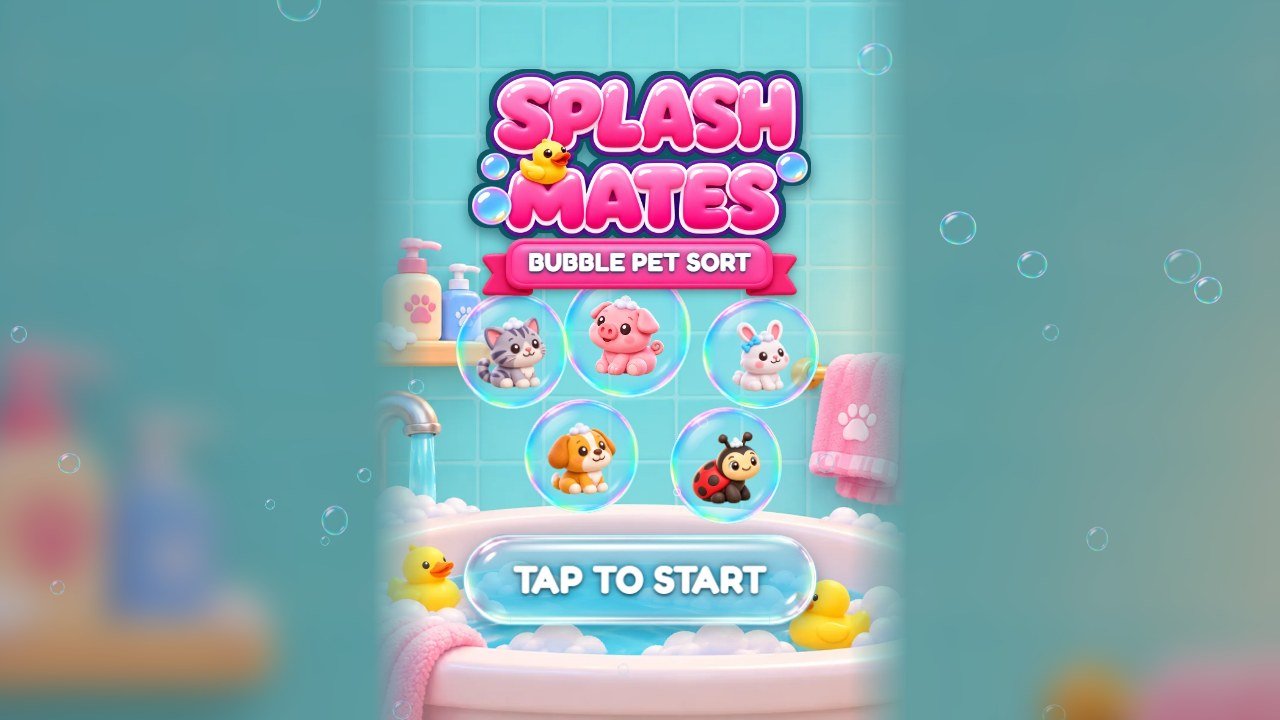 1
2
3
4
5
| # | What you see | File to change |
|---|---|---|
| 1 | Logo |
assets/art/logo.webp. The same file is used on the title screen and at the top of the home
screen (recipe B).
|
| 2 | Subtitle ribbon |
Text: key tagline in src/locales.js (recipe E). Ribbon picture:
assets/art/ribbon-coral*.webp.
|
| 3 | Pets of the title |
The pet pictures in assets/art/: clown.webp (the kitten),
puffer.webp (the puppy), angel.webp (the bunny) and the others (recipe C). The
soap bubbles around them are drawn by src/reef.js.
|
| 4 | Tap to start button | Text: key tapToStart. Glass shape: assets/art/glass-pill.webp. |
| 5 | Background | assets/art/bg-home.webp for the title and the home screen (recipe D). |
Home screen (My Bath)
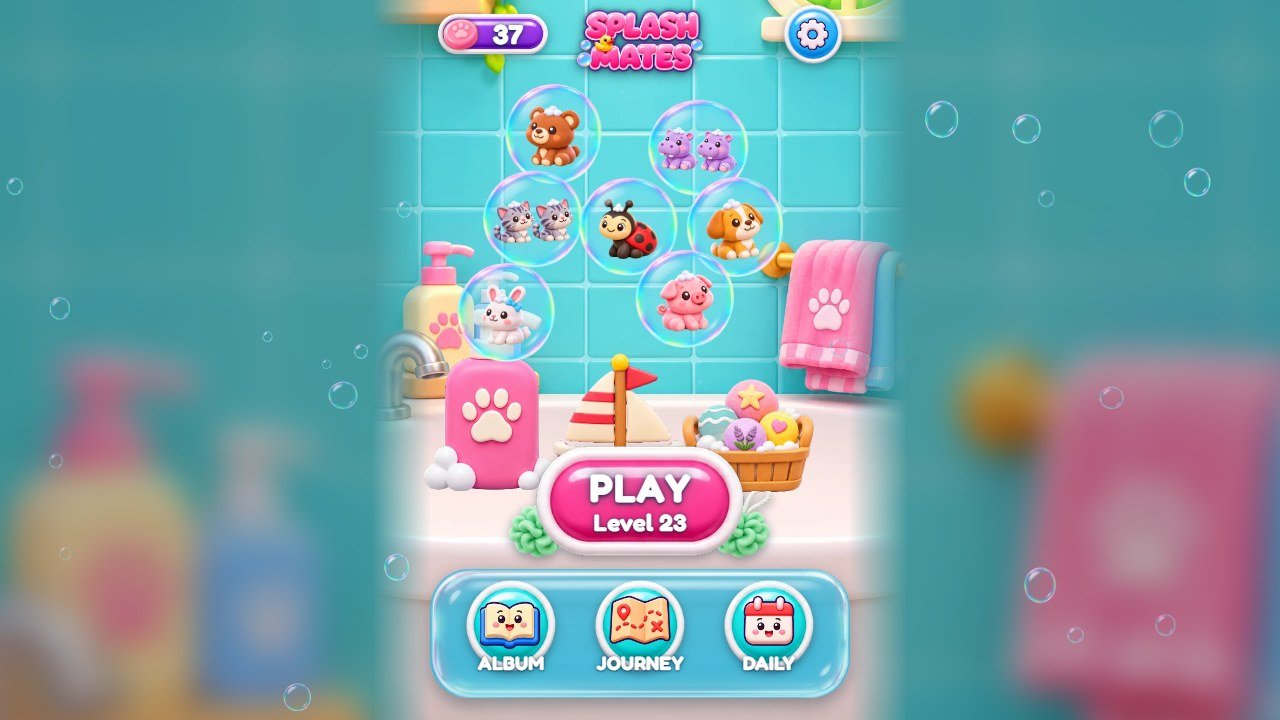 1
2
3
4
5
6
7
| # | What you see | File to change |
|---|---|---|
| 1 | Soap counter |
Soap icon: assets/art/pearl.webp (the code still calls the soaps pearls). Violet plate:
ui-plate*.webp. Starting soaps and helper prices: recipe G.
|
| 2 | Small logo | assets/art/logo.webp, the same file as the title screen. |
| 3 | Settings button | Icon: assets/art/ic-gear.webp. Round button: ui-round-blue.webp. |
| 4 | Washed pets | The same pet pictures used in the levels (recipe C), floating in soap bubbles. They appear here as the player fills the album. |
| 5 | Bath decoration |
Pictures: assets/art/decor-*.webp; round bath mat under it: pedestal.webp.
Which level opens each spot and its three choices: PEDESTALS in
src/config.js (recipe I).
|
| 6 | Play button |
Text: keys play and levelN. Button picture:
assets/art/ui-btn-coral*.webp.
|
| 7 | Album, Journey and Daily |
Texts: keys album, journey, daily. Icons:
ic-book.webp, ic-map.webp, ic-calendar.webp.
|
Journey map
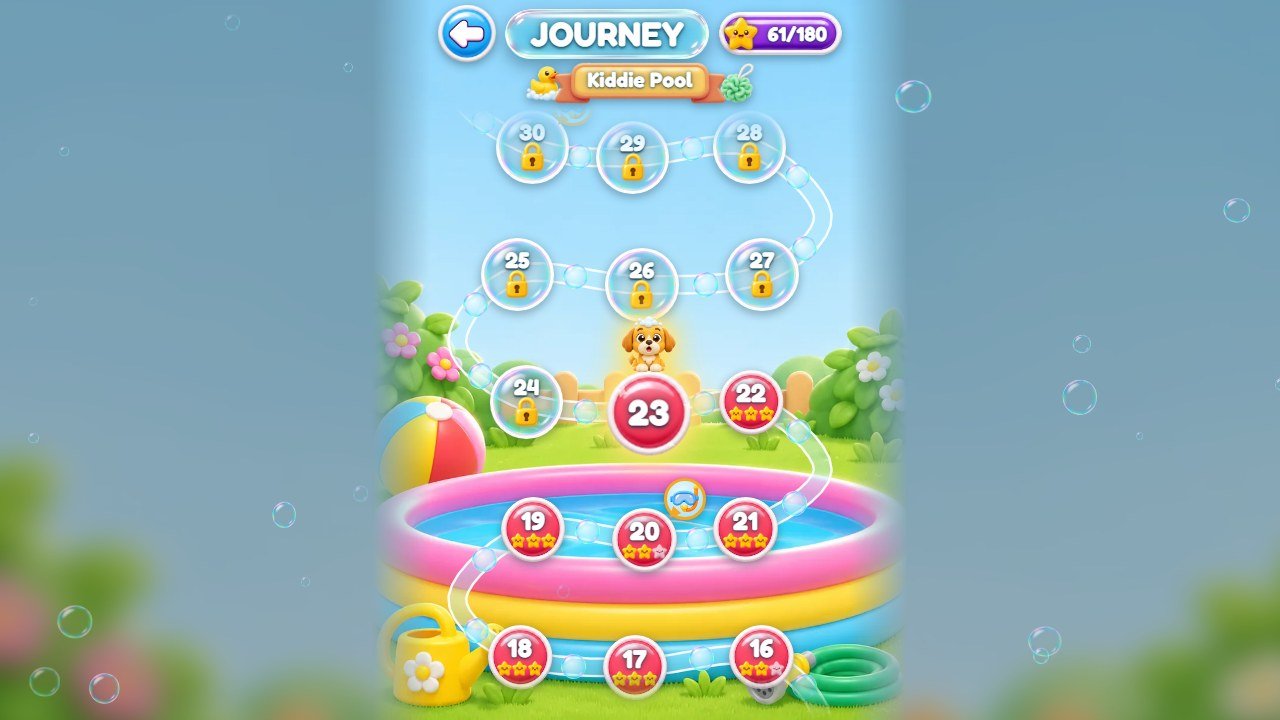 1
2
3
4
5
6
| # | What you see | File to change |
|---|---|---|
| 1 | Back button | Icon: assets/art/ic-back.webp. |
| 2 | World name |
Texts: keys w_coral, w_kelp, w_ship, w_glow,
w_ice, w_deep. Ribbon: ui-ribbon-gold*.webp.
|
| 3 | Stars earned | Icon: assets/art/ui-star.webp. Three stars per level, 60 levels. |
| 4 | Current level |
Round button: assets/art/ui-round-red.webp; mascot above it:
puffer-front.webp; sparkles: sparkle.webp.
|
| 5 | Locked level | Glass ball: assets/art/glass-orb.webp; lock: padlock.webp. |
| 6 | World background |
assets/art/bg-coral.webp, bg-kelp.webp, bg-ship.webp,
bg-glow.webp, bg-ice.webp, bg-deep.webp: one per world (recipe
D).
|
A level
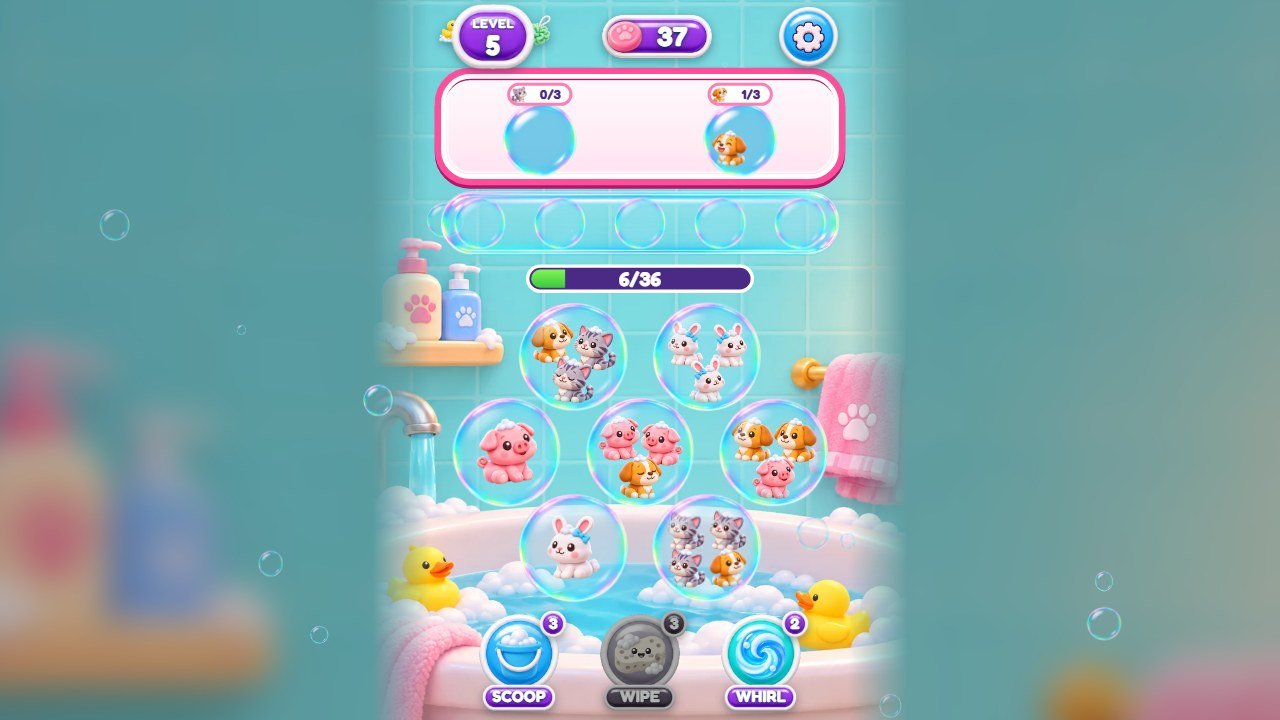 1
2
3
4
5
6
7
8
| # | What you see | File to change |
|---|---|---|
| 1 | Level number |
Text: key level. Plate: assets/art/ui-plate-bl.webp and
ui-plate-br.webp.
|
| 2 | Soap counter |
Soap icon: assets/art/pearl.webp (the code still calls the soaps pearls). Violet plate:
ui-plate*.webp. Starting soaps and helper prices: recipe G.
|
| 3 | Pause button | Icon: assets/art/ic-gear.webp. It opens the pause window with the volumes. |
| 4 | Top bubbles |
Drawn by src/render/view.js with assets/art/glass-orb.webp. How many are open
at once: floats in recipe F.
|
| 5 | Bubbles with pets |
Pets: the pictures of recipe C. Extra pieces: kelp.webp (foam wrap),
clam-lock.webp (locked soap box), key.webp, oyster.webp (soap
dish), gold*.webp (Golden Duck). How many pets and kinds: recipe F.
|
| 6 | Tray |
Drawn by src/render/view.js. Number of spots: TRAY in
src/sim/sim.js (recipe F).
|
| 7 | The three helpers |
Pictures: assets/art/pelican.webp (bucket), crab-broom.webp (sponge),
whirl.webp (drain whirl). Names: keys scoop, sweep,
whirl. Prices: recipe G.
|
| 8 | World background |
assets/art/bg-coral.webp, bg-kelp.webp, bg-ship.webp,
bg-glow.webp, bg-ice.webp, bg-deep.webp: one per world (recipe
D).
|
3. More screens of the game
Windows (pause, settings, win, lose) share the same pieces: the glass window is
assets/art/glass-panel.webp, the title ribbons are ribbon-coral*.webp (pink),
ribbon-gold*.webp (yellow) and ribbon-purple*.webp (violet), the buttons are
ui-btn-coral*.webp (pink) and ui-btn-teal*.webp (cyan). The file names keep the colors
of the first theme: coral now means pink, and ui-ribbon-brown*.webp and
ui-plate*.webp are violet.
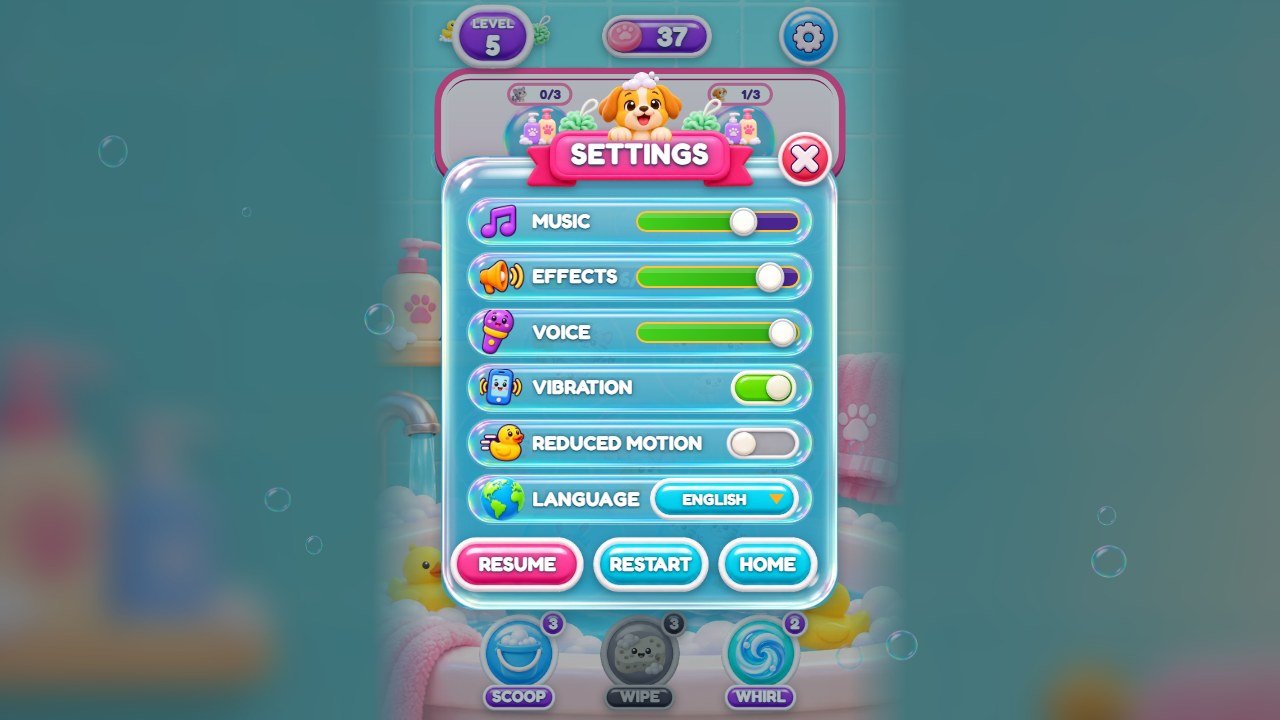
ic-music,
ic-speaker, ic-mic, ic-phone, ic-motion,
ui-globe; switches: ui-toggle-on and ui-toggle-off.
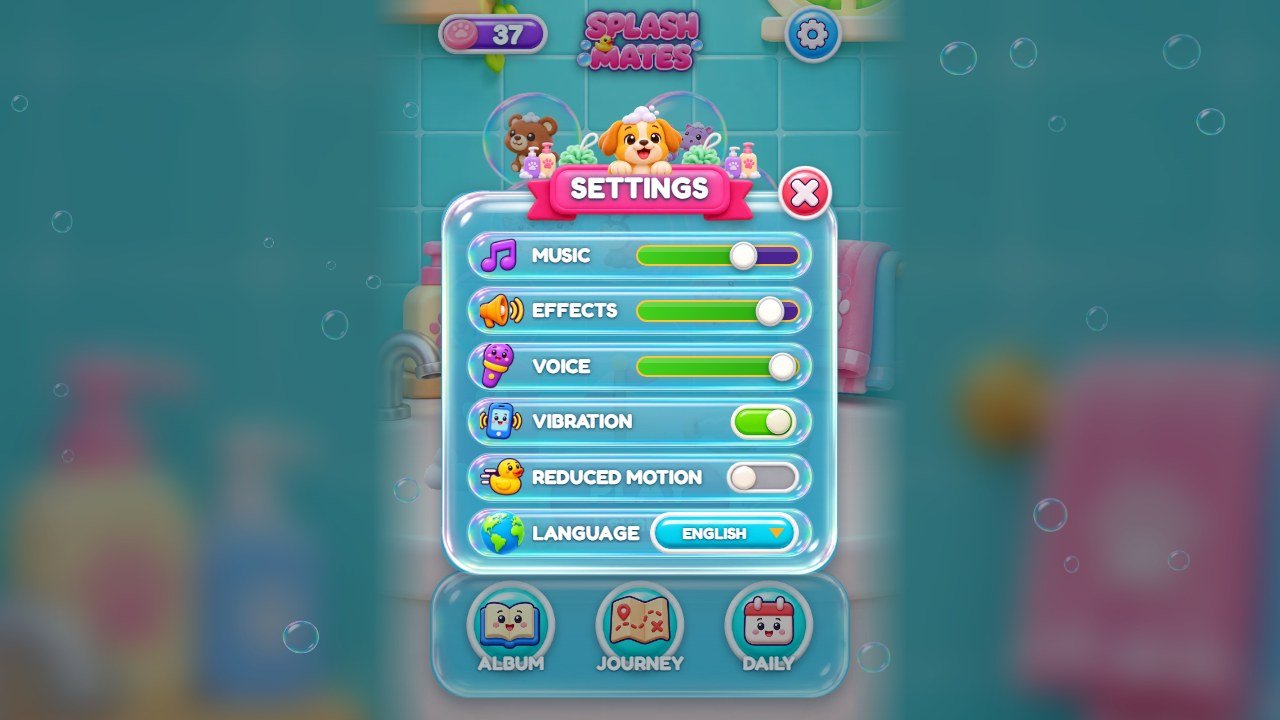
puffer-peek.webp.
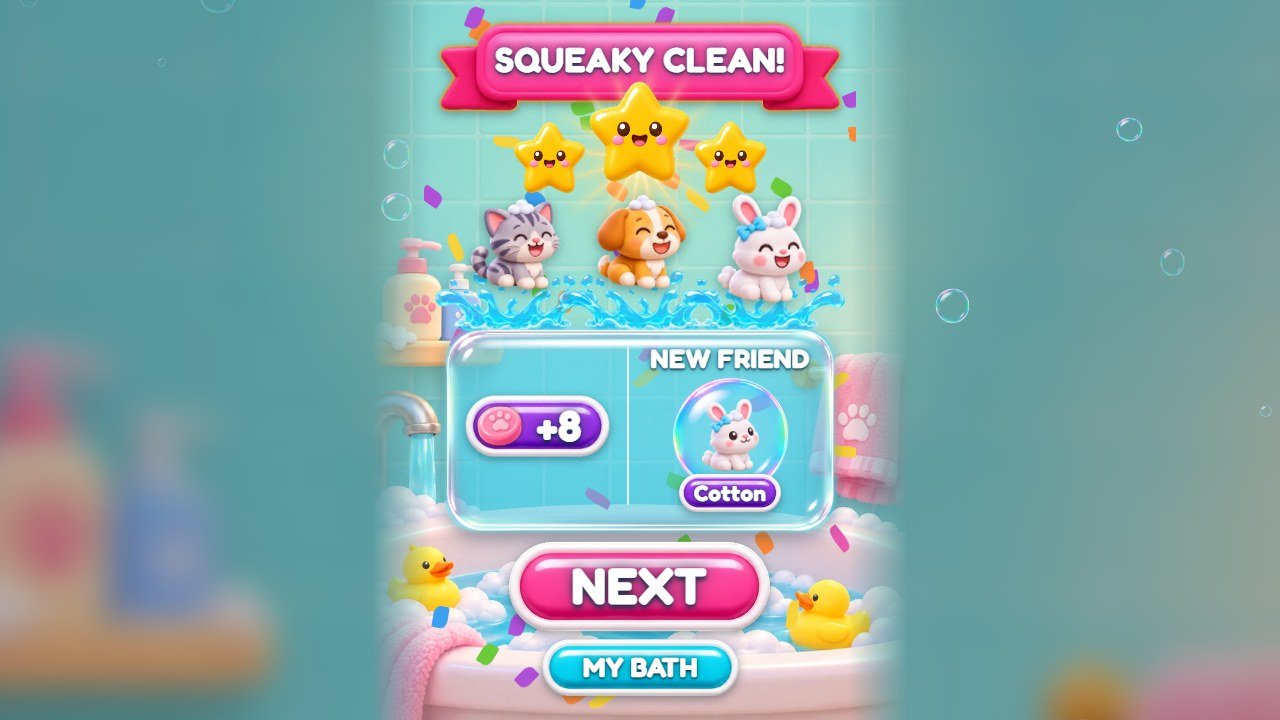
ui-star.webp and ui-star-off.webp, light rays
sunburst.webp and rays.webp, mascots splash*.webp.
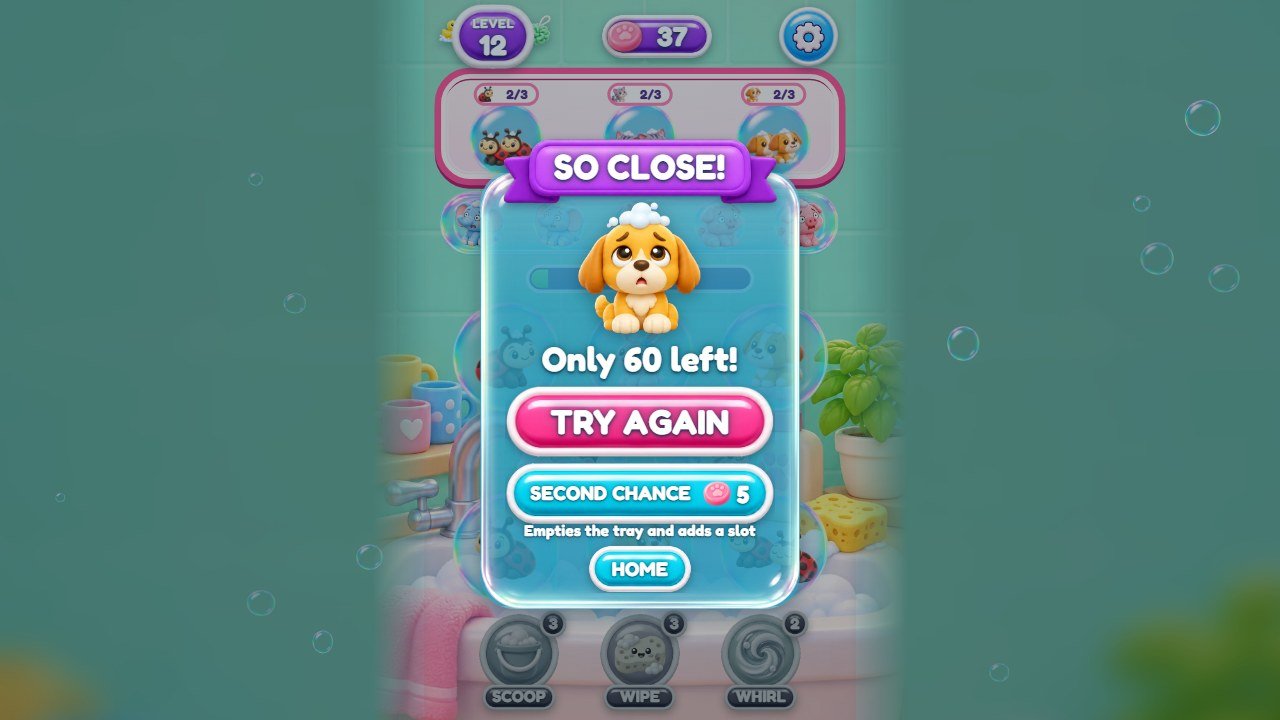
puffer-sad.webp. Texts: keys soClose,
onlyLeft, tryAgain, secondChance, addsSlot.
ic-question.webp.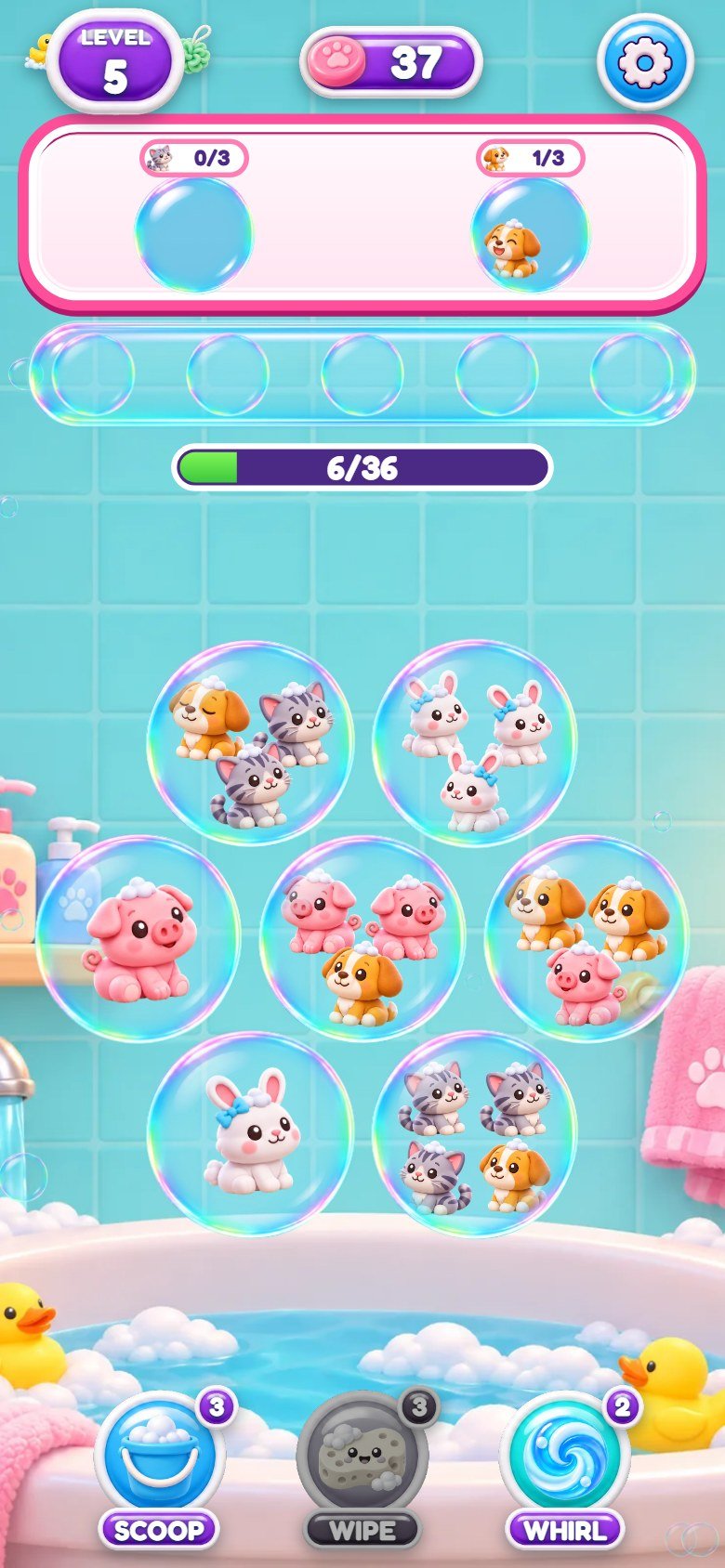
4. Recipe A: replace a picture
All pictures are in assets/art/ in WebP format. The game finds each picture by its file name, so a
new picture with the same name simply takes its place.
-
Find the file with the screens above or by its name: pet names (
clown,puffer...),bg-*backgrounds,decor-*bath decorations,ui-btn-*buttons,ribbon-*andui-ribbon-*ribbons,ui-plate*violet plates,glass-*glass pieces,ic-*icons. - Open the old picture in your image editor and note its width and height.
-
Make your new picture with the same width and height and a
transparent background (except the
bg-*backgrounds). Keep the drawing in the same position inside the picture. -
Export as WebP with the exact same name, for example
pearl.webp(the soap), and replace the old file. -
Buttons, ribbons and plates come in four files: the whole piece and three slices that let it stretch, for
example
ui-btn-coral.webp,ui-btn-coral-l.webp(left end),ui-btn-coral-m.webp(middle) andui-btn-coral-r.webp(right end). Replace all four, cutting your new picture at the same places. - Reload the game with Ctrl+F5.
5. Recipe B: change the logo and the game name
-
Logo: replace
assets/art/logo.webp(recipe A). Keep the same width, height and transparent background. -
Browser tab name: open
index.htmland change the text between<title>and</title>. On the line of the logo, a little below, change the name insidealt="SPLASHMATES"too (screen readers read it). -
Subtitle under the logo ("Bubble Pet Sort"): key
taglineinsrc/locales.js(recipe E). - Tab icon: replace
favicon.ico, next toindex.html.
6. Recipe C: change the pets
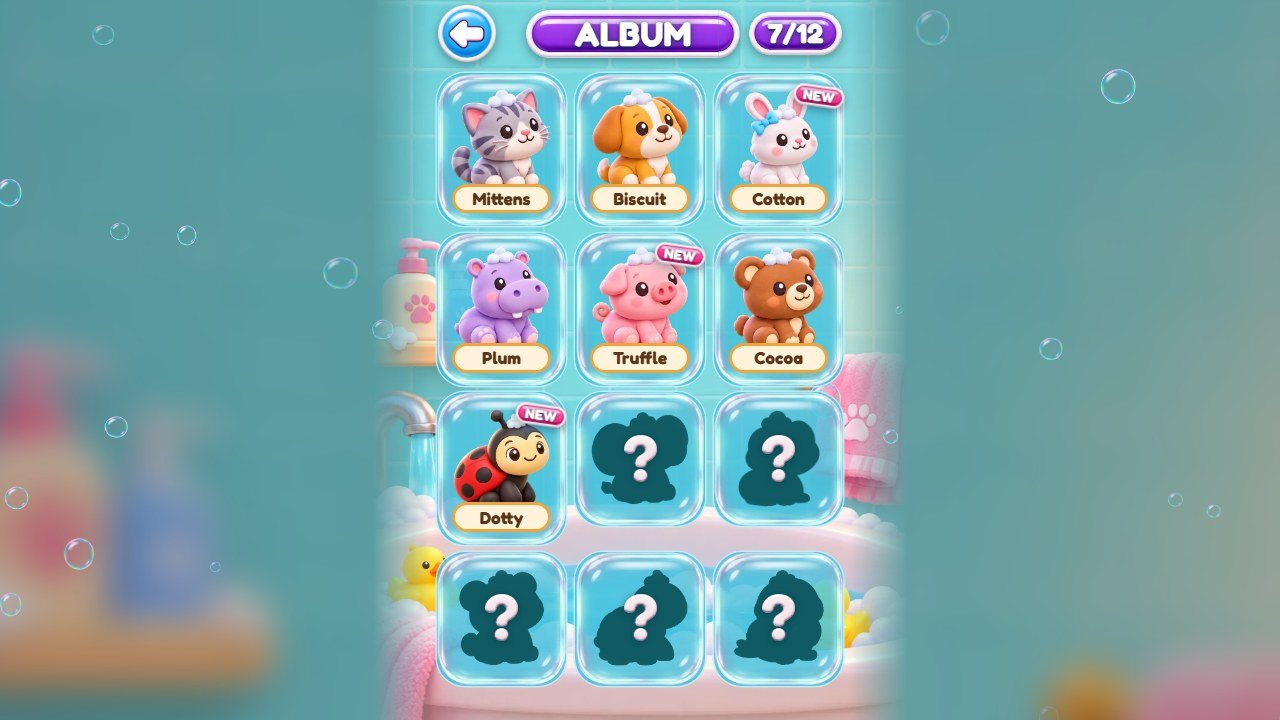
There are 12 pets and the Golden Duck. Each one is a set of five pictures in assets/art/: the
picture alone and four faces (-x0 normal, -blink eyes closed, -happy,
-worry). Replace the whole set, drawing the same pet with the four faces, in the same size and
position. The file names come from the first theme of the game (clown.webp is the kitten,
puffer.webp the puppy, and so on); the table shows which file is which pet, and you may keep the
names even if your pets are something else.
| # | Name in the game | Pet | Pictures | Spoken name |
|---|---|---|---|---|
| 0 | Mittens | kitten |
clown.webp, clown-x0.webp, clown-blink.webp,
clown-happy.webp, clown-worry.webp
|
name_0.mp3 |
| 1 | Biscuit | puppy (the mascot) |
puffer.webp, puffer-x0.webp, puffer-blink.webp,
puffer-happy.webp, puffer-worry.webp
|
name_1.mp3 |
| 2 | Cotton | bunny |
angel.webp, angel-x0.webp, angel-blink.webp,
angel-happy.webp, angel-worry.webp
|
name_2.mp3 |
| 3 | Plum | hippo |
eel.webp, eel-x0.webp, eel-blink.webp,
eel-happy.webp, eel-worry.webp
|
name_3.mp3 |
| 4 | Truffle | piglet |
seahorse.webp, seahorse-x0.webp, seahorse-blink.webp,
seahorse-happy.webp, seahorse-worry.webp
|
name_4.mp3 |
| 5 | Cocoa | bear cub |
star.webp, star-x0.webp, star-blink.webp,
star-happy.webp, star-worry.webp
|
name_5.mp3 |
| 6 | Dotty | ladybug |
crab.webp, crab-x0.webp, crab-blink.webp,
crab-happy.webp, crab-worry.webp
|
name_6.mp3 |
| 7 | Peanut | baby elephant |
tang.webp, tang-x0.webp, tang-blink.webp,
tang-happy.webp, tang-worry.webp
|
name_7.mp3 |
| 8 | Hopper | frog |
box.webp, box-x0.webp, box-blink.webp,
box-happy.webp, box-worry.webp
|
name_8.mp3 |
| 9 | Bao | panda |
banner.webp, banner-x0.webp, banner-blink.webp,
banner-happy.webp, banner-worry.webp
|
name_9.mp3 |
| 10 | Shelly | turtle |
jelly.webp, jelly-x0.webp, jelly-blink.webp,
jelly-happy.webp, jelly-worry.webp
|
name_10.mp3 |
| 11 | Kiwi | budgie |
octo.webp, octo-x0.webp, octo-blink.webp,
octo-happy.webp, octo-worry.webp
|
name_11.mp3 |
-
The Golden Duck uses
gold.webpandgold-x0,gold-blink,gold-happy,gold-worry. -
The puppy (the
pufferfiles) is also the mascot:puffer-front.webp(map),puffer-peek.webp(settings) andpuffer-sad.webp(level lost). -
Names: the list
NAMESnear the top ofsrc/locales.js, in the order of the table. Change only the words inside the quotes. -
Album sentences: keys
f_0tof_11(same order) in each language. -
Spoken names: the album says the name with
assets/voice/en/name_0.mp3toname_11.mp3(also inpt/andes/). If you rename a pet, record the new name over the file with the same number.
7. Recipe D: change the backgrounds and the worlds
-
Backgrounds are in
assets/art/:bg-home.webp(title and home) and one per world, in this order:bg-coral.webp(levels 1 to 10, the Bubble Tub),bg-kelp.webp(11 to 20, the Kitchen Sink),bg-ship.webp(21 to 30, the Kiddie Pool),bg-glow.webp(31 to 40, the Night Bath),bg-ice.webp(41 to 50, the Snowy Hot Tub),bg-deep.webp(51 to 60, the Deep End). - Replace a file with a picture of the same width and height (recipe A). Keep the middle calm, without strong details: the bubbles are drawn there. The sides are shown blurred on wide screens.
-
World names: keys
w_coral,w_kelp,w_ship,w_glow,w_ice,w_deepinsrc/locales.js(recipe E). The file names stay the same even if your world has another theme; players never see them.
8. Recipe E: change texts and translations
All texts players read are in two files: src/locales.js (English, Portuguese, Spanish) and
src/locales-more.js (French, German, Italian, Dutch, Polish, Turkish, Russian, Indonesian,
Japanese, Korean, Chinese). Each language is a block of lines like these:
  tapToStart: 'Tap to start',
  play: 'Play',
  levelN: 'Level {n}',
soClose: 'So close!',- Find the text you want to change (Ctrl+F in your editor). The word before the colon is the key; never change it.
-
Change only the words inside the quotes. If your text has an apostrophe, like
Let's, put double quotes around the text:"Let's go!". - Keep markers such as
{n}: the game puts a number there. - Change the same key in the other languages you use.
-
If you use
source/, runnpm test: it checks that the 14 languages still have every key and every marker.
The sentences of the guided first levels are the keys g1a, g1b, g1c,
g2a, g2b, g2c, and the one-sentence cards of new pieces start with
l_. The guided sentences are also spoken: see recipe H.
9. Recipe F: make the levels easier or harder
The 60 levels are not drawn by hand: src/levels.js has the numbers of each level and the game
builds the bubbles from them. The first world (levels 1 to 10) is three plain lists, one number per level:
const W1 = {
  fish: [12, 18, 24, 30, 36, 42, 48, 54, 60, 72],
  sp: [2, 3, 4, 4, 5, 5, 6, 6, 6, 7],
  slots: [4, 5, 6, 6, 7, 7, 8, 8, 8, 8],
};| Setting | What it means | Easier |
|---|---|---|
fish |
How many pets the level has (the code still uses the old word fish). Always a multiple of
3.
|
fewer |
sp / nsp |
How many different kinds of pet appear. | fewer |
slots |
How many bubbles with pets are on the screen at once. | shipped values: 4 to 10 |
floats |
How many top bubbles are open at once (2, 3 or 4). | more |
kelp, lock, free, oyster |
How many foam wraps, locked soap boxes, free bubbles and soap dishes the level has. | fewer foam wraps and locks, more free bubbles |
hard |
How mixed the pets are, from 0 (grouped) to 0.65. | lower |
-
Levels 11 to 60 use the formulas a few lines below, inside
params(n):wis the world (2 to 6) andkthe position in the world (0 to 9). To make all of them easier, lower the first number of thefishline (60) or the numbers of thehardline. -
The tray has 5 spots:
TRAYat the top ofsrc/sim/sim.js. A bigger tray makes every level much easier. -
After changing level numbers, open a terminal in
source/and run the two commands below. The first one finds a new solvable layout for each level and rewritessrc/level-seeds.js; the second plays the 60 levels with a simulated player and fails if a level cannot be won.
npm run levels
npm test
These two commands need Node.js; the main buyer guide explains how to install it, step by step.
10. Recipe G: change soaps and helper prices
-
Helper prices, in soaps:
COSTat the top ofsrc/sim/sim.js.chanceis the price of the second chance on the lose window.
export const COST = { scoop: 3, sweep: 3, whirl: 2, chance: 5 };-
Soaps a new player starts with:
START_PEARLSinsrc/config.js(6; the code still calls the soaps pearls). -
Level that unlocks each helper:
HELPER_ATinsrc/config.js(Scoop, the bucket, at level 3; Wipe, the sponge, at 5; Whirl at 7).
Change only the numbers. Keep the commas, braces and names exactly where they are. Soaps are earned by playing; the game has no store and no real-money purchases.
11. Recipe H: replace music, sounds and voice
Save your audio as MP3 with the same file name and replace the old file.
-
Music (
assets/music/):reef.mp3plays on the menus,play-a.mp3in levels 1 to 30 andplay-b.mp3in levels 31 to 60. Each track repeats; a track that ends softly loops best.
| Recorded sound | When it plays |
|---|---|
assets/sfx/win.mp3 |
level complete |
assets/sfx/fail.mp3 |
the tray is full, level lost |
assets/sfx/star.mp3 |
each star on the win window |
assets/sfx/pearl.mp3 |
soaps are earned |
assets/sfx/unlock.mp3 |
a locked soap box opens, a new-piece card appears, a decoration is placed |
assets/sfx/gold.mp3 |
the Golden Duck completes a bubble |
assets/sfx/oyster.mp3 |
a soap dish opens |
assets/sfx/scoop.mp3 |
the Scoop helper (bucket) |
assets/sfx/sweep.mp3 |
the Wipe helper (sponge) |
assets/sfx/whirl.mp3 |
the Whirl helper (drain whirl) |
assets/sfx/chance.mp3 |
second chance is used |
-
If a new sound is too loud or too quiet, change its number in
GAINat the top ofsrc/audio/sound.js(1 is full volume, 0.5 is half). -
The short sounds of play (tap, tray, pop, buttons, the rising notes of a full bubble) are not files: the game
makes them with the numbers in
SYNTH, in the same file.fis the pitch in Hz,durthe length in seconds,gthe volume. -
Voice (
assets/voice/en/,pt/,es/):intro.mp3(welcome),g1atog2c(the guided first levels) andname_0toname_11(pet names). If you change one of those texts, record the new sentence over the file with the same name. -
To remove the voice, delete the files or the whole
assets/voice/folder: the game keeps working and shows only the written captions. The same is true for the music and the recorded sounds. -
Players set the Music, Effects and Voice volumes in Settings; the starting values are
VOLinsrc/config.js. On phones, sound starts after the first touch (a browser rule).
12. Recipe I: change the bath decorations
The home screen has 6 decoration spots. Open src/config.js and find PEDESTALS, one
line per spot:
{ at: 5, x: 0.15, y: 0.685, opts: ['lighthouse', 'castle', 'tiki'] },
{ at: 30, x: 0.6, y: 0.6, k: 0.86, opts: ['anchor', 'tiki', 'chest'] },at: the level that opens the spot (5, 10, 20, 30, 40, 50).-
opts: the three decorations the player can choose there. Each name is a pictureassets/art/decor-<name>.webp:amphora(fern),anchor(towels),arch(rubber-duck family),boat(sailboat),castle(water-wheel toy),chest(bath-bomb basket),helmet(toy submarine),lighthouse(shampoo bottle),tiki(candle). -
xandy: where the spot is on the bath, from 0 (left, top) to 1 (right, bottom).yis the bottom of the decoration. -
k(only on the three spots of the back row, 0.86 in the second line above): the size of the decoration compared with the front row (1 when the line has nok). -
To change a decoration, replace its picture (recipe A). To add one, save
decor-yourname.webpand write'yourname'in anoptslist.
13. Recipe J: change colors, buttons and the font
-
Main colors: the block
:rootnear the top ofstyle-1-base.css:--ink(deep violet text),--coraland--coral-d(pink),--tealand--teal-d(cyan),--goldand--gold-d(white and light pink, used for borders),--cream. Change the value after the colon, for example--coral: #ff4f9a;. -
Browser bar color on phones: the line
theme-colorinindex.html. - Buttons, ribbons and plates are pictures: recolor them in your image editor (Hue/Saturation) and save with the same names (recipe A, step 5). Most of the colors you see are in these pictures, not in the CSS.
-
Font: Fredoka, in
assets/fonts/, declared by the four@font-faceblocks at the top ofstyle-1-base.css. To use another font, add its.woff2files toassets/fonts/and change the file names in those blocks. Check that its license allows use in games.
14. Check and publish your changes
- Play the parts you changed on your computer (see Before you start), in a wide window and in a narrow one (F12, then Ctrl+Shift+M shows phone sizes).
-
If you edited
source/: in a terminal insidesource/, run the commands below. The first checks the rules, the levels and the texts; the second copies the game tosource/dist/.
npm test
npm run build-
Upload everything inside
game/(orsource/dist/, if you built it) to your web hosting, replacing the old files. - Open your game address and press Ctrl+F5. If you still see the old version, read the section about updates and cache in the main buyer guide.
15. If something goes wrong
-
The game stops on the first screen after you edit a
.jsfile: a comma, quote or brace is missing. Press F12 and open the Console: it shows the file name and the line with the error. Compare that line with your backup. -
A picture is missing: the file name is different (names are case sensitive:
Logo.webpis notlogo.webp), or the file is not WebP. - Nothing changed: the browser is showing the old file. Press Ctrl+F5, or open the game in a private window.
- Still stuck? Restore your backup and change one thing at a time. Support: willian@polargames.com.br (include the game version, what you changed and a screenshot).