
Contents
- Overview
- Quick installation by FTP
- Requirements and sound
- Controls and how the game works
- Screens and controls explained
- Map of the files
- Customizing numbers, pictures, texts and sounds
- Languages
- Local saves
- Optional development
- Updating and cache
- Licenses
- Troubleshooting
- Frequently asked questions
- Support
1 Overview
Seam Street is an HTML5 merge game set in a fashion boutique. The player taps a sewing station to make a piece, drags two equal pieces together to merge them into a better one, and delivers what the customers ask for. Customers pay coins, coins dress the mannequins in the shop windows of the street, mannequins give stars and stars raise the level. The game has 7 fashion lines with 8 pieces each and 7 sewing stations with 5 levels each.
The street has 4 collections: Boutique Avenue, Riviera Promenade, Maple Avenue and Winter Gala. Each one has 3 places with 6 mannequins, its own scenery, customers, music and counter color, and the last three bring a new station (Summer Wear, Autumn Knits and Winter Coats). The game also has a special customer who pays triple, a rush hour with double coins, a shelf, a gift box, a Lookbook, a guided tutorial of 9 steps, a win screen when the 4 collections are dressed and 14 interface languages.
The game runs in any modern browser on phones, tablets and computers, in portrait and in landscape, each
with its own layout. It uses plain HTML, CSS and JavaScript modules: no framework, no build step to play, no
server code, no ads, no store, no ranking and no accounts. Every balance number is in one file,
src/config.js.
2 Quick installation by FTP
Installing takes a few minutes if you have FTP access or a file manager in your hosting panel.
- 1. Extract
seam-street-static-1.0.0.zipon your computer. -
2. Connect to your hosting by FTP or its file manager and open the folder where the game should live, for
example
public_html/games/seam-street/. -
3. Upload only the contents of the
game/folder, so thatindex.htmlsits directly inside the target folder. -
4. Keep
assets/,src/,style.css,style-land.cssandstyle-more.cssbesideindex.html, with names and letter case exactly as extracted. -
5. Open
https://your-domain.example/games/seam-street/in a modern browser.
source/ folder, the documentation/ folder or the ZIP itself.
Players need no Node.js, PHP, database or account.
3 Requirements and sound
-
Any static web hosting with HTTPS (or HTTP). Opening
index.htmldirectly from the disk (file://) is not supported, because browsers block JavaScript modules that way. - A current browser: Chrome, Edge, Firefox or Safari, on desktop or mobile. Pieces are dragged with the mouse or a finger.
- Browsers start sound only after a user gesture. The game opens on a title screen with a Play button, and the music starts with the first touch.
- When the page is hidden, the sound stops; it comes back when the player returns.
4 Controls and how the game works
Tap a sewing station: it uses 1 spool of thread and drops a piece on the nearest free space of the counter. Drag a piece onto an equal one and the two merge into the next piece of that fashion line, up to piece 8. A double tap on a piece merges it with its nearest twin. Dropping a piece on an empty space moves it, and dropping it on a different piece swaps the two. A covered piece cannot be moved; it opens when an equal piece is dropped on it. Two equal stations merge into a better station, which sometimes drops pieces that are already merged.
Spools of thread are the energy: the basket holds 100 spools and gets 1 back every 2 seconds. Each customer shows the pieces they want and the coins they pay. When the pieces are on the counter the order turns ready: tap its green button, or drag the piece onto the customer. A delivery also gives some spools back. An order can be changed for free with the round arrow, once every 2 minutes. A piece can be sold for a few coins with the Sell button, or kept on the shelf, which has 6 places.
The mannequin button opens the street. Each collection has 3 places with 6 mannequins. A mannequin costs coins and gives 2 stars; 3 stars make 1 level. A new level fills the basket of spools and opens the hatboxes of the counter marked with that number, up to level 12. New stations and station parts arrive in the gift box. When the 18 mannequins of a collection are dressed the next collection opens, and when the 4 collections are dressed the player wins the prize of the year and Year 2 starts with higher prices.
From level 3 on, a special customer marked ×3 may appear: they want the best piece already made of one fashion line and pay 3 times the normal price. Also from level 3, a rush hour starts every 12 deliveries: for 60 seconds every delivery pays double. The Lookbook shows everything already sewn, and a complete page of 8 pieces gives 80 coins. The pause button opens the menu with the sound and music volumes, the language, less motion, Resume, Menu and Start over.
5 Screens and controls explained

Marks on the screenshot
- Play

Marks on the screenshot
- Tutorial text
- Station: tap to sew
- Covered piece
- Customer and order

Marks on the screenshot
- Level and star bar
- Spools of thread (energy)
- Coins
- Pause
- Customer and order
- Order ready: green button
- Counter
- Hatbox that opens at a level
- Selected piece and Sell button
- Lookbook
- Shelf
- Gift box
- Street
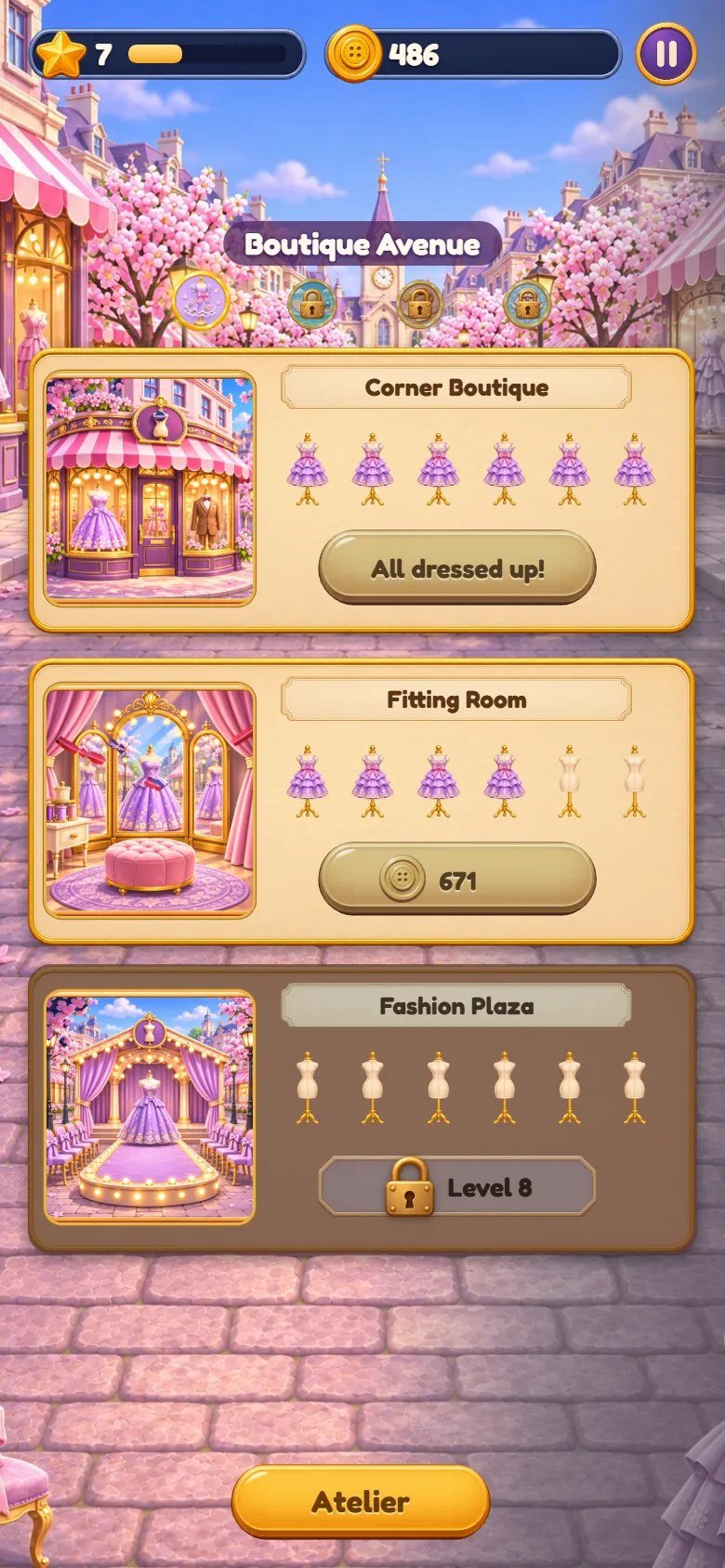
Marks on the screenshot
- Level and star bar
- Coins
- Collection name
- Map of the collections
- Place
- Mannequins dressed
- Price of the next mannequin
- Locked place
- Back to the atelier

Marks on the screenshot
- Fashion lines
- Pieces found
- Station levels
- Page reward

Marks on the screenshot
- Sound volume
- Music volume
- Language
- Less motion
- Resume
- Title screen
- Start over

Marks on the screenshot
- Collections dressed
- Prize of the year
- Next year
6 Map of the files
game/ is the ready-to-host game. source/ has the same editable files plus the
tests, a local preview server and the build command. Code comments are in Portuguese. The internal names of
folders, files and ids were kept from the engine, so some do not match what the player sees; the list below
says what each one is.
game/                        upload these contents to your web host
  index.html                 entry page: counter, street, Lookbook, pause menu, cards
  style.css                  portrait layout and everything shared
  style-land.css             landscape layout
  style-more.css             title in landscape, rush hour, special customer, map, win
  src/game.js                screen, touch and drag, tutorial, street, cards, pause menu
  src/sim.js                 the rules (spools, merging, orders, street, collections, book)
  src/config.js              every balance number and the save key
  src/fx.js                  synthesized sounds, music, particles and motion
  src/locales.js             texts: English, Portuguese; language choice
  src/locales-more.js        gathers the other 12 languages
  src/locales/               one file per language (es, fr, de, it, nl, pl, tr, ru, id, ja, ko, zh)
  assets/items/              fashion pieces and sewing stations (PNG, 256x256)
  assets/ui/                 interface images and the first collection
  assets/bairros/            the other collections: porto, lotus, neve
  assets/music/              feira.mp3, porto.mp3, lotus.mp3, neve.mp3
  assets/fonts/              Fredoka font and its license
  assets/icon-*.png, favicon.ico, manifest.webmanifest
  DOCUMENTATION.txt          short note that points to this guide
source/                      the same editable files, plus:
  package.json               npm test, npm run build, npm run serve
  package-lock.json
  README.md
  test/                      node --test tests
  tools/build.mjs            copies the game into dist/
  tools/serve.mjs            local preview server
documentation/index.html     this guide (offline, 14 languages)
documentation/customization.html   step-by-step customization guide
documentation/img/           the screenshots of both guides
DOCUMENTATION.html           shortcut to this guide
CUSTOMIZATION.html           shortcut to the customization guide
START-HERE.txt, CHANGELOG.txt
THIRD-PARTY-LICENSES/        font license
-
src/config.js: every number you may want to tune (counter, fashion lines, stations, spools, orders, mannequin prices, collections, feel) and the save key. Fashion lines:grill= Hats,steam= Dresses,tea= Handbags,sweet= Shoes,sea= Summer Wear,noodle= Autumn Knits,warm= Winter Coats. Collections (DISTRICTS):market= Boutique Avenue,porto= Riviera Promenade,lotus= Maple Avenue,neve= Winter Gala.STEPSandSTEP_COSTare the mannequins of each place and their price,NIGHT_REWARDis the prize of each year. -
src/sim.js: the rules with no drawing and no clock (spools, merging, orders, street, collections, Lookbook). -
src/game.js: the screen, touch and drag: drawing, orders, tutorial, Lookbook, street, cards, pause menu and the test shortcuts.src/fx.js: synthesized sounds, music, particles and motion. -
src/locales.js: English and Portuguese texts and the language choice.src/locales/: one file for each of the other 12 languages, gathered bysrc/locales-more.js. -
style.css: the portrait layout and everything shared.style-land.css: the landscape layout.style-more.css: title screen in landscape, rush hour, special customer, collection map and win card. Keep the order of the three files inindex.html. -
assets/items/: pieces (<line>-1.pngto-8.png) and stations (gen-<line>-1.pngto-5.png).assets/ui/: interface images and the first collection:flame.pngis the spool of thread,lid.pngandsteamer-open.pngthe closed and open hatbox,dish.pngthe shopping bag of a delivery,btn-lantern.pngthe mannequin button,planter-on.pngandplanter-off.pngthe dressed and bare mannequins of the street,lamp2-on.pngthe hangers on the corners of the panels,barraca-*.pngthe boutique front of the landscape layout,icon-9.pngthe Lookbook andguide.pngthe stylist.assets/bairros/: the other three collections.assets/music/: one MP3 per collection (feira.mp3is Boutique Avenue).
7 Customizing numbers, pictures, texts and sounds
CUSTOMIZATION.html in the main folder of the
download, or documentation/customization.html.
Customization Guide (step by step, in English)
Balance: open src/config.js. ENERGY sets the basket of spools and how fast they
come back, ORDERS the customers, the pay, the special customer and the rush hour,
STEP_COST the price of the mannequins, DISTRICT_COST how much each collection
raises it and NIGHT_REWARD the prize of the year. npm test plays whole games with
a robot and fails when the game stops progressing.
Pieces and stations: replace the PNG files in assets/items/ keeping the names. A piece is
<line>-1.png to <line>-8.png and a station is
gen-<line>-1.png to gen-<line>-5.png, all 256×256 with a transparent
background. Their names are the texts item.<line> and gen.<line>.
Collections: each collection is a line of DISTRICTS in src/config.js, a folder
assets/bairros/<id>/ with 14 pictures (scenery, wide scenery, street, 3 places and 6
customers) and the track assets/music/<id>.mp3. The first collection keeps its pictures
in assets/ui/ and its track is feira.mp3.
Look: the logo is assets/ui/logo.png, the title backgrounds are splash.jpg and
splash-land.jpg in the same folder, and the icons are favicon.ico and
assets/icon-180.png, icon-192.png and icon-512.png. Colors and sizes
are in the three style sheets, measured in --u. The page title is in
index.html and the app name in manifest.webmanifest.
Music and sound effects
Music: feira.mp3, porto.mp3, lotus.mp3 and neve.mp3 in
assets/music/, one per collection, played in a loop. To change a track, replace the MP3 keeping
the name. To remove the music, delete the files: the game stays silent where a file is missing.
Sound effects: the pops, chimes and fanfares are synthesized in src/fx.js, so they have no
files. The volumes the player starts with are in src/game.js (volume and
music), and players change them in the pause menu.
8 Languages
The game has 14 languages: English, Português, Español, Français, Deutsch, Italiano, Nederlands, Polski, Türkçe, Русский, Indonesia, 日本語, 한국어 and 中文. It follows the browser language on the first visit and the player can change it in the pause menu. English and Portuguese are the reference texts; the other 12 languages were not reviewed by native speakers, so a native review is recommended before a launch in those markets. The bundled font covers Latin letters; Russian, Japanese, Korean and Chinese use a font of the device.
To force a language, add ?lang=pt (or another code) to the game address. A text missing in a
language is shown in English.
To add a language, copy one of the files in src/locales/, translate it, import it in
src/locales-more.js and add its code and name to LANGS in
src/locales.js. Then run npm test: it compares every language with English.
9 Local saves
-
Progress (counter, coins, level, mannequins, collection, Lookbook), the volumes and the language are saved
in the browser
localStorageof each device. - There are no accounts or cloud saves. Clearing site data resets the progress on that device.
-
The three keys are shown below. Their prefix is
STORAGE_PREFIXinsrc/config.js.
seamstreet.template.save.v1.progress
seamstreet.template.save.v1.prefs
seamstreet.template.save.v1.lang
10 Optional development
This section is only for changing the code. The game/ folder already contains the finished
game, so installing it needs no Node.js. The game has no dependencies and no compile step:
npm run build only copies the files into source/dist/, which is identical to
game/.
1. Install Node.js. Open https://nodejs.org/en/download and choose the latest Node.js 26 LTS installer for your system (minimum 26.13.1). npm is included.
Windows: run the .msi installer, keep npm and Add to PATH enabled, finish the installation and reopen Command Prompt. macOS: run the official .pkg installer and reopen Terminal. Linux: follow the instructions on the official download page for your distribution, including npm.
2. Check the installation. Run node --version and npm --version separately. Both
must print a version number, and Node.js must be 26.13.1 or newer. If a command is not found, reopen the
terminal and check the installation.
node --version
npm --version
3. Extract the complete ZIP first and open its source/ folder, where
package.json is. Windows: type cmd in the address bar of that folder in File Explorer. macOS
and Linux: open Terminal and use cd with the folder path in quotes.
4. Run the commands below one by one. npm ci checks the lock file (nothing is downloaded, the
project has no dependencies). npm test checks the rules, plays whole games with a robot and
checks the 14 languages and the save key; stop and fix any error before going on.
npm ci
npm test
5. Preview: npm run serve starts a local server; open http://localhost:5198/ in your browser,
play for a while, and stop the server with Ctrl+C.
npm run serve
6. Build: npm run build empties source/dist/ and copies index.html,
the three style sheets, src/, assets/, the web manifest and the icon into it.
dist/ is what you publish; while the source is unchanged it matches game/ file by
file.
npm run build
7. Publish: back up the game on your website, then upload the contents of dist/ in place of the
old files, keeping the folders. If you deleted or renamed a file, delete the old one on the server yourself.
Clear the browser cache to see the new version (see below).
Test shortcuts (local addresses only)
The shortcuts below work only when the page address is localhost, 127.x.x.x,
192.168.x.x or [::1]. On any public address they are ignored, so players cannot
use them. ?lang=pt (or another language code) is not a test shortcut and works on any address.
?debugopens the counter directly, without the title screen.-
?debugalso exposes the running game aswindow.LBfor automated tests in the browser console. -
?debug&bairro=2opens collection 2 directly (0 to 3; larger numbers are the following years).
http://localhost:5198/?debug&bairro=2&lang=es
11 Updating and cache
Clearing the cache without losing progress
Progress is stored in this browser, not on the server. Clearing cached images and files, or doing a hard reload, keeps your progress.
Computer: press Ctrl+F5 on Windows and Linux, or Cmd+Shift+R on macOS. Phone: in the browser settings, choose the option to clear cached images and files.
Do not choose cookies and site data, or clear site data, for the game's address. That deletes the local save.
12 Licenses
The game code and the artwork are supplied under the license of the item you purchased. The music used by the game is included in the package and can be replaced or removed (see the customizing section).
The Fredoka font is used under the SIL Open Font License 1.1; its complete license text is in
THIRD-PARTY-LICENSES/ and in game/assets/fonts/LICENSE-Fredoka-OFL.txt. The game
has no third-party code and no npm dependencies.
13 Troubleshooting
-
Blank page or a game that never opens: the game was opened from the disk or a file is missing. Use a web
host and keep
assets/,src/and the three style sheets next toindex.html. - A picture does not appear after you replace it: check the folder, the file name, the extension and the letter case against the original file.
- No sound: tap the screen once; check that the device is not silent and that the volumes in the pause menu are up.
- Old version after an update: clear the browser cache (see below).
-
An address such as
?debugdoes nothing on your website: test shortcuts only work on local addresses (see the development section).
14 Frequently asked questions
Does the game work without internet?
Can I add ads, a store, cloud saves or a ranking?
Can I publish it on game portals or app stores?
Does the player ever have to wait for energy?
ENERGY in src/config.js.
How do I reset the progress while testing?
localStorage.clear() in the browser
console.
15 Support
Questions or problems: write to willian@polargames.com.br with your purchase code, the browser
and a short description or screenshot.
Support request
When you write to support, include the browser and device, the game version, the page address, the steps that caused the problem, a screenshot and the first error shown in the browser console. Never send passwords, payment details or secret keys.