1. Overview
- 30 holes across five themed courses
- Daily challenges with course modifiers
- Stars, medals, hidden coins and cosmetic unlocks
- Two to four players taking turns on one device
- Course progress and personal records stored locally
Three.js + Rapier WASM
English, Portuguese, Spanish, French, German, Italian
2. Quick installation
- Extract the complete ZIP. The game/ folder is already ready to publish.
- Upload the contents of game/ to a directory on your HTTP(S) host. Preserve all relative paths.
- Open the index.html URL. Do not open via file://. No PHP, database or service account is required.
For a local test, open a terminal inside game/ and run:
python -m http.server 8765
http://localhost:8765/
3. Requirements and audio
Use a modern browser with JavaScript, ES modules and WebGL2. Enable hardware acceleration for 3D games. The first user gesture unlocks audio; browsers may block autoplay. Use HTTPS for public hosting. In an iframe, allow fullscreen and autoplay when needed.
4. Controls
Drag away from the ball to set direction and power, then release. Drag with two fingers or right-drag to rotate the camera; pinch or scroll to zoom. Use the pause button or P.
5. Interface layout guide
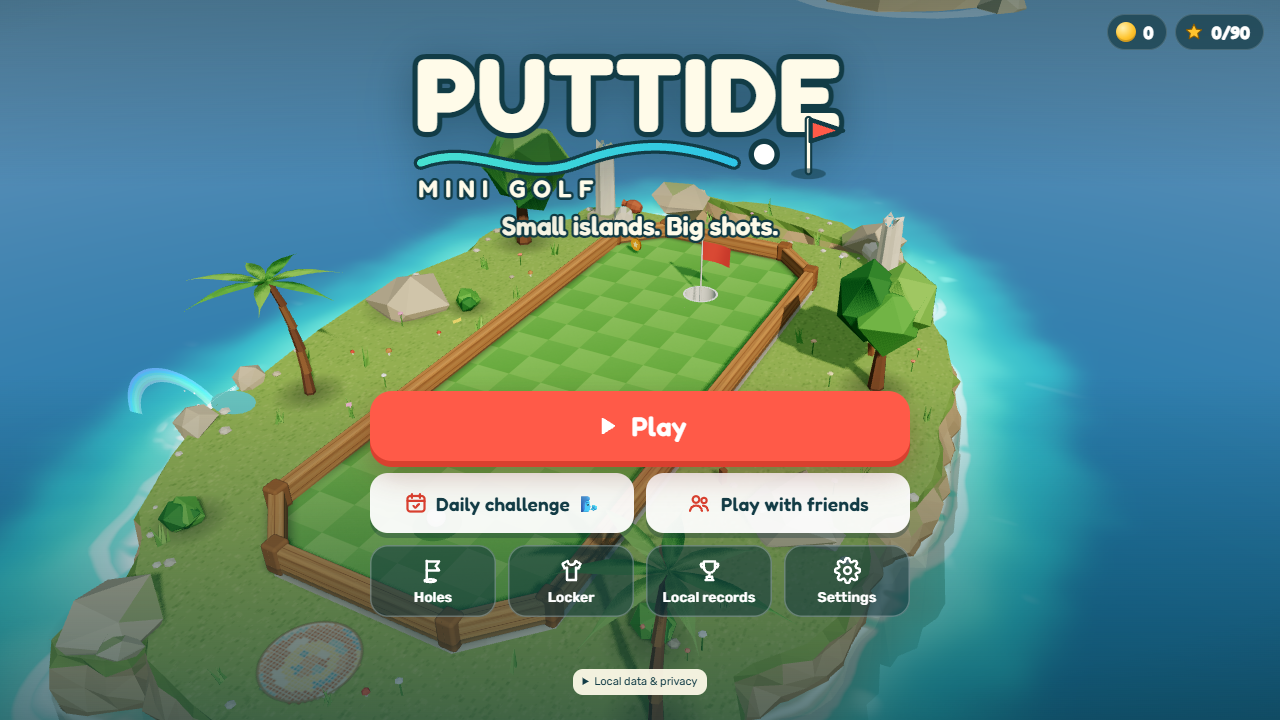 Main menu: modes and navigation
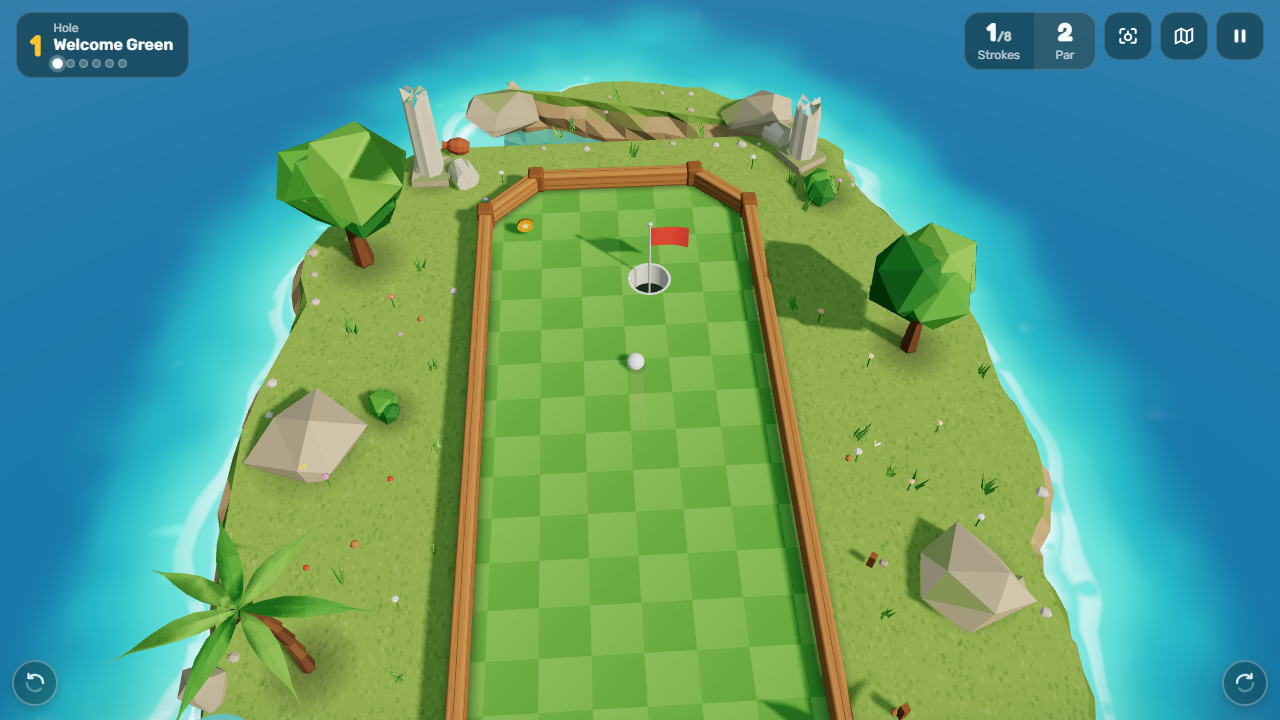 Actual gameplay: play area and HUD
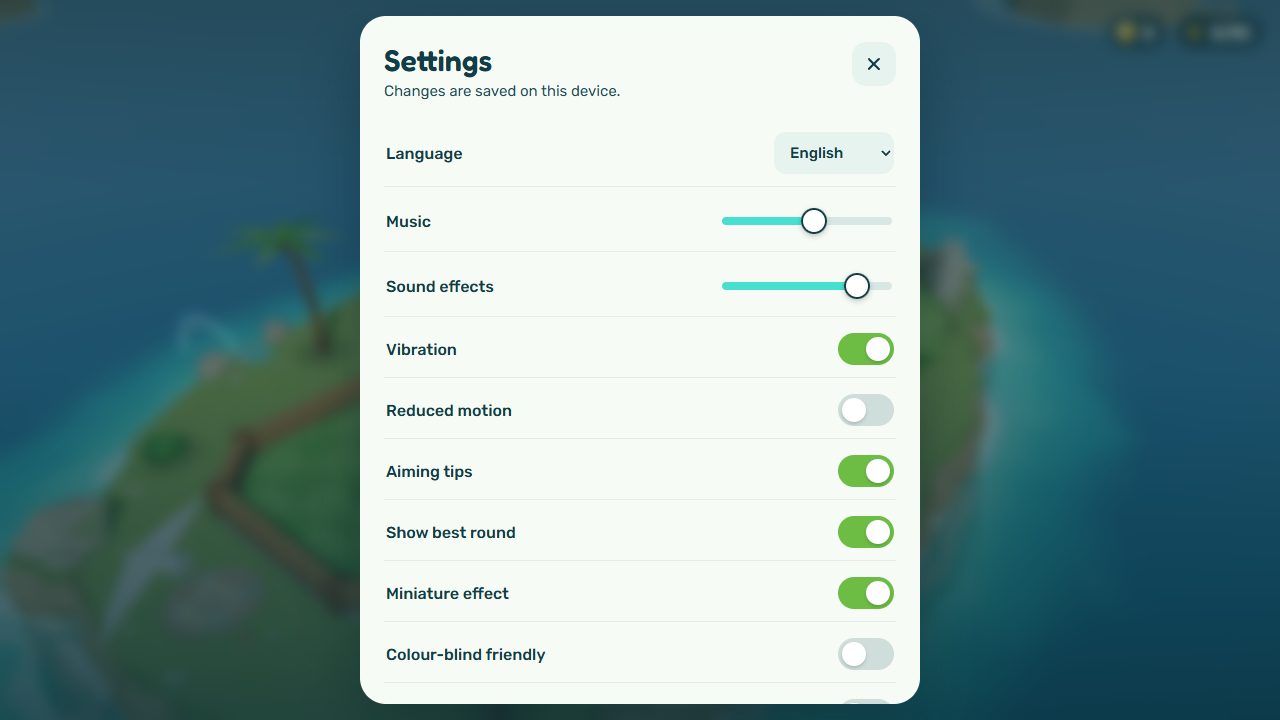 Settings: language, sound and game options
6. File map
Paths below are relative to source/. game/ contains deployable files; documentation/ contains these manuals and images; licenses/ preserves third-party notices.
| File | Purpose |
|---|
src/course/courses.js | Course ordering and unlock requirements |
src/course/holes.js | Ruins hole geometry, par and obstacles |
src/course/pier.js | Pier holes |
src/course/ice.js | Ice holes |
src/course/lava.js | Lava holes |
src/course/sky.js | Sky holes |
src/sim/constants.js | Physics tuning |
src/game/economy.js | Ball, trail and outfit definitions and prices |
src/ui/i18n.js | Language dictionaries |
src/game/localRecords.js | Browser-local course records |
css/style.css | Interface colors, fonts and responsive styles |
7. Customization
To create a hole, duplicate a definition in the appropriate course file, give it a unique id, set par, tee and cup positions, then add it to the corresponding course. Test collisions, out-of-bounds recovery and stars. Add its display name and tip to the language dictionaries. Change cosmetic prices in economy.js; preserve IDs already saved by players.
Back up before editing. Change one feature at a time and test menu, gameplay, pause, result and reload. Keep item IDs and save keys stable to preserve existing players.
The included recordings are music/menu.mp3 and music/play-1.mp3. Scene-specific music falls back to the gameplay recording. To add another licensed recording, update the explicit track mapping in src/audio/audio.js (probeTracks) as well as copying the file. No directory listing or missing-file probes are required.
8. Optional developer workflow
This edition uses static JavaScript modules. No build or npm install is required. Edit source/ and copy changed files to game/. Preserve relative paths and included dependencies.
9. Saves and local records
Full-course solo runs save personal records by course. Fewer strokes is better. Restarting a hole invalidates that ranked run. Daily challenges and same-device rounds use their own existing local progress; no score is uploaded.
Storage belongs to the browser origin (protocol, host and port). Changing domains does not transfer saves. Clearing data or private browsing can remove progress. Back up storage before migrating. This edition uses its own keys, separate from portal editions.
10. Dependencies, licenses and deployment
All required runtime assets are included, including fonts, audio and the libraries used. No mandatory CDN is used. This does not mean automatic PWA/offline installation: a fresh page load still needs access to your HTTP host. Multiplayer servers, online leaderboards, ad SDKs, native projects and internal editors are excluded. Use included assets as part of the licensed end product under the marketplace terms; do not resell them separately. Preserve full notices in licenses/ and font/vendor directories.
11. Troubleshooting and FAQ
Tela vazia / blank screen
Confirme HTTP(S), WebGL e caminhos com maiúsculas/minúsculas. Leia o console. / Check HTTP(S), WebGL, case-sensitive paths and browser console.
JS recusado / module refused
O servidor deve enviar .js e .mjs com MIME JavaScript; .wasm com application/wasm. Não use text/plain para módulos. / Serve .js and .mjs with JavaScript MIME, and .wasm as application/wasm.
Sem áudio / no audio
Toque no jogo, verifique volume e permissões do navegador. / Tap the game, check volume and browser permissions.
Save desapareceu / save lost
Confira domínio, porta, modo privado e limpeza de dados. / Check domain, port, private mode and storage clearing.
Posso adicionar multiplayer? / add multiplayer?
Requer desenvolvimento e servidor próprios; não é um recurso incluído. / Requires your own development and server; not included.
Funcionará em qualquer celular? / any phone?
Os controles se adaptam à tela. O desempenho depende do navegador e hardware; teste seus aparelhos alvo. / Controls adapt to screen size; performance depends on browser and hardware. Test your target devices.
12. Support and updates
Support and custom development: willian@polargames.com.br. Include version, URL, browser, reproduction steps and a screenshot. Support follows the marketplace item terms. Updates are distributed through your purchase channel; read the changelog before replacing files and preserve saves. This guide does not promise a fixed response time or new features on specific dates.