
Contents
1 Overview
Octo Reef Solitaire has three games in one: Klondike with draw 1 or 3, FreeCell with four free cells, and Spider with 1, 2 or 4 suits. A mascot deals the cards, points at hints and reacts to the game.
On the new game screen the player can turn on Winnable deals (every deal can be solved), type a Deal number to replay the same deal, and choose Standard scoring or none. The Daily Deal brings one new deal every day, with a calendar and a streak. Wins unlock card backs and tables in the Collection, and Stats show the results of each game.
This download includes the ready-to-host game, the full editable source, this guide, a step-by-step customization guide and the third-party license notices. This edition has no multiplayer, online ranking or payments, and it does not connect to any external service.
2 Install the ready-to-play game
Only the contents of the game/ folder go to your web host.
- Extract the whole ZIP on your computer.
-
Open your hosting file manager or an FTP program and create a folder for the game, for example
octo-reef-solitaire. -
Upload everything inside
game/to that folder, keeping the foldersassets,cssandsrcas they are. -
Open the folder's address in a browser, for example
https://yoursite.com/octo-reef-solitaire/. - Tap or click the title screen to start. Browsers only play sound after a first tap.
index.html on your computer will not work: use a web host or the local server described in
the development section.
3 Requirements
- Any static web host that serves plain files, with HTTPS recommended.
- A current browser on desktop, Android or iPhone, with JavaScript enabled.
- No database, PHP, account or external service is needed to host the game.
- Node.js 22 or newer only if you want to run the optional tests, local server or build command.
4 How the game works
Klondike: build the columns downward in alternating colors, move kings to empty columns and build the four foundations from Ace to King. Tap the deck to draw cards, 1 or 3 at a time as chosen on the new game screen.
FreeCell: every card is face up and any card can be parked in one of the four free cells. Free cells and empty columns let you move longer runs. Spider: build downward in any suit, but only a run of one suit moves together. A complete run from King to Ace is cleared. Tapping the deck deals a card to every column, and no column can be empty at that moment.
Tap a card to send it where it fits, or drag a card or a run to its place. The pause button opens Resume, Restart deal, New game and Quit to menu.
Hint shows a good move with a light and a note from the mascot, and tells you when there is none. Undo has no limit. With Auto-complete on, the rest of a Klondike or FreeCell game plays itself when nothing is left to decide.
With scoring on, cards sent to a foundation and cards turned face up give points, and a time bonus is added at the win. The result panel shows time, moves, score and 1 to 3 stars: 3 stars under 110 moves and 2 under 170. Every win counts in Stats and in the Collection, and the Daily Deal keeps a streak.
5 Interface
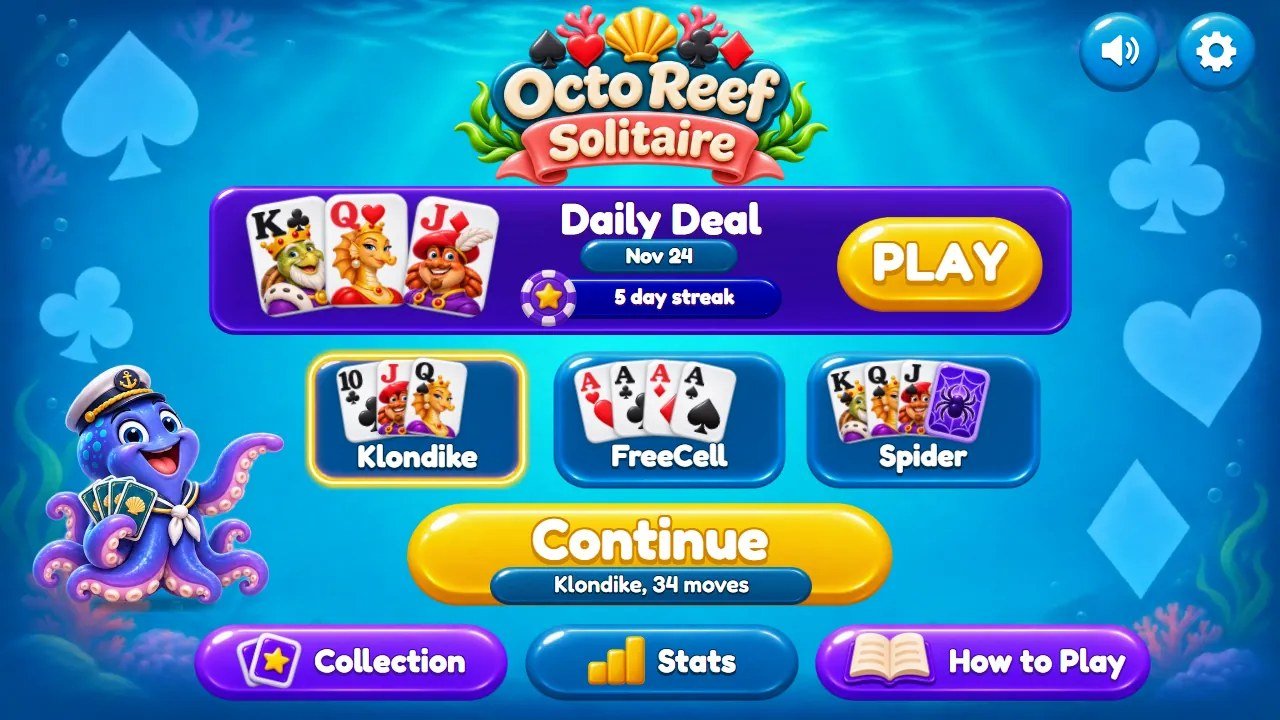
Marks on the screenshot
- Daily Deal: play today's deal
- The three games: Klondike, FreeCell and Spider
- Play or Continue: new game, or the saved game
- Collection: card backs and tables unlocked by wins
- Stats: results of each game
- How to Play: short illustrated pages
- Sound: effects and music volumes
- Settings
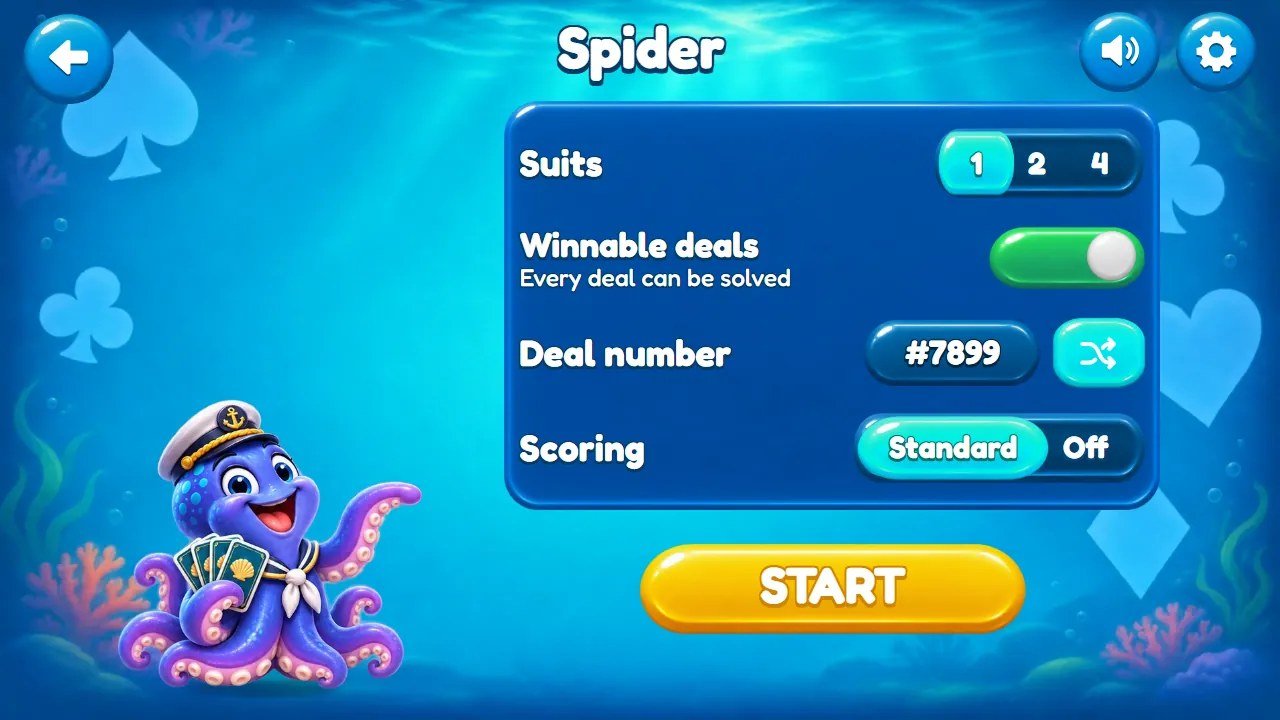
Marks on the screenshot
- Suits in Spider: 1, 2 or 4
- Winnable deals: every deal can be solved
- Deal number: the same number gives the same deal
- Pick another deal number
- Scoring: Standard or Off
- Start the game
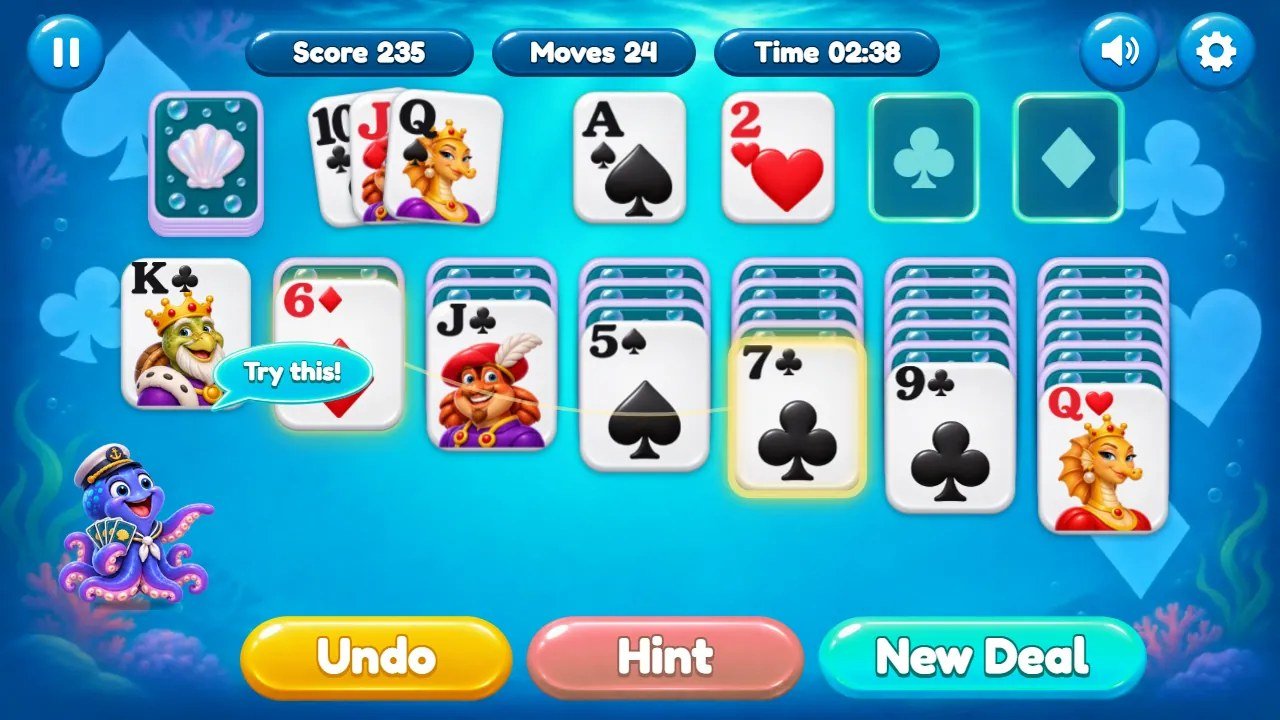
Marks on the screenshot
- Pause
- Score
- Deck: tap to draw or deal
- Foundation: one suit, Ace to King
- The hint light and the mascot's note
- Undo: as many moves as you like
- Hint: shows a good move
- New Deal: starts another game
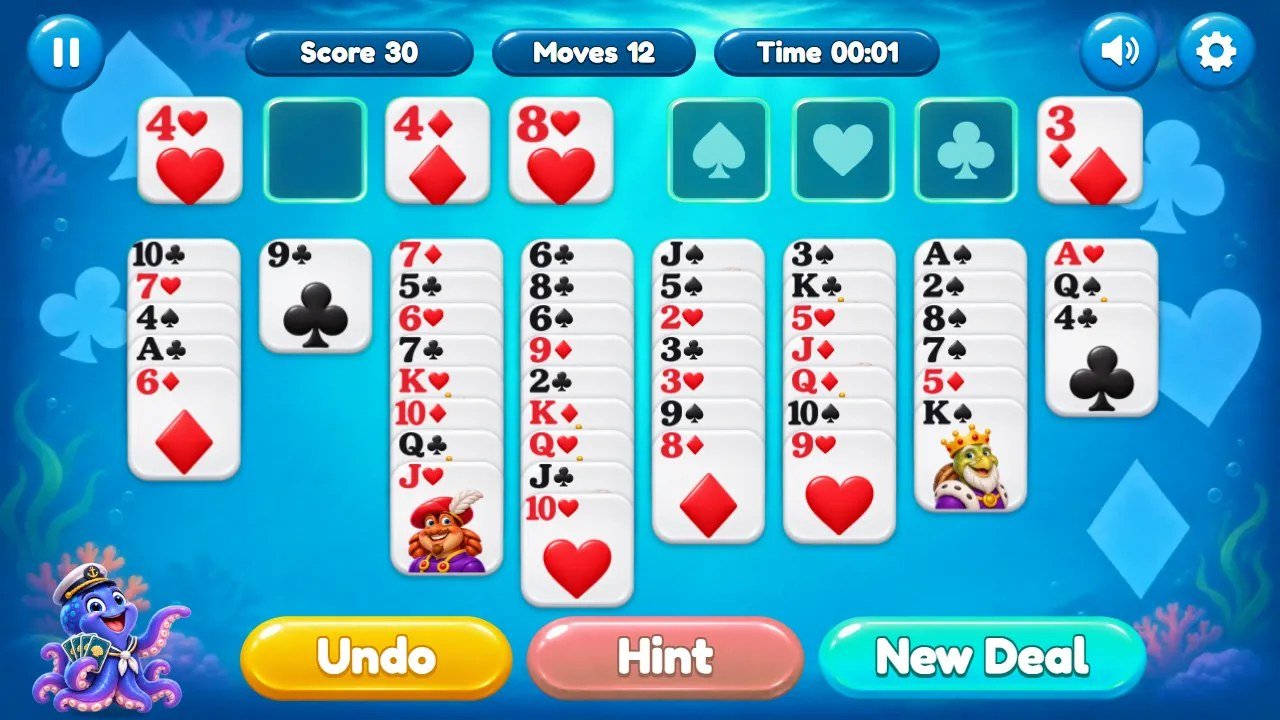
Marks on the screenshot
- Free cells: park any card here
- Foundations: build each suit from Ace to King
- The mascot: deals, points at hints and reacts
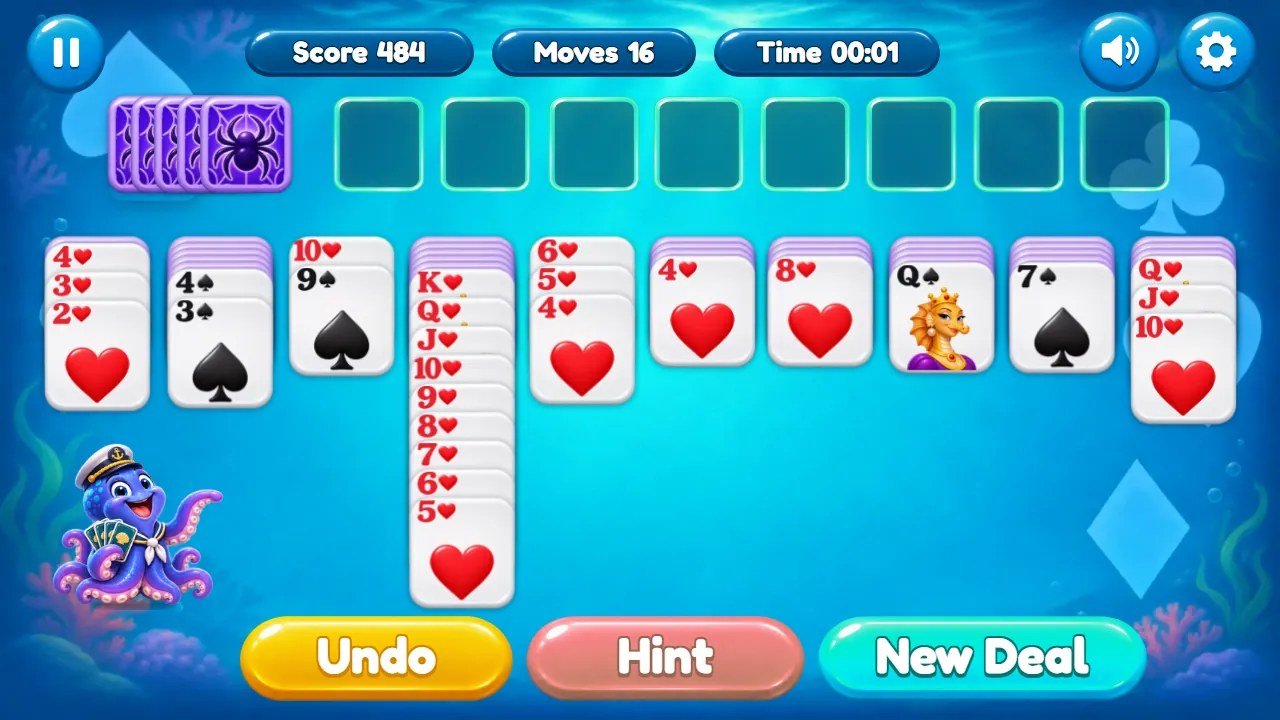
Marks on the screenshot
- Deck: deals a card to every column
- Completed runs, King to Ace
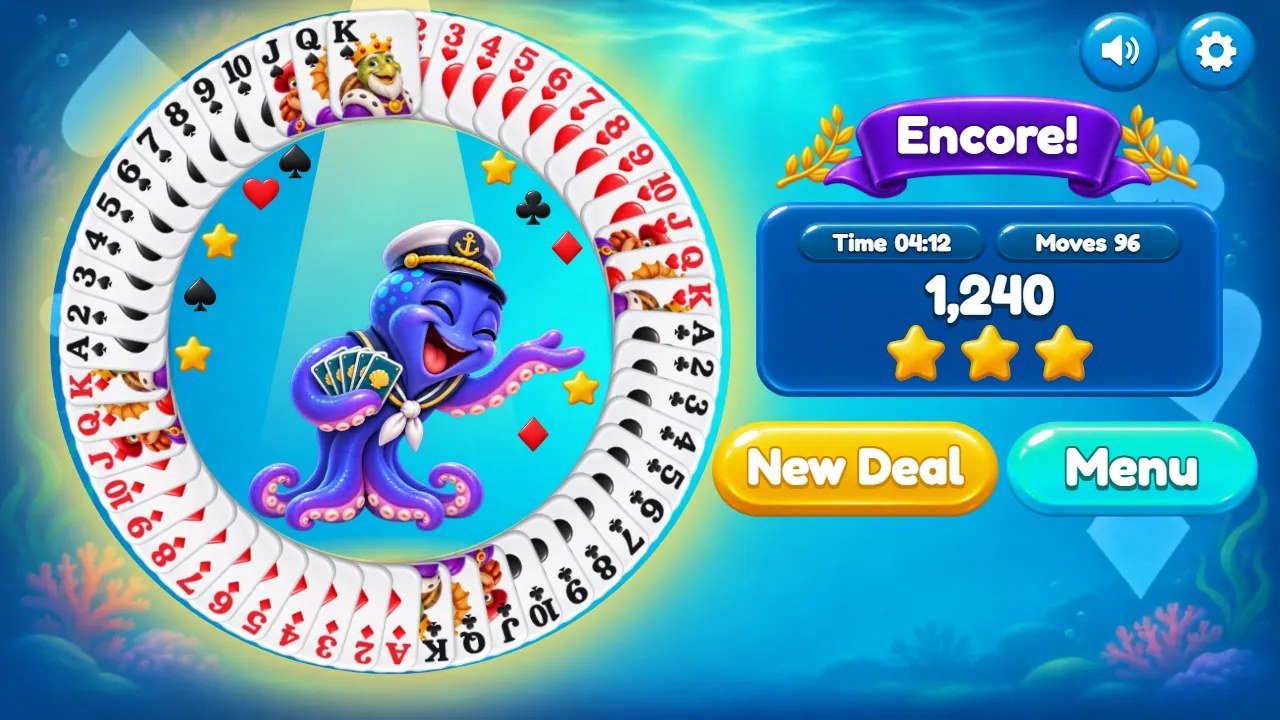
Marks on the screenshot
- Final score
- Stars: 3 under 110 moves, 2 under 170
- New Deal: play another deal
- Back to the menu
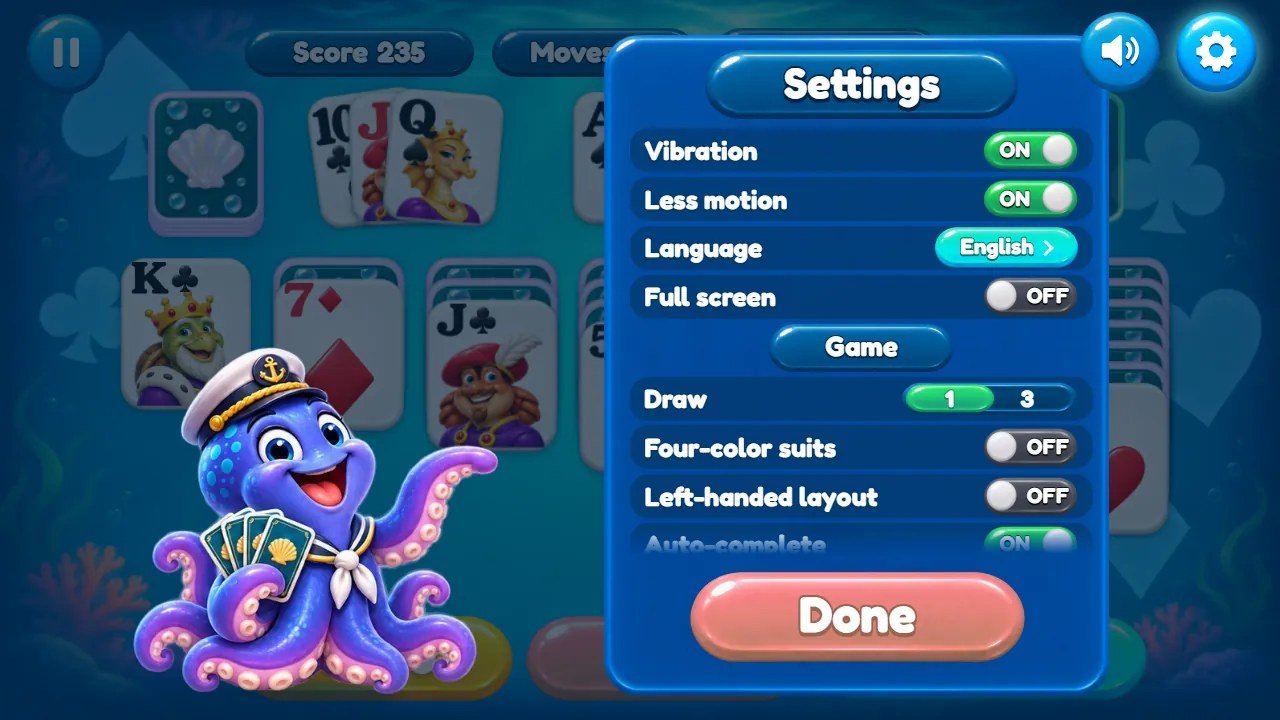
Marks on the screenshot
- Vibration on phones
- Less motion: fewer animations
- Language, 14 available
- Four-color suits
- Left-handed layout
- Auto-complete the end of a game
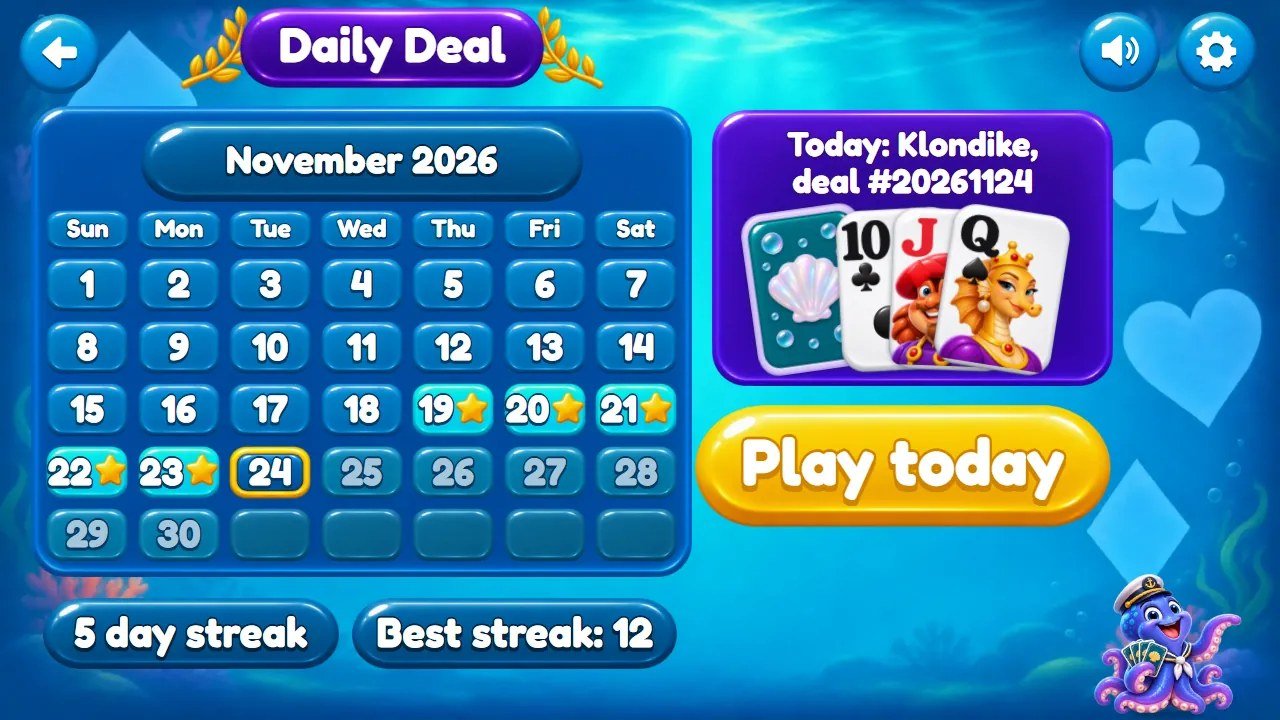
Marks on the screenshot
- Calendar: a star marks each daily deal won
- Daily streak
- Play today's deal
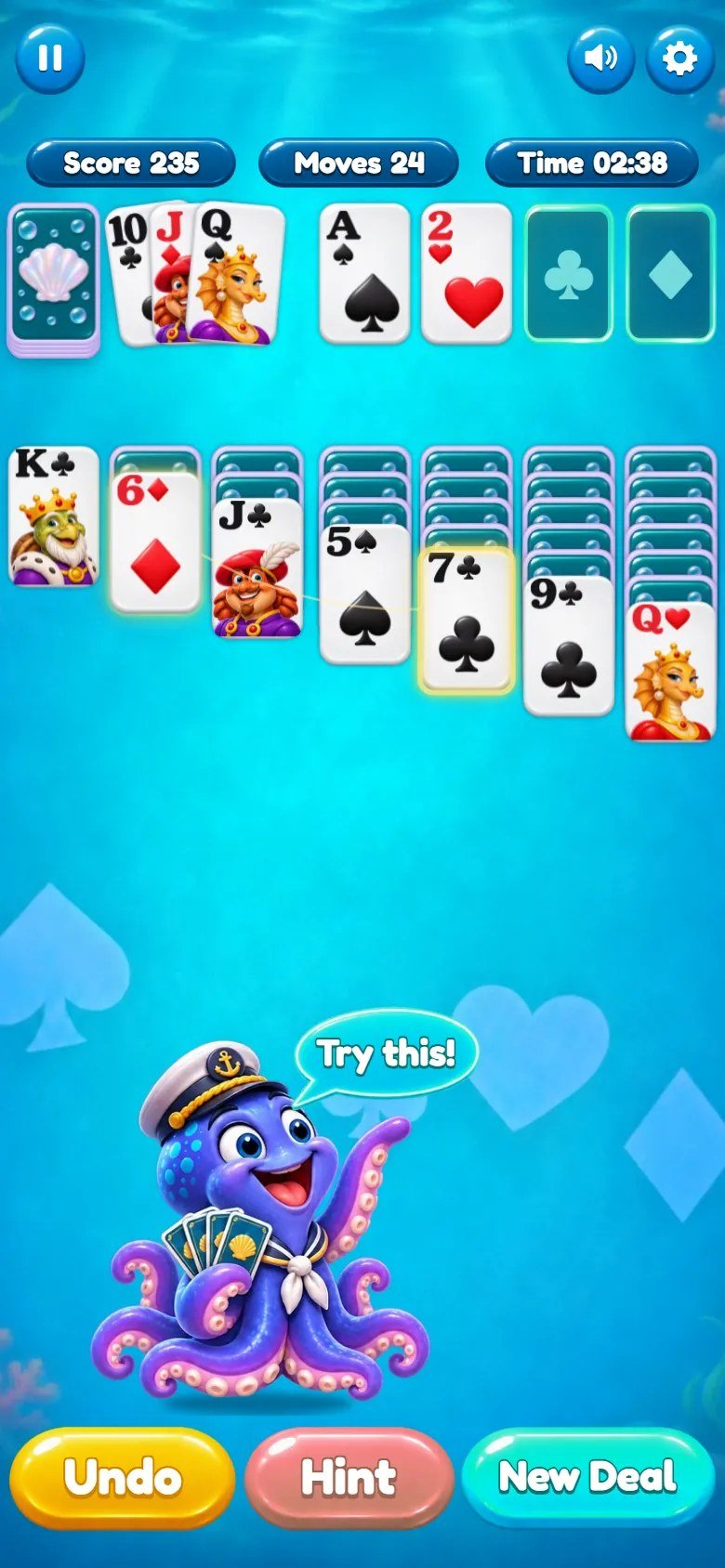
Marks on the screenshot
- Hint: shows a good move
- The hint light and the mascot's note
6 File map
The game/ folder is what you publish. The source/ folder holds the same editable
files plus the tests and tools.
game/                        upload these contents to your web host
  index.html                 entry page with every screen and panel
  css/                       base.css (buttons, panels) and screens.css (screens and table)
  src/main.js                boot, settings, saving and screen flow
  src/theme.js               game name, save key and mascot picture size
  src/rules.js, src/solver.js   Klondike rules and solver
  src/modes/                 FreeCell and Spider rules and solvers
  src/game.js                one game in progress: undo, score, moves
  src/board.js, layout.js    the table: card positions, tap and drag
  src/duke.js                the mascot: poses and reactions
  src/juice.js, hintfx.js, fx.js   landings, hint light, win ceremony
  src/audio.js               sound effects and music
  src/ui/                    screens, menus, panels, piece positions
  src/locales/               the texts of the 14 languages
  assets/                    art (WebP), sound (MP3), fonts and license
  DOCUMENTATION.txt          short note that points to this guide
source/                      the same editable files, plus:
  package.json, package-lock.json
  README.md
  test/                      rules robots for the three games
  tools/build.mjs            copies the game into dist/
  tools/serve.mjs            local preview server (npm run dev)
  tools/check-node.mjs       checks the Node.js version before the commands
documentation/index.html     this guide (offline, 14 languages)
documentation/customization.html   step-by-step customization guide
documentation/img/           the screenshots of the guides
DOCUMENTATION.html           shortcut to this guide
CUSTOMIZATION.html           shortcut to the customization guide
START-HERE.txt, CHANGELOG.txt
THIRD-PARTY-LICENSES/        font licenses
-
src/theme.jsholds the game name, the save key (store) and the size of the mascot pictures. -
src/rules.jsholds the Klondike rules, with no drawing or timers, andsrc/modes/holds FreeCell and Spider. Each game has its own solver. -
src/game.jskeeps one game in progress (undo, score, moves),src/board.jsandsrc/layout.jsdraw the table, andsrc/duke.jsmoves the mascot. -
src/ui/holds the screens and panels,css/the layout andsrc/locales/the texts of the 14 languages. -
assets/holds the art in WebP (ui/,cards/,courts/,backs/,duke/for the mascot poses,fx/for the victory confetti),assets/audio/the sound in MP3 andassets/fonts/the fonts. -
test/holds the tests:npm testreplays thousands of deals of the three games.?devteston a local address exposeswindow.__apfor them. Players never see it.
7 Customize
Customization Guide (step by step, in English)
Art: replace a WebP file in assets/ with another of the same name and similar size. Cards use
assets/cards/ and assets/courts/, card backs assets/backs/, the
mascot assets/duke/ and the interface assets/ui/. The size of the mascot pictures
is set in src/theme.js.
Pace and feel: the FEEL blocks at the top of src/juice.js,
src/hintfx.js, src/fx.js, src/layout.js and
src/audio.js hold the numbers for landings, the hint light, victory effects, table layout and
audio mix.
Rules: Klondike is in src/rules.js and FreeCell and Spider are in src/modes/. Run
npm test after changing them.
Texts: each language is one file in src/locales/, and all of them use the same keys. Keep the
marks such as {...} inside the sentences.
Music and sound effects
Sound effects are MP3 files in assets/audio/ named <name>-a.mp3, and the
list of names is FEEL.version in src/audio.js. Replace a file keeping its name.
Music is the file assets/audio/music.mp3. Players set effects and music on two separate volumes
in the sound panel.
store in
src/theme.js so their saved progress stays separate.
8 Languages
The interface comes in 14 languages: English, Portuguese, Spanish, French, German, Italian, Dutch, Polish, Turkish, Russian, Indonesian, Japanese, Korean and Chinese.
The game follows the browser language on the first visit, and the player can change it at any moment in Settings without losing progress.
To add a language, copy src/locales/en.js, translate its values, then import it in
src/i18n.js and add its code to LANGS and ORDER.
9 Saved progress
- Settings, language, volumes, stats, the daily calendar and streak, unlocked backs and tables, and the game in progress are saved automatically in the browser's local storage.
- Clearing the browser's site data deletes this progress. There is no cloud save, and progress does not move between devices.
- All saved values use the prefix below, followed by the name of each value.
octo-reef-solitaire.template.save.v1:
10 Install Node.js and use the tools
This part is optional. The ready game needs none of it; it is only for running the tests, previewing your edits and creating a new copy to upload.
1. Download the LTS version of Node.js (22 or newer) from https://nodejs.org/ and install it with the default options.
2. Open a new terminal: PowerShell on Windows, Terminal on macOS or Linux.
3. Check that both commands answer with a version number:
node --version
npm --version
4. Go to the extracted source folder, for example with cd path/to/source. It is
the folder that contains package.json.
5. Check the project and run the automatic tests:
npm ci
npm test
6. Preview the game while you edit it, at http://localhost:5283/ (press Ctrl+C to stop):
npm run dev
7. Create the copy to publish, which is written to the dist folder:
npm run build
8. Upload the contents of dist to your host, replacing the old files.
npm ci downloads nothing. If Windows blocks
npm, run npm.cmd instead or allow scripts for your user. If a command reports an
old Node.js version, install the LTS version and open a new terminal.
Test scenes
On your own computer only, adding ?devtest to the address exposes window.__ap for
automated checks. Players never see it:
http://localhost:5283/?devtest
11 Updates and cache
Clearing the cache without losing progress
Progress is stored in this browser, not on the server. Clearing cached images and files, or doing a hard reload, keeps your progress.
Computer: press Ctrl+F5 on Windows and Linux, or Cmd+Shift+R on macOS. Phone: in the browser settings, choose the option to clear cached images and files.
Do not choose cookies and site data, or clear site data, for the game's address. That deletes the local save.
12 Licenses
The game uses the fonts Fredoka and Nunito under the SIL Open Font License 1.1. Their notices are in
THIRD-PARTY-LICENSES/ and in assets/fonts/.
Japanese, Korean and Chinese use the fonts of the player's device. The project has no third-party code libraries.
13 Troubleshooting
-
Blank page: confirm that all of
game/was uploaded, includingassets,cssandsrc, and that you opened a web address, not a file on your disk. -
A script error about MIME type: your server must send
.jsfiles as JavaScript. Most hosts already do; if yours does not, ask them to enable it. - No sound: browsers only start audio after a tap or click. Check that the volumes in the sound panel are not at zero and that the phone is not silenced.
- An old version still appears after an update: clear the cache as explained in the section above.
- Progress disappeared: it is stored per browser and per address, so a new domain, a private window or cleared site data starts a new save.
14 Frequently asked questions
Does the game need a server or a database?
Can I change the cards, the mascot and the backgrounds?
assets/ keeping their names. The Customization Guide shows
how.
Can I change the rules of the games?
src/rules.js and FreeCell and Spider are in src/modes/. Run
npm test after changing the rules.
Can I embed it in my own site?
game/ contents and show that address in an iframe. Add
allow="fullscreen" if you want the full screen option to work.
Can I resell this template as it is?
15 Support
For help with this product or for custom development, write to the address below with your purchase code, the address where the game is hosted and a description of the problem.
Support request
When you write to support, include the browser and device, the game version, the page address, the steps that caused the problem, a screenshot and the first error shown in the browser console. Never send passwords, payment details or secret keys.