Customization Guide
Make Gemburrow your own game: a new character, new backgrounds and gems, your own logo, texts, music and sounds, and easier or harder levels. Every recipe below is a short list of steps and says exactly which file to open. You do not need to know how to program. All pictures on this page are real screenshots of the game in this package.
1. Before you start
Free tools you need:
- A code text editor: Visual Studio Code (Windows, Mac, Linux) or Notepad++ (Windows). Do not use Word or WordPad: they break the files.
- An image editor that can export WebP with a transparent background: Photopea (in the browser), GIMP or Krita. You can also draw in any program, save as PNG and convert the PNG to WebP at squoosh.app.
- For music and sounds: Audacity (exports MP3).
Which folder to edit. The download has two copies of the game:
-
game/is the finished game. Simplest way: change files directly insidegame/and upload that folder. No other tools are needed. -
source/is the same game with tests and a local server. If you use it, editsource/and runnpm run build: it copies the game tosource/dist/, and that folder is what you upload. Pick one way and keep to it.
The paths in this guide (for example assets/art/logo.webp) are the same inside both folders.
See your changes on your computer. The game must be opened from a web address, not by
double-clicking index.html. Two easy ways:
-
With Python (python.org): open a terminal in the game folder, run the command below and open
http://localhost:8080. -
With Node.js: in
source/, runnpm run serveand openhttp://localhost:5345. It showssource/;npm run serve -- distshows the builtsource/dist/instead.
python -m http.server 8080After each change, reload the page with Ctrl+F5 (Windows) or Cmd+Shift+R (Mac) so the browser does not show the old file.
localhost or 127.0.0.1) a few
shortcuts help you check your work. Add them to the address, for example
http://localhost:8080/?level=38&unlock:
?level=38&unlockopens level 38 even if it is still locked;-
?screen=levelsopens the levels screen;?notutorialskips the guided first level; ?lang=ptshows the game in another language (this one also works on a published site).
Saved progress. The game saves stars and settings in the browser under names that start with
gemburrow.template.save.v1 (STORAGE_PREFIX in src/config.js). If you put
two copies of the game on the same website, give each copy its own prefix so they do not share progress.
2. Where everything is
The numbers on each screenshot match the table below it. Texts are named by their key in
src/locales.js (recipe E). All pictures are in assets/art/.
Title screen
 1
2
3
4
5
| # | What you see | File to change |
|---|---|---|
| 1 | Logo | assets/art/logo.webp (recipe B). The logo appears only on this screen. |
| 2 | Subtitle |
The words "Gem Shooter Puzzle" are written in index.html (recipe B). Plate picture:
assets/art/pill-glass-790.webp.
|
| 3 | Title picture |
assets/art/title-hero.webp: the mole, its bucket, the gems, the track and the dragon nest
are one picture. When the player taps the button, the mole ducks into the bucket:
dive.webp.
|
| 4 | Tap to start button |
Text: key tapToStart in src/locales.js (recipe E). Button picture:
assets/art/pill-green-rim-370.webp.
|
| 5 | Background |
The title always shows the world 1 background: assets/art/bg1-land.webp on this wide screen
(recipe D).
|
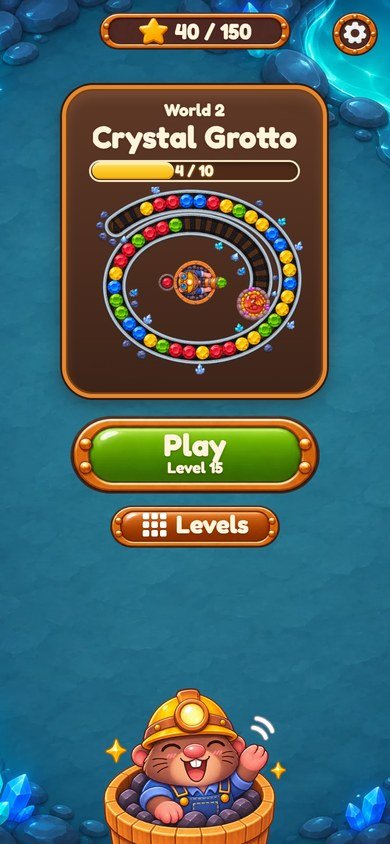
Home screen
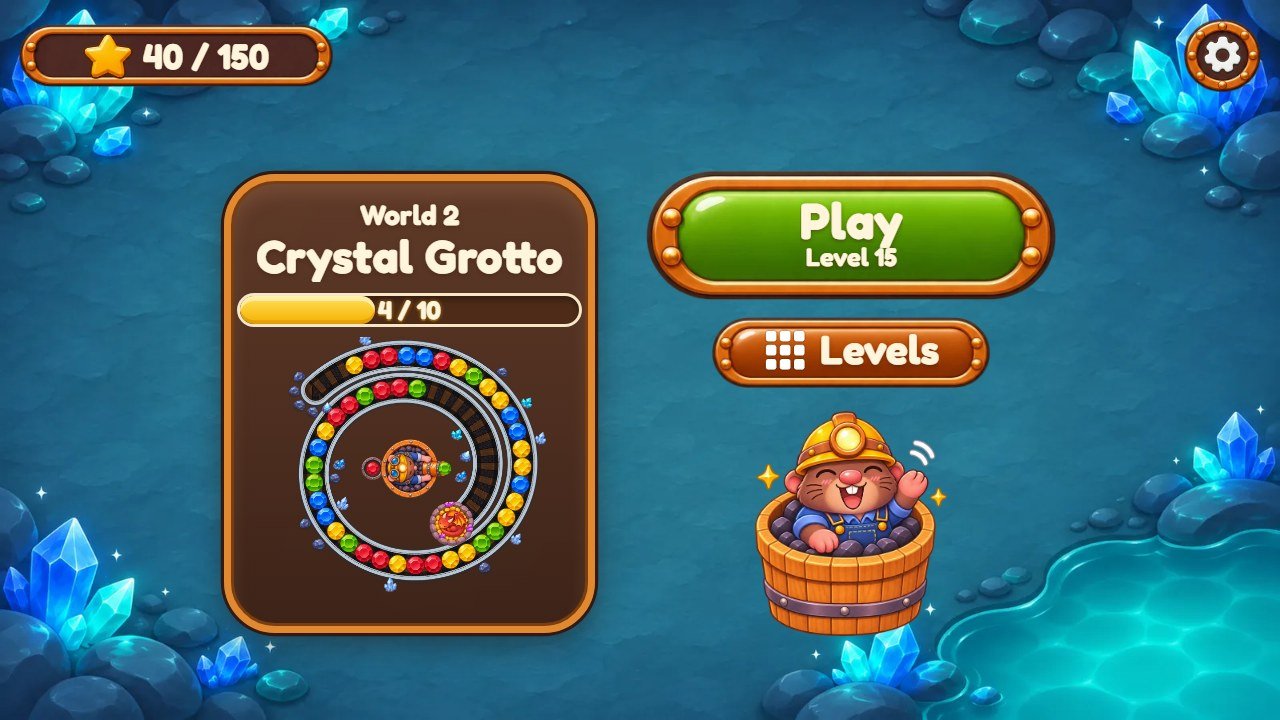 1
2
3
4
5
6
7
8
9
| # | What you see | File to change |
|---|---|---|
| 1 | Stars earned |
Star: assets/art/star.webp. Glass plate: pill-glass-*.webp. Up to 3 stars per
level, 150 in all.
|
| 2 | Settings button | Icon: assets/art/i-gear.webp. Round glass: round-glass.webp. |
| 3 | World card |
Texts: keys world ("World 2") and w2 ("Crystal Grotto"). Card color: the
.card rules in style.css (recipe J).
|
| 4 | World progress | Levels finished in this world, out of 10. Drawn by style.css, no picture. |
| 5 | Track preview |
Drawn by the game from the pieces of the world: the track bed water2.webp, the trackside
pieces b21.webp to b26.webp, the gems and the mole (recipes C, D and F).
|
| 6 | Play button |
Texts: keys play and level. Button picture:
assets/art/pill-green-rim-315.webp.
|
| 7 | Levels button |
Text: key levels. Icon: i-grid.webp. Button picture:
pill-teal-390.webp.
|
| 8 | Waving mole | assets/art/mole-wave.webp (recipe C). |
| 9 | World background |
One set per world. Here assets/art/bg2-land.webp: the home screen shows the world of the
next level to play (recipe D).
|
Levels screen
 1
2
3
4
5
6
7
8
9
| # | What you see | File to change |
|---|---|---|
| 1 | Back button | Icon: assets/art/i-back.webp. |
| 2 | Screen title | Text: key levels. Plate: pill-glass-*.webp. |
| 3 | Stars earned |
Star: assets/art/star.webp. Glass plate: pill-glass-*.webp. Up to 3 stars per
level, 150 in all.
|
| 4 | World badges |
assets/art/badge1.webp to badge5.webp, one per world. Lock:
i-lock.webp.
|
| 5 | World name |
Texts: keys world and w1 to w5. The ornaments on both sides:
deco1.webp to deco5.webp, one per world.
|
| 6 | Finished level |
Gem setting: t0.webp to t5.webp, in turn. Stars: star.webp and
star-off.webp.
|
| 7 | Next level | Always the green setting t3.webp. |
| 8 | Locked level | Rock: assets/art/m-lock.webp; lock: i-lock.webp. |
| 9 | Rail track of the levels |
Drawn by the game with the track bed water2.webp and the trackside pieces
b21.webp to b26.webp. Each world uses its own (recipe D).
|
A level (level 38, Frost Cavern)
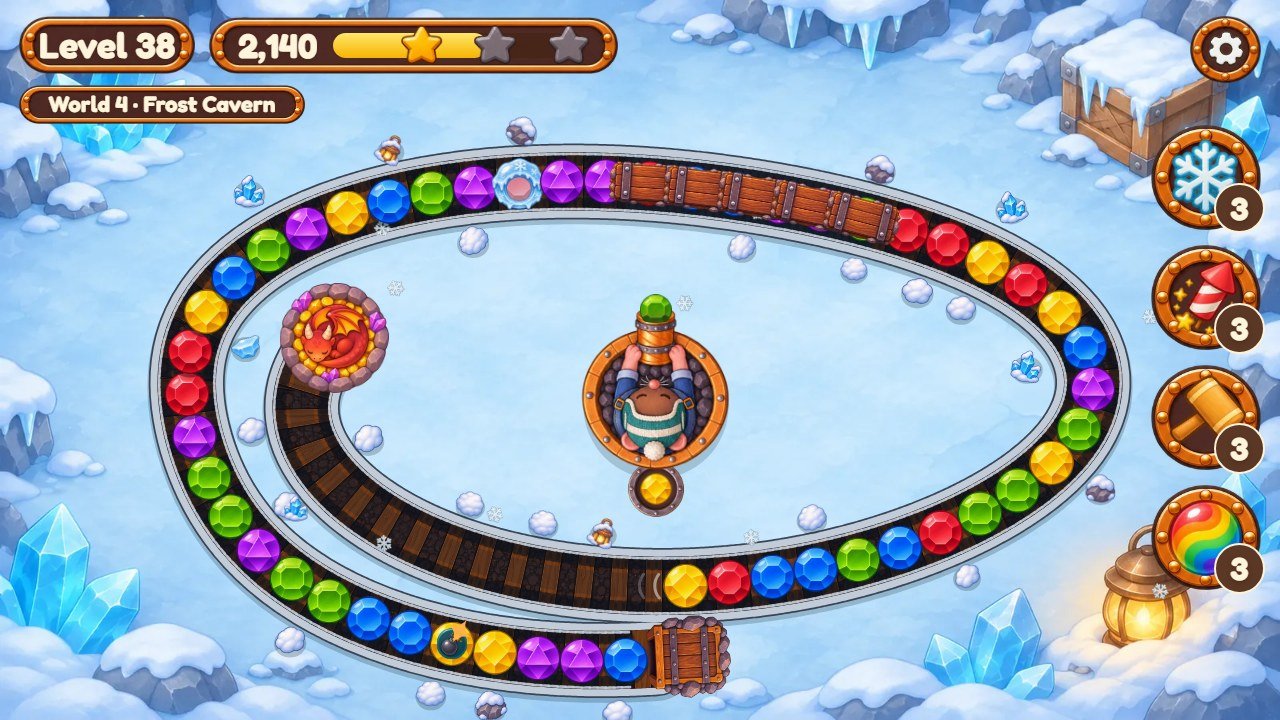 1
2
3
4
5
6
7
8
9
10
11
12
13
14
15
| # | What you see | File to change |
|---|---|---|
| 1 | Level number | Text: key level. Plate: pill-glass-*.webp. |
| 2 | Score and star bar |
Stars: star.webp and star-off.webp. The points needed for each star: recipe G.
|
| 3 | World of this level |
Texts: keys world and w4. On level 1 it shows the key tutorial.
|
| 4 | Pause button | Icon: assets/art/i-gear.webp. It opens the pause window. |
| 5 | Gem |
Six colors, one picture each: m0.webp (red) to m5.webp (orange). Recipe F.
|
| 6 | Special gem (bomb) |
An icon drawn over a normal gem: assets/art/p-bomb.webp. The others are
p-bomb, p-slow (snail), p-rev (rewind) and
p-bolt (lightning). Recipes F and I.
|
| 7 | Frozen gem | The ice shell drawn over the gem: assets/art/ice.webp. How many per level: recipe G. |
| 8 | Tunnel mouth | Where the gems come in: assets/art/spout.webp. |
| 9 | Tunnel |
Wooden covers drawn one after another: assets/art/slab.webp. The gems roll under them.
Where tunnels are: recipe G.
|
| 10 | Dragon nest |
assets/art/drain.webp. When the gems get close, and when the level is lost, the dragon
wakes up: drain-awake.webp. If the first gem reaches the nest, the level is lost.
|
| 11 | Trackside pieces |
One set of six pieces per world, here b41.webp to b46.webp. The track bed
texture is water4.webp; the rail colors are in src/config.js (recipes D and
J).
|
| 12 | Mole in the bucket | assets/art/mole4.webp and its seven poses: one set per world (recipe C). |
| 13 | Next gem | Iron pan: assets/art/basket.webp. Tapping the mole swaps the two gems. |
| 14 | Power-ups |
Pictures: h-freeze.webp, h-rocket.webp, h-hammer.webp,
h-rainbow.webp. Names: keys hFreeze, hRocket,
hHammer, hRainbow. Recipe I.
|
| 15 | World background | assets/art/bg4-land.webp here: Frost Cavern, world 4, on a wide screen (recipe D). |
3. More screens of the game
The windows share the same pieces: the window glass and its light border are drawn by
style.css (recipe J), the titles sit on pill-glass-*.webp plates and the buttons are
pill-green*, pill-amber*, pill-blue* and pill-teal* pictures
(recipe A explains the numbers in these names). Round buttons in windows use round-solid.webp.

i-music, i-sfx, i-vib,
i-motion, i-lang, i-full, i-help.

paused, resume, restart, home. Icons
i-play, i-replay, i-home; the sleeping mole is
mole-nap.webp.

tut1, tut2 (tut2pc on computers),
tut3 and skip. Face: mole-face.webp; pointing hand:
hand.webp. The first time a new piece appears, the same bubble shows one of the keys
tipTunnel, tipBridge, tipDuo, tipIce,
tipBomb, tipSlow, tipRev, tipBolt.

levelComplete, score, bestChain,
next. Mole: mole-cheer.webp; stars star.webp; score plate
pill-teal-360.webp; a new best score shows stamp-green.webp with the key
newRecord.
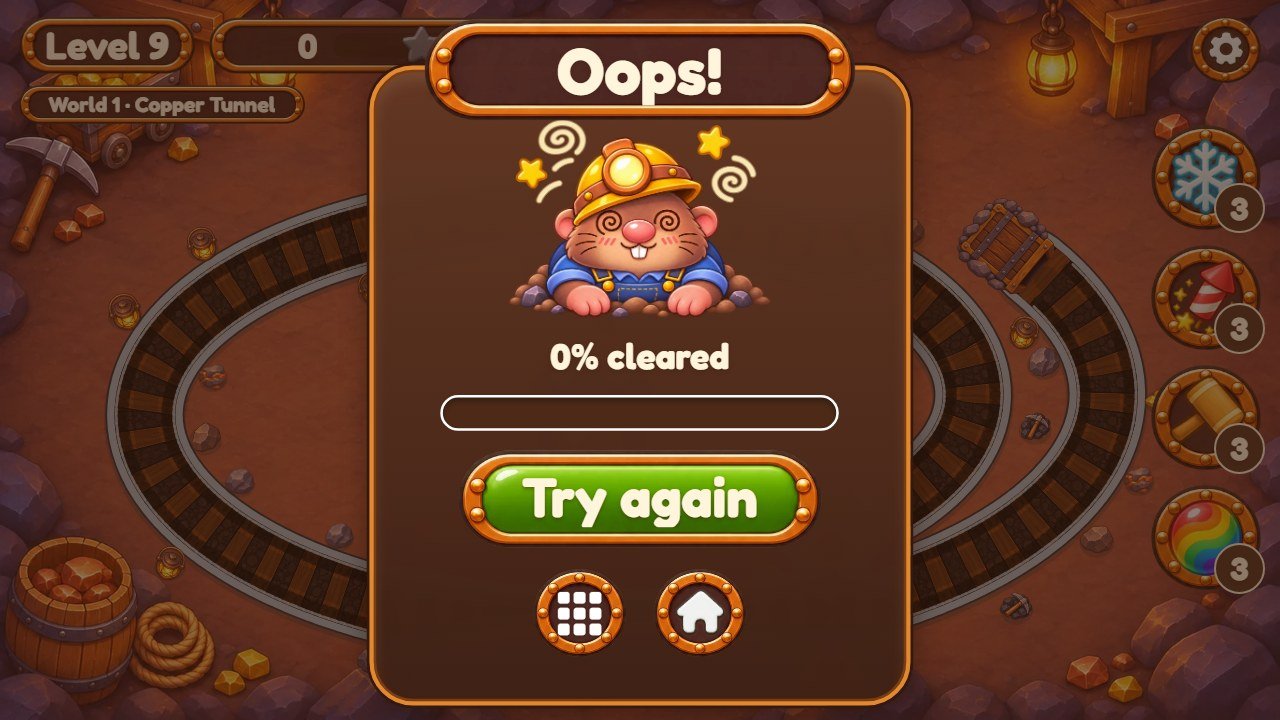
oops, or soClose when at least 30% of the line
was cleared. Also cleared and tryAgain. Mole: mole-dizzy.webp; icons
i-grid and i-home.
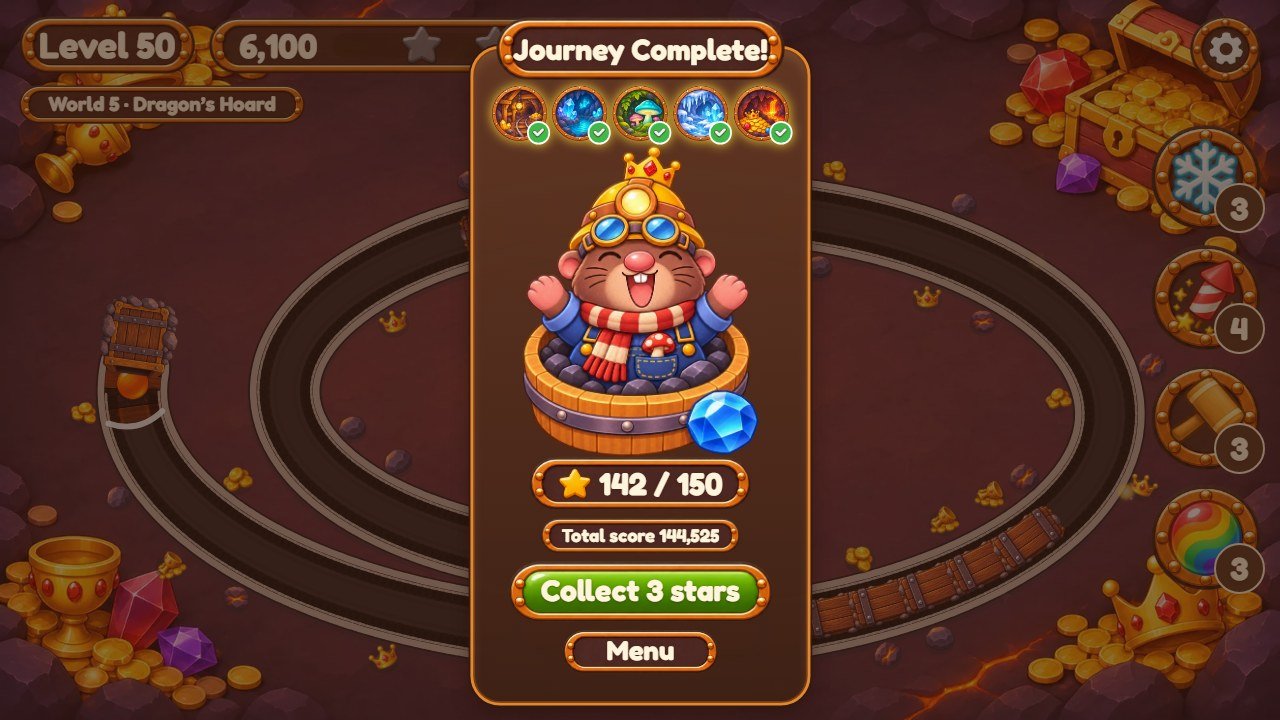
journey, totalScore, collect3 (shown while some
level has fewer than 3 stars) and menu. Pictures: badge1 to badge5,
i-check, mole-journey.webp.
bg2-port.webp.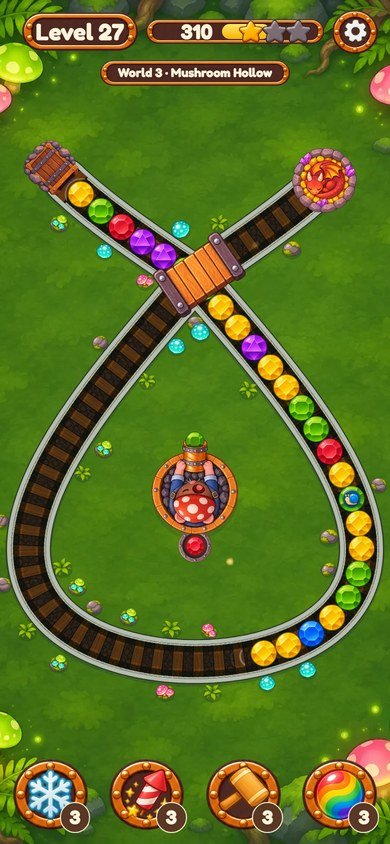
bridge.webp; the glowing
specks are glow.webp.
4. Recipe A: replace a picture
All pictures are in assets/art/ in WebP format. The game finds each picture by its file name, so a
new picture with the same name simply takes its place.
-
Find the file with the screens above or by its name:
bg*backgrounds,mole*mole,m*gems,p-*special gems,h-*power-ups,i-*icons,pill-*buttons and plates,b*trackside pieces,water*track bed textures,t*level buttons,badge*anddeco*world ornaments. Effects:burst,shock,spark,puff1topuff3,splash1tosplash4. - Open the old picture in your image editor and note its width and height.
-
Make your new picture with the same width and height and a
transparent background (except the
bg*backgrounds and thewater*strips). Keep the drawing in the same position inside the picture. -
Export as WebP with the exact same name, for example
star.webp, and replace the old file. - Reload the game with Ctrl+F5.
Buttons and plates come in several shapes. They are never stretched out of shape: each button
uses the picture made for its proportion. The number at the end of the name is the width divided by the height,
times 100. For example pill-green-435.webp is 666 x 153 pixels (4.35 times as wide as tall) and
pill-glass-790.webp is 7.9 times as wide as tall. So:
-
To recolor or redraw a kind of button, change every file of that color: for the green
buttons,
pill-green.webp,pill-green-315.webp,pill-green-370.webp,pill-green-435.webp,pill-green-rim-315.webpandpill-green-rim-370.webp. Otherwise some buttons keep the old look. -
Keep each file's exact width and height. To see where a file is used, search
style.cssfor its name.
5. Recipe B: change the logo and the game name
-
Logo: replace
assets/art/logo.webp(1100 x 377 pixels, transparent background). -
Title picture:
assets/art/title-hero.webp(900 x 873) is the mole in its bucket with the track, under the logo. -
Browser tab name: open
index.htmland change the text between<title>and</title>. A little below, change the name insidealt="Gemburrow"too (screen readers read it). -
Subtitle under the logo: the words
Gem Shooter Puzzleare written directly inindex.html, on the line withclass="plate sub". They are not translated: every language shows the same words. -
Tab icon: the line
<link rel="icon" href="./assets/art/m2.webp" />inindex.htmluses the blue gem. To use your own icon, save it inassets/art/(for exampleicon.png) and change the address on that line to./assets/art/icon.png. Keep it insideassets/:npm run buildcopies onlyindex.html,style.css,src/andassets/. -
Browser bar color on phones: the line
theme-colorinindex.html.
6. Recipe C: change the mole
The mole in the bucket is drawn from above, and each world has its own set of eight pictures (here for world 1;
world 2 uses mole2*.webp, and so on up to mole5*.webp):
| Picture | When it shows |
|---|---|
mole1.webp |
dozing, eyes closed: after 12 seconds without a move |
mole1-aim.webp |
awake, eyes open: the usual pose during play |
mole1-recoil.webp |
just after a shot |
mole1-cheer.webp |
after a big chain and when the level is won |
mole1-scared.webp |
when the gems are close to the dragon nest and when the level is lost |
mole1-ear.webp |
a quick ear twitch while waiting |
mole1-yawn.webp |
sometimes, a yawn after 7 seconds without a shot |
mole1-peek.webp |
when the mouse moves (computers) |
- All eight are 800 x 800 pixels: the bucket is a circle with a radius of 150 pixels in the middle, and the launcher points to the right. The game turns the picture to aim. Keep the bucket and the launcher in the same place in every pose.
-
The game knows where the mouth of the launcher is in each world:
tipinsrc/launcher-art.js, the distance from the middle of the bucket to the gem in the launcher, in bucket radii (1.327 means 1.327 x 150 = 199 pixels). If your launcher is longer or shorter, change that number for the world. -
The other mole pictures:
mole-wave.webp(home),mole-face.webp(tips and the tutorial),mole-cheer.webp(level complete),mole-dizzy.webp(level lost),mole-nap.webp(pause),mole-journey.webp(Journey Complete),title-hero.webpanddive.webp(title screen).
7. Recipe D: change the backgrounds and the worlds
There are 5 worlds of 10 levels. Each world has its own pictures:
| # | World | Levels | Its pictures |
|---|---|---|---|
| 1 | Copper Tunnel (key w1) |
1 to 10 |
bg1-*.webp (5 files), badge1.webp, deco1.webp,
water1.webp, b11.webp to b16.webp, mole1*.webp (8
files)
|
| 2 | Crystal Grotto (key w2) |
11 to 20 |
bg2-*.webp (5 files), badge2.webp, deco2.webp,
water2.webp, b21.webp to b26.webp, mole2*.webp (8
files)
|
| 3 | Mushroom Hollow (key w3) |
21 to 30 |
bg3-*.webp (5 files), badge3.webp, deco3.webp,
water3.webp, b31.webp to b36.webp, mole3*.webp (8
files)
|
| 4 | Frost Cavern (key w4) |
31 to 40 |
bg4-*.webp (5 files), badge4.webp, deco4.webp,
water4.webp, b41.webp to b46.webp, mole4*.webp (8
files)
|
| 5 | Dragon's Hoard (key w5) |
41 to 50 |
bg5-*.webp (5 files), badge5.webp, deco5.webp,
water5.webp, b51.webp to b56.webp, mole5*.webp (8
files)
|
World names are the keys w1 to w5 in src/locales.js (recipe E). The file
names stay the same even if your world has another theme; players never see them.
Each background comes in five shapes, so it is never cut badly on any screen. The game picks the file that matches the shape of the screen. For world 1:
| File | Size (pixels) | Used on |
|---|---|---|
bg1-land.webp |
1600 x 900 | Wide screens: computers and phones turned sideways |
bg1-port.webp |
900 x 1600 | Phones held upright |
bg1-l43.webp |
1280 x 960 | Tablets turned sideways (about 4:3) |
bg1-p34.webp |
960 x 1280 | Tablets held upright (about 3:4) |
bg1-sq.webp |
1280 x 1280 | Almost square windows |
- Replace all five files of a world, each with the same width and height. If you change only one, the old background still shows on other screens.
- Keep the middle calm, without strong details: the track and the buttons are drawn there. Put the details near the corners.
- The title screen always uses the world 1 background. The home and levels screens use the world of the next level (or the world chosen on the levels screen).
The rail track of each world is drawn by the game:
-
water1.webptowater5.webp(1200 x 166) are the texture strips of the track bed (gravel and wooden sleepers), laid along the track. The left and right ends must join without a seam. The namewatercomes from the engine and is kept in the code. -
b11.webptob16.webp(world 1) up tob51.webptob56.webpare the small pieces beside the track: rocks, ore, crystals, mushrooms, snow, gold and so on. -
The specks that drift over the screen in each world (
glow.webp,spark.webp,snow.webp) are the listambientinFEEL, insrc/config.js. -
The engine can also carry small pieces along the track (
fl11.webptofl52.webp,leaf.webp,petal.webp). This game does not use them: the list is left empty infloatInit, insrc/game.js. The files are still loaded, so keep them in place. -
The colors of the rails and the track bed (
rim,shallow,band,deep,shine) are inWORLDSinsrc/config.js, one line per world.
8. Recipe E: change texts and translations
All texts players read are in two files: src/locales.js (English, Portuguese, Spanish) and
src/locales-more.js (French, German, Italian, Dutch, Polish, Turkish, Russian, Indonesian,
Japanese, Korean, Chinese). Each language is a block of lines like these:
  tapToStart: 'Tap to start',
  play: 'Play',
  level: 'Level {n}',
w1: 'Copper Tunnel',- Find the text you want to change (Ctrl+F in your editor). The word before the colon is the key; never change it.
-
Change only the words inside the quotes. If your text has an apostrophe, like
Let's, put double quotes around the text:"Let's go!". - Keep markers such as
{n}and{name}: the game puts a number or a name there. - Change the same key in the other languages you use. A key missing from a language shows the English text.
-
If you use
source/, runnpm test: it checks that the 14 languages still have every key and every marker.
Two texts are not in these files: the subtitle under the logo and the browser tab name (recipe B).
9. Recipe F: change the gems
There are six gem colors. Each color has one gem picture, used on the track, and one gem setting picture, used for the level buttons of the levels screen. Each gem also has its own cut (the shape in the middle), so players who cannot tell the colors apart can still tell the gems apart: keep that idea in your own pieces.
| # | Color | Gem | Level button |
|---|---|---|---|
| 0 | red | m0.webp |
t0.webp |
| 1 | yellow | m1.webp |
t1.webp |
| 2 | blue | m2.webp |
t2.webp |
| 3 | green | m3.webp |
t3.webp |
| 4 | purple | m4.webp |
t4.webp |
| 5 | orange | m5.webp |
t5.webp |
- Keep them round, the same size as the old pictures (gems about 128 x 128 pixels, level buttons 198 x 200), with a transparent background.
m-wild.webpis the rainbow gem (recipe I) andm-lock.webpthe locked level.-
MARBLEandMARBLE_DARKinsrc/config.jsare the same six colors, in the same order, for the sparks, the flying points and the plain pieces the game draws if a picture is missing (in the code the gems are called marbles). If you change a gem's color, change its line there too. -
Special gems are an icon drawn over a normal gem:
p-bomb.webp,p-slow.webp,p-rev.webpandp-bolt.webp. Frozen gems get the shellice.webp.
10. Recipe G: make the levels easier or harder
The 50 levels are not drawn by hand. Each one is a line of a table in src/levels.js, and the game
builds the track for the screen it is playing on. The table is called PLAN: one block per world,
one line per level. These are the last lines of world 2:
    ['spiral', { bomb: 2 }, 1],
    ['bean', { slow: 1, bomb: 1 }],
['spiral', { slow: 1, bomb: 2 }, 2],| Part of the line | What it means |
|---|---|
| 1st: the track shape |
'oval', 'spiral', 'bean', 'serp' (zigzag),
'eight' (the track crosses itself over a bridge) or 'duo' (two tracks, two
lines of gems). On wide screens a zigzag is played as a bean.
|
| 2nd: special gems |
How many of each: bomb, slow (snail), rev (rewind),
bolt (lightning). {} or nothing means none.
|
| 3rd: tunnels |
0 or nothing: none; 1: one short tunnel; 2: two tunnels. Where
they are: TUNNELS, as parts of the track (0.42 is 42% of the way).
|
| 4th: frozen gems | How many gems start frozen. |
-
Colors per level:
COLORS, one line per world: the number of colors for levels 1 to 5 and for levels 6 to 10 of that world (3 to 6). Fewer colors is easier. -
Length, speed and how mixed the colors are rise smoothly from level 1 to 50. They are the
lines of
getLevel(n)in the same file:count(how many gems),speed(how fast the line rolls, from 0.36 to 0.8),rollTo(how far the line rushes in at the start) andclump(from 0.56 to 0.24: lower values mix the colors more). To make every level slower, lower the two numbers inlerp(0.36, 0.8, t), for example tolerp(0.3, 0.6, t). -
Stars: finishing a level gives 1 star. 2 and 3 stars need points:
star2andstar3inRULES_UI, insrc/config.js. Lower numbers give stars more easily. -
Special gems and the danger zone:
RULESat the top ofsrc/chain.js:slowS(seconds the snail slows the line, 8),slowMul(how slow, 0.4),revS(seconds the line rolls back, 3),bombReach(blast size, 3.5 gems),freezeS(seconds of the freeze power-up, 6),dangerFrom(0.85: the last 15% of the track, where the line slows down). -
After changing levels, open a terminal in
source/and runnpm test. It builds the track of all 50 levels on seven screen sizes and fails if one cannot be built (for example, a line too long for its shape). The eight shape is made for about 47 to 55 gems. The test also checks that level 50 stays much harder than level 2: more than twice the gems, more than 1.8 times the speed and more colors. A flatter curve (for example the same number of colors in every world) makes that check fail.
npm testThis command needs Node.js; the main buyer guide explains how to install it, step by step.
11. Recipe H: replace music and sounds
Save your audio as MP3 with the same file name and replace the old file.
-
Music (
assets/music/):menu.mp3plays on the home and levels screens andplay.mp3in the levels. The title screen is silent. Each track repeats: 2.5 seconds before the end, the next round starts and the two blend, so let your track fade out softly over its last 2 or 3 seconds. The blend time isMUSIC_TAILat the top ofsrc/audio/sound.js. -
Recorded sounds (
assets/sfx/):plop1.mp3toplop5.mp3, the pop of the gems. The game plays a different one each time. Their volume isGAINat the top ofsrc/audio/sound.js(0.55; 1 is full volume). -
All the other sounds are not files: the game makes them with the numbers in
SYNTH, in the same file (fis the pitch in Hz,durthe length in seconds,gthe volume).
Name in SYNTH |
When it plays |
|---|---|
shot |
a shot |
swap |
the two gems are swapped |
clink |
a gem joins the line |
clack |
two parts of the line bump together |
bomb, slow, rev, bolt |
a special gem pops |
freeze, rocket, hammer, wild |
a power-up is used |
thaw |
ice breaks |
heart, phew |
gems near the dragon nest, and safe again |
win, star, cheer |
level won, each star, a big chain |
lose, sink |
level lost |
ui_click, ui_back, ui_no, stamp |
buttons and the "New record!" stamp |
splash, fill |
a shot that lands off the track, and the track appearing when a level starts |
- To remove the music or the pops, delete the files: the game keeps working, silent where a file is missing (without the pop files it uses its own pop sound).
-
Players set the Music and Sound effects volumes in Settings; the starting values are
VOLinsrc/config.js. On phones, sound starts after the first touch (a browser rule).
12. Recipe I: change the power-ups and the special gems
The four power-ups are on the side of the level (pictures h-freeze, h-rocket,
h-hammer, h-rainbow; names: keys hFreeze, hRocket,
hHammer, hRainbow). Their numbers are in RULES_UI, in
src/config.js:
  startHelps: 3,
  rockets: 5,
hammerReach: 2.3,-
startHelps: how many of each power-up a new player has (3). The first time a level is finished with 3 stars, the player gets one more power-up, in turn. -
rockets: how many gems the rockets hit (5).hammerReach: the size of the hammer blow, in gems (2.3). The hammer shows the keyhammerHint. -
Freeze stops every line for
freezeSseconds (inRULES,src/chain.js). The rainbow gem (m-wild.webp) matches any color. - Special gems work when they pop: the bomb clears the gems near it, the snail slows the line, rewind rolls the line back and lightning clears every gem of its color. Their numbers are in recipe G; their pictures in recipe F.
-
The words that pop up during play are keys too:
nice,amazing,gap,freeze,slow,rev.
Change only the numbers. Keep the commas, braces and names exactly where they are. Power-ups are earned by playing; the game has no store and no real-money purchases.
13. Recipe J: change colors, buttons and the font
-
Text colors: the block
:rootnear the top ofstyle.css:--ink(the white text),--shade(the soft shadow under it) and--rim(the light border of the windows). Change the value after the colon, for example--ink: #fff;. -
Window glass: the rule
.panelwithlinear-gradient(...)near the end ofstyle.css; the home card is the rule.carda little further down. The two colors are the top and the bottom of the glass. -
Behind the game while it loads: the
backgroundofhtml, bodynear the top ofstyle.css. Browser bar color on phones:theme-colorinindex.html. - Buttons, plates and round buttons are pictures: recolor them in your image editor (Hue/Saturation) and save with the same names, every size of a color (recipe A).
-
Track and gem colors:
WORLDSandMARBLEinsrc/config.js(recipes D and F). -
Font: Fredoka, in
assets/fonts/, declared by the four@font-faceblocks at the top ofstyle.css. To use another font, add its.woff2files toassets/fonts/and change the file names in those blocks (and in thepreloadline ofindex.html). Check that its license allows use in games.
14. Check and publish your changes
- Play the parts you changed on your computer (see Before you start), in a wide window and in a narrow one (F12, then Ctrl+Shift+M shows phone sizes).
-
If you edited
source/: in a terminal insidesource/, run the commands below. The first checks the rules, the levels and the texts; the second copies the game tosource/dist/.
npm test
npm run build-
Upload everything inside
game/(orsource/dist/, if you built it) to your web hosting, replacing the old files. - Open your game address and press Ctrl+F5. If you still see the old version, read the section about updates and cache in the main buyer guide.
15. If something goes wrong
-
The game stops on the first screen after you edit a
.jsfile: a comma, quote or brace is missing. Press F12 and open the Console: it shows the file name and the line with the error. Compare that line with your backup. -
A picture is missing: the file name is different (names are case sensitive:
Logo.webpis notlogo.webp), or the file is not WebP. - A background or button still shows the old picture on some screens: it has other files for other screen shapes (recipes A and D).
- Nothing changed: the browser is showing the old file. Press Ctrl+F5, or open the game in a private window.
- Still stuck? Restore your backup and change one thing at a time. Support: willian@polargames.com.br (include the game version, what you changed and a screenshot).