Customization Guide
Make Dragon Roost your own game: new dragons, new enemies, your own logo, sounds, texts and colors, an easier or harder campaign and other prices. Every recipe below is a short list of steps and names the exact file to open. You do not need to know how to program. Every picture on this page is a real screenshot of the game in this download.
1. Before you start
Free tools:
- A code text editor: Visual Studio Code (Windows, Mac, Linux) or Notepad++ (Windows). Do not use Word or WordPad: they break the files.
- An image editor that exports WebP and PNG: Photopea (free, in the browser), GIMP or Krita. You can also save a PNG and convert it to WebP at squoosh.app.
- For sounds: Audacity (free, exports MP3).
Which folder to edit. The download has two copies of the game:
-
game/is the finished game. Simplest way: change files directly insidegame/and upload that folder. No other tools are needed. -
source/is the same game with tests and tools. If you use it, editsource/and runnpm run build, then upload the newsource/dist/folder (see Check and publish). Pick one way and keep to it.
The paths in this guide (for example assets/ui/logo.webp) are the same inside both folders.
See your changes on your computer. The game must be opened from a web address, not by
double-clicking index.html. Two easy ways:
-
With Python (python.org): open a terminal inside the game folder, run the command below and open
http://localhost:8080. -
With Node.js 26.13 or newer: in
source/, runnpm run serveand openhttp://localhost:5191.
python -m http.server 8080
After each change, reload with Ctrl+F5 (Windows) or Cmd+Shift+R (Mac) so the
browser does not show the old file. On your own computer you can add ?debug=1 to the address (for
example http://localhost:8080/?debug=1) to open a testing panel with extra coins, "win this wave"
and "go to wave" buttons. The panel never appears on a public website.
2. Screenshot gallery
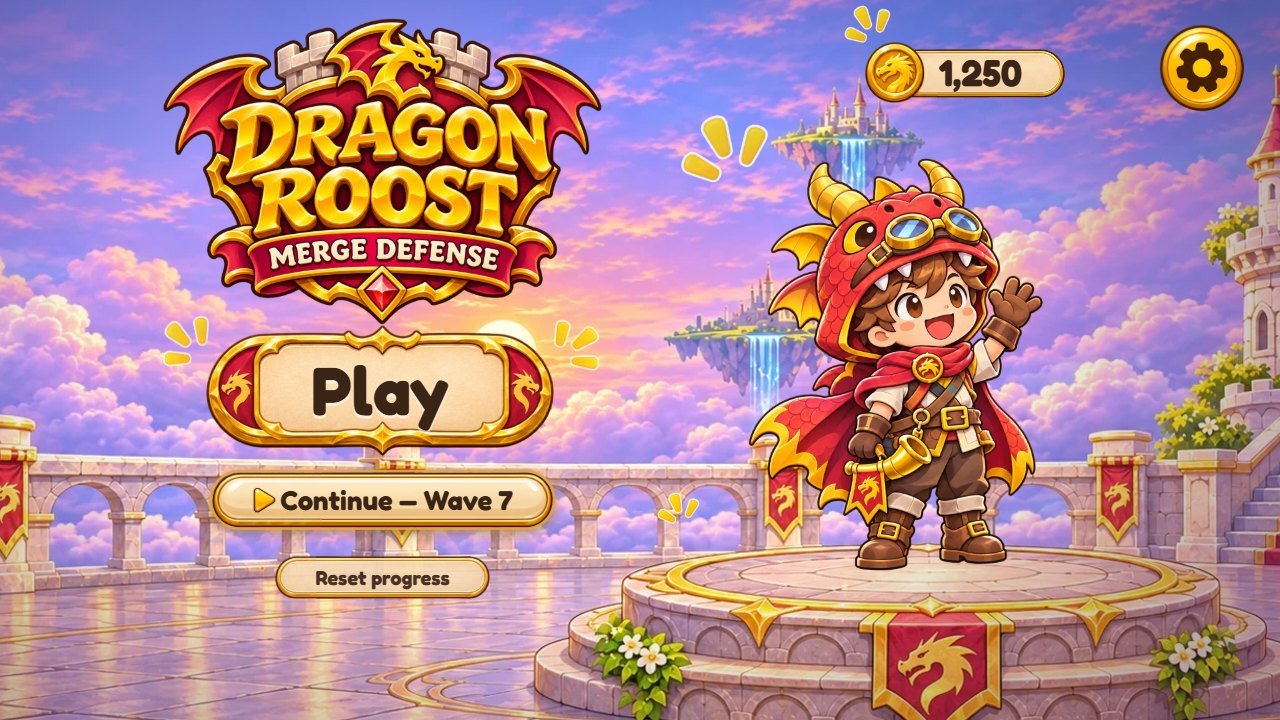
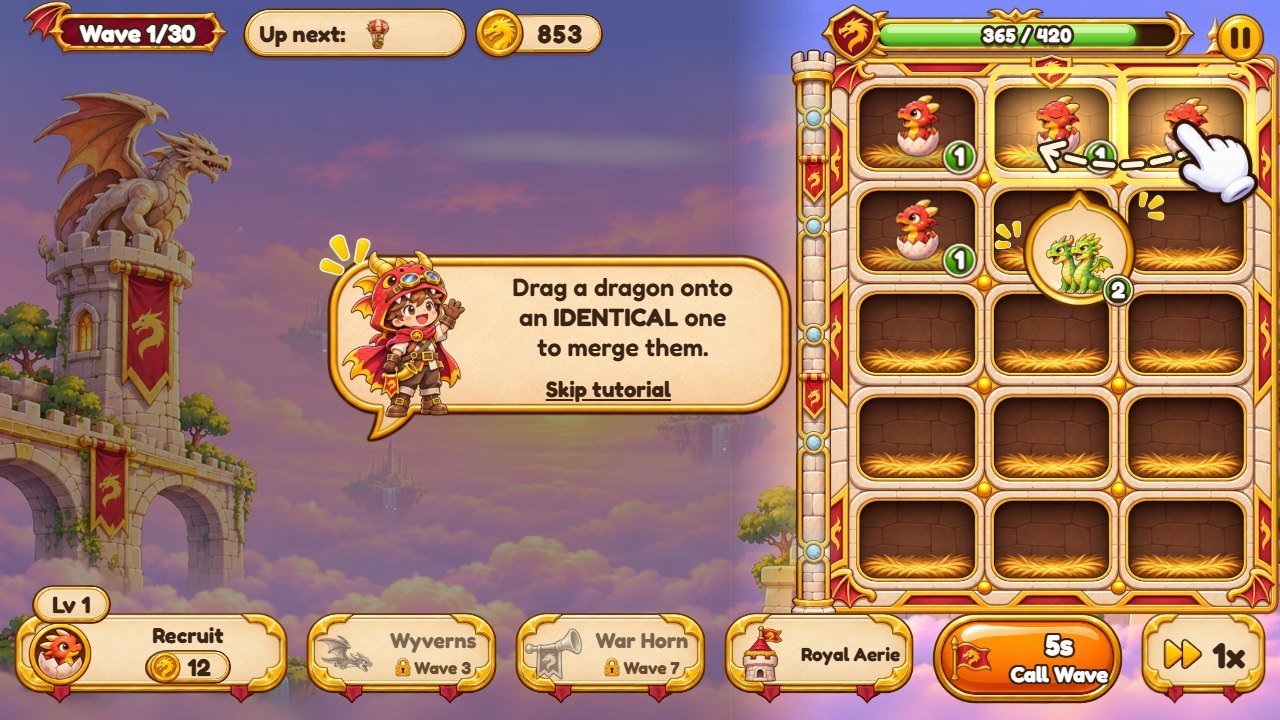
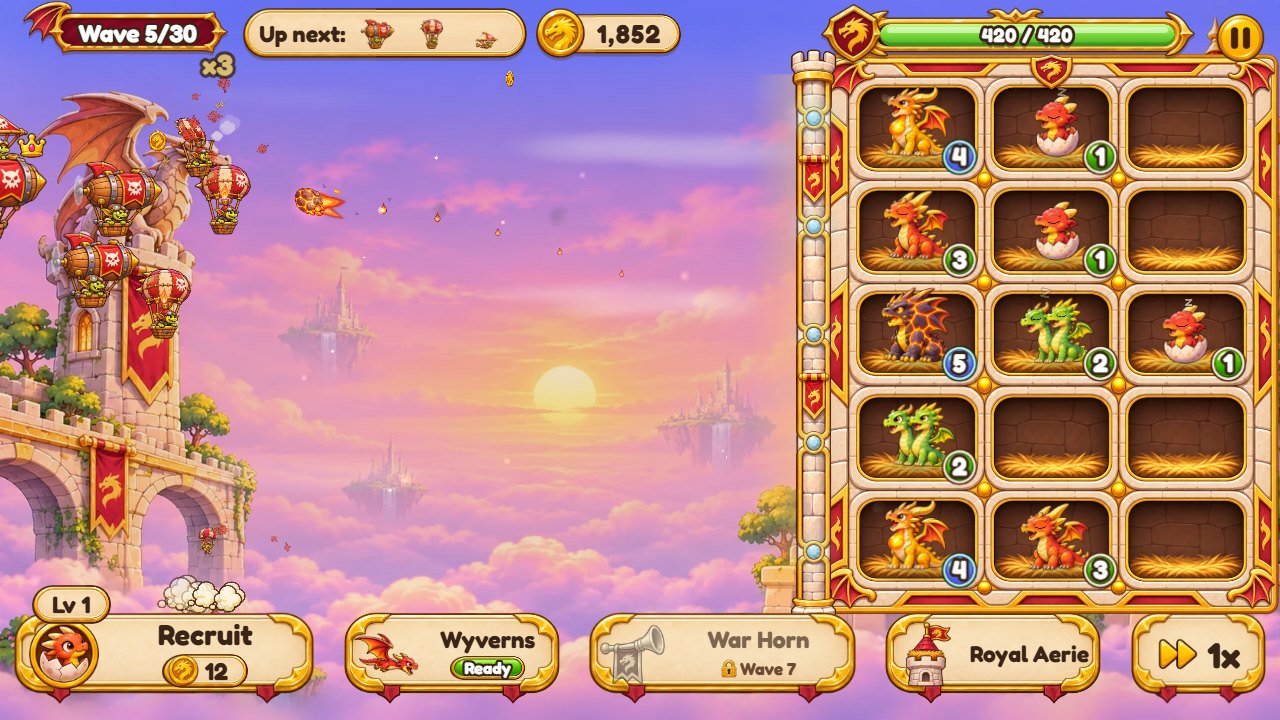
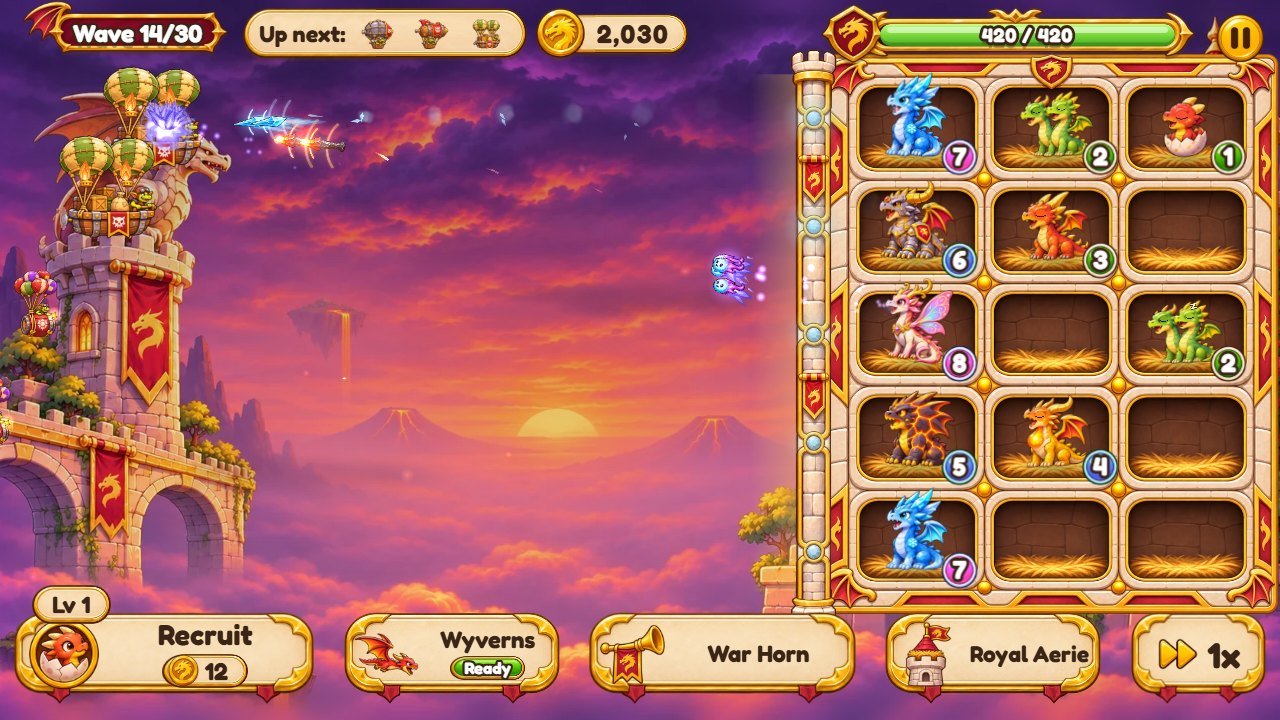
Real screenshots of this version: 1280 x 720 on a computer, plus a phone in both positions. The game is played in landscape; on a phone held upright it shows a "turn your phone" screen.
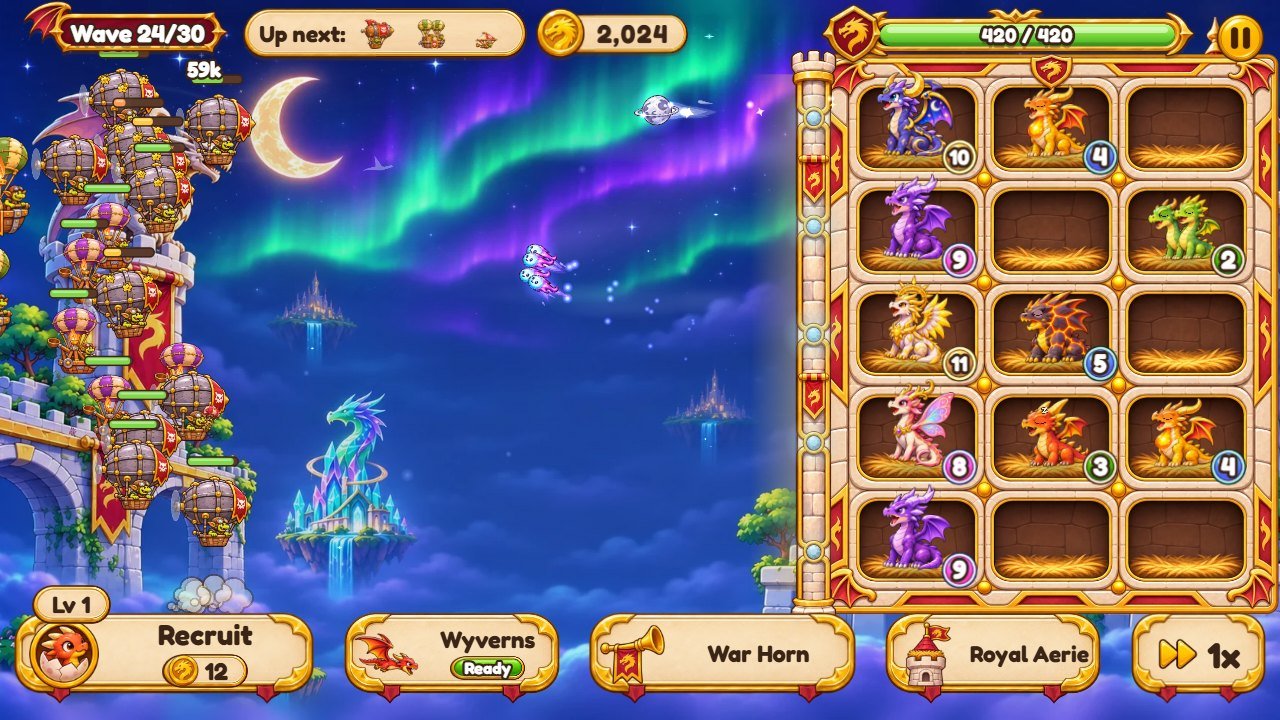
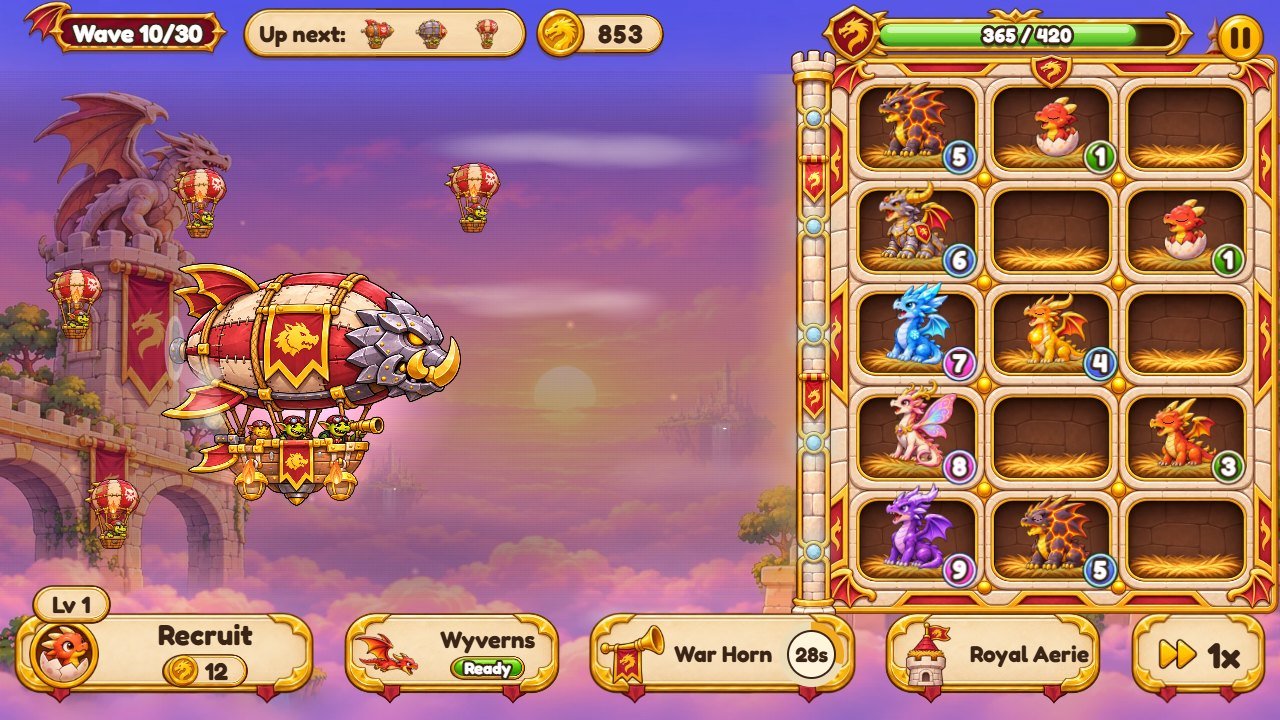
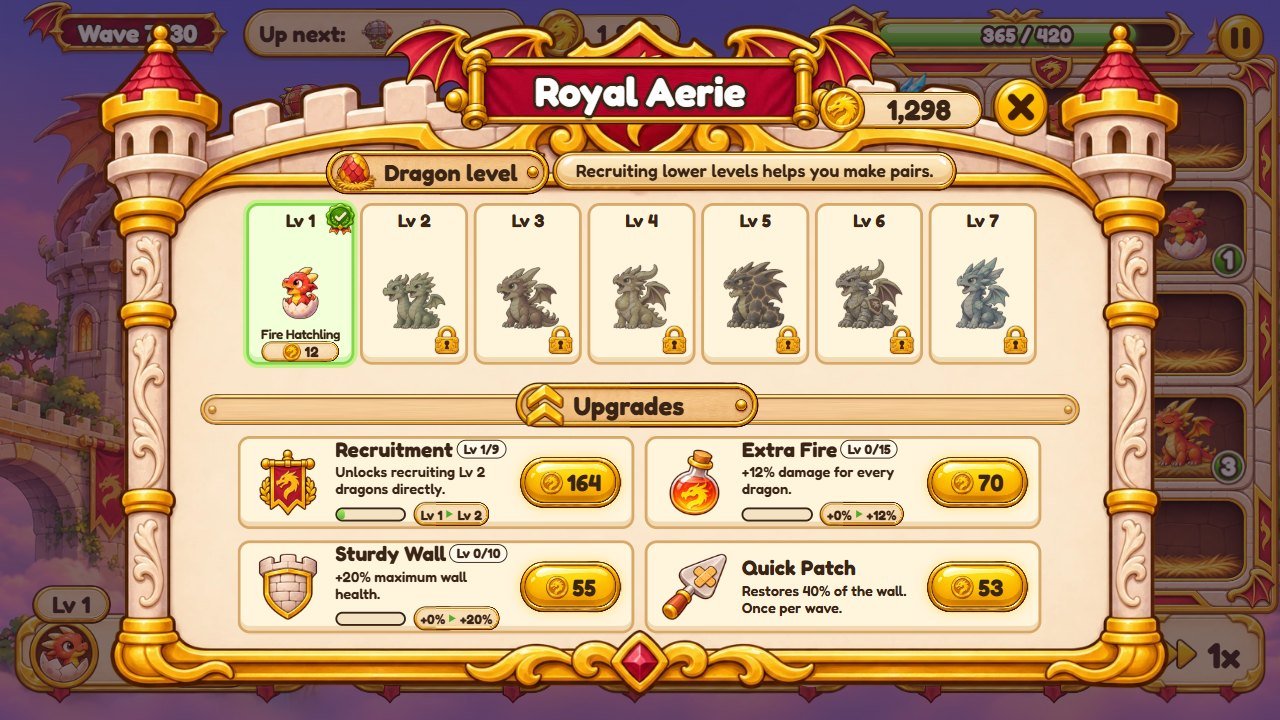
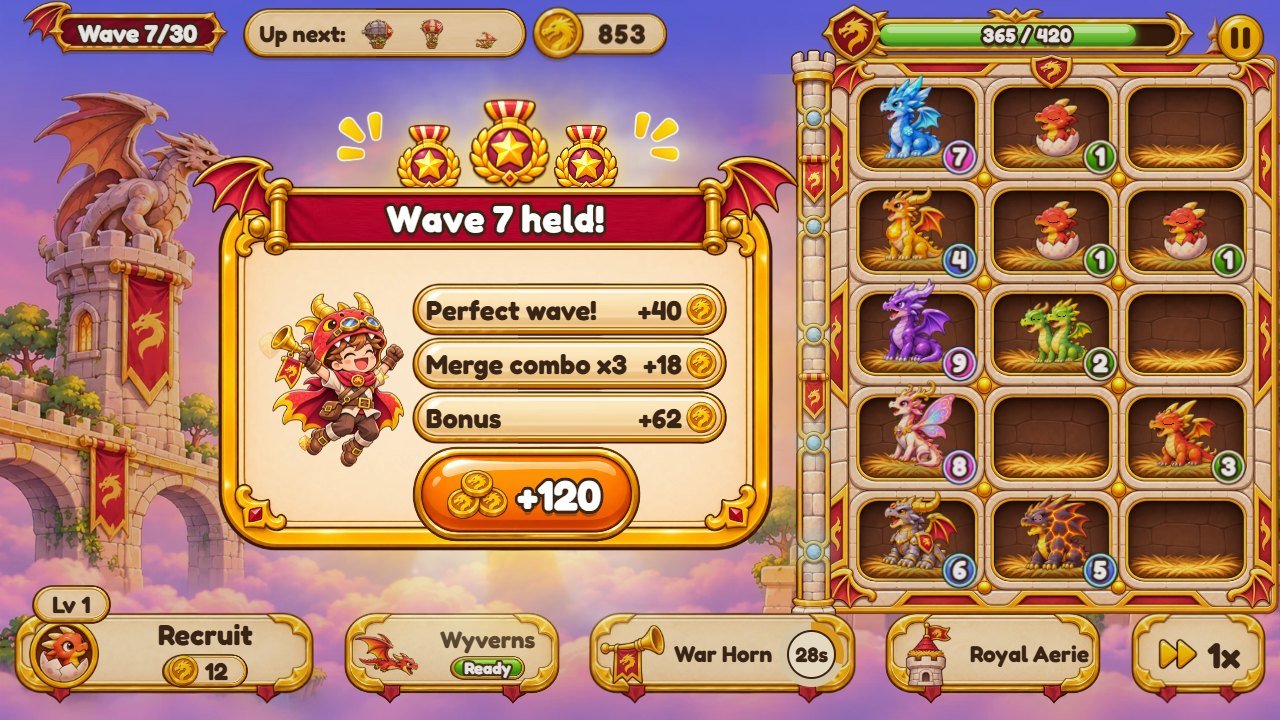
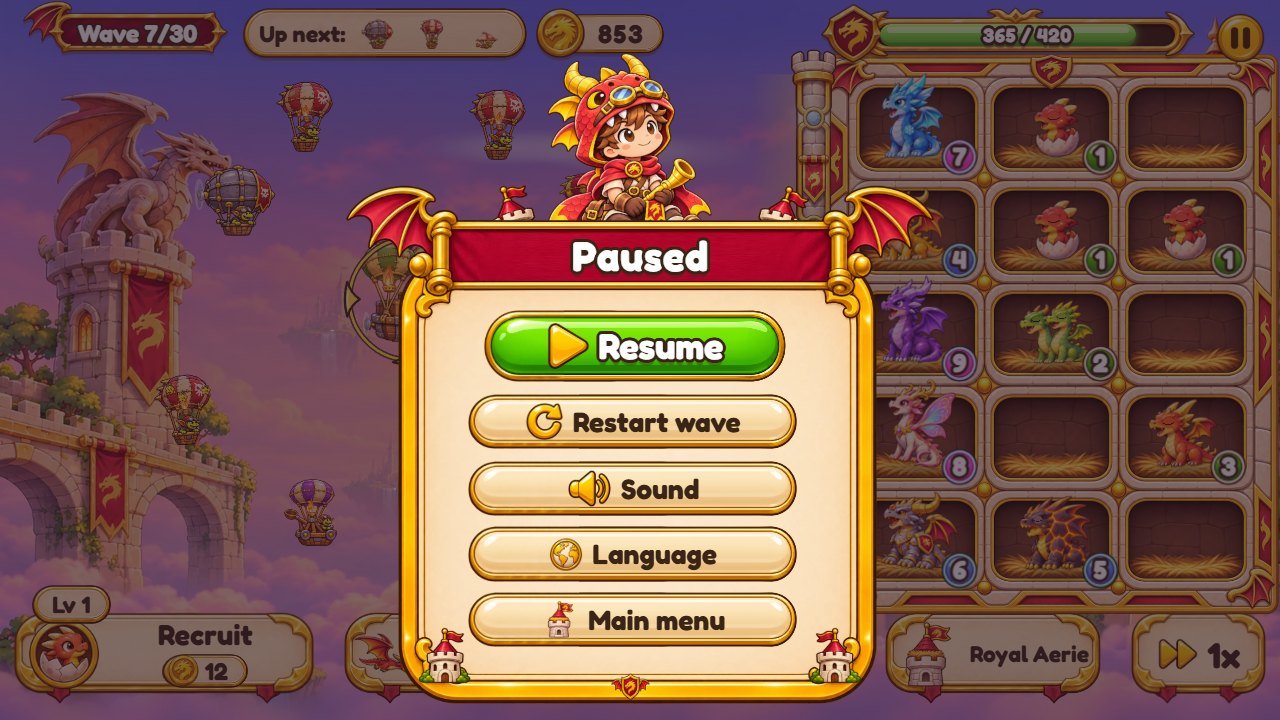
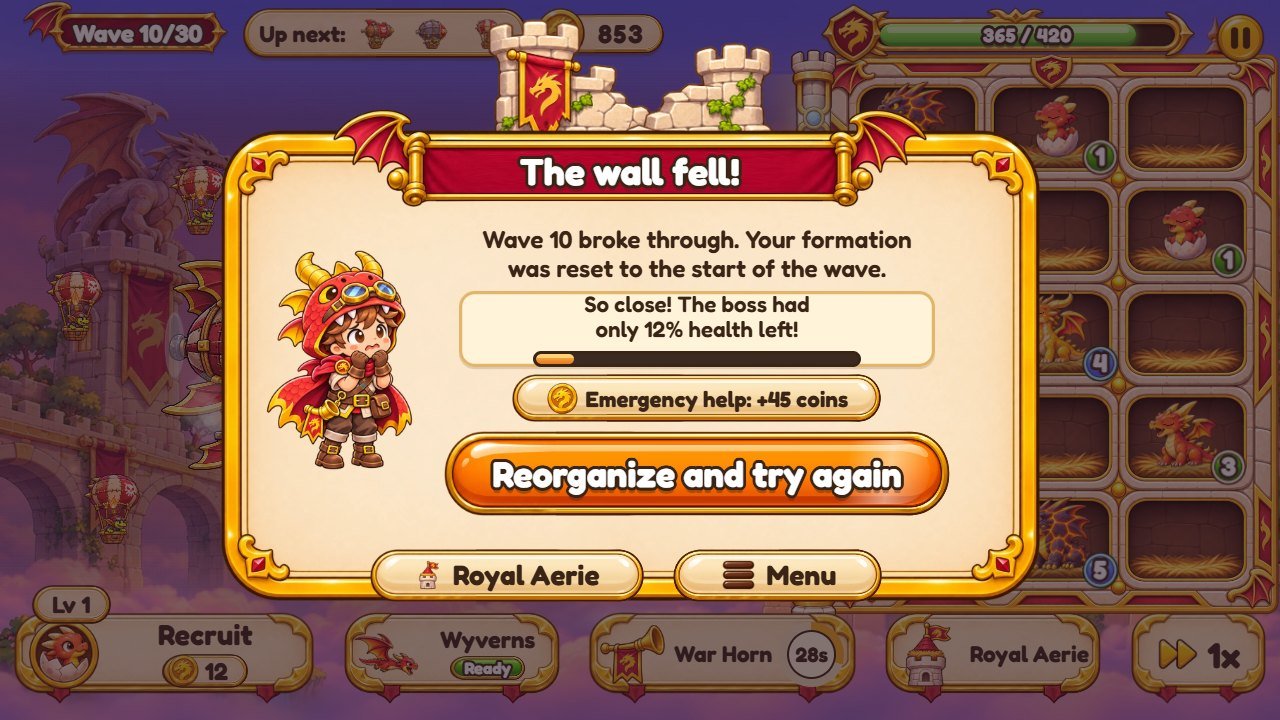
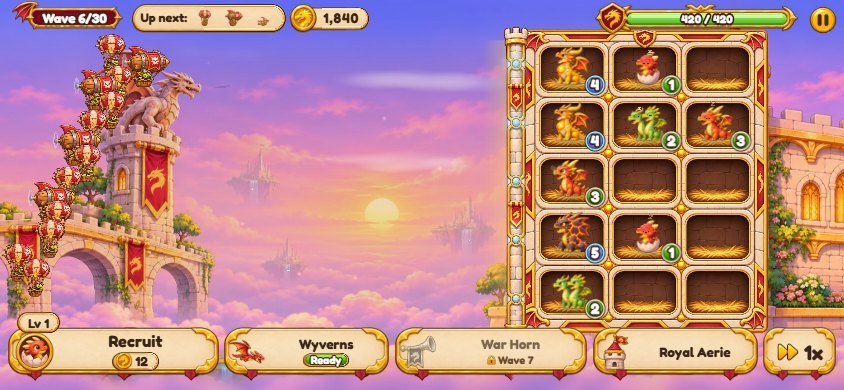
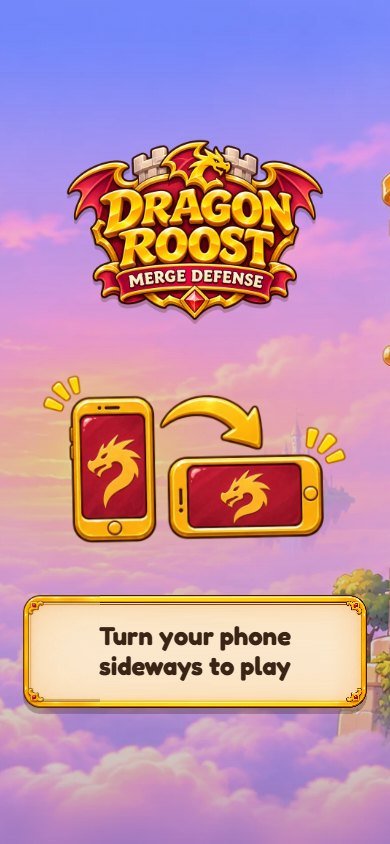
3. Where everything is
The numbers on each screenshot match the table below it. Text keys such as play are explained in
recipe F.
Title screen
1
2
3
4
| # | What you see | File to change |
|---|---|---|
| 1 | Game logo |
assets/ui/logo.webp (1536 x 1024, transparent background). Also shown on the loading and
"turn your phone" screens (recipe B).
|
| 2 | Play button |
Text: key play in src/i18n/en.js (one file per language). Button picture:
assets/ui/btn-play.webp.
|
| 3 | Settings button | Picture: assets/ui/btn-gear.webp. |
| 4 | Dragon keeper (mascot) |
assets/ui/hazel-wave.webp and the other hazel-*.webp poses (650 x 650). Title
background: assets/env/title-wide.webp.
|
Battle (World 1, Golden Skies)
1
2
3
4
5
6
7
8
9
10
| # | What you see | File to change |
|---|---|---|
| 1 | Wave number |
Plate: assets/ui/wave-plate.webp. Number of campaign waves: TOTAL_WAVES and
WAVES in src/game/data.js (recipe G).
|
| 2 | Enemies coming next |
Pill: assets/ui/upnext-pill.webp. The icons are cut from the enemy pictures in
assets/pests/ (recipe D).
|
| 3 | Coins |
Pill: assets/ui/coin-pill.webp; coin: assets/ui/ic-coin.webp. Coins earned and
prices: recipe H.
|
| 4 | Wall health |
Frame: assets/ui/hp-frame.webp. Wall health: BAL.fence.hp in
src/game/data.js (recipe G). The wall drawn on the field: assets/env/fence.webp.
|
| 5 | Pause button | Picture: assets/ui/pause.webp. |
| 6 | Recruit button |
Button: assets/ui/btn-gold.webp; text: key plant in
src/i18n/dragon-theme.js. Price of a dragon: recipe H.
|
| 7 | Wyverns power |
Icon: assets/ui/ic-bee.webp; button: assets/ui/btn-cream.webp; text: key
bees. Unlock wave and cooldown: BAL.bees in src/game/data.js.
|
| 8 | War Horn power |
Icon: assets/ui/ic-sack.webp; text: key fertilizer. Unlock wave, cooldown and
length: BAL.fertilizer.
|
| 9 | Royal Aerie button |
Icon: assets/ui/ic-shed.webp; text: key shed in
src/i18n/dragon-theme.js.
|
| 10 | Game speed 1x / 2x | Button: assets/ui/btn-square.webp; icon: assets/ui/ic-fast.webp. |
Royal Aerie (dragon levels and upgrades)
1
2
3
4
5
6
7
| # | What you see | File to change |
|---|---|---|
| 1 | Royal Aerie title |
Plank: assets/ui/plank.webp; window: assets/ui/shed-panel.webp; text: key
shed.
|
| 2 | Your coins | Same pill as the battle: assets/ui/coin-pill.webp. |
| 3 | Dragon level card |
Dragon picture: assets/plants/p1-0.webp ... p12-0.webp. Name: keys
p1 ... p12. Price: recipe H.
|
| 4 | Locked level | The same dragon picture, darkened by the game; lock: assets/ui/ic-lock.webp. |
| 5 | Upgrade card |
Names and descriptions: keys seedLine, richSoil, sturdyFence and
their ...Desc keys in src/i18n/dragon-theme.js.
|
| 6 | Upgrade price |
Button: assets/ui/btn-gold.webp. Prices and effects: BAL.richSoil,
BAL.sturdyFence, BAL.seedLineCostMul and
BAL.fence.patchCost (recipe H).
|
| 7 | Close | Picture: assets/ui/btn-x.webp. |
Wave held (reward card)
1
2
3
| # | What you see | File to change |
|---|---|---|
| 1 | "Wave held" ribbon |
Ribbon: assets/ui/ribbon-win.webp; text: key waveHeld. Mascot:
assets/ui/hazel-cheer.webp.
|
| 2 | Reward lines |
Coins for a cleared wave: BAL.waveBonus; star bonus: BAL.stars (recipe H).
|
| 3 | Collect button | Button: assets/ui/btn-orange.webp; coins icon: assets/ui/ic-coins.webp. |
Pause menu
1
2
3
4
5
6
| # | What you see | File to change |
|---|---|---|
| 1 | Pause ribbon | Ribbon: assets/ui/ribbon-pause.webp; window: assets/ui/panel.webp. |
| 2 | Resume | Button: assets/ui/btn-green.webp; icon: assets/ui/ic2-play.webp. |
| 3 | Restart the wave | Icon: assets/ui/ic2-restart.webp. |
| 4 | Sound volumes |
Icon: assets/ui/ic2-sound.webp. Opens the sliders for effects, voice and music (recipe E).
|
| 5 | Language | Icon: assets/ui/ic2-globe.webp. 14 languages (recipe F). |
| 6 | Main menu |
Icon: assets/ui/ic-shed.webp (pause) or assets/ui/ic2-menu.webp (wall fell).
|
The wall fell (defeat)
1
2
3
4
| # | What you see | File to change |
|---|---|---|
| 1 | "The wall fell!" ribbon |
Ribbon: assets/ui/ribbon-lose.webp; broken wall behind it:
assets/ui/broken-fence.webp; mascot: assets/ui/hazel-worried.webp; text: key
fenceFell.
|
| 2 | Try again |
Button: assets/ui/btn-orange.webp. Emergency coins after two failed tries:
BAL.mercy.
|
| 3 | Royal Aerie from the defeat window | Opens the same Royal Aerie as the battle button. |
| 4 | Main menu |
Icon: assets/ui/ic-shed.webp (pause) or assets/ui/ic2-menu.webp (wall fell).
|
4. Recipe A: replace a picture
All pictures are WebP files (a few PNG) inside assets/. The game finds each picture by its file
name, so a new picture with the same name simply takes its place.
| Folder | What is inside |
|---|---|
assets/ui/ |
Interface: buttons btn-*, ribbons ribbon-*, windows panel.webp and
shed-panel.webp, icons ic-* and ic2-*, the mascot
hazel-*, the logo and the tab icon.
|
assets/plants/ |
The 12 dragons (recipe C). |
assets/pests/ |
Goblin balloons and bosses (recipe D). |
assets/env/ |
Sky backgrounds of the three worlds, the title background, the castle wall and the nest board (recipe D). |
assets/fx/ |
Small effect pictures: sparkles, coins, crowns, the treasure chest balloon. |
- Find the file with the numbered screens or by its name in the folders above.
- Open the old picture in your image editor and note its width and height.
- Make your new picture with the same width and height and a transparent background (except the sky backgrounds). Keep the subject in the same place inside the picture.
-
Export as WebP with the exact same name, for example
assets/ui/btn-play.webp, and replace the old file. - Reload the game with Ctrl+F5.
5. Recipe B: change the logo and the game name
-
Logo: replace
assets/ui/logo.webp(1536 x 1024, transparent background). It is used on the title, loading and "turn your phone" screens. -
Browser tab name and description: open
index.html, change the text between<title>and</title>, thecontentof thedescriptionline and thealttexts of the two logo images. -
Tab icon: replace
assets/ui/favicon-dragon.png(a square PNG, for example 64 x 64). -
Browser bar color on phones: the
theme-colorline inindex.html. -
Name inside the game: key
titleinsrc/i18n/dragon-theme.js(one line per language, recipe F), and thealttext of the logo insrc/app/hud.js(search forDragon Roost).
6. Recipe C: change the dragons
There are 12 dragon levels. Two dragons of the same level merge into the next level. Each level has five pictures:
-
assets/plants/p1-0.webp,p1-1.webp,p1-2.webp,p1-3.webp: four small frames, 300 x 300, used in the Royal Aerie cards, the tutorial and the bottom bar. Make all four the same drawing (or a tiny wing movement). -
assets/plants/p1-hd.webp: the same dragon at 600 x 600, drawn in battle so it stays sharp on phones and large screens.
- Draw your level 1 creature on a transparent 600 x 600 canvas, facing left (the enemies come from the left), standing on the bottom middle.
-
Export it as
p1-hd.webp. Resize a copy to 300 x 300 and export it four times asp1-0.webp...p1-3.webp. - Repeat for
p2...p12, from smallest to strongest. -
Names: keys
p1...p12insrc/i18n/dragon-theme.js(Fire Hatchling, Twin Whelp ... Elder Dragon). -
Where the fire comes out: the mouth and eye points of each level are in
src/art/anchors.js, in pixels of the 300 x 300 frame (boca= mouth,olhos= eyes,pupila= pupil). Open your 300 x 300 picture in Photopea, point at the mouth, read the x and y in the Info panel and type them there. -
Strength:
PLANTSat the top ofsrc/game/data.js, one line per level:dmg(damage per hit),rate(shots per second) andrange. Keepfireas it is: it chooses the attack animation.
{ lv: 1, key: 'seed', fire: 'single', range: 540, rate: 2.0, dmg: 10 }, // dmg: 12 makes level 1 stronger7. Recipe D: change the enemies, bosses and backgrounds
-
Enemies are picture strips in
assets/pests/:aphid.webp(Goblin Balloon),hopper.webp,beetle.webp,snail.webp(andsnail_cracked.webp, its broken armor),slug.webp,stinkbug.webp,bombardier.webpandladybug.webp(the golden treasure balloon). Each strip has 8 frames side by side, each 420 x 330 (3360 x 330 in total). Their order and the point where each enemy "touches" the lane are listed inassets/pests/pests.json. Keep the same size and order and the new strip simply replaces the old one. -
Bosses:
rhino.webp(Ram Zeppelin),wasp.webp(Goblin Queen) andmegasnail.webp(Shell Fortress), plus one large picture each,rhino-space-hd.png,wasp-space-hd.pngandmegasnail-space-hd.png, drawn in battle for sharpness. Replace both. Boss names: keysboss_rhino,boss_wasp,boss_megasnailinsrc/i18n/dragon-theme.js. -
Burners and propellers drawn on top of the balloons are positioned in
src/art/anchors.js(queimadores= burners,helices= propellers), in fractions of the frame. If your enemy has no propeller, leave the list empty:helices: []. -
Sky backgrounds:
assets/env/bg1.webp(World 1, Golden Skies),bg2.webp(World 2, Storm Canyon),bg3.webp(World 3, Aurora Night), each with a-wideversion for wide screens. World names: keysworld0,world1,world2. -
Title background:
assets/env/title-wide.webp. Castle wall:assets/env/fence.webp. Nest board:assets/env/planter.webp(the 15 nests are measured on it inPLANTER,src/render/scene-art.js; keep the same layout). -
Mascot (the dragon keeper who guides the player):
assets/ui/hazel-wave.webp,hazel-point.webp,hazel-cheer.webp,hazel-sit.webp,hazel-worried.webpand the tutorial bustassets/ui/tut-bust.webp.
8. Recipe E: replace sounds, music and narration
Sound effects are short MP3 files in assets/sfx/dragao/. Every effect has two
recorded variations (-1.mp3 and -2.mp3) and the game alternates between them. Replace
both with your sound, keeping the names.
| Effect | Files (and the -2 twin) |
When it plays |
|---|---|---|
click |
click-1.mp3 |
any button |
open / close |
open-1.mp3, close-1.mp3 |
a window opens or closes |
buy |
buy-1.mp3 |
a dragon is recruited |
drop |
drop-1.mp3 |
a dragon lands in a nest |
merge / mergeBig |
merge-1.mp3, mergeBig-1.mp3 |
two dragons merge (big = high levels) |
shot / shotTwin / shotThorn / shotRapid |
shot-1.mp3, shotTwin-1.mp3, shotThorn-1.mp3,
shotRapid-1.mp3
|
breath of dragon levels 1, 2, 3 and 4 |
shotCannon / shotPlasma |
shotCannon-1.mp3, shotPlasma-1.mp3 |
launched fireballs: levels 5 and 6 / levels 7, 10 and 12 |
shotWisp / laserBeam / zap |
shotWisp-1.mp3, laserBeam-1.mp3, zap-1.mp3 |
lobbed shots (level 8), beams and lightning |
shotMagma / shotIron / shotFrost / shotMoon / shotVortex |
shotMagma-1.mp3, shotIron-1.mp3, shotFrost-1.mp3,
shotMoon-1.mp3, shotVortex-1.mp3
|
spare attack sounds: the ALIAS list at the top of src/audio.js chooses which
sound each attack plays
|
hit / hitWood / crack |
hit-1.mp3, hitWood-1.mp3, crack-1.mp3 |
a balloon is hit, armor cracks |
pop / popBoss |
pop-1.mp3, popBoss-1.mp3 |
a balloon or a boss is defeated |
coin / coinBig |
coin-1.mp3, coinBig-1.mp3 |
coins arrive |
packet |
packet-1.mp3 |
a treasure chest is caught |
fence / fenceHeavy |
fence-1.mp3, fenceHeavy-1.mp3 |
the wall is hit |
bees |
bees-1.mp3 |
Wyverns power |
fertilizer |
fertilizer-1.mp3 |
War Horn power |
boss |
boss-1.mp3 |
a boss arrives |
waveStart / waveWin / lose |
waveStart-1.mp3, waveWin-1.mp3, lose-1.mp3 |
wave starts, wave held, the wall fell |
-
Volume of one effect:
LEVELnear the top ofsrc/audio.js, for exampleshot: 0.35(effects not listed there play at 0.75). The list of files per effect is insrc/sfx-selecao.js. -
Music (
assets/music/):dragon-menu.mp3(title and menus),dragon-onda.mp3(waves) anddragon-chefe.mp3(boss waves). Loops work best when the end flows into the start. -
Narration (
assets/voice/, English): the mascot's short lines, for examplewave-1.mp3,boss-1.mp3,newdragon-1.mp3,victory-1.mp3. Replace them with your own recordings, or make a 1-second silent MP3 with the same name to mute a line. - Players set effects, voice and music volume in the pause menu. On phones, sound starts after the first touch (a browser rule).
9. Recipe F: change texts and translations
All the names of this theme (dragons, powers, bosses, worlds, the Royal Aerie) are in
src/i18n/dragon-theme.js, one block per language. Other interface texts are in one file per
language: src/i18n/en.js, pt.js, es.js, fr.js,
de.js, it.js, nl.js, pl.js, tr.js,
ru.js, id.js, ja.js, ko.js and zh.js. When a
key exists in both, dragon-theme.js wins.
    plant: 'Recruit',
    bees: 'Wyverns',
    fenceFell: 'The wall fell!',
p1: 'Fire Hatchling',- Find the text you want to change (Ctrl+F in your editor). The word before the colon is the key; never change it.
-
Change only the words inside the quotes. If your text has an apostrophe, like
Let's, put double quotes around it:"Let's go". - Keep markers such as
{n}: the game puts a number there. - Change the same key in the other languages you use. A missing translation falls back to English.
- Short names fit the buttons better: check the bottom bar on a phone after a change.
Remove a language: in src/i18n/i18n.js, delete it from LANGS and
LANG_NAMES (and its import line). Add one: copy en.js to
a new file, translate it, import it there and add it to both lists.
10. Recipe G: make the campaign easier or harder
Every balance number is in src/game/data.js. Change one number at a time, play a few waves and keep
a copy of the old value.
| Setting | What it means | Easier |
|---|---|---|
BAL.startCoins |
Coins at the start of a new campaign (45). | higher |
BAL.fence.hp |
Health of the castle wall (420). | higher |
BAL.hpGrowth |
How much tougher enemies get each wave (1.405 = +40.5% per wave up to wave 22, then
BAL.hpGrowthLate).
|
lower, for example 1.35 |
BAL.prep / BAL.bossPrep |
Seconds to get ready before a wave / a boss wave. | higher |
PESTS |
Each enemy: hp (health), speed, dmg (damage to the wall),
reward (coins). Bosses are rhino, wasp and
megasnail.
|
lower hp, speed, dmg |
WAVES |
The 30 campaign waves, in order. Each line is one group: enemy, how many, seconds between them, pattern, start time in seconds. | smaller counts |
BAL.mercy |
Emergency coins after afterFails failed tries of the same wave. |
higher share |
  W([
    ['aphid', 5, 2.4, 'spread', 0],   // wave 1: 5 goblin balloons, one every 2.4 s
    ['aphid', 3, 0.9, 'center', 13],  // then 3 more at 13 s
  ]),
Keep the commas, brackets and quotes exactly where they are. With Node.js, run npm test in
source/ after a change: one test plays the campaign with a simple robot player and warns if the
game became impossible.
11. Recipe H: change prices and rewards
Prices are in in-game coins only (there are no real-money purchases). All in BAL,
src/game/data.js:
| Setting | What it changes |
|---|---|
plantPrice |
Price of a level 1 dragon (12 coins). |
priceGrowth |
Each dragon level costs this many times the level below (1.95). |
inflation |
Price increase after each dragon you recruit (1.055 = +5.5%). |
compost |
Share of the price returned when a dragon is dismissed (0.5 = half). |
seedLineCostMul |
Recruitment upgrade (recruit higher levels directly): price = that level's dragon price times this number (7). |
richSoil |
Extra Fire upgrade: cost of the first level, growth per level,
max levels, per damage bonus (0.12 = +12%).
|
sturdyFence |
Sturdy Wall upgrade: same fields, per = +20% wall health per level. |
fence.patchCost |
Quick Patch price on wave 1 (it grows with the waves); fence.patch = share of the wall
restored (0.4).
|
waveBonus |
Coins for holding wave 1 (grows with the waves through incomeGrowth). |
stars.bonus |
Extra share of the wave bonus for 2 and 3 stars. |
packet |
Treasure chests: from which wave, chance, coins inside. |
  plantPrice: 12,     // change to 10 for cheaper dragons
  priceGrowth: 1.95,
12. Recipe I: change colors and the font
-
Text and outline color (dark brown):
--ink: #3a2416;at the top ofcss/game.css. The cream color of light texts is--creamon the next line. The page color behind the game is thebackgroundofhtml, bodya few lines below (#7d6bb5). -
Buttons, pills, ribbons and windows are pictures in
assets/ui/:btn-gold(Recruit, upgrade prices),btn-green(resume),btn-orange(try again, collect),btn-cream(powers),btn-play,ribbon-win,ribbon-lose,ribbon-pause,panel. Recolor them in your image editor (Image > Adjustments > Hue/Saturation in Photopea) and save with the same names. -
Font: Fredoka (SIL Open Font License), files in
assets/fonts/, declared with four@font-faceblocks at the top ofcss/game.css. To use another font, put its.woff2files inassets/fonts/, change the file names in those blocks and the first name in--font. Choose a font whose license allows use in games (Google Fonts are a good source). -
Screen shake, flashes and particle amounts:
src/render/feel.js(smaller numbers = calmer game).
13. Internal names used in the code
The engine is shared with an earlier garden-themed game, so some file and code names are neutral leftovers.
Players never see them; the names they see come from src/i18n/dragon-theme.js.
| In the code and files | In the game |
|---|---|
plants, PLANTS, assets/plants/pN-*.webp |
Dragons, levels 1 to 12 |
pests, PESTS, aphid, hopper, beetle,
snail, slug, stinkbug, bombardier,
ladybug
|
Goblin balloons and airships (ladybug = treasure balloon) |
rhino, wasp, megasnail |
Ram Zeppelin, Goblin Queen, Shell Fortress |
fence |
The castle wall |
shed |
The Royal Aerie |
bees / fertilizer |
Wyverns power / War Horn power |
seedLine / richSoil / sturdyFence |
Recruitment / Extra Fire / Sturdy Wall upgrades |
packet |
Treasure chest on a little balloon |
planter |
The board with the 15 nests (5 front nests that attack, 10 reserve nests) |
hazel-* |
The dragon keeper mascot |
dragoes, boca, olhos, pupila,
queimadores, helices (in src/art/anchors.js)
|
Dragons, mouth, eyes, pupil, burners, propellers (measured points) |
assets/sfx/dragao/ |
The dragon sound effects folder |
14. Check and publish your changes
- Play the parts you changed on your computer (see Before you start), in a wide window and in a phone size (in Chrome or Edge press F12, then Ctrl+Shift+M).
-
If you edited
source/: in a terminal insidesource/, run the commands below. The first checks the rules, the second writes the finished game tosource/dist/.
npm test
npm run build-
Upload everything inside
game/(orsource/dist/) to your web hosting, replacing the old files and keeping the folders. - Open your game address and press Ctrl+F5. If you still see the old version, read "Updating and cache" in the main buyer guide.
-
Saved progress belongs to each website address. If you host two copies on the same domain, give each its own
save name:
SAVEandSETTINGSat the top ofsrc/main.js.
15. If something goes wrong
-
Blank or frozen screen after editing a
.jsfile: a comma, quote or bracket is missing. Press F12 and open the Console: it shows the file name and the line with the error. Compare that line with your backup. -
A picture is missing or looks broken: the file name is different (names are case sensitive:
Logo.webpis notlogo.webp), or the file is not really WebP. - Nothing changed: the browser is showing the old file. Press Ctrl+F5 or open the game in a private window.
- Still stuck? Restore your backup and change one thing at a time. Support: willian@polargames.com.br (include the game version, what you changed and a screenshot).