How to use this guide
Step-by-step recipes for people who do not program. Every part of the screen has a number on the real
screenshots below and the exact file that controls it. Work in the source/ folder of the
download, then run npm run build (or copy the changed files) and upload. You can also edit the
files inside game/ directly: they are the same files.
- Make a backup: copy the whole extracted folder (or keep the original ZIP) before you change anything.
- Open the
source/folder in your editor (VS Code: File > Open Folder). - Change a picture, a sound or a text using the recipes below.
-
See the result on your computer: in
source/, runnpm run devand open http://localhost:5190/ (the game does not run from a double-clickedindex.html). Without Node.js you can use the free "Live Server" extension of VS Code. Press Ctrl+F5 after each change. -
Publish: run
npm run buildand upload the contents ofdist/(or upload only the files you changed, at the same paths, into your game folder on the host).
Free tools
| Tool | What for |
|---|---|
| VS Code or Notepad++ |
Edit texts, settings, levels and code (free). VS Code: File > Open Folder >
source/.
|
| Photopea (photopea.com) or GIMP | Edit pictures and export WebP/PNG (free). |
| Squoosh (squoosh.app) | Convert PNG/JPG to WebP and make files smaller (free, in the browser). |
| Audacity | Edit sounds and music, export MP3 (free). |
| FileZilla | Upload the game to your host by FTP (free). |
| Node.js 26.13 or newer (nodejs.org) | Optional: local server, tests, level tools and the build copy. |
Which file controls each part of the screen
Texts are in src/locales/<language>.js (shown here for English,
src/locales/en.js). Pictures are WebP files in assets/art/; replace them keeping the
same name and size.
Main menu
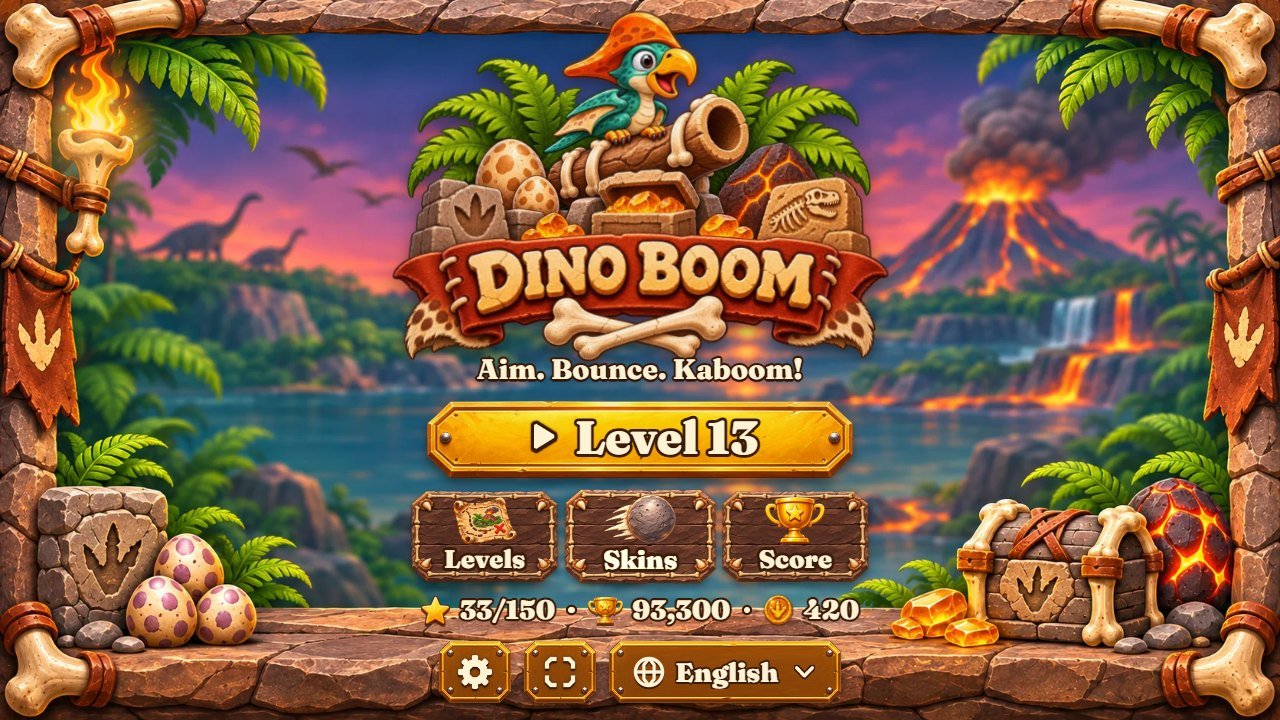 12345678
| # | Part of the screen | File to change |
|---|---|---|
| 1 | Logo picture (with the game name painted in it), the menu scene (mascot, stone cannon, eggs) and the volcano sunset background behind it |
assets/art/logo.webp, assets/art/menu-hero.webp, background
assets/art/bg.webp
|
| 2 | Play button (gold plate) and its text |
picture assets/art/btn-play-wide.webp; texts play and
continueLevel in src/locales/en.js
|
| 3 | Levels button (plate + map icon) |
assets/art/btn-wood.webp, assets/art/icon-map.webp; text levels
|
| 4 | Skins button (ball icon) | assets/art/icon-ball.webp; text skins |
| 5 | Score button (trophy icon) | assets/art/icon-trophy.webp; text ranking |
| 6 | Settings button (small gold plate) | assets/art/btn-gold.webp |
| 7 | Stars, total score and coins line |
icons assets/art/icon-star.webp, assets/art/icon-trophy.webp,
assets/art/coin.webp
|
| 8 | Language picker (14 languages) | list in src/locales.js; texts in src/locales/ |
A level (desktop layout)
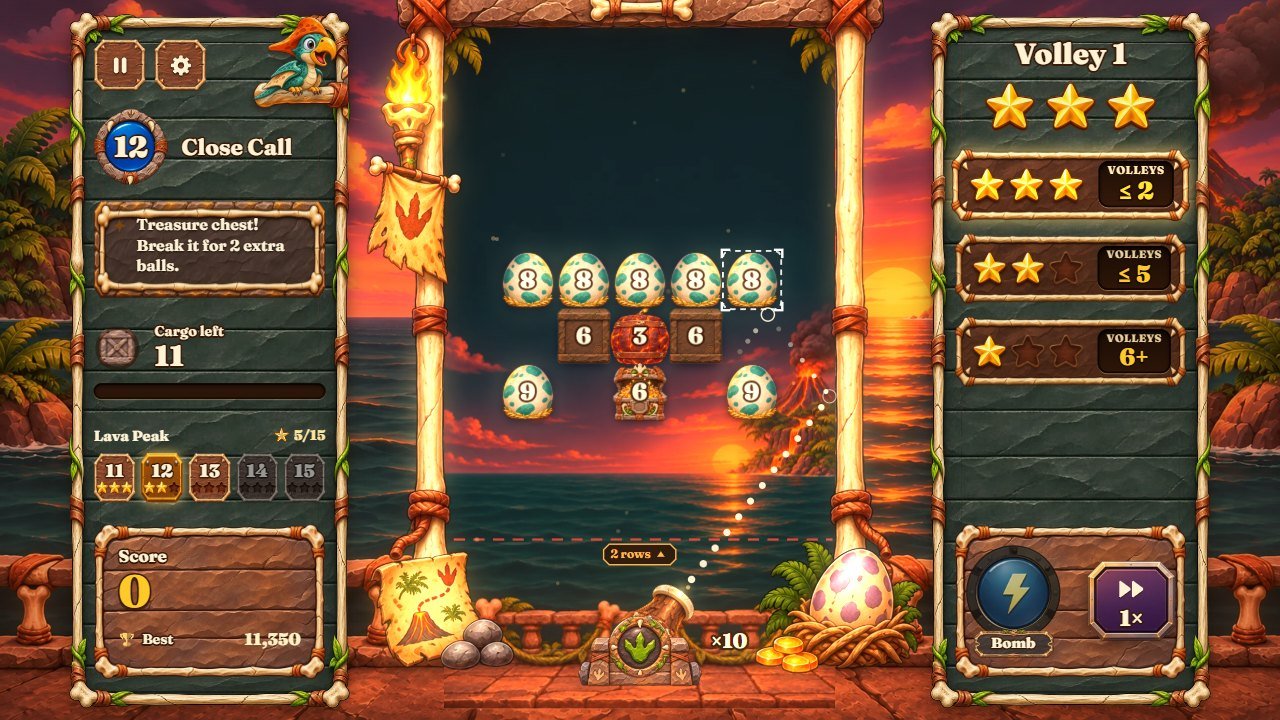 123456789
| # | Part of the screen | File to change |
|---|---|---|
| 1 | Left card: level badge, name, hint, cargo left, chapter strip |
card assets/art/panel-tall.webp, badge assets/art/wheel.webp, hint note
assets/art/hint-plaque.webp, block icon assets/art/icon-crate.webp; names
and hints l1..l50, h1..h50 in
src/locales/en.js
|
| 2 | Score box | assets/art/score-box.webp |
| 3 | Pause button | assets/art/hud-btn.webp |
| 4 | Settings button | assets/art/hud-btn.webp |
| 5 | Right card: volley number and the star goals |
assets/art/panel-tall.webp, rows assets/art/row-plaque.webp, stars
assets/art/star-big.webp, assets/art/star-empty.webp; goals from
par in src/levels.js
|
| 6 | Stars still possible | assets/art/star-big.webp, assets/art/star-empty.webp |
| 7 | Bomb button |
assets/art/pulse-idle.webp, assets/art/pulse-armed.webp, label
assets/art/label.webp; text pulse
|
| 8 | Speed 1x/2x button | assets/art/btn-speed.webp |
| 9 | Arena: frame, background, blocks, stone cannon, balls |
frame assets/art/frame.webp, water and sky behind the blocks
assets/art/interior.webp, terrace scene assets/art/scene.webp, blocks
assets/art/crate.webp (and the others in the picture table), cannon
assets/art/barrel-gun.webp, assets/art/carriage.webp,
assets/art/breech.webp; drawn by src/render/view-arena.js
|
Victory card
 1234567
| # | Part of the screen | File to change |
|---|---|---|
| 1 | Level name on the red ribbon | assets/art/ribbon-red.webp; card assets/art/card-parchment.webp |
| 2 | Stars won |
assets/art/star-big.webp, assets/art/star-empty.webp,
assets/art/stars-decor.webp
|
| 3 | Score and best | scoring rules in src/sim/config.js |
| 4 | Coins earned | winCoins in src/modes.js; coin assets/art/coin.webp |
| 5 | Next | assets/art/btn-play.webp; text next |
| 6 | Retry | assets/art/btn-wood.webp; text retry |
| 7 | Levels | assets/art/btn-wood.webp; text levels |
Defeat card
 1234
| # | Part of the screen | File to change |
|---|---|---|
| 1 | Title and message |
card assets/art/card-dark.webp; mascot assets/art/parrot-sad.webp; texts in
src/locales/en.js
|
| 2 | One more chance (costs coins) | RESCUE_COST in src/modes.js |
| 3 | Try again | text retry |
| 4 | Levels | text levels |
Shop (skins and cannon upgrades)
 123
| # | Part of the screen | File to change |
|---|---|---|
| 1 | Cannon upgrades |
prices in UPGRADES of src/modes.js; icons
assets/art/icon-ball.webp, assets/art/pulse-armed.webp,
assets/art/icon-spyglass.webp; texts up_balls, up_fuse,
up_sight
|
| 2 | Ball skins |
SKINS in src/render/palette.js (colours, stars needed), pictures
assets/art/ball-spark.webp ... assets/art/ball-prism.webp, price
skinPrice in src/modes.js; names skin_spark ...
skin_prism
|
| 3 | Coins and stars | assets/art/coin.webp, assets/art/icon-star.webp |
Settings
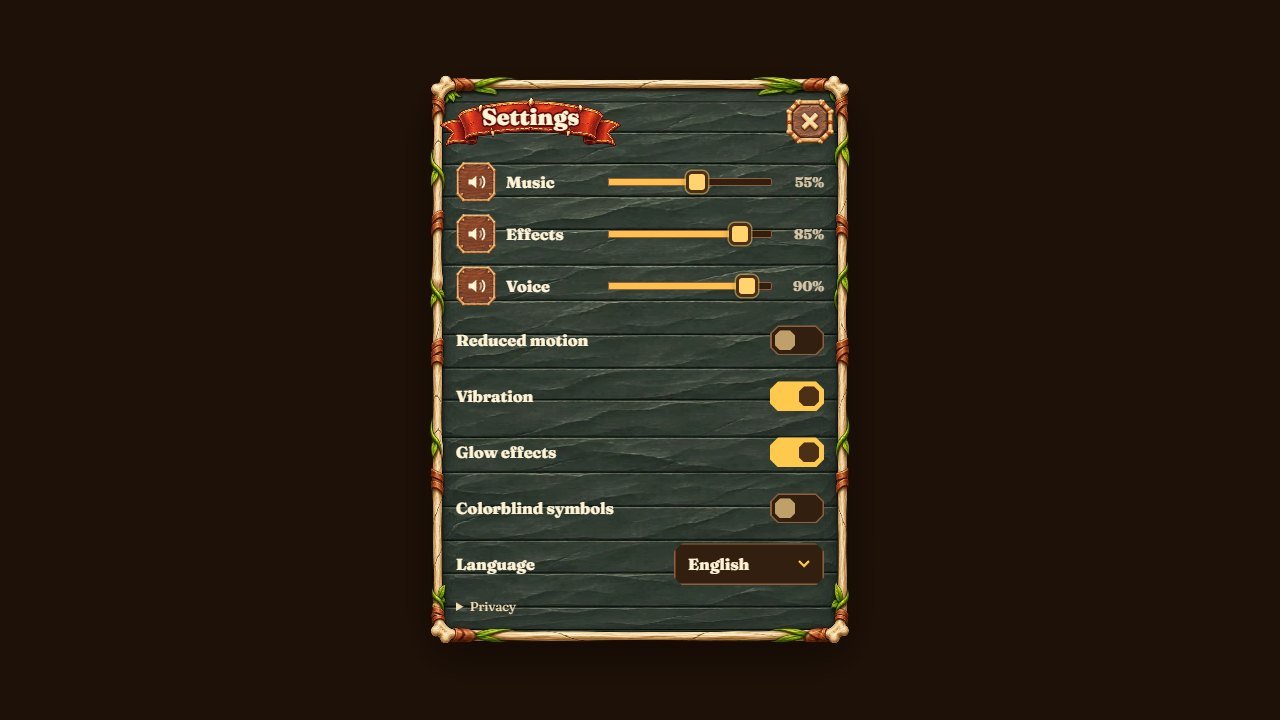 12345
| # | Part of the screen | File to change |
|---|---|---|
| 1 | Music volume | default volumes at the top of src/main.js (music: 0.55) |
| 2 | Effects volume | sfx: 0.85 in src/main.js |
| 3 | Narration volume | voice: 0.9 in src/main.js |
| 4 | Language | src/locales/ |
| 5 | Close | assets/art/btn-x.webp |
Level map
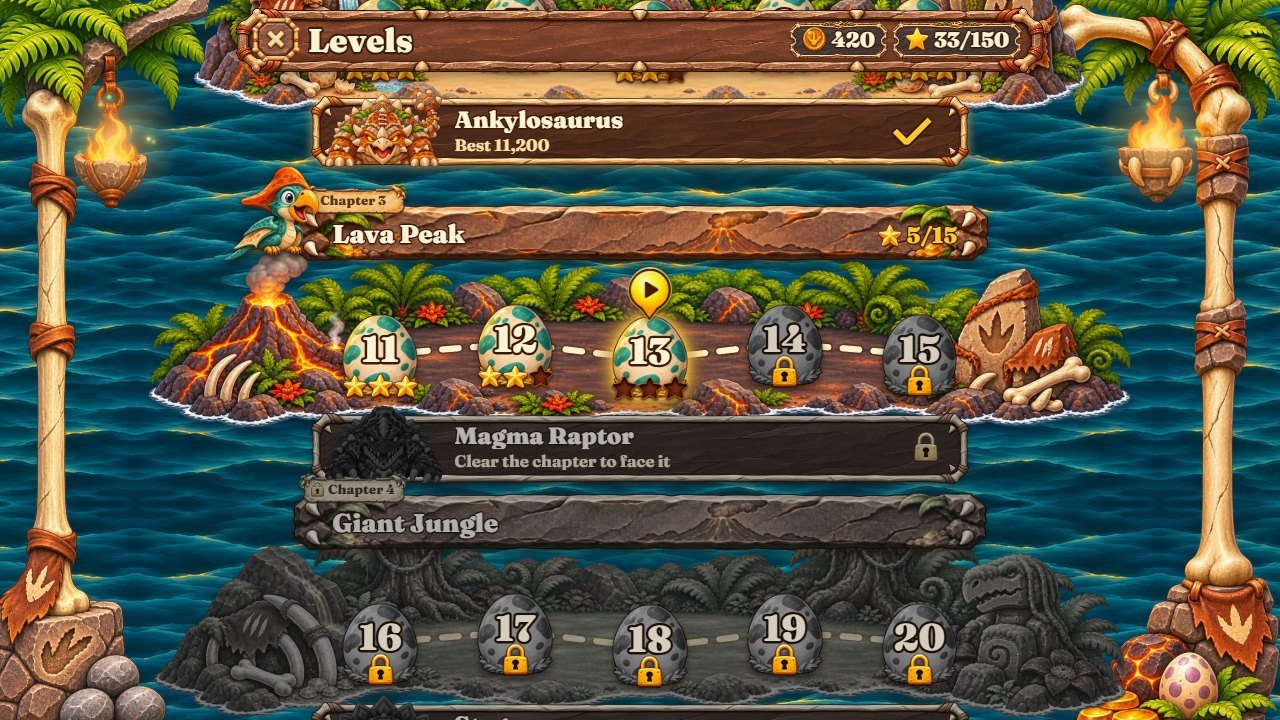 123
| # | Part of the screen | File to change |
|---|---|---|
| 1 | Chapter areas and level buttons |
assets/art/map-isle1-wide.webp ... assets/art/map-isle10-wide.webp (desktop)
and -tall (phones), signs assets/art/sign-chapter.webp,
assets/art/map-sign.webp, water assets/art/map-sea.webp
|
| 2 | Coins and stars | assets/art/label.webp |
| 3 | Close | assets/art/btn-x.webp |
Main pictures
| File | What it shows |
|---|---|
assets/art/crate.webp, assets/art/barrel.webp,
assets/art/chest.webp
|
Stone block, dinosaur egg and bone chest (regular and reinforced blocks); -d1 /
-d2 are the cracked versions shown as they lose hit points
|
assets/art/keg.webp |
Lava rock |
assets/art/rum.webp, assets/art/anchor-block.webp,
assets/art/treasure.webp
|
Tar pot, fossil block, treasure chest |
assets/art/kraken.webp, assets/art/boss2.webp ...
assets/art/boss10.webp
|
The ten bosses (kraken is the first one, the Triceratops); -hurt is the
picture shown when hit
|
assets/art/parrot-happy.webp, assets/art/parrot-sad.webp,
assets/art/parrot-cheer.webp, assets/art/parrot-scared.webp,
assets/art/parrot-perch.webp
|
The baby pterodactyl mascot in its five poses |
assets/art/ball-spark.webp ... assets/art/ball-prism.webp |
Ball skins |
assets/art/bg.webp, assets/art/menu-hero.webp,
assets/art/logo.webp, assets/art/logo-band.webp
|
Menu background, menu scene, logo, logo band of the phone layout |
assets/art/frame.webp, assets/art/interior.webp,
assets/art/scene.webp, assets/art/wood.webp
|
Arena frame, water and sky behind the blocks, terrace scene, stone slab texture |
assets/art/coin.webp, assets/art/hand.webp |
Coin, tutorial hand |
assets/icons/icon-512.png, favicon.ico |
App icon and browser tab icon (all sizes in assets/icons/, including
assets/icons/icon-maskable-512.png)
|
Sounds and music
Every sound the game plays is listed in assets/audio-manifest.json. Replace a file keeping its
name; the description says what the original sounds like.
| Name | File | Description |
|---|---|---|
anchor |
assets/sfx/anchor.mp3 |
Stone ball thudding off a heavy block of polished obsidian, short hard glassy stone clack with a low thump, no ring, isolated game sound |
ball_return |
assets/sfx/ball_return.mp3 |
Soft short thunk of a small iron ball dropping into a wooden bucket, gentle, single sound |
boss_hit |
assets/sfx/boss_hit.mp3 |
Heavy thud of a stone hitting a big scaly dinosaur, soft low thump with a small surprised grunt, short |
boss_roar |
assets/sfx/boss_roar.mp3 |
Cartoon dinosaur roar, big deep growl of a tyrannosaurus, short, funny, not scary, game sound effect |
break_glass |
assets/sfx/break_glass.mp3 |
Sandstone block crumbling apart, satisfying crunchy stone crack with a few pebbles and sand falling, short, punchy, game sound effect |
break_heavy |
assets/sfx/break_heavy.mp3 |
Treasure chest bursting open, heavy wood crack with a metal latch clank and a quick jingle of spilling gold coins, short and punchy, game sound effect |
coin |
assets/sfx/coin.mp3 |
Single gold coin clink landing on a pile of coins, bright short metallic clink, isolated |
combo |
assets/sfx/combo.mp3 |
Short rising run of three quick bright gold coin clinks, arcade combo sound |
core_boom |
assets/sfx/core_boom.mp3 |
Big cartoon lava rock explosion, heavy deep bass boom with a bright fiery burst and stone chunks scattering, punchy and satisfying, short, arcade game sound, no long rumble |
danger |
assets/sfx/danger.mp3 |
Short urgent warning on a primitive bone horn, two quick low toots, not harsh, isolated game sound |
descend |
assets/sfx/descend.mp3 |
Heavy stone blocks sliding down one step, a short low stone scrape ending in a soft thud with a little sand, dry, isolated game sound |
hit_glass |
assets/sfx/hit_glass.mp3 |
Single short knock of a stone ball hitting a sandstone block, dry stony clack with a clear pitch, very short, no reverb, isolated game sound |
hit_heavy |
assets/sfx/hit_heavy.mp3 |
Single dull heavy clank of a stone ball hitting a golden metal chest, low thud with a short metallic ring, isolated game impact sound |
launch |
assets/sfx/launch.mp3 |
Single short soft cartoon launcher shot, a round hollow wooden thoomp with a quick puff of air, like a pebble fired from a hollow log, tight and dry, no echo, no sharp crack, game sound effect |
lose |
assets/sfx/lose.mp3 |
Short sad descending tune on a wooden flute, three falling notes ending low with a soft log drum thud, gentle cartoon game over |
pulse_charge |
assets/sfx/pulse_charge.mp3 |
Bomb fuse being lit, quick match strike then a fast sizzling sparkling fuse rising in intensity, short, cartoon game |
pulse_hit |
assets/sfx/pulse_hit.mp3 |
Big cartoon bomb explosion, deep bass boom with a bright crackle and falling debris, short, arcade game |
rum |
assets/sfx/rum.mp3 |
Whoosh of fire racing along spilled tar, quick bright flame swoosh with a crackle, short, cartoon game |
splash |
assets/sfx/splash.mp3 |
Stone dropping into river water, a clear plop with a splash of water, short, cartoon game sound effect |
star |
assets/sfx/star.mp3 |
Bright shiny gold coin ding, single high metallic chime for awarding a star, short |
tap_start |
assets/sfx/tap_start.mp3 |
Short deep tribal drum hit with a chunky stone thump, satisfying start game confirm, short |
ui_back |
assets/sfx/ui_back.mp3 |
Soft low muted wooden knock, short |
ui_click |
assets/sfx/ui_click.mp3 |
Soft short wooden button tap, pleasant woody click |
unlock |
assets/sfx/unlock.mp3 |
Treasure chest opening reward, wooden creak then shimmering ascending chimes and coin sparkle, short |
wall_tick |
assets/sfx/wall_tick.mp3 |
Single short dry woody tick of a small iron ball bouncing off a wooden post, isolated game sound |
whoosh |
assets/sfx/whoosh.mp3 |
Quick rope and sail swoosh, airy cloth whoosh, smooth, short |
win |
assets/sfx/win.mp3 |
Short triumphant prehistoric victory fanfare, tribal log drums, marimba and a wooden flute playing a quick rising four-note phrase, ending on a bright shaker and bell, joyful, game level complete jingle |
cove-game-a |
assets/music/cove-game-a.mp3 |
Music track |
cove-game-b |
assets/music/cove-game-b.mp3 |
Music track |
cove-kraken |
assets/music/cove-kraken.mp3 |
Music track |
cove-menu |
assets/music/cove-menu.mp3 |
Music track |
Recipes, step by step
Change a picture (blocks, bosses, buttons, backgrounds)
- Find the picture in the tables above or open
assets/art/and look at the thumbnails. -
Make a copy of the original first (for example
crate-original.webp, outside the game folder). - Open it in Photopea (free, in the browser) or GIMP and draw over it, or prepare your own picture with the same width and height and a transparent background.
- Export as WebP with the same file name (Photopea: File > Export as > WEBP; or export PNG and convert it with Squoosh).
-
Replace the file in
source/assets/art/(and ingame/assets/art/if you upload directly), then reload with Ctrl+F5.
Change the mascot (the baby pterodactyl)
-
Replace the five
assets/art/parrot-*.webppictures keeping their sizes (each pose has its own file: happy, sad, cheer, scared, perched).parrotis only the internal file name. -
The mascot also talks: the narration files are in
assets/voice/en/,assets/voice/pt/andassets/voice/es/(one MP3 per line; what each line says is listed inassets/audio-manifest.json). Replace them keeping the names, or set the narration volume to 0 by default insrc/main.js.
Change a block
-
Pictures:
assets/art/crate.webp(stone block, low hit points),assets/art/barrel.webp(dinosaur egg),assets/art/chest.webp(bone chest) and their-d1/-d2cracked versions;assets/art/keg.webpfor the lava rock. -
Which picture a block uses (and the tint per chapter) is chosen in
src/render/sprites.jsandsrc/render/palette.js. -
The hit sounds are
hit_glass,hit_heavy,break_glassandbreak_heavyinassets/sfx/.
Change a boss
-
Pictures:
assets/art/kraken.webp(chapter 1, the Triceratops) andassets/art/boss2.webp...assets/art/boss10.webp, each with a-hurtversion. -
Name: the texts
boss1...boss10insrc/locales/en.js(and in the other languages). -
Health and escort:
bossHp,ESCORTandRAGEinsrc/modes.js; runnode tools/check-modes.mjsafter changing them. -
Boss music:
assets/music/cove-kraken.mp3(internal name only); roar and hit sounds:boss_roar,boss_hitinassets/sfx/.
Change a sound effect
-
Open
assets/audio-manifest.json: undersfxeach sound has a name, its file inassets/sfx/and a short description. - Edit or record the new sound in Audacity (free), keep it short (most effects are under 1 second) and export as MP3.
- Replace the file keeping the same name. No code change is needed.
Change the music
-
The four tracks are
assets/music/cove-menu.mp3(menus),assets/music/cove-game-a.mp3andassets/music/cove-game-b.mp3(levels, alternating) andassets/music/cove-kraken.mp3(bosses and the last level). Thecove-prefix is only an internal name. - Replace them with MP3 files of the same names; loops sound best when the end flows into the start.
-
If the new track has a different length, update its
dur(seconds) in themusiclist ofassets/audio-manifest.json.
Change a text or a translation
-
Open
src/locales/en.js(English) in VS Code or Notepad++. Each line iskey: 'text'. - Change only the text between the quotes. Keep
{n}and similar markers. Save as UTF-8. -
Do the same in the other languages (
src/locales/pt.js,src/locales/es.js...). A key missing in a language shows the English text. -
The page title and description are in
index.html(<title>,<meta name="description">) andmanifest.webmanifest.
Change colours
-
Interface colours are CSS variables at the top of
style.cssanddino.css(for example--gold,--cream,--brown,--amber,--danger). Change the hex value, save, reload. -
The arena colours of each chapter (background, glow, rails) are the
THEMESinsrc/render/palette.js; block tints and ball skins are in the same file. -
Most of the look comes from the pictures: to change the stone slabs or parchment, edit
assets/art/wood.webp,assets/art/panel-tall.webp,assets/art/card-parchment.webpand the button plates.
Change the font
- Put the new font file (WOFF2) in
assets/fonts/together with its licence. -
Change the
@font-facerule at the top ofdino.css(titles, Fraunces) orstyle.css(numbers, Chakra Petch) and the--fontvariable. -
The canvas texts use
FONTinsrc/render/view-shared.js: put the same family name first.
Make the game easier or harder
- Balls per volley:
BALLSinsrc/sim/config.js(10). - Stars:
parof each level insrc/levels.js(volleys allowed for 3 stars). -
Block health: the numbers in the level maps of
src/levels.js; boss health:bossHpinsrc/modes.js. -
After changing levels, run
node tools/validate.mjs --solve <n>(see "Editing levels" in the main guide) andnpm test.
Change prices and rewards
-
All of them are at the bottom of
src/modes.js:START_COINS,RESCUE_COST,winCoins,BOSS_COINS,DAILY_COINS,STAR_MILESTONES,UPGRADES(prices per level),MISSIONS(goals and rewards),skinPrice. -
Stars needed for each skin:
starsinSKINSofsrc/render/palette.js. - Run
npm testafterwards.
Turn ads, the "Tap to start" screen or the full-screen button on and off
-
Open
dino-boom.config.js, changeprovider,tapToStartorfullscreenas explained in its comments, save and reload. See "Settings file and optional ads" in the main guide.
Publish your changes
-
In
source/, runnpm test(if you changed code, levels or prices) andnpm run build. -
Upload the contents of
dist/to your game folder on the host (FileZilla or the host file manager), replacing the old files. Keep the same web address so players keep their progress. - Open the game in a private window or press Ctrl+F5 (Cmd+Shift+R on a Mac): browsers and CDNs keep old files for a while. Do not clear "site data", it deletes the save.
- If something breaks, put back the file from your backup and compare.
Internal names in the code
Some code names come from the first version of the engine. The player never sees them: all visible names come
from src/locales/.
| In the code | In the game |
|---|---|
targets, cargo, crystal, gem, armor
|
The blocks the balls break (stone blocks, dinosaur eggs, bone chests); gem and
armor pick the block look
|
core, CORE, sound core_boom, picture keg |
Lava rock (explodes its 8 neighbours) |
rum, anchor-block / anchor, treasure |
Tar pot (burns its row), fossil block (indestructible), treasure chest (+2 balls) |
pulse, Pulse, btn-pulse, pulse-armed |
The Bomb power (opens a 3x3 hole) |
volley, balls |
A volley of pebbles (10 at the start) |
kraken, boss2 ... boss10 (pictures in assets/art/)
|
The ten chapter bosses; kraken is the first one, the Triceratops (names from
boss1 ... boss10 in src/locales/)
|
skins |
Ball looks (pebble, lava, egg, ...) sold in the shop |
coins |
Coins |
parrot-* pictures; Rico in setRicoDrawer,
drawRotRico, res-rico, rot-rico
|
The baby pterodactyl mascot |
rank, ranking, btn-rank |
The local score screen (no online leaderboard in this edition) |
MOCK in src/render/view-shared.js |
Reference measurements of the portrait layout |
theme keys ice, geode, forge, ... in
src/render/palette.js
|
The 10 chapters (Fern Valley, Nest Cliffs, Lava Peak, ... Volcano Throne) |
level ids in src/levels.js (first-spark ...
heart-of-the-volcano)
|
Save keys of each level's record |
music cove-menu, cove-game-a, cove-game-b,
cove-kraken
|
Menu, two gameplay tracks, boss track (cove is only an internal prefix) |
Help
Main guide: documentation/index.html (installation, settings, levels, economy, languages, troubleshooting). Questions and custom work: willian@polargames.com.br.